
Introduction
This manual provides instructions for the assembly, operation, and maintenance of your Member Mark Dakota 2-Piece Writing Desk and C-Table Set. This set is designed to offer a functional and stylish workspace for home offices, student areas, or compact living spaces. It includes a writing desk with a dark brown wood top and a mobile C-table with shelves and casters.

Image: The Member Mark Dakota 2-Piece Writing Desk and C-Table Set, featuring a dark brown desktop and black metal frame, positioned in a contemporary room with plants and a laptop.
Safety Information
- Read all instructions carefully before assembly and use.
- Keep all small parts and packaging materials away from children.
- Ensure all connections are secure before using the desk and C-table.
- Do not overload the desk or C-table. Refer to specifications for weight limits.
- Use on a level surface to prevent tipping.
- Avoid placing hot items directly on the desktop without protection.
Package Contents
Verify that all components are present before beginning assembly.
- 1 x Writing Desk (Desktop, Frame components)
- 1 x Mobile C-Table (Shelves, Frame components, Casters)
- Assembly Hardware (Screws, bolts, tools if included)
- Adjustable Feet Levelers for Desk
- Wire Management Clips for Desk
- Under-mount USB/Power Hub for Desk
Setup and Assembly
Assembly is required for this product. Follow these general steps. Specific diagrams and hardware may vary; refer to any included manufacturer's diagrams for precise instructions.
- Unpack Components: Carefully remove all parts from the packaging and lay them out on a clean, soft surface to prevent scratches.
- Assemble Desk Frame: Connect the metal frame components of the writing desk using the provided hardware. Ensure all screws are finger-tightened initially.
- Attach Desktop: Secure the K21 oak veneer desktop to the assembled desk frame. Fully tighten all screws once the desktop is aligned.
- Install Adjustable Feet Levelers: Screw the adjustable feet levelers into the bottom of the desk legs. Adjust them as needed to ensure the desk is stable and level on uneven floors.
- Install USB/Power Hub and Wire Clips: Mount the under-mount USB/Power hub to the underside of the desk using the designated hardware. Attach the wire management clips to organize cables.
- Assemble C-Table Frame: Connect the metal frame components for the C-table.
- Attach C-Table Shelves: Secure the top and bottom shelves to the C-table frame.
- Install Rolling Casters: Attach the rolling casters to the base of the C-table. Ensure the casters with locking brakes are positioned for easy access.
- Final Check: Verify all connections are tight and the furniture is stable before use.
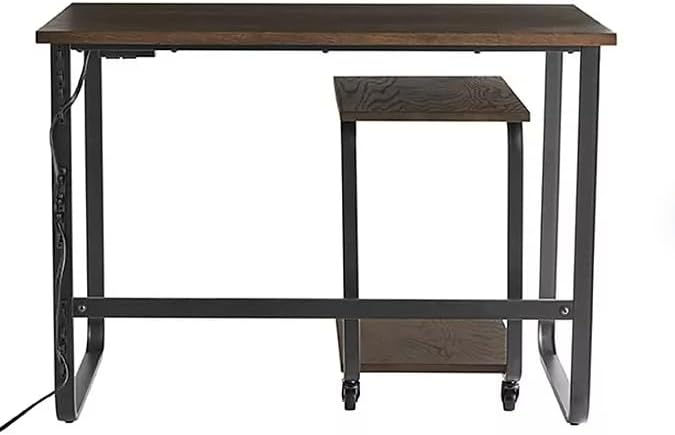
Image: Front view of the writing desk, highlighting the integrated under-mount USB/Power hub on the left side of the desk frame.
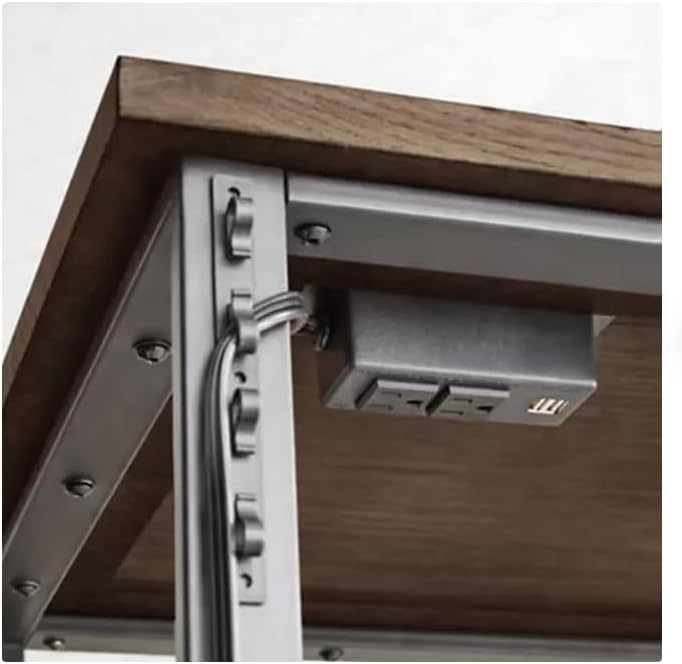
Image: Detailed view of the under-mount USB/Power hub with two power outlets and two USB ports, along with wire management clips attached to the desk frame.
Operating Instructions
Using the Writing Desk
- Workspace: The desk provides a spacious surface for your laptop, documents, and other office essentials.
- Adjustable Feet: If the desk wobbles, adjust the feet levelers at the bottom of the legs by twisting them until the desk is stable.
- USB/Power Hub: Utilize the integrated under-mount USB/Power hub to conveniently charge devices and power electronics directly from your desk. Plug the hub's main power cord into a wall outlet.
- Wire Management: Use the wire management clips to keep cables tidy and prevent clutter on and around your desk.

Image: Close-up view of the dark brown K21 oak veneer desktop, showing its wood grain texture.
Using the Mobile C-Table
- Positioning: The C-table can be easily rolled and positioned alongside or tucked underneath the main desk for versatile storage or an extended surface.
- Storage: Use the top and bottom shelves of the C-table for books, files, office supplies, or decorative items.
- Locking Casters: The C-table is equipped with smooth-rolling casters, some of which have locking brakes. To secure the C-table in place, press down on the lever of the locking casters. To allow movement, lift the lever.
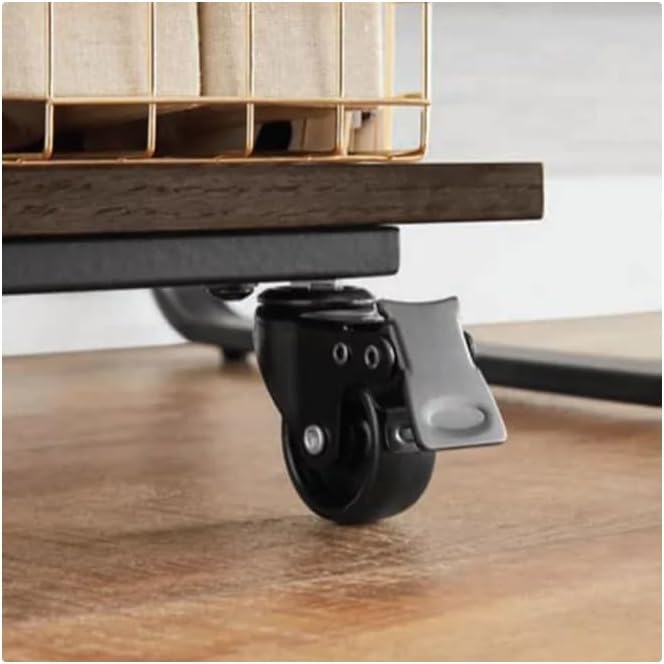
Image: Close-up of one of the C-table's rolling casters, showing the gray lever for engaging and disengaging the locking brake.

Image: Side view of the mobile C-table, demonstrating how it can be partially tucked under the writing desk, providing flexible space utilization.
Maintenance
- Cleaning: Wipe surfaces with a damp cloth to remove dust and spills. Follow with a dry cloth to prevent water spots.
- Avoid Harsh Chemicals: Do not use abrasive cleaners or strong chemical solutions, as these can damage the finish.
- Regular Checks: Periodically check all screws and connections to ensure they remain tight. Tighten if necessary.
- Protect Surfaces: Use coasters or placemats for drinks and hot items to protect the desktop from heat and moisture damage.
Troubleshooting
- Desk/C-Table Wobbles: Ensure the product is on a level surface. Adjust the desk's feet levelers. Check all assembly screws and tighten if loose.
- C-Table Casters Not Rolling Smoothly: Check for debris caught in the casters. Ensure the locking brakes are disengaged.
- USB/Power Hub Not Working: Verify the hub's main power cord is securely plugged into a functional wall outlet. Check if the wall outlet itself is receiving power.
Specifications
| Feature | Detail |
|---|---|
| Product Name | Member Mark Dakota 2-Piece Writing Desk and C-Table Set |
| Model Number | GR20-SCH010-111 |
| Brand | Generic |
| Color | Dark Brown/Black |
| Material Type | Alloy Steel, Wood (K21 oak veneer desktop) |
| Desk Dimensions (Assembled) | 42" W x 24" D x 30" H |
| C-Table Dimensions (Assembled) | 14" W x 20" D x 24" H |
| Item Weight | 45 Pounds |
| Included Components | 1 Writing Desk, 1 mobile C-Table |
| Special Features (Desk) | Adjustable feet levelers, wire management clips, under-mount USB/Power hub |
| Special Features (C-Table) | Top and bottom shelf, rolling casters with locking brakes |
| Assembly Required | Yes |
| Product Care Instructions | Wipe with Damp Cloth, Wipe with Dry Cloth |
Warranty Information
This product is covered by a standard manufacturer's warranty against defects in materials and workmanship. Please retain your proof of purchase for any warranty claims. For specific warranty terms and conditions, refer to the documentation included with your purchase or contact the retailer.
Support
If you encounter any issues or have questions regarding the assembly, operation, or maintenance of your Member Mark Dakota 2-Piece Writing Desk and C-Table Set, please contact the retailer or manufacturer's customer support for assistance. Have your model number (GR20-SCH010-111) and proof of purchase ready when contacting support.