
1. Introduction and Overview
The Must PV18-3524 is a 3500W 220/24V off-grid solar inverter designed to provide reliable power for various applications. This device allows users to generate their own energy, reducing dependence on the main electrical grid and offering significant long-term savings. It is suitable for isolated residences, backup power systems, recreational vehicles, remote off-grid installations, and small commercial or office setups.
This manual provides essential information for the safe and efficient operation, installation, and maintenance of your Must PV18-3524 solar inverter.
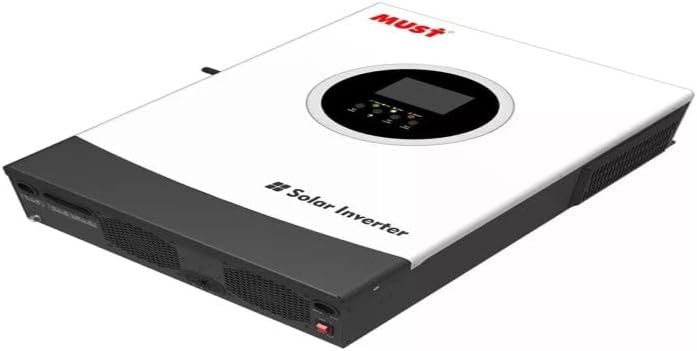
Figure 1: The Must PV18-3524 Off-Grid Solar Inverter. This image displays the inverter's white and dark gray casing, featuring the 'MUST' brand logo and 'Solar Inverter' text on its top surface. A circular display and control panel are prominently visible on the top, indicating user interface elements.
2. Safety Instructions
Always observe the following safety precautions to prevent injury and damage to the inverter or connected equipment:
- Installation must be performed by qualified personnel in accordance with all local and national electrical codes.
- Do not attempt to disassemble or repair the inverter yourself. Refer all servicing to authorized service personnel.
- Ensure proper grounding of the inverter.
- Keep the inverter away from water, moisture, and flammable materials.
- Ensure adequate ventilation around the inverter to prevent overheating.
- Before any maintenance or cleaning, disconnect all power sources, including solar panels and batteries.
- Use appropriate personal protective equipment (PPE) during installation and maintenance.
3. Product Features
The Must PV18-3524 inverter incorporates advanced features for optimal performance and user convenience:
- Pure Sine Wave Output: Ensures compatibility with all types of electronic equipment, providing clean and stable power.
- MPPT Charge Controller: Maximizes efficiency in solar energy generation, optimizing power harvest from solar panels.
- Wi-Fi Monitoring: Allows real-time performance tracking of your solar system via a connected device.
- Comprehensive Safety Protections: Includes safeguards against overcharge, overload, and other electrical anomalies to ensure safe operation.
- High Peak Power Capability: Supports a maximum peak power of 7000W for 5 seconds (combined primary + secondary), handling high surge loads.
- Lithium Battery Support: Compatible with lithium-ion battery systems for flexible energy storage solutions.
4. Setup and Installation
Proper installation is crucial for the safe and efficient operation of your inverter. It is highly recommended that installation be performed by a certified electrician or solar professional.
- Site Selection: Choose a cool, dry, and well-ventilated location, away from direct sunlight, heat sources, and flammable materials. Ensure sufficient clearance around the inverter for airflow.
- Mounting: Securely mount the inverter to a sturdy vertical surface using appropriate hardware.
- Battery Connection: Connect the battery bank to the inverter's battery terminals, ensuring correct polarity. Use appropriately sized cables.
- Solar Panel Connection: Connect the solar panel array to the inverter's PV input terminals, observing voltage and current limits.
- AC Output Connection: Connect your AC loads or distribution panel to the inverter's AC output terminals.
- Grounding: Ensure the inverter is properly grounded according to local electrical codes.
- Initial Power-Up: Follow the specific power-up sequence outlined in the detailed installation guide (not provided here, but implied for a real manual). Verify all connections before applying power.
Note: This section provides a general overview. Always refer to the detailed installation manual provided with the product for specific wiring diagrams and safety procedures.
5. Operating Instructions
Once installed, the Must PV18-3524 inverter operates largely automatically. The integrated display and Wi-Fi monitoring feature allow you to observe its performance.
- Power On/Off: Use the designated power switch to turn the inverter on or off. Allow a few moments for the system to initialize.
- Display Navigation: Use the buttons on the control panel to navigate through various display screens, showing input voltage, output power, battery status, and error codes.
- Wi-Fi Monitoring: Connect the inverter to your Wi-Fi network (if applicable) and use the dedicated mobile application or web interface to monitor system performance remotely. This includes real-time data on energy production, consumption, and battery charge.
- Mode Selection: Some inverters offer different operating modes (e.g., utility priority, solar priority, battery priority). Consult the detailed manual for instructions on how to select and configure these modes.
6. Specifications
The following table details the technical specifications of the Must PV18-3524 Off-Grid Solar Inverter:
| Feature | Specification |
|---|---|
| Model Name | Inversor Solar Must Pv18-3524 3500w 220/24v Off Grid |
| Manufacturer | BR STEEL |
| Brand | Genérico |
| Power (Watts) | 3500 watts |
| Voltage | 230 Volts |
| Energy Efficiency Label (ENCE) | 3.5kW PV18-3524 PREM |
| Power Source Type | Solar Powered and Battery Powered |
| Battery Capacity | 230 Ampere Hours |
| Color | White |
| Product Weight | 6.4 Kilograms |
| Number of Units | 10 |
| Certification | Not applicable |
| ASIN | B0F1PNCJQT |
| Available for purchase since | March 17, 2025 |
7. Maintenance
Regular maintenance helps ensure the longevity and optimal performance of your inverter:
- Cleaning: Periodically clean the exterior of the inverter with a dry, soft cloth. Ensure ventilation openings are free from dust and debris. Do not use liquid cleaners.
- Connections Check: Annually, or as needed, inspect all electrical connections (battery, solar, AC) for tightness and signs of corrosion. Tighten any loose connections.
- Ventilation: Ensure that the area around the inverter remains clear and that airflow is not obstructed.
- Battery Health: If using lead-acid batteries, regularly check their water levels and terminal cleanliness. For all battery types, monitor their health and performance through the inverter's display or monitoring system.
8. Troubleshooting
This section provides general guidance for common issues. For complex problems, contact technical support.
| Problem | Possible Cause | Solution |
|---|---|---|
| Inverter not turning on | No battery power; loose battery connections; inverter switch off. | Check battery voltage; ensure connections are secure; turn on inverter switch. |
| No AC output | Overload; short circuit; low battery voltage; AC output breaker tripped. | Reduce load; check for short circuits; charge batteries; reset AC breaker. |
| Low solar charging | Shaded panels; dirty panels; incorrect PV wiring; MPPT fault. | Clear shading; clean panels; verify PV connections; consult manual for MPPT errors. |
| Unusual noises or smells | Internal fault; overheating. | Immediately disconnect power. Do not operate. Contact qualified service personnel. |
9. Warranty and Support
The Must PV18-3524 Solar Inverter comes with a manufacturer's warranty of 3 months from the date of purchase. This warranty covers defects in materials and workmanship under normal use.
For warranty claims, technical support, or service inquiries, please contact your point of purchase or the manufacturer's authorized service center. Ensure you have your purchase receipt and product serial number available when contacting support.
Please note that the warranty may be voided if the product is misused, improperly installed, modified, or repaired by unauthorized personnel.

