
1. Introduction
This manual provides detailed instructions for the LINCAE GPS Wireless Dog Fence F830 PLUS. This system is designed to create a safe and adjustable containment area for your dog using advanced GPS technology. It features three warning modes, a wide adjustable radius, and an IPX7 waterproof collar, suitable for dogs over 16 lbs.

Image 1.1: The LINCAE GPS Wireless Dog Fence F830 PLUS collar and its packaging, featuring a dog wearing the collar.
2. Safety Information
- Outdoor Use Only: This GPS wireless dog fence system is designed exclusively for outdoor use. It will not function correctly indoors due to GPS signal limitations.
- Dog Weight and Neck Size: The collar is suitable for dogs weighing over 16 lbs with neck sizes between 9 and 29 inches. Ensure the collar fits properly to prevent discomfort or malfunction.
- Initial Training: Proper training is crucial for your dog to understand the boundaries. Do not rely solely on the system without adequate training.
- Supervision: Always supervise your dog, especially during initial use, to ensure they respond correctly to the warnings and remain within the designated area.
- Avoid Overstimulation: The system is designed to minimize overstimulation with a pause between correction cycles. However, monitor your dog's reaction and adjust settings as needed.
- Regular Checks: Periodically check the collar for wear and tear, and ensure the contact points are clean and making proper contact with your dog's skin.
- GPS Signal: Performance may vary in areas with poor GPS signal reception (e.g., dense tree cover, tall buildings).
3. Package Contents
Verify that all items listed below are included in your package:

Image 3.1: Visual representation of the LINCAE GPS Wireless Dog Fence F830 PLUS package contents.
- GPS Collar x 1
- Charging Cable x 1
- Shock Test Light x 1
- Training Guide x 1
- User Manual x 1 (This document)
- Contact Points x 2 (sets, typically short and long)
- Boundary Flags x 10
4. Product Overview
The LINCAE GPS Wireless Dog Fence F830 PLUS is a portable, all-in-one pet containment system. It requires no wires or external transmitters, operating solely through the GPS collar. The collar features an intuitive color screen for easy monitoring and adjustment.

Image 4.1: Detailed view of the collar's color screen and control buttons, indicating functions like GPS signal, battery, and warning modes.
Collar Components:
- Multi-function button: For navigating menus and confirming selections.
- Center point setting button: Used to establish the central point of the containment area.
- Up/down buttons: For adjusting settings and navigating options.
- Color Screen Display: Shows GPS signal strength, positioning icon, vibration mode, static mode, level strength, current distance from center point, and battery icon.
- Contact Points: Deliver static correction. Ensure proper length for your dog's coat.
- Adjustable Strap: Fits neck sizes 9-29 inches.
5. Setup
5.1 Charging the Collar
Before first use, fully charge the GPS collar. Connect the provided charging cable to the collar's charging port and a USB power source. The battery icon on the screen will indicate charging status. A full charge typically provides up to 24 hours of working time.
5.2 Fitting the Collar
Proper collar fit is essential for effective operation and your dog's comfort.
- Select the appropriate contact points (short or long) based on your dog's coat length. The contact points must touch your dog's skin.
- Place the collar around your dog's neck, ensuring the receiver is positioned centrally under the chin or on the side of the neck.
- Adjust the strap so that it is snug but not too tight. You should be able to fit two fingers comfortably between the collar and your dog's neck.
- Trim any excess strap length if necessary.

Image 5.1: Illustration of various dog breeds and the collar's adjustable size range (9-29 inches), suitable for dogs over 16 lbs.
5.3 Setting the GPS Boundary
The system uses GPS to define a circular containment area. This process must be done outdoors in an open area with clear sky view for optimal GPS signal reception.
- Turn on the collar and wait for it to acquire a stable GPS signal. The GPS signal icon on the screen will indicate signal strength.
- Stand at the desired center point of your dog's containment area.
- Press and hold the "Center point setting button" until the collar confirms the center point has been set.
- Use the up/down buttons to adjust the radius of the containment area. The radius can be set from 25 to 999 yards (approximately 0.4 to 647 acres).
- Once the radius is set, the system will establish the boundary. You can use the provided boundary flags to visually mark the perimeter for initial training.

Image 5.2: Diagram illustrating the GPS-based containment area, showing the central point, adjustable radius, boundary, and correction zone.
6. Operation
6.1 Warning Modes
The LINCAE GPS Wireless Dog Fence F830 PLUS offers three distinct warning modes to safely train your dog to stay within the designated boundary.
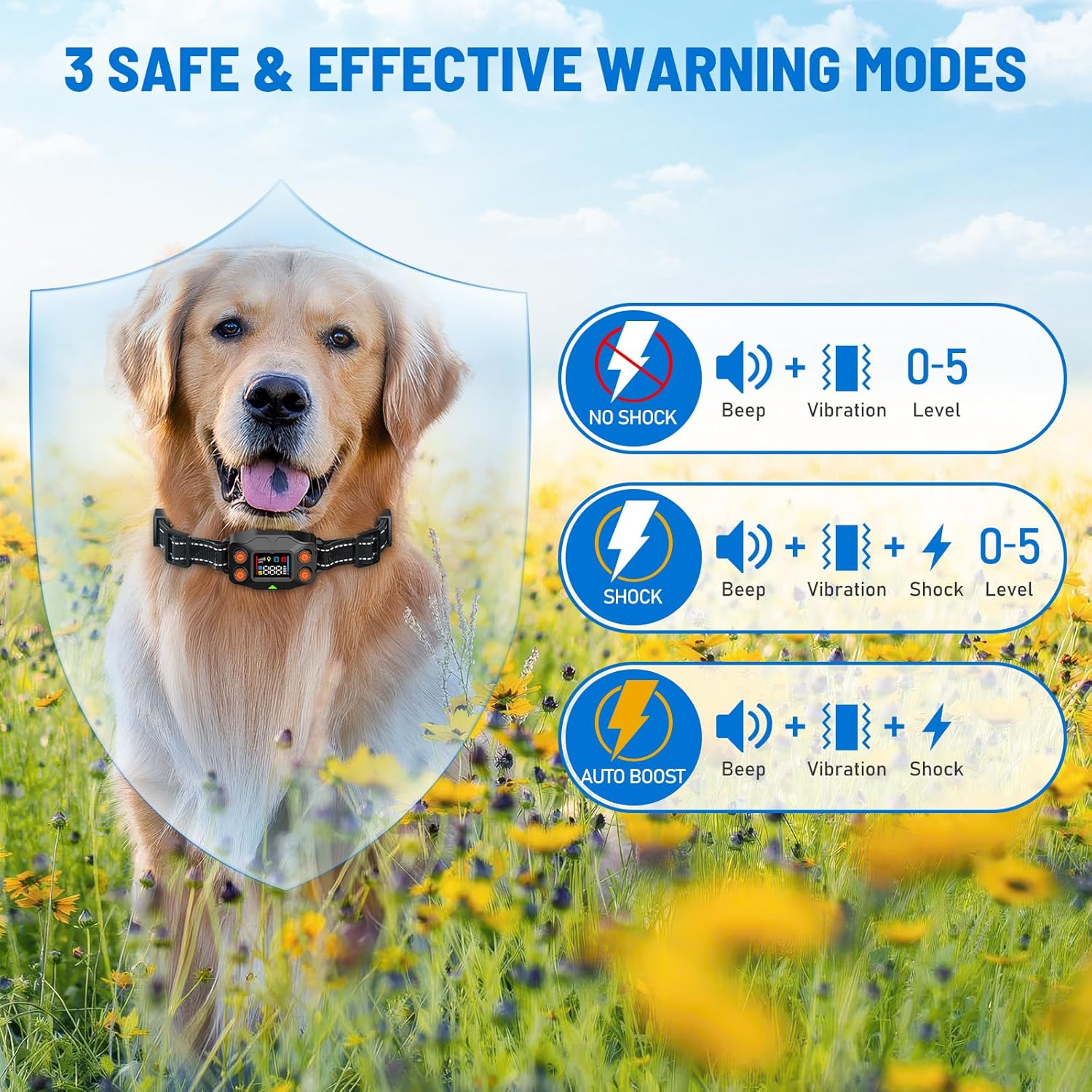
Image 6.1: Visual explanation of the three warning modes: No Shock (Beep + Vibration), Shock (Beep + Vibration + Adjustable Shock), and Auto Boost (Beep + Vibration + Automatic Shock).
- No Shock Mode: When your dog approaches within 3 yards of the boundary, the collar will emit a tone (beep) and then vibrate. This mode is ideal for initial training or for sensitive dogs.
- Shock Mode: If your dog continues past the 3-yard warning zone and crosses the boundary, the collar will deliver a tone, vibration, and a static shock. There are 5 adjustable levels of static shock.
- Auto Boost Mode: Similar to Shock Mode, but the system automatically adjusts the static shock level based on your dog's response.
After a correction, the system pauses for 3 seconds before repeating the cycle, up to 5 times, to prevent overstimulation.
6.2 Adjusting Warning Levels
Use the up/down buttons on the collar to select the desired warning mode and adjust the static shock level (0-5) if using Shock or Auto Boost mode. Refer to the collar's screen for current settings.
6.3 Outdoor Use Considerations
This system is designed for outdoor use in open areas. Avoid using it near large metal objects, dense foliage, or tall buildings that may interfere with GPS signal reception. The portability of the collar makes it suitable for various outdoor environments.

Image 6.2: Examples of suitable outdoor environments for the GPS wireless dog fence, including courtyards, farms, campgrounds, and parks.
7. Maintenance
7.1 Cleaning the Collar
Regularly clean the collar strap and the contact points. Use a damp cloth to wipe down the collar. Ensure the contact points are free of dirt, debris, or skin oils, which can affect conductivity.
7.2 Waterproofing
The LINCAE GPS Wireless Dog Fence F830 PLUS collar has an IPX7 waterproof rating. This means it is protected against immersion in water up to 1 meter for up to 30 minutes. Your dog can swim, bathe, or play in the rain without damaging the collar.

Image 7.1: Demonstrates the IPX7 waterproof capability of the collar, showing dogs engaging in water activities.
7.3 Battery Care
The collar is equipped with a rechargeable Lithium-Ion battery. To prolong battery life:
- Charge the collar fully before first use.
- Avoid completely draining the battery regularly.
- Store the collar in a cool, dry place when not in use.
8. Troubleshooting
| Problem | Possible Cause | Solution |
|---|---|---|
| Collar not acquiring GPS signal. | Indoor use; dense tree cover; tall buildings; cloudy weather. | Move to an open outdoor area with a clear view of the sky. Wait a few minutes for signal acquisition. |
| Dog not responding to corrections. | Collar too loose; contact points not touching skin; low battery; incorrect warning mode/level. | Ensure collar is snug and contact points are making contact. Check battery level. Adjust warning mode and static shock level. Re-train your dog. |
| Boundary seems inconsistent or shifts. | Weak GPS signal; environmental interference; rapid movement during setup. | Re-establish the center point in an area with strong GPS signal. Avoid setting the boundary during heavy cloud cover or near large metal structures. |
| Collar not charging. | Faulty charging cable; dirty charging port; power source issue. | Try a different USB charging cable and power adapter. Clean the charging port. Ensure connections are secure. |
| Collar turns off unexpectedly. | Low battery. | Recharge the collar fully. |
9. Specifications
- Model Name: F830 GPS Wireless Dog Fence
- Model Number: F830 PLUS
- Brand: LINCAE
- Item Weight: 14.4 ounces
- Item Package Dimensions: 7.4 x 6.57 x 2.09 inches
- Battery: 1 Lithium Ion battery (included)
- Waterproof Rating: IPX7
- Adjustable Boundary Radius: 25 - 999 yards (0.4 to 647 acres)
- Warning Modes: Tone, Vibration, Static Shock (5 adjustable levels)
- Suitable for Dogs: Over 16 lbs
- Neck Size Compatibility: 9 - 29 inches
- Color: Black
- Closure Type: Buckle
- Specific Uses: Behavior, Outdoor Containment
10. Warranty & Support
10.1 Warranty Information
The LINCAE GPS Wireless Dog Fence F830 PLUS comes with a 2-Year Warranty from the date of purchase. This warranty covers manufacturing defects and malfunctions under normal use. It does not cover damage caused by misuse, accidents, unauthorized modifications, or normal wear and tear.
Please retain your proof of purchase for warranty claims.
10.2 Customer Support
For technical assistance, troubleshooting, or warranty inquiries, please contact LINCAE customer support. Refer to the contact information provided in your product packaging or visit the official LINCAE website for support details.
When contacting support, please have your product model number (F830 PLUS) and purchase date available.