
1. Introduction
The Putikeeg HAMCUBE Mini CW Trainer is a compact and portable device designed for individuals learning or practicing Morse code. It supports various functions including sending, copying, and decoding Morse code signals. This Mini version is distinguished by the absence of a built-in CW audio decoder board, which means it cannot be directly connected to shortwave radio stations for decoding Chinese and English audio signals. All other operational features and functionalities are consistent with the professional version of the HAMCUBE CW Trainer.
Key features of the HAMCUBE Mini CW Trainer include:
- Custom Character Storage: Equipped with 8 groups of custom character storage units, each capable of holding up to 60 English characters, enabling quick, one-key transmission of pre-programmed messages.
- Assisted Learning: Provides a comprehensive CW full-process assisted learning experience.
- Long Battery Life: Features a built-in 2500mAH high-capacity lithium battery, offering up to 20 hours of continuous standby time.
- Dual Functionality: Can be utilized as a dedicated Morse code exerciser or as a sending device for transmitting reports.
- User-Friendly Interface: Supports both Chinese and English menu interfaces, with options to customize the boot interface.
2. Package Contents
Please verify that all items listed below are present in your package:
- 1 x Putikeeg HAMCUBE Mini CW Trainer Unit
- 1 x Grey Storage Pouch
- 1 x USB-A to USB-C Charging Cable
- 1 x USB-C to USB-A Adapter
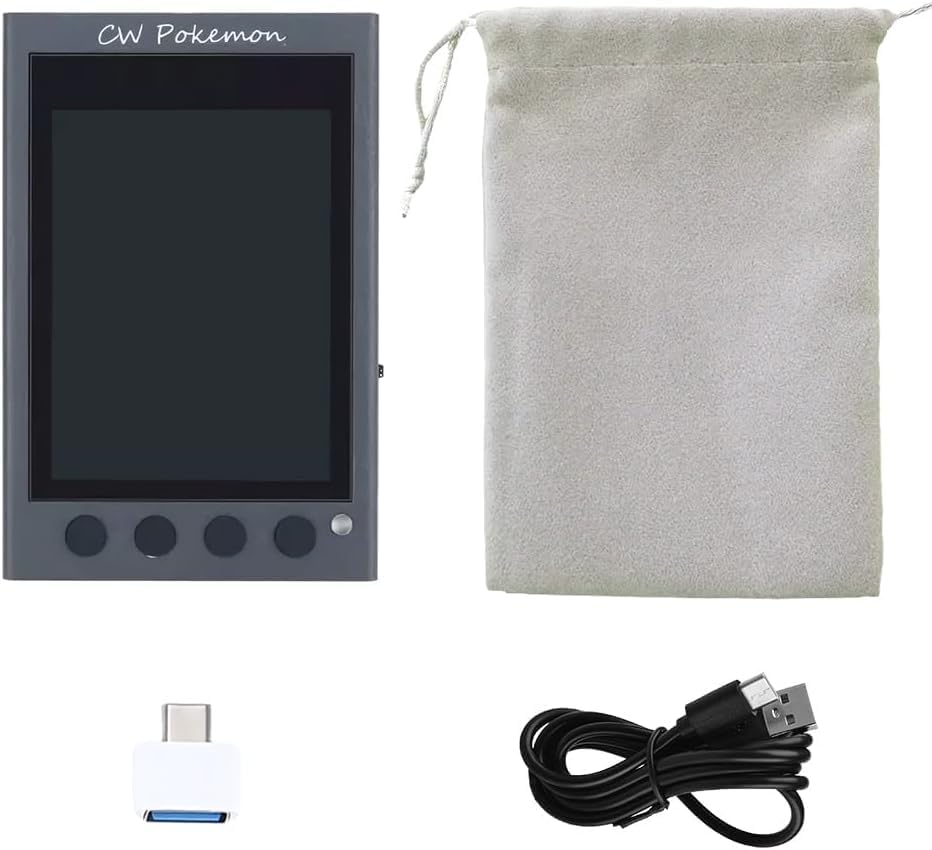
Image: The HAMCUBE Mini CW Trainer unit, a grey drawstring pouch, a USB-C to USB-A adapter, and a USB charging cable.
3. Product Overview
3.1 Device Interfaces
The HAMCUBE Mini CW Trainer features several ports and controls for its operation:

Image: A side view of the HAMCUBE Mini CW Trainer highlighting its various ports and a multifunction selector switch.
- Multifunction Selector Switch: Used for navigating menus and selecting options.
- Charging Port / Data Interface: A USB-C port for charging the device and for data transfer.
- Key Interface / Keyboard Interface: A 3.5mm jack for connecting an external Morse code keyer or a keyboard.
- Earphone / External Speaker Port: A 3.5mm jack for connecting headphones or an external speaker for audio output.
- Keying Output / Function Multiplexing Interface: An additional port for keying output and other multiplexed functions.
3.2 Mini vs. PRO Version Differences
It is important to note the primary distinction between the Mini and Professional (PRO) versions:

Image: A visual comparison of the HAMCUBE Mini and HAMCUBE PRO, illustrating their external similarities and functional differences.
| Feature | HAMCUBE Mini | HAMCUBE PRO |
|---|---|---|
| Built-in CW Audio Decoding Board | No | Yes |
| Shortwave Radio Connection for Decoding | Cannot connect | Can connect to decode Chinese and English audio signals |
| Other Functions | Same as PRO version | Same as Mini version |
4. Setup
4.1 Initial Charging
Before first use, fully charge the HAMCUBE Mini CW Trainer. Connect the provided USB-A to USB-C cable to the device's charging port and a compatible USB power adapter (not included) or a computer USB port. The device's display will indicate charging status.
4.2 Connecting Peripherals
- Morse Code Keyer: Connect your external Morse code keyer to the 'Key Interface' 3.5mm jack.
- Headphones/Speaker: For private practice or louder audio, connect headphones or an external speaker to the 'Earphone/External Speaker Port' 3.5mm jack.

Image: The HAMCUBE Mini CW Trainer connected to an external Morse code keyer, demonstrating a typical connection setup in an outdoor environment.
5. Operating Instructions
5.1 Power On/Off
To power on the device, press and hold the power button (location may vary, typically on the side or front panel) until the display illuminates. To power off, press and hold the power button again until the device shuts down.
5.2 Menu Navigation
Use the multifunction selector switch to navigate through the device's menu options. Typically, rotating the switch scrolls through options, and pressing it confirms a selection.
5.3 Practice Modes
The HAMCUBE Mini offers various modes for Morse code practice:
- Sending Practice: Connect an external keyer and practice sending Morse code. The device may provide feedback on your sending accuracy.
- Copying Practice: The device generates Morse code signals, and you can practice copying them. Adjust speed and character sets as needed.
- Decoding Practice: Input Morse code signals (e.g., from a connected keyer or internal generator), and the device will display the decoded text on its screen.
5.4 Custom Character Storage
Utilize the 8 custom character storage units to store frequently used phrases or call signs. Access these units through the menu to transmit stored messages with a single key press.

Image: A hand placing the HAMCUBE Mini CW Trainer into a pocket, illustrating its compact and portable design for practice on the go.
6. Maintenance
- Cleaning: Wipe the device with a soft, dry cloth. Avoid using harsh chemicals or abrasive materials.
- Storage: Store the device in a cool, dry place away from direct sunlight and extreme temperatures. Use the provided storage pouch for protection.
- Battery Care: To prolong battery life, avoid fully discharging the device frequently. If storing for an extended period, charge the battery to approximately 50% and recharge every few months.
7. Troubleshooting
- Device Not Powering On: Ensure the battery is charged. Connect the device to a power source using the USB cable and attempt to power on again.
- No Audio Output: Check if headphones or an external speaker are properly connected to the 'Earphone/External Speaker Port'. Verify volume settings on the device.
- Keyer Not Responding: Ensure the external keyer is correctly plugged into the 'Key Interface'. Check the keyer's functionality independently if possible.
- Display Issues: If the display is unresponsive or shows anomalies, try restarting the device. If the issue persists, contact support.
8. Specifications
| Specification | Detail |
|---|---|
| Model Number | Mini |
| Brand | Putikeeg |
| Manufacturer | putikeeg |
| Item Weight | 10.2 ounces |
| Package Dimensions | 5.16 x 4.09 x 2.68 inches |
| Battery Life | Up to 20 Hours (standby) |
| Color | Green (Note: Product images may show a grey unit) |
| Number of Channels | 1 |
| Special Feature | Lightweight |
| Water Resistance Level | Not Water Resistant |
9. Warranty Information
This product does not come with a manufacturer's warranty. Please refer to your retailer's return policy for details on returns or exchanges.
10. Support
For further assistance or inquiries regarding your Putikeeg HAMCUBE Mini CW Trainer, please visit the official Putikeeg store or contact your point of purchase.
Putikeeg Store: https://www.amazon.com/stores/PUTIKEEG/page/F551B48B-9FBF-477F-A117-DAE0D783D2A
