
1. Introduction
Thank you for choosing the ENTMENITSEA SW-TG50 Laser Distance Meter. This device is a high-precision, handheld digital measuring tool designed for accurate distance, area, and volume measurements. It features a red laser emitter, a large LCD with backlight, and a durable, compact design. Please read this manual carefully before using the device to ensure safe and correct operation.
2. Safety Information
Always observe the following safety precautions to prevent injury and damage to the device:
- Laser Radiation: This device emits Class 2 laser radiation. Do not stare directly into the laser beam or direct it at other people or animals.
- Eye Protection: Avoid direct eye exposure to the laser beam.
- Operating Environment: Do not operate the device in explosive environments or near flammable materials.
- Maintenance: Do not attempt to disassemble or modify the device. Repairs should only be performed by authorized service personnel.
- Children: Keep the device out of reach of children.
3. Product Overview
The SW-TG50 is engineered for precision and durability, offering reliable performance in various applications.
3.1 Key Features
- High accuracy: ±2mm
- Measurement range: Up to 50 meters
- Large LCD with backlight for clear readings in low light
- Multiple measurement modes (distance, area, volume, Pythagorean)
- Dustproof, drop-resistant, and waterproof design for enhanced durability
- Compact and ergonomic design for comfortable handling
3.2 Device Components
Familiarize yourself with the main parts of your SW-TG50 Laser Distance Meter:

Figure 1: Front view of the ENTMENITSEA SW-TG50 Laser Distance Meter, showing the display, control buttons, and laser emitter/receiver lens.
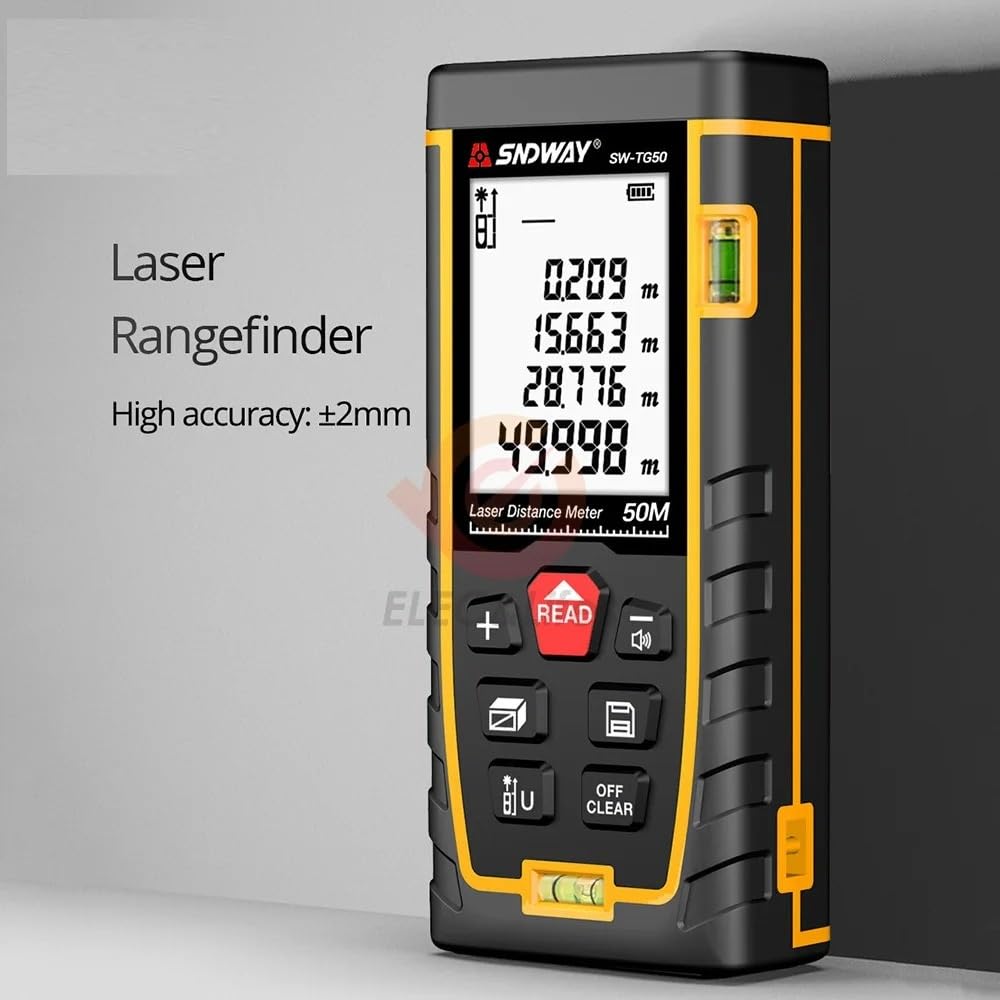
Figure 2: Angled view of the SW-TG50, emphasizing its laser rangefinder capability and high accuracy of ±2mm.

Figure 3: Close-up of the SW-TG50's large LCD with backlight, demonstrating clear readability of measurement data even in poor lighting conditions.

Figure 4: Angled view of the SW-TG50, illustrating its robust construction with dustproof, drop-resistant (up to 1.5m), and waterproof features, ensuring high quality and durability.
3.3 Package Contents
Upon unboxing, ensure all items are present:

Figure 5: The complete package contents for the SW-TG50, including the laser distance meter, protective pouch, user's manual, wrist strap, and a reflective plate.
- SW-TG50 Laser Distance Meter
- Protective Pouch
- User Manual
- Wrist Strap
- Reflective Plate (for measurements over long distances or on poor reflective surfaces)
4. Setup
4.1 Battery Installation
- Locate the battery compartment cover on the back of the device.
- Slide or unclip the cover to open it.
- Insert two AAA batteries (not included) according to the polarity indicators (+/-) inside the compartment.
- Close the battery compartment cover securely.
4.2 Powering On/Off
- Power On: Press the READ button to turn on the device. The laser will activate.
- Power Off: Press and hold the OFF/CLEAR button for a few seconds to turn off the device. The device will automatically power off after 150 seconds of inactivity to save battery.
5. Operating Instructions
5.1 Basic Distance Measurement
- Turn on the device by pressing the READ button. The laser will activate.
- Aim the laser beam at the target point.
- Press the READ button again to take a single measurement. The measured distance will be displayed on the screen.
5.2 Continuous Measurement (Tracking)
- Turn on the device.
- Press and hold the READ button for approximately 2 seconds. The device will enter continuous measurement mode, displaying real-time distance as you move.
- Press the READ button again to stop continuous measurement.
5.3 Unit Conversion
To change the measurement unit (e.g., meters, feet, inches), press the U button repeatedly until the desired unit is displayed.
5.4 Area Measurement
- Press the MODE button (often indicated by a square icon) until the area measurement icon appears on the display.
- Take the first measurement (length) by pressing READ.
- Take the second measurement (width) by pressing READ. The device will automatically calculate and display the area.
5.5 Volume Measurement
- Press the MODE button until the volume measurement icon (often a cube) appears.
- Take the first measurement (length) by pressing READ.
- Take the second measurement (width) by pressing READ.
- Take the third measurement (height) by pressing READ. The device will automatically calculate and display the volume.
5.6 Pythagorean Measurement
The SW-TG50 supports indirect measurement using the Pythagorean theorem. This is useful for measuring heights or distances that cannot be directly accessed.
- Press the MODE button until the Pythagorean measurement icon appears (e.g., a triangle).
- Follow the on-screen prompts to take the required measurements (e.g., hypotenuse, base). The device will then calculate the unknown side.
6. Maintenance
- Cleaning: Use a soft, damp cloth to clean the device. Do not use abrasive cleaners or solvents. Pay special attention to keeping the laser lens clean.
- Storage: Store the device in its protective pouch in a cool, dry place when not in use. Remove batteries if storing for extended periods to prevent leakage.
- Avoid Extreme Conditions: Do not expose the device to extreme temperatures, humidity, or direct sunlight for prolonged periods.
7. Troubleshooting
| Problem | Possible Cause | Solution |
|---|---|---|
| Device does not power on | Low or dead batteries; incorrect battery installation | Replace batteries; check battery polarity |
| Inaccurate measurements | Laser lens dirty; unstable measurement surface; target too far/close; strong light interference | Clean lens; ensure stable position; check range limits; use reflective plate in bright conditions |
| Laser beam not visible | Device off; very bright ambient light | Turn on device; use in lower light conditions or use reflective plate |
| Error message on display | Measurement out of range; internal error | Move closer/further from target; restart device; contact support if persistent |
8. Specifications
| Feature | Specification |
|---|---|
| Model | SW-TG50 |
| Measurement Range | 0.05m - 50m (0.16ft - 164ft) |
| Measurement Accuracy | ±2mm (±0.08 inches) |
| Laser Class | Class 2, <1mW |
| Laser Type | 635nm, Red Laser |
| Units of Measurement | m / in / ft |
| Automatic Laser Off | 30 seconds |
| Automatic Device Off | 150 seconds |
| Battery Type | 2 x AAA (not included) |
| Operating Temperature | 0°C to 40°C (32°F to 104°F) |
| Storage Temperature | -20°C to 60°C (-4°F to 140°F) |
| Durability | Dustproof, Drop-resistant (1.5m), Waterproof |
9. Warranty and Support
ENTMENITSEA is committed to providing high-quality products and excellent customer service. This product comes with a money-back guarantee, reflecting our confidence in its quality and performance.
If you have any questions, concerns, or require technical assistance with your SW-TG50 Laser Distance Meter, please do not hesitate to contact our customer support team. We are ready to assist you to ensure your best experience with our product.
For support, please refer to the contact information provided with your purchase or visit the official ENTMENITSEA website.