
1. Introduction
The ENTMENITSEA THB6128 is a high-performance stepper motor driver module designed for precise control of stepper motors. It features a double full-bridge MOSFET design, supporting up to 2A current and 36V voltage. This module incorporates an automatic half-flow lock function for enhanced motor stability and efficiency. This manual provides essential information for the proper installation, operation, and maintenance of your THB6128 driver module.
2. Product Overview
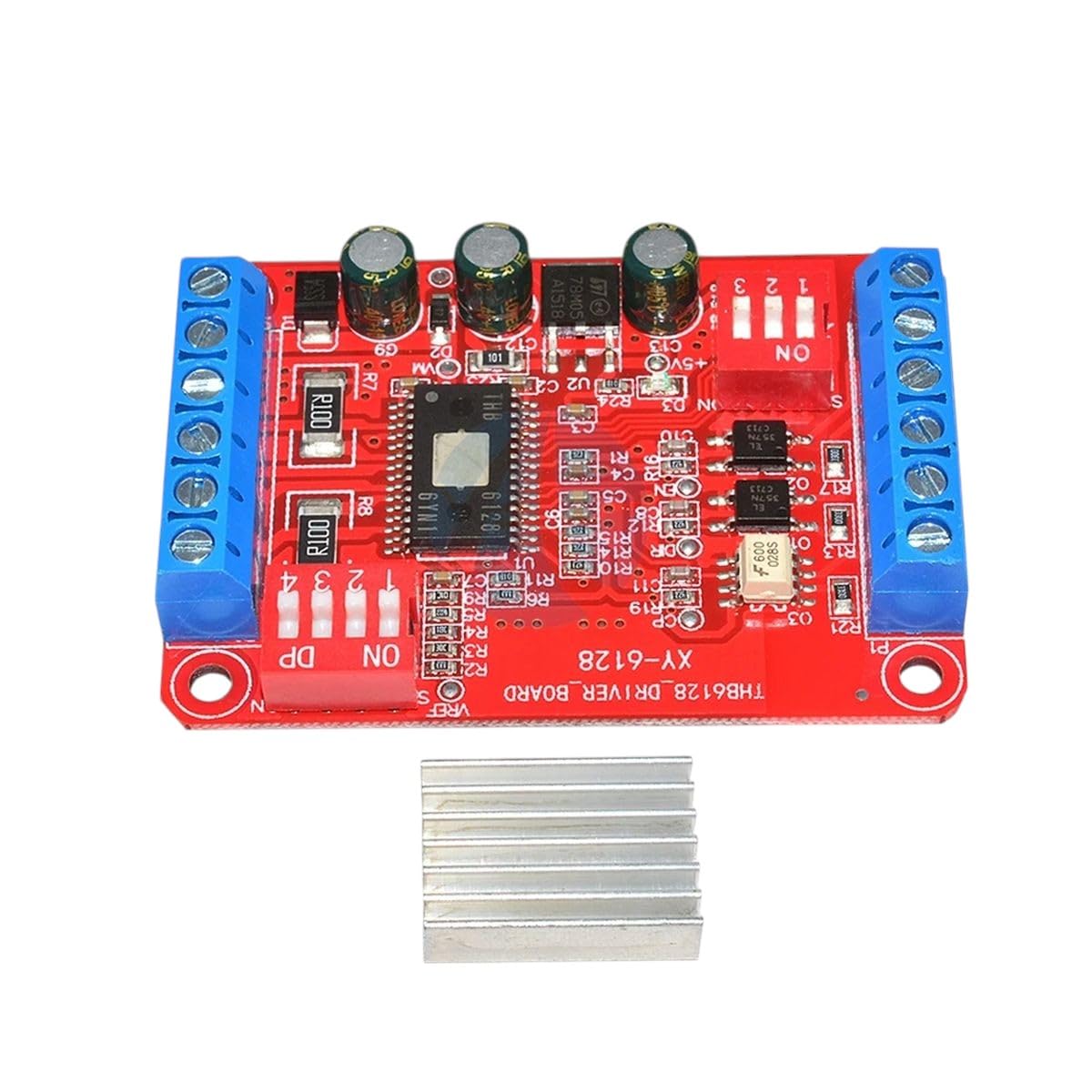
Figure 1: THB6128 Stepper Motor Driver Module. This image displays the top view of the THB6128 driver board, showing the terminal blocks for power and motor connections, the THB6128 IC, capacitors, resistors, and the DIP switches for configuration. A small heatsink is also visible below the board.
The THB6128 driver module is equipped with easily configurable DIP switches for microstepping resolution and current settings. Its robust design ensures stable performance for various stepper motor applications.
3. Setup and Installation
Follow these steps for proper installation of the THB6128 driver module:
- Power Supply Connection: Connect a DC power supply (up to 36V) to the VCC and GND terminals. Ensure correct polarity. The module supports a maximum current of 2A.
- Motor Connection: Connect your 2-phase stepper motor to the A+, A-, B+, B- terminals. Refer to your motor's datasheet for coil identification.
- Control Signal Connection: Connect your microcontroller or control board to the STEP, DIR, and ENABLE pins.
- STEP (Pulse): Each pulse on this pin advances the motor by one step (or microstep).
- DIR (Direction): A high or low signal on this pin determines the motor's rotation direction.
- ENABLE: A low signal typically enables the driver, while a high signal disables it, removing power from the motor coils.
- DIP Switch Configuration: Use the onboard DIP switches to set the desired microstepping resolution and output current. Consult the table below for common settings.
DIP Switch Settings
| Function | Switch 1 | Switch 2 | Switch 3 | Switch 4 |
|---|---|---|---|---|
| Microstepping (Example) | ON (1/2) | OFF (1/4) | ON (1/8) | OFF (1/16) |
| Current Setting (Example) | ON (1.0A) | OFF (1.5A) | ON (2.0A) | OFF (0.5A) |
Note: The exact function of each DIP switch may vary. Refer to the specific markings on your THB6128 board for precise configuration details. Typically, switches 1-3 control microstepping, and switch 4 controls current or half-flow.
4. Operating Instructions
Once the module is wired and configured, you can operate your stepper motor:
- Enable the Driver: Ensure the ENABLE pin is set to its active state (usually low) to power the motor coils.
- Set Direction: Apply a high or low signal to the DIR pin to select the desired rotation direction.
- Generate Step Pulses: Send a series of pulses to the STEP pin. Each pulse will cause the motor to move one step or microstep, according to your DIP switch settings. The frequency of these pulses determines the motor's speed.
- Automatic Half-Flow Lock: The THB6128 features an automatic half-flow lock function. This reduces the current to the motor coils when the motor is idle (no step pulses for a certain period), decreasing power consumption and heat generation while maintaining holding torque.
5. Maintenance
To ensure the longevity and optimal performance of your THB6128 driver module:
- Heat Management: Stepper motor drivers can generate heat during operation. Ensure adequate ventilation around the module. If operating at higher currents or in enclosed spaces, consider adding a fan or a larger heatsink (a small heatsink is included with the product).
- Cleanliness: Keep the module free from dust and debris. Use a soft, dry brush or compressed air for cleaning.
- Connections: Periodically check all wiring connections to ensure they are secure and free from corrosion.
- Environmental Conditions: Operate the module within its specified temperature and humidity ranges to prevent damage.
6. Troubleshooting
If you encounter issues with your THB6128 driver module, consider the following:
- Motor Not Moving:
- Verify power supply voltage and current capacity.
- Check motor wiring for correct phase connections.
- Ensure the ENABLE pin is active (low).
- Confirm STEP pulses are being sent and DIR signal is stable.
- Check DIP switch settings for current and microstepping.
- Motor Overheating:
- Reduce the output current via DIP switches if possible.
- Ensure adequate heat dissipation (heatsink, ventilation).
- Verify the motor's rated current matches the driver's setting.
- Driver Module Overheating:
- Ensure the heatsink is properly attached.
- Check for short circuits in motor wiring.
- Reduce the load on the motor.
- Erratic Motor Movement:
- Check for electrical noise on control signals. Use shielded cables if necessary.
- Verify the integrity of step pulses (clean rising/falling edges).
- Ensure the motor is not stalled due to excessive load.
7. Specifications
| Feature | Specification |
|---|---|
| Model | THB6128 |
| Driver Type | Stepper Motor Driver |
| MOSFET Type | Double Full-Bridge Mosfet |
| Max. Operating Voltage | 36V |
| Max. Output Current | 2A |
| Control Interface | STEP, DIR, ENABLE |
| Microstepping | Configurable via DIP switches |
| Special Features | Automatic Half-Flow Lock |
8. Warranty and Support
ENTMENITSEA is committed to providing high-quality electronic components and excellent customer service.
- Money-Back Guarantee: We offer a money-back guarantee, reflecting our confidence in the quality and performance of our products.
- Customer Support: Our knowledgeable team is available to assist you with any questions or concerns regarding the THB6128 driver module. For support, please contact us through the platform where you purchased this product.