
Pandaing PD-GSAS-18
Pandaing Flameless LED Candles with Remote and Timer User Manual
Model: PD-GSAS-18
Introduction
This manual provides instructions for the safe and effective use of your Pandaing Flameless Battery Operated LED Candles with Remote and Timer. Please read this manual thoroughly before operating the product and retain it for future reference.

Image: An 18-pack of Pandaing flameless LED candles in various heights, featuring embedded star strings and accompanied by four remote controls. The candles are grey with a warm, flickering light.
Package Contents
Verify that all items listed below are included in your package:
- 6 x LED Candles (Diameter 2.2" x Height 5.5")
- 6 x LED Candles (Diameter 2.2" x Height 6.3")
- 6 x LED Candles (Diameter 2.2" x Height 7")
- 4 x Remote Controls
- 1 x User Manual (this document)
Safety Information
- This product is for indoor use only.
- Keep batteries out of reach of children and pets.
- Do not mix old and new batteries, or different types of batteries.
- Remove batteries if the product will not be used for an extended period to prevent leakage.
- Dispose of used batteries according to local regulations.
- Do not expose candles to extreme temperatures or direct sunlight, as this may affect battery life and product integrity.
Setup
1. Battery Installation
- Each LED candle requires two (2) AA batteries (not included).
- Locate the battery compartment at the bottom of each candle.
- Open the battery cover.
- Insert two AA batteries, ensuring correct polarity (+/-).
- Close the battery cover securely.
2. Initial Power On
After installing batteries, move the ON-OFF switch located on the bottom of each candle to the ON position. The candle will illuminate. To use the remote control, ensure this switch is always in the ON position.
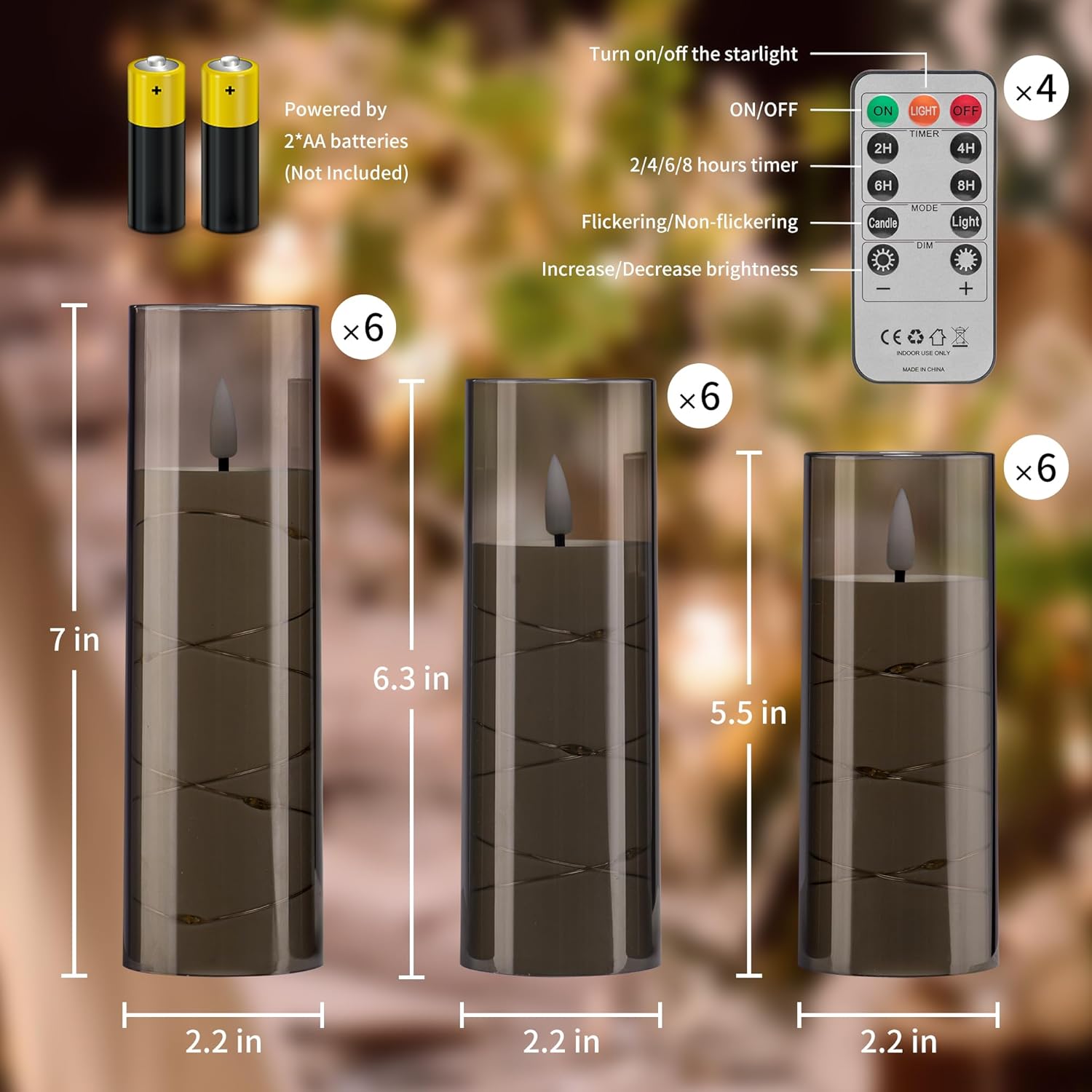
Image: A diagram illustrating the dimensions of the three candle sizes (5.5", 6.3", 7" height, 2.2" diameter), the battery compartment requiring 2 AA batteries, and a detailed view of the remote control with its various buttons and functions.
Operating Instructions
Manual Operation
To turn a candle on or off manually, use the physical ON-OFF switch located on the bottom of each candle. When the switch is in the ON position, the candle is ready for operation, either manually or via remote control.
Remote Control Functions
The included remote control allows for convenient operation of all candles simultaneously, provided their bottom switches are in the ON position. Point the remote directly at the candles for optimal response.
- ON/OFF Button: Press ON to turn all candles on. Press OFF to turn all candles off.
- TIMER: Set the automatic timer for the candles to remain on for a specific duration. Options include 2H (2 hours), 4H (4 hours), 6H (6 hours), and 8H (8 hours). Once set, the candles will turn on at the same time each day and stay on for the selected duration.
- MODE:
- Candle: Activates the flickering flame effect, mimicking a traditional candle.
- Light: Provides a steady, non-flickering light.
- Brightness Control (DIM +/-): Use the + button to increase brightness and the - button to decrease brightness.
- Starlight ON/OFF: The remote also features buttons to turn the embedded star string lights on or off independently of the main candle light.
Maintenance
Battery Replacement
When the candle light dims or stops functioning, it is time to replace the batteries. Follow the battery installation steps outlined in the Setup section. Constant use of the timer function may reduce battery life more quickly.
Cleaning
Wipe the candles with a soft, dry cloth to remove dust. Do not use abrasive cleaners or immerse the candles in water.
Storage
If the candles will not be used for an extended period, switch the ON-OFF button at the bottom of each candle to OFF and remove the batteries to prevent potential leakage and preserve battery life.
Troubleshooting
| Problem | Possible Cause | Solution |
|---|---|---|
| Candle does not turn on. |
|
|
| Remote control is not working. |
|
|
| Candles turn on unexpectedly. |
|
|
Specifications
- Model: PD-GSAS-18
- Quantity: 18 Flameless LED Candles
- Candle Dimensions (Diameter x Height):
- 2.2" x 5.5" (6 candles)
- 2.2" x 6.3" (6 candles)
- 2.2" x 7" (6 candles)
- Material: Acrylic (Shell)
- Light Source: LED
- Power Source: Battery Operated
- Battery Type (per candle): 2 x AA batteries (not included)
- Expected Battery Life: Approximately 200 hours (with high-grade batteries)
- Control Method: Remote Control, Manual Switch
- Special Features: Flameless, Flickering Effect, Embedded Star String, Timer Function, Brightness Control
- Indoor/Outdoor Usage: Indoor
- Water Resistance: Not Water Resistant
Warranty and Support
For warranty information or technical support, please refer to the retailer's return policy or contact Pandaing customer service through the platform where the product was purchased. Please have your model number (PD-GSAS-18) and purchase details ready.
Ask a question about this manual
Ask about setup, troubleshooting, compatibility, parts, safety, or missing instructions. Manuals+ will review the question and use this page’s manual context to help answer it.