
1. Safety Information
Please read and understand all instructions before assembly and use. Keep this manual for future reference.
- Do not exceed a total weight of 1000 pounds on the bed frame.
- Be cautious of sharp edges during assembly and use.
- Ensure all connections are secure before use.
- Keep small parts away from children during assembly to prevent choking hazards.
- Do not stand on the bed frame during assembly or use.
2. Product Overview
The Zevemomo Full Size Bed Frame is designed for comfort and functionality, featuring integrated storage, LED lighting, and a charging station. This platform bed eliminates the need for a box spring.
Key Features:
- Maximized Storage Space: Includes 8 spacious drawers for organizing clothes, bedding, and other items.
- Sturdy and Noise-Free Design: Constructed with a reinforced metal frame and silent cotton strips to ensure durability and a quiet sleeping environment.
- No Box Spring Required: A robust slat system provides direct support for your mattress.
- Storage Headboard with Charging Station: Features built-in USB and standard plug outlets for convenient device charging.
- Adjustable RGB LED Lights: Customize your bedroom ambiance with color-changing LED lights on the headboard.

Image: Overview of the Zevemomo Full Size Bed Frame, highlighting its integrated headboard, storage drawers, and overall design.
3. Assembly Instructions
Assembly is required. Please follow these steps carefully. It is recommended to have two people for assembly.
- Unpack and Inspect: Unpack all parts from the packaging. Verify that all components are present and undamaged. Refer to the parts list in the included manual.
- Assemble Frame Base: Using the provided screws and tools, assemble the main frame base. Ensure all connections are tightened securely.
- Attach Headboard: Connect the headboard to the assembled frame base. Align the pre-drilled holes and secure with the appropriate fasteners.
- Install Slats and Drawers: Place the mattress support slats onto the frame. Install the 8 storage drawers into their designated compartments beneath the bed frame.
- Connect Electrical Components: Connect the charging station and LED light strip according to the specific wiring instructions provided in the detailed manual.
- Final Placement: Carefully place your mattress on the assembled bed frame, ensuring it is centered and securely supported by the slat system.

Image: Illustration of the bed frame's quiet design elements and simplified assembly process.
4. Operating Instructions
4.1. Using the Storage Drawers

Image: The bed frame with its eight storage drawers extended, demonstrating ample storage capacity.
The bed frame includes 8 integrated storage drawers. To open, gently pull the handle. To close, push the drawer back until it is fully seated under the bed. Ensure drawers are not overloaded to prevent damage.
4.2. Using the Charging Station

Image: Detail of the headboard's charging station, featuring two standard 125V/12A outlets and a 5V/2A Type-C & USB port.
The headboard features a built-in charging station with USB ports and standard AC outlets. Plug the bed frame's power cord into a wall outlet. You can then connect your devices to the USB ports or AC outlets for charging. Do not exceed the maximum power rating of the charging station.
4.3. Adjusting LED Lights

Image: The bed frame's headboard illuminated by RGB LED lights, demonstrating various color settings and control options for brightness and timing.
The headboard is equipped with adjustable RGB LED lights. Use the provided remote control or integrated buttons to change colors, adjust brightness, and set timing functions. Refer to the separate LED light manual for detailed instructions on specific modes and features.
5. Maintenance
- Cleaning: Wipe the metal and wood surfaces with a soft, damp cloth. Avoid harsh chemicals or abrasive cleaners that may damage the finish.
- Drawer Maintenance: Periodically check the drawer slides for smooth operation. Clean any dust or debris that may accumulate.
- Fastener Check: Regularly inspect all bolts and screws to ensure they remain tight. Re-tighten if necessary to maintain stability.
- Electrical Components: Ensure the charging station and LED light connections are secure. Do not attempt to repair electrical components yourself; contact qualified personnel if issues arise.
6. Troubleshooting
- Squeaking Noises: If the bed frame makes noise, check all fasteners and tighten any loose bolts. Ensure the mattress is properly seated on the slats.
- Drawers Not Sliding Smoothly: Check for obstructions in the drawer tracks. Clean any debris and ensure drawers are properly aligned.
- LED Lights Not Working: Verify the power connection to the LED strip and the wall outlet. Check the remote control battery if applicable.
- Charging Station Not Functioning: Ensure the bed frame's main power cord is securely plugged into a working wall outlet. Test with different devices and cables.
7. Specifications
| Feature | Detail |
|---|---|
| Model | bed frame |
| Brand | Zevemomo |
| Size | Full |
| Material | Metal, MDF, Wood |
| Product Dimensions (L x W x H) | 81.49" x 54.13" x 39.17" |
| Number of Drawers | 8 |
| Special Features | Charging Station, LED Lighting, No Box Spring Needed, Storage Drawer |
| Color | Brown Board |
| Weight | 71 Pounds |
| UPC | 990484100238 |
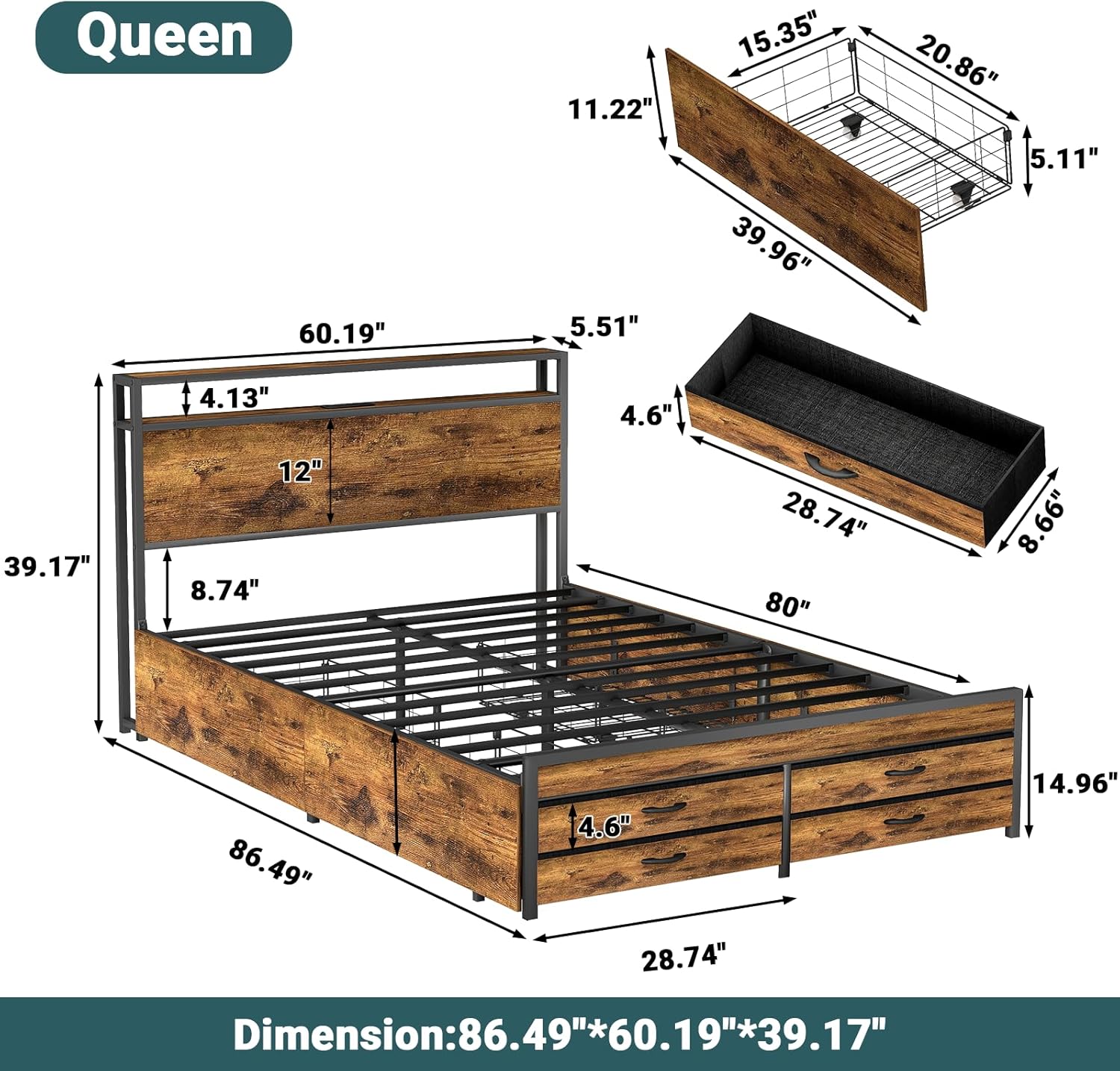
Image: Technical drawing illustrating the precise dimensions of the bed frame, headboard, and individual drawers.
8. Warranty and Support
For warranty information or technical support, please contact Zevemomo customer service. Keep your purchase receipt for warranty claims.
- Customer Service: Refer to the contact information provided with your product packaging or visit the official Zevemomo website.
- Returns: This product is eligible for 30-day easy returns through Amazon.com.