
Jolly line 33-03-0032
Jolly Line JL1718-2/COMP Compatible Replacement Remote Control for LG TV
Model: JL1718-2/COMP (Manufacturer Code) / 33-03-0032 (Item Model Number)
1. Introduction
This manual provides instructions for the Jolly Line JL1718-2/COMP Compatible Replacement Remote Control for LG TVs. This remote is designed to function as a direct replacement for your original LG TV remote without requiring any programming or setup. Simply insert batteries, and it is ready for immediate use.
2. Safety Information
- Do not mix old and new batteries.
- Do not mix alkaline, standard (carbon-zinc), or rechargeable (nickel-cadmium) batteries.
- Always remove exhausted batteries promptly to prevent leakage and damage.
- Dispose of used batteries according to local regulations.
- Keep the remote control away from extreme temperatures, direct sunlight, and moisture.
- Do not attempt to disassemble or modify the remote control.
3. Package Contents
- 1 x Jolly Line JL1718-2/COMP Compatible Replacement Remote Control
Note: 2 x AAA 1.5V batteries are not included and must be purchased separately.

Image 3.1: The Jolly Line JL1718-2/COMP remote control shown within its retail packaging, highlighting its '100% Compatible' and 'Ready to Use' features.
4. Setup
4.1 Battery Installation
- Locate the battery compartment on the back of the remote control.
- Slide the battery compartment cover downwards or in the direction indicated by an arrow to open it.
- Insert two (2) AAA 1.5V batteries, ensuring the positive (+) and negative (-) terminals align correctly with the markings inside the compartment.
- Slide the battery compartment cover back into place until it clicks securely.
4.2 First Use
This remote control is pre-programmed for LG TVs and requires no additional setup. Once batteries are installed, point the remote control towards your LG TV and begin using it immediately.
5. Operating Instructions
The remote control features a standard layout for LG TVs, providing access to common functions. Refer to the image below for button identification.
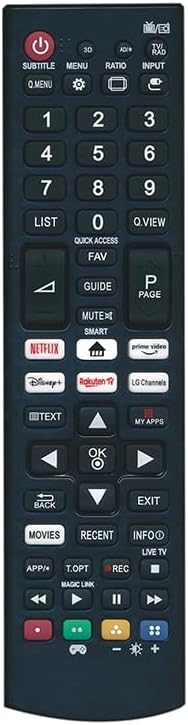
Image 5.1: Front view of the Jolly Line JL1718-2/COMP remote control, displaying all functional buttons.
5.1 Basic Functions
- POWER (Red Button): Turns the TV on or off.
- SUBTITLE: Activates or deactivates subtitles.
- MENU: Accesses the TV's main menu.
- RATIO: Adjusts the screen aspect ratio.
- INPUT: Selects the input source (HDMI, AV, etc.).
- Number Buttons (0-9): Directly select channels.
- LIST: Displays the channel list.
- Q.MENU: Accesses the Quick Menu for common settings.
- Q.VIEW: Switches between the current and previously viewed channel.
- VOL (+/-): Adjusts the volume level.
- CH (Page Up/Down): Changes channels.
- MUTE: Mutes or unmutes the TV sound.
- Navigation Buttons (Up, Down, Left, Right, OK): Navigate through menus and confirm selections.
- BACK: Returns to the previous screen or menu.
- EXIT: Exits the current menu or application.
5.2 Special Functions and App Buttons
- 3D: Activates or deactivates 3D mode (if supported by TV).
- AD/P: Audio Description / Picture mode.
- QUICK ACCESS: Provides quick access to frequently used apps or functions.
- FAV: Accesses favorite channels.
- GUIDE: Displays the electronic program guide.
- SMART: Accesses the TV's Smart Hub or main smart features.
- NETFLIX, Prime Video, Disney+, Rakuten TV, LG Channels: Direct access buttons for these streaming services and LG's channel platform.
- TEXT: Activates or deactivates Teletext.
- MY APPS: Opens the list of installed applications.
- MOVIES: Direct access to movie content.
- RECENT: Displays recently viewed content or applications.
- INFO: Displays information about the current program or input.
- LIVE TV: Switches to live television broadcast.
- APP/*: Customizable app button or special function.
- T.OPT: Teletext Options.
- REC: Starts recording (if supported by TV and external storage).
- Media Control Buttons (Rewind, Play, Pause, Stop, Fast Forward): Control playback of media content.
- Color Buttons (Red, Green, Yellow, Blue): Functionality varies depending on the context (e.g., Teletext, Smart TV apps).
6. Maintenance
- Clean the remote control with a soft, dry cloth. Do not use liquid cleaners or abrasive materials.
- If the remote control will not be used for an extended period, remove the batteries to prevent leakage.
7. Troubleshooting
7.1 Remote Control Not Working
- Check Batteries: Ensure batteries are inserted correctly with the correct polarity (+/-). Replace with fresh AAA batteries if necessary.
- Line of Sight: Make sure there is a clear line of sight between the remote control and the TV's infrared sensor. Obstructions can block the signal.
- Distance: Ensure you are within the effective range of the remote control (typically up to 7 meters or 23 feet).
- TV Sensor: Verify that the TV's remote control sensor is not blocked or dirty.
7.2 Specific Buttons Not Responding
- This remote is designed for broad compatibility with LG TVs. However, some advanced or TV-specific functions may not be fully supported if your original remote had unique features not present on this replacement.
- Ensure your TV is powered on and not in a standby mode that might restrict certain functions.
8. Specifications
| Feature | Detail |
|---|---|
| Brand | Jolly line |
| Model Number | JL1718-2/COMP (Manufacturer Code), 33-03-0032 (Item Model Number) |
| Compatibility | LG Televisions |
| Power Source | 2 x AAA 1.5V Batteries (not included) |
| Dimensions (L x W x H) | 7.09 x 1.97 x 0.79 inches (17.5 x 4.5 x 1.5 cm) |
| Item Weight | 3.17 ounces |
| Special Features | Ergonomic, Pre-Programmed, No setup required |
| Color | Black |
9. Warranty and Support
For warranty information or technical support, please refer to the documentation provided with your purchase or contact Jolly Line customer service directly. Contact details are typically available on the manufacturer's official website or product packaging.