
SGPWATT 7.6KW-48V
SUNGOLDPOWER 7.6KW 48V Solar Hybrid Inverter
User Manual
Model: 7.6KW-48V | Brand: SGPWATT
1. Product Overview
The SUNGOLDPOWER 7.6KW 48V Solar Hybrid Inverter is a versatile power solution designed for both on-grid and off-grid applications. It features a 240Vac split-phase pure sine wave output and incorporates three Maximum Power Point Trackers (MPPTs) for optimal solar energy harvesting. This inverter is built for reliability, efficiency, and scalability, making it suitable for homes, offices, and remote power setups.

Figure 1: SUNGOLDPOWER 7.6KW 48V Solar Hybrid Inverter
Key Features:
- High Solar Input: Equipped with 3 MPPTs, supporting up to 600V PV input per MPPT, for a total solar input of 12kW with a maximum 210A charging current.
- Scalable Power: Capable of parallel connection for up to 9 units, creating systems up to 68.4KW for expanded power needs.
- Advanced Features: Supports AC Coupling for integration with grid-tie systems and smart load management.
- Monitoring & Control: Monitor system status via LCD display and a dedicated mobile application with Bluetooth connectivity.
- Reliable Backup: Ensures continuous power to critical loads with battery backup during grid failures.
- Wide Compatibility: Works seamlessly with various battery types including Flooded, AGM, LiFePO4, GEL, Sealed Lead Acid, and user-defined settings.
- Durable & Safe: IP65 rated, wall-mounted design, and UL 1741/CSA C22.2/UL 1699B UL 1741SB, IEEE 1547:2018, HECO SRD 2.0 certified.

Figure 2: Key Specifications of the 7.6KW 48V Split Phase Hybrid Inverter
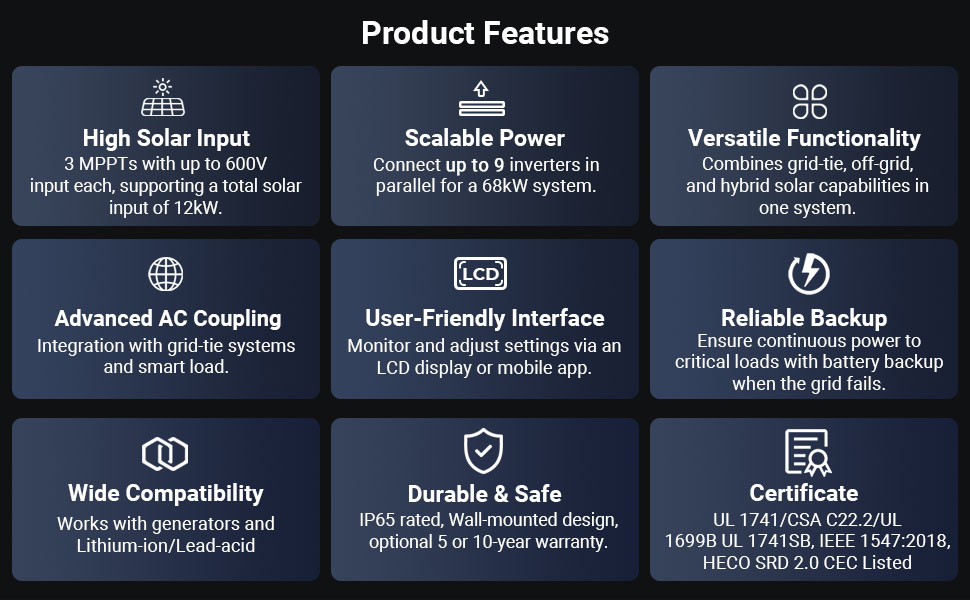
Figure 3: Comprehensive Product Features
2. Safety Information
Please read all instructions and warnings carefully before installation and operation. Failure to follow these instructions may result in electric shock, fire, or severe injury. Keep this manual for future reference.
- Installation must be performed by qualified personnel.
- Ensure all wiring complies with local and national electrical codes.
- Do not disassemble the inverter. There are no user-serviceable parts inside.
- Ensure proper grounding of the unit.
- Keep away from flammable materials and ensure adequate ventilation.
- Disconnect all power sources (PV, battery, grid) before performing any maintenance or wiring.
3. What's in the Box
Upon unpacking, verify that all items listed below are included and undamaged:
- 7.6KW inverter unit
- WIFI module
- BTS cable
- Parallel cable
- CT cable
- User Manual (this document)
- Mounting bracket
- 1X9-Pin terminal & 3X4-Pin terminal
- M6 Expansion screws & M6 Security screws

Figure 4: Packaging Contents and Dimensions
4. Installation and Setup
Proper installation is crucial for the safe and efficient operation of your SUNGOLDPOWER inverter. Refer to the detailed wiring diagrams and instructions provided in the full PDF user manual for specific steps.
4.1 Mounting the Inverter
The inverter is designed for wall-mounted installation. Use the provided mounting bracket and screws to securely fasten the unit to a sturdy vertical surface. Ensure the installation location allows for adequate ventilation and is protected from direct sunlight, rain, and excessive dust.
4.2 System Connection Overview
The inverter integrates various components to form a complete energy system. Connections typically include PV array, battery bank, grid connection, and loads.
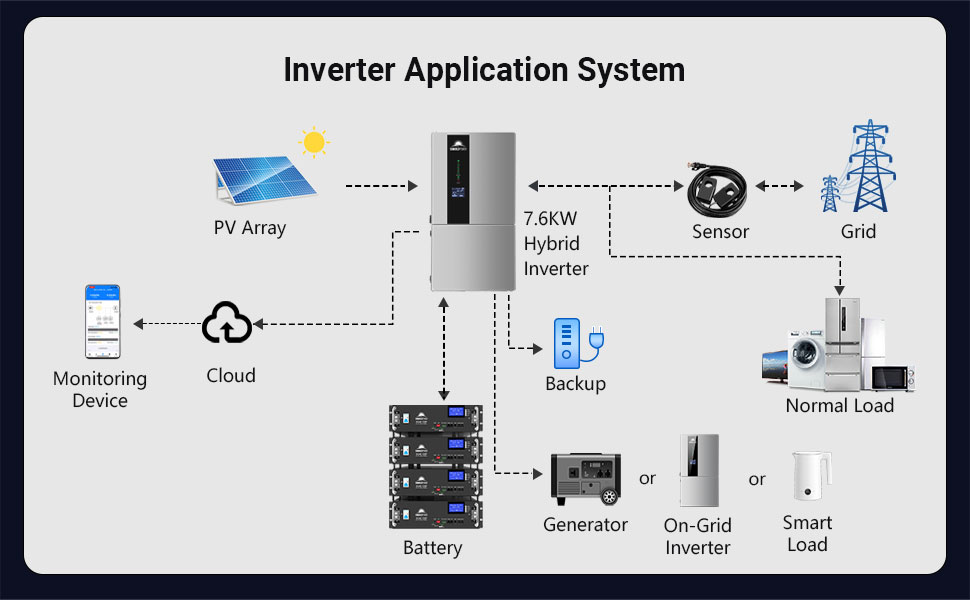
Figure 5: Inverter Application System Diagram
4.3 Component Identification
Familiarize yourself with the external and internal components of the inverter for proper connection and operation.
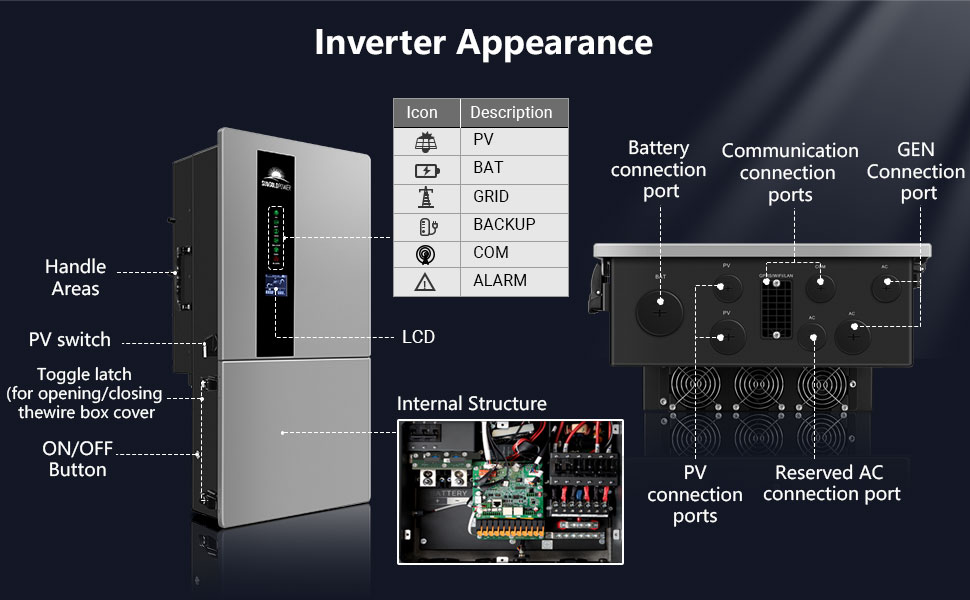
Figure 6: Inverter Appearance and Connection Ports
4.4 Parallel Connection (Optional)
For increased power output, up to 9 inverters can be connected in parallel. This requires specific wiring and configuration. Refer to the full user manual for detailed instructions on parallel setup.
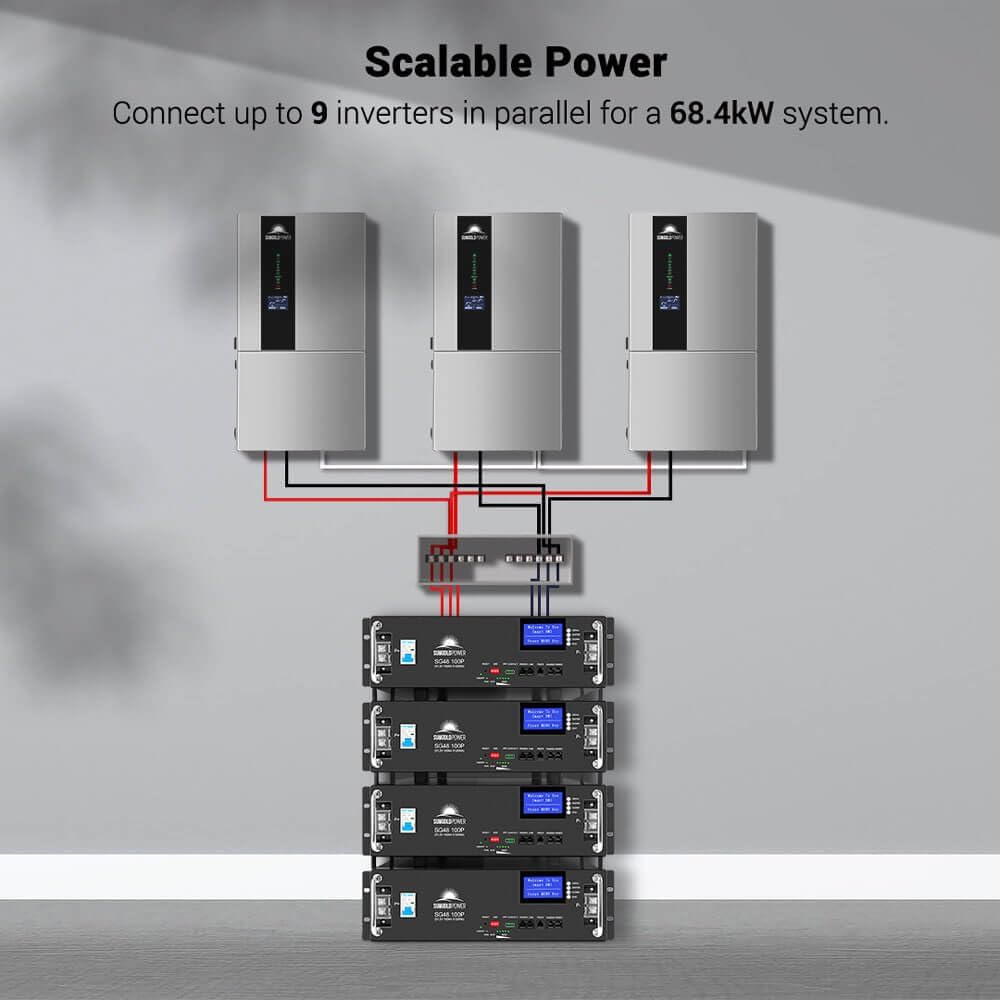
Figure 7: Scalable Power with Parallel Connection
5. Operating Modes
The inverter supports various operating modes to optimize energy usage based on your needs:
- Self-consumption Mode: Prioritizes using solar and battery power for loads before drawing from the grid.
- Feed-in Priority Mode: Prioritizes feeding excess solar energy back into the grid.
- Back-up Mode: Utilizes battery power to supply loads when the grid is unavailable.
- Off-Grid Mode: Operates completely independent of the grid, relying on solar and battery power.
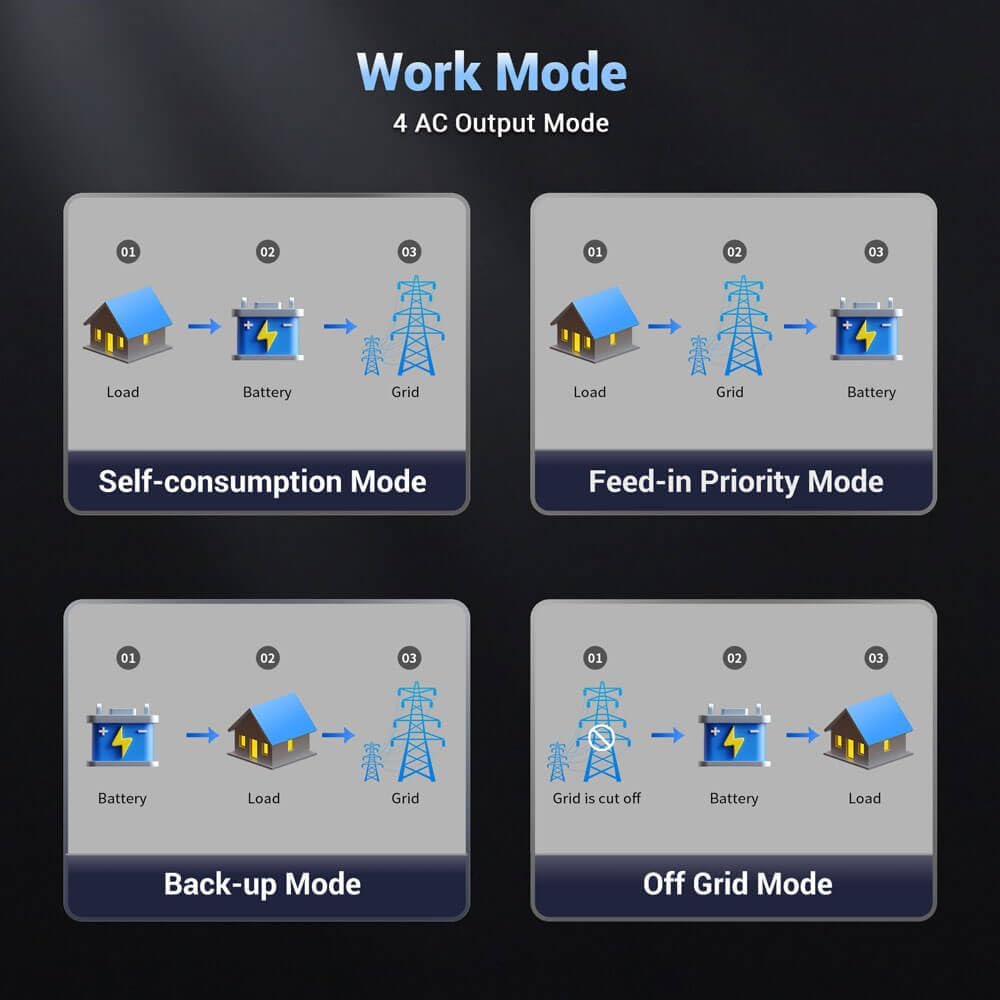
Figure 8: Inverter Work Modes
5.1 Forced Charge/Discharge Function
The inverter allows users to set specific time periods for forced battery charging or discharging, regardless of the current working mode. This feature is useful for optimizing battery health or utilizing off-peak electricity rates.
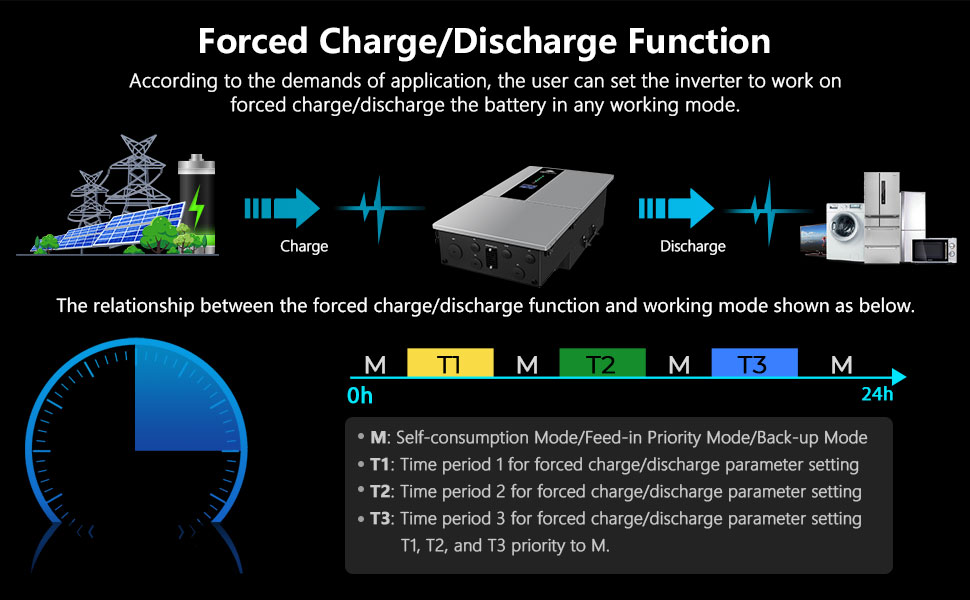
Figure 9: Forced Charge/Discharge Function
5.2 Monitoring and Control
The inverter features an LED+LCD HD Display for real-time monitoring of PV, battery, grid, backup, communication, and alarm status. Additionally, a built-in WIFI module allows for remote monitoring and adjustment of settings via a mobile application.

Figure 10: LED+LCD HD Display

Figure 11: APP Monitoring and Customization
The inverter also supports BMS (Battery Management System) communication for optimized battery performance and longevity.
6. Maintenance
Regular maintenance ensures the longevity and optimal performance of your SUNGOLDPOWER inverter. Always disconnect all power sources before performing any maintenance.
- Cleaning: Periodically clean the exterior of the inverter with a dry, soft cloth. Ensure ventilation openings are free from dust and debris.
- Connections: Annually inspect all electrical connections for tightness and signs of corrosion.
- Ventilation: Ensure the area around the inverter remains clear to allow for proper airflow and heat dissipation.
- Firmware Updates: Check for available firmware updates via the mobile app or manufacturer's website to ensure your inverter has the latest features and bug fixes.
- Battery Inspection: If using lead-acid batteries, regularly check electrolyte levels and terminal conditions as per battery manufacturer guidelines.
7. Troubleshooting
This section provides basic troubleshooting steps for common issues. For complex problems, contact customer support.
| Problem | Possible Cause | Solution |
|---|---|---|
| Inverter not turning on | No DC input from PV or battery; DC breaker off; Wiring error. | Check PV and battery connections; Ensure DC breaker is ON; Verify wiring according to manual. |
| No AC output | AC breaker off; Overload; Inverter fault. | Check AC breaker; Reduce load; Check LCD for error codes and consult manual. |
| Low power output | Insufficient solar input; Battery issues; MPPT not tracking optimally. | Check PV array for shading/dirt; Inspect battery health; Monitor MPPT performance via app. |
| Communication issues (Wi-Fi/BMS) | Poor Wi-Fi signal; Incorrect settings; Cable issues. | Ensure strong Wi-Fi signal; Verify app settings; Check communication cable connections. |
8. Technical Specifications
| Parameter | Value |
|---|---|
| Inverter Model | SGN7.6K1HB-48 |
| Rated Output Power | 7600W |
| DC Volt | 48V DC |
| Rated Output Voltage | 120V/240V (split phase) / 208V (2/3 phase) VAC |
| Parallel Capability | Yes, up to 9 units |
| Max. AC Output Power (PF=1) | 7,600W |
| Peak Power | 15,200VA |
| Nominal Output Frequency | 50Hz/60Hz |
| Nominal Grid Output Power | 7600W |
| Nominal Grid AC Current | 31.7A |
| Solar Charger Type | MPPT |
| Maximum PV Array Power | 12000W |
| MPPT Operation Voltage | 90-540VDC |
| Maximum PV Array Open Circuit Voltage | 600VDC |
| Max. DC Input current / per string | 32A/22A/22A |
| Number of MPPT Tracker | 3 |
| Max. Charge/Discharge Current | 210A/180A |
| Ingress Protection Degree | IP65/NEMA 3R |
| Dimensions (W*H*D) | 16.5"x31.5"x9.4" (420*800*240mm) |
| Net Weight | 88lb/40Kg |
| Communication Interface | RS485/CAN (for BMS), DRM/RS485 (for meter), RS485, Optional: Wi-Fi/LAN |
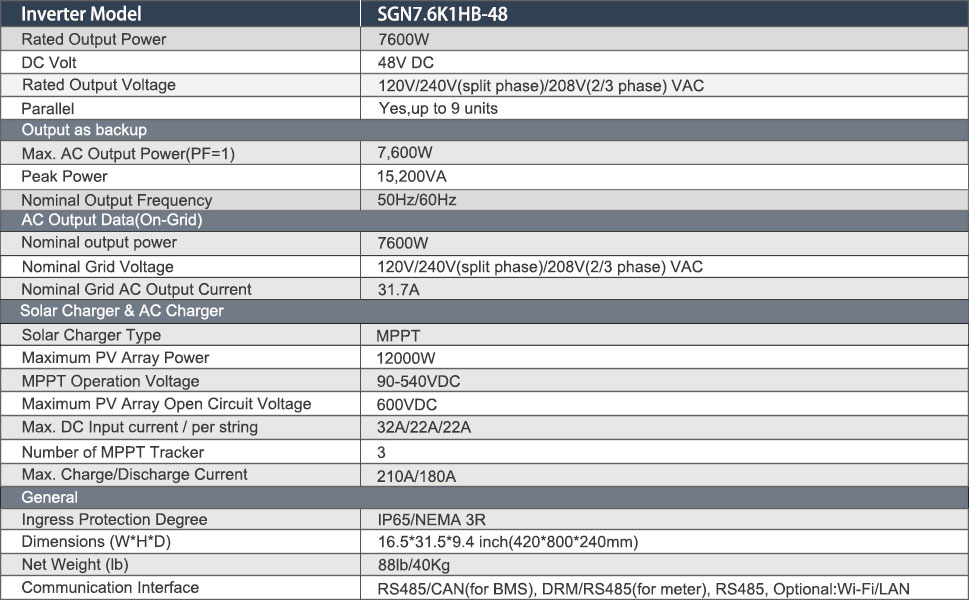
Figure 12: Detailed Technical Specifications
9. Warranty and Customer Support
The SUNGOLDPOWER 7.6KW 48V Solar Hybrid Inverter comes with a 10-year warranty, ensuring long-term reliability and peace of mind. For any technical assistance, troubleshooting, or warranty claims, please contact SGPWATT customer support.
For further assistance, refer to the official User Manual PDF available for download or contact customer support through the provided channels.