
Introduction
This manual provides instructions for the AULCMEET XXD3059 Replacement Remote Control. This remote is designed to be compatible with various Pioneer DVD CD Receiver Speaker Systems, including models such as XW-DV515, XV-DV515, and S-DV515. It offers direct functionality without the need for complex programming.
Setup
The AULCMEET XXD3059 Replacement Remote Control is designed for immediate use. No programming or pairing is required. Simply install the batteries, and the remote will be ready to operate your compatible Pioneer system.
Battery Installation
- Locate the battery compartment on the back of the remote control.
- Slide the battery compartment cover downwards or outwards to open it.
- Insert two (2) AAA batteries, ensuring the positive (+) and negative (-) terminals align correctly with the markings inside the compartment.
- Slide the battery compartment cover back into place until it clicks securely.
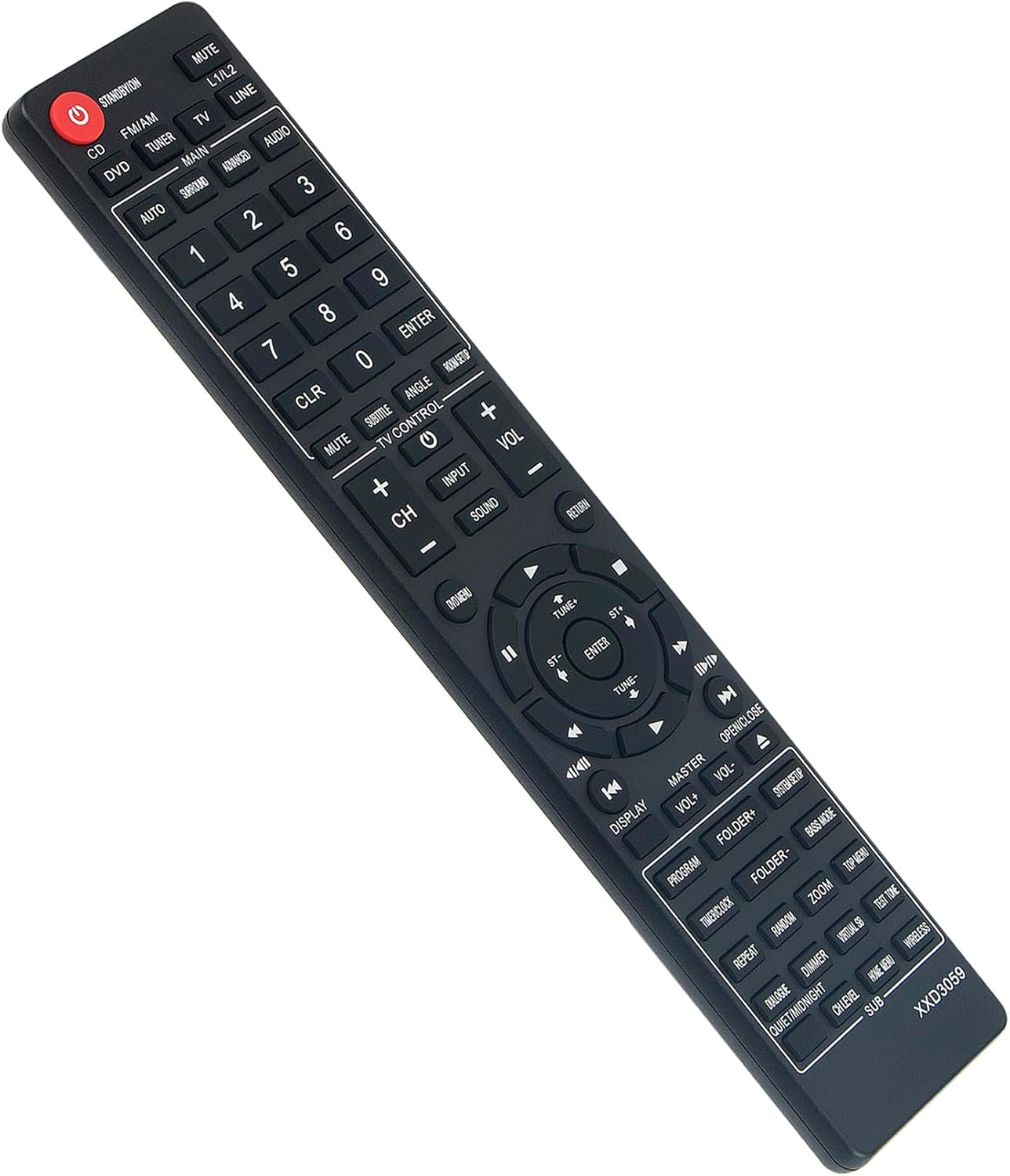
Figure 1: Rear view of the remote control, illustrating the battery compartment location.
Operating Instructions
This section details the primary functions of the buttons on your AULCMEET XXD3059 remote control.

Figure 2: Front view of the AULCMEET XXD3059 remote control.
Key Functions
- STANDBY/ON (Red Button): Powers the system on or off.
- MUTE: Mutes or unmutes the audio output.
- L1/L2: Selects audio input L1 or L2.
- Source Selection Buttons (CD, FM/AM, DVD, TUNER, TV, LINE, AUDIO, SURROUND, ADVANCED): Selects the desired input source or mode.
- Number Buttons (0-9): Used for direct track selection, channel input, or menu navigation.
- CLR (Clear): Clears the current input or selection.
- ENTER: Confirms a selection or input.
- TV CONTROL (+/- VOL, CH, INPUT): Controls basic functions of a connected TV (if compatible).
- Navigation Buttons (Up, Down, Left, Right, ENTER): Navigates through menus and options.
- VOL +/-: Adjusts the main volume level.
- CH +/-: Changes channels (for tuner/TV modes).
- Playback Controls (Play, Pause, Stop, Fast Forward, Rewind, Skip Forward, Skip Back): Controls media playback.
- DISPLAY: Changes the information displayed on the screen.
- OPEN/CLOSE: Opens or closes the disc tray (for DVD/CD players).
- PROGRAM: Accesses programming functions.
- FOLDER +/-: Navigates through folders on a disc or media.
- BASS MODE: Adjusts bass settings.
- REPEAT: Repeats playback (e.g., track, folder, all).
- RANDOM: Enables random playback.
- ZOOM: Zooms in or out on video content.
- DIMMER: Adjusts display brightness.
- SUB: Selects subtitle options.
Maintenance
Cleaning the Remote
To maintain the remote control's appearance and functionality, clean it regularly with a soft, dry cloth. Avoid using abrasive cleaners, solvents, or chemical sprays, as these can damage the remote's surface or internal components.
Battery Care
If the remote control will not be used for an extended period (e.g., one month or more), remove the batteries to prevent potential leakage and corrosion. Dispose of used batteries responsibly according to local regulations.
Troubleshooting
If you experience issues with your remote control, please refer to the following common solutions:
- Remote is not responding:
- Ensure the batteries are inserted correctly with the correct polarity (+/-).
- Replace the batteries with new AAA batteries.
- Ensure there are no obstructions between the remote control and the infrared sensor on your Pioneer system.
- Make sure you are within the effective operating range (approximately 33 feet or 10 meters) and pointing the remote directly at the system.
- Limited operating range:
- Replace the batteries. Weak batteries can reduce the remote's effective range.
- Ensure the remote's infrared emitter and the system's receiver are clean and free from dust or dirt.
Specifications
Below are the technical specifications for the AULCMEET XXD3059 Replacement Remote Control:
| Feature | Specification |
|---|---|
| Brand | AULCMEET |
| Model Number | XXD3059 |
| Connectivity Technology | Infrared |
| Compatible Devices | Pioneer DVD CD Receiver Speaker Systems (e.g., XW-DV515, XV-DV515, S-DV515) |
| Power Source | 2 x AAA Batteries (not included) |
| Maximum Range | 33 Feet (10 meters) |
| Color | Black |
| Item Weight | 1.9 Ounces |
| Item Dimensions (L x W x H) | 5"L x 1"W x 0.5"H |
| Button Quantity | 30 |

Figure 3: Approximate dimensions of the remote control.
Warranty Information
This AULCMEET XXD3059 Replacement Remote Control comes with a 1-year warranty from the date of purchase. This warranty covers manufacturing defects under normal use. Please retain your proof of purchase for warranty claims.
Customer Support
For further assistance, troubleshooting not covered in this manual, or warranty inquiries, please contact the seller or manufacturer directly through your purchase platform. Provide your product model number (XXD3059) and details of the issue for efficient support.