
Casaottima 2070
Casaottima 48 inch Small Computer Home Office Desk
Model: 2070
Introduction
Thank you for choosing the Casaottima 48 inch Small Computer Home Office Desk. This manual provides essential instructions for the safe assembly, proper use, and maintenance of your new desk. Please read this manual thoroughly before assembly and retain it for future reference.
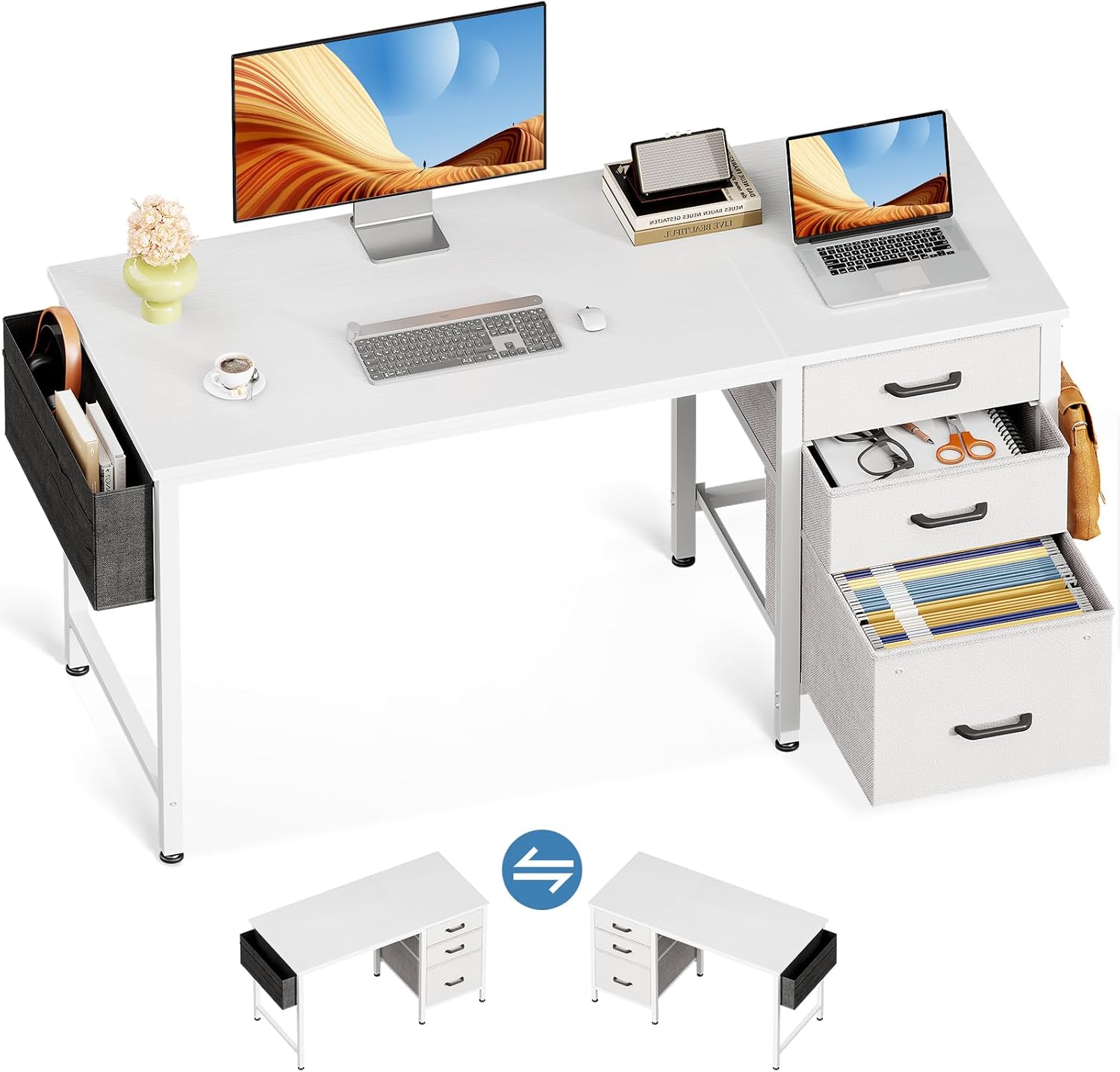
Image: The Casaottima 48 inch desk, showcasing its main features including the desktop, fabric drawers, and side storage bag.
Important Safety Information
Please observe the following safety guidelines to ensure safe use and prevent damage to the product or injury:
- Always assemble the desk on a stable, flat surface to prevent tipping.
- Do not place heavy items on the desk that exceed its weight capacity or could cause it to tip over.
- Keep the desk away from direct heat sources, such as radiators or fireplaces, to prevent material damage.
- Avoid placing liquids directly on the desktop surface to prevent water damage. Use coasters or protective mats.
- Ensure all screws and fasteners are securely tightened during assembly and periodically check for tightness during use.
Package Contents
Before beginning assembly, verify that all components listed below are present and undamaged. If any parts are missing or damaged, please contact customer support.
- Desktop Panel
- Desk Frame Components (Legs, Support Bars)
- Fabric File Cabinet
- Fabric Drawers (2 units)
- Cloth Storage Bag
- Iron Hook
- Adjustable Leg Pads
- Assembly Hardware (Screws, Allen Wrench)
- Instruction Manual
Note: A screwdriver is recommended for assembly but is not included in the package.
Assembly Instructions (Setup)
Assembly typically takes 15-30 minutes for one person. Follow these steps carefully:
- Assemble the Desk Frame: Connect the desk legs and support bars using the provided hardware. Ensure all connections are firm but do not fully tighten screws until the frame is complete.
- Attach the Desktop: Carefully place the desktop panel onto the assembled frame. Align the pre-drilled holes and secure the desktop to the frame with screws. Once the desktop is attached, fully tighten all screws on the frame.
- Assemble Fabric Drawers and File Cabinet: Insert the fabric drawers and file cabinet into their designated slots within the desk frame. The desk features a reversible design, allowing you to position the drawers and file cabinet on either the left or right side according to your preference.
- Attach the Iron Hook and Cloth Storage Bag: Secure the iron hook to the side of the desk frame. Attach the cloth storage bag to the opposite side or the same side as the hook, depending on your desired configuration. Both the hook and bag are reversible.
- Adjust Leg Pads: Once the desk is assembled and in its desired location, adjust the non-slip foot pads at the bottom of each leg to ensure stability on uneven surfaces and protect your floor from scratches.

Image: Visual guide illustrating the four main assembly steps for the desk.

Image: Illustration of the desk's reversible design, demonstrating how the storage components can be installed on either side.
Product Features and Operation
- Fabric File Cabinet and Drawers: The desk includes one fabric file cabinet suitable for letter, A4, or legal-sized files, and two fabric drawers for general storage. These provide organized space for office supplies and documents, helping to keep your workspace tidy.
- Iron Hook: A versatile iron hook is provided for hanging headphones, bags, or other accessories, keeping them easily accessible and off the desktop.
- Cloth Storage Bag: The attached cloth storage bag offers additional space for books, magazines, or other items, contributing to a clutter-free desktop.
- Reversible Design: The storage components (drawers, file cabinet, hook, and bag) can be installed on either the left or right side of the desk to best suit your room layout and personal preference.
- Adjustable Leg Pads: The desk is equipped with adjustable non-slip foot pads to ensure stability on various floor types and to prevent scratches.

Image: Detailed view of the fabric file cabinet and a fabric storage drawer, illustrating their capacity for files and small items.

Image: Visual representation of the desk's waterproof surface, convenient side storage bag, and adjustable leg pads.
Care and Maintenance
- Cleaning: Wipe the desk surfaces with a dry cloth. For stubborn marks, a slightly damp cloth with mild soap can be used, followed by immediate drying. Avoid harsh chemicals or abrasive cleaners.
- Fabric Components: The fabric drawers and file cabinet are designed for easy cleaning. Spot clean with a damp cloth and mild detergent as needed. Allow to air dry completely.
- Regular Checks: Periodically inspect all screws and connections to ensure they remain tight. Retighten if necessary to maintain stability.
- Avoid Overloading: Do not exceed the recommended weight capacity of the desktop or drawers to prevent structural damage.
Troubleshooting
- Desk is Wobbly: Ensure all assembly screws are fully tightened. Adjust the leg pads on each corner until the desk is stable and level on your floor.
- Drawers Do Not Slide Smoothly: Check that the fabric drawers are correctly inserted and not obstructed. Ensure the desk frame is assembled squarely.
- Missing Parts or Damaged Components: If you discover any missing or damaged parts upon opening the package, please contact Casaottima customer support immediately for assistance. Do not attempt to assemble the desk with incomplete or damaged parts.
Specifications
| Feature | Detail |
|---|---|
| Brand | Casaottima |
| Model Number | 2070 |
| Product Dimensions (D x W x H) | 18.9"D x 47.2"W x 29.2"H |
| Item Weight | 29.76 Pounds |
| Color | White |
| Top Material Type | Engineered Wood |
| Base Material | Metal |
| Number of Drawers | 3 (2 fabric drawers, 1 fabric file cabinet) |
| Special Features | Reversible Design, Fabric Drawers, File Cabinet, Cloth Storage Bag, Headphone Hook, Adjustable Leg Pads |
| Assembly Required | Yes |
| Tools Recommended for Assembly | Screwdriver (not included) |
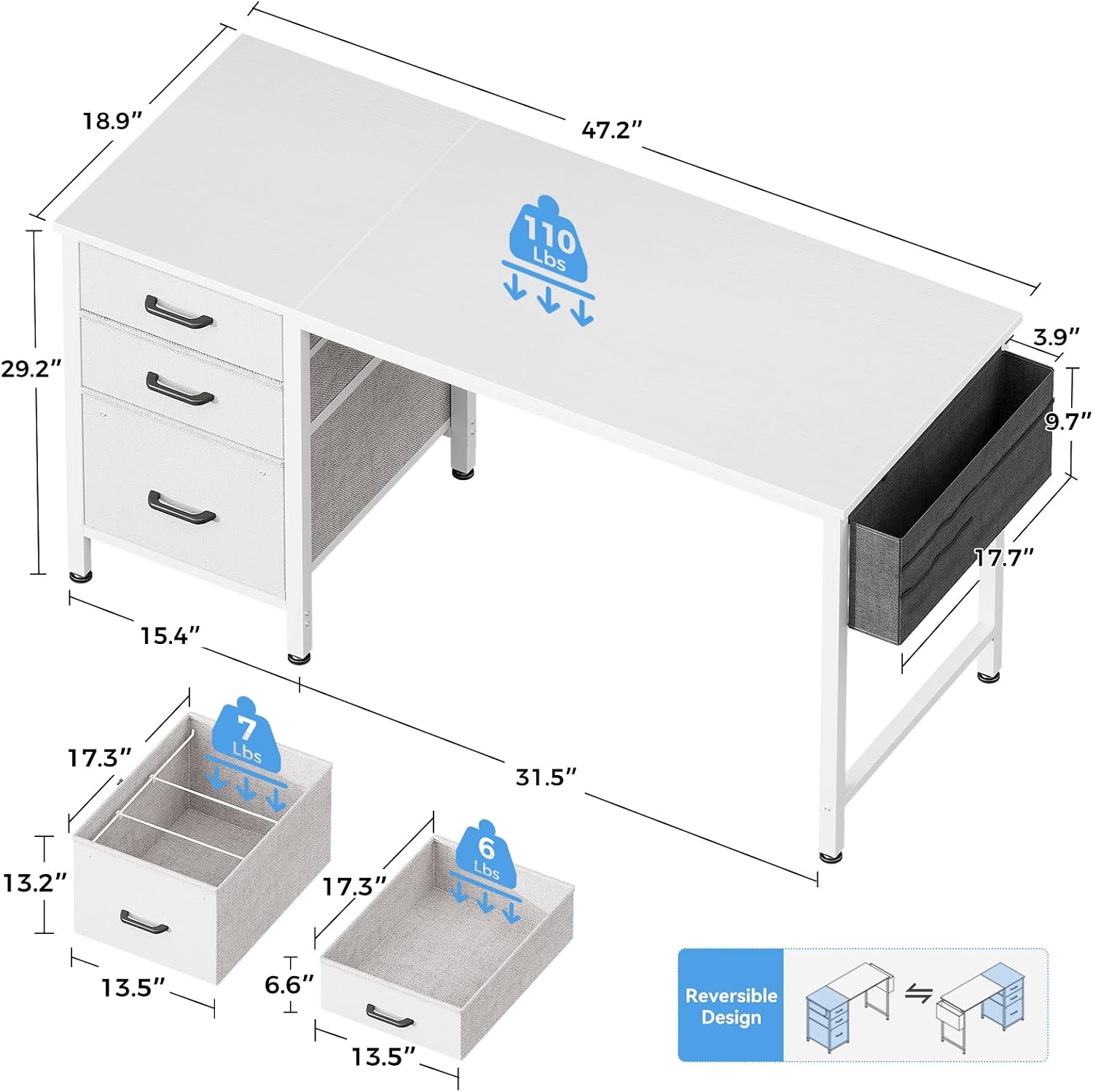
Image: Detailed dimensional drawing of the desk and its storage components.
Warranty Information
This Casaottima desk comes with a Limited Warranty. For specific details regarding warranty coverage, duration, and terms, please refer to the warranty card included with your product or contact Casaottima customer support directly. Keep your proof of purchase for warranty claims.
Customer Support
If you have any questions, require assistance with assembly, or need to report missing/damaged parts, please contact Casaottima customer support. Refer to the contact information provided on the product packaging or the official Casaottima website.
Ask a question about this manual
Ask about setup, troubleshooting, compatibility, parts, safety, or missing instructions. Manuals+ will review the question and use this page’s manual context to help answer it.