
1. Introduction
This manual provides detailed instructions for the assembly, operation, and maintenance of your Casaottima 40-inch Small Computer Home Office Desk (Model 2100). Please read this manual thoroughly before assembly and use to ensure proper function and longevity of your product.
2. Safety Information
- Ensure the desk is placed on a level and stable surface to prevent tipping.
- Avoid overloading the fabric drawers or hanging excessively heavy items on the side hook.
- Keep small parts and assembly tools away from children during assembly.
- Do not stand or sit on the desk.
3. Package Contents
Please verify that all components are present before beginning assembly. If any parts are missing or damaged, contact customer support.
- Desktop Panel (MDF Board)
- Metal Frame Components
- 1 Fabric File Cabinet
- 2 Fabric Drawers
- 1 Iron Hook
- 1 Cloth Storage Bag
- Adjustable Leg Pads
- Assembly Hardware (screws, bolts, etc.)
- Assembly Tools (screwdriver)
- Instruction Manual
4. Setup and Assembly
The Casaottima desk is designed for straightforward assembly, typically completed by one person in 15-30 minutes. All parts are well-labeled, and clear instructions are included in the package.
4.1 Assembly Steps Overview
Refer to the detailed assembly instructions provided in your package for specific diagrams and step-by-step guidance. The general process involves:
- Assemble the desk frame.
- Attach the desktop to the assembled frame.
- Assemble and insert the fabric drawers and file cabinet.
- Attach the earphone hook and cloth storage bag.
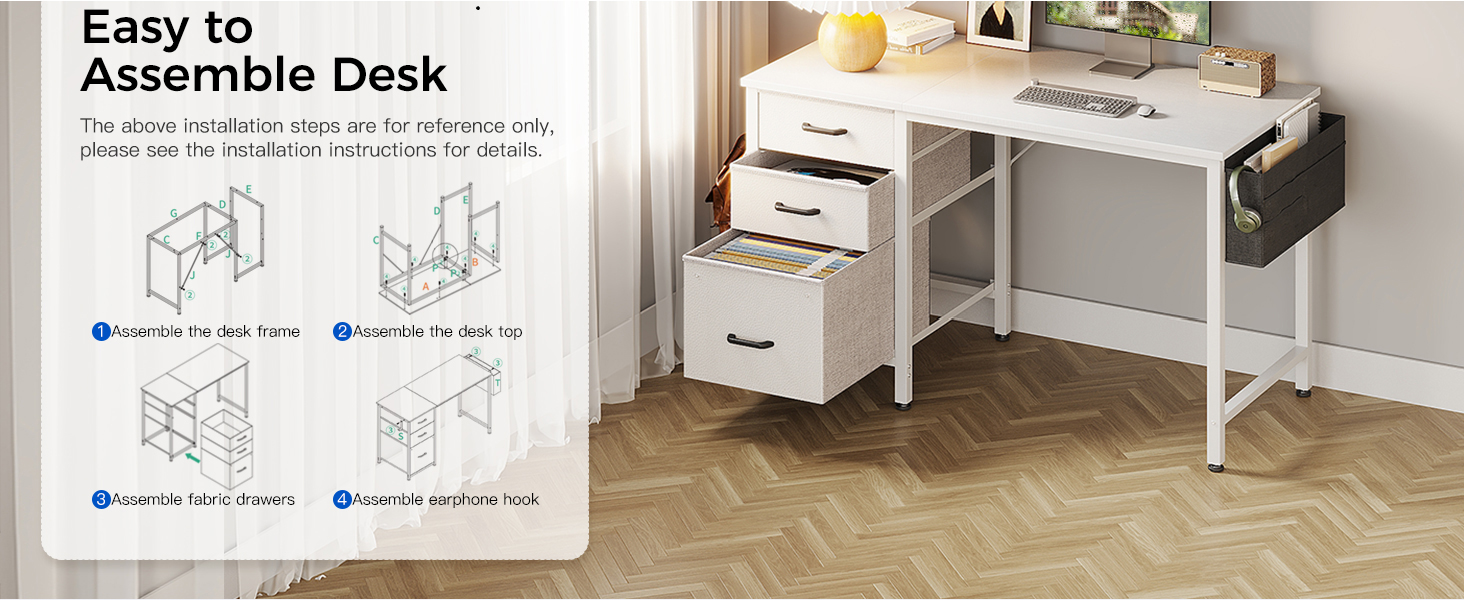
Image: Assembly steps overview. This diagram illustrates the four main stages of assembling the desk: constructing the metal frame, attaching the desktop, installing the fabric drawers, and adding the earphone hook.
4.2 Reversible Design
The desk features a reversible design, allowing you to install the fabric drawers and file cabinet on either the left or right side of the desk to best suit your space and preferences.

Image: Reversible Design. This image demonstrates how the storage unit (drawers and file cabinet) can be configured on either the left or right side of the desk during assembly.
5. Operating Instructions
5.1 Fabric File Cabinet and Drawers
The desk includes one fabric file cabinet and two fabric drawers. The file cabinet is designed to accommodate letter, A4, or legal-sized files, helping to keep your documents organized. The two smaller drawers provide additional storage for office supplies and personal items.

Image: Fabric Drawer & File Cabinet. This image shows the interior of the fabric file cabinet with hanging folders and a fabric drawer organized with small personal items.
5.2 Iron Hook and Cloth Storage Bag
An iron hook is provided for hanging headphones, bags, or other accessories, keeping them easily accessible and off the desktop. The cloth storage bag offers a convenient space for books, magazines, or additional files, helping to maintain a tidy workspace. Both the hook and bag can be attached to either side of the desk.
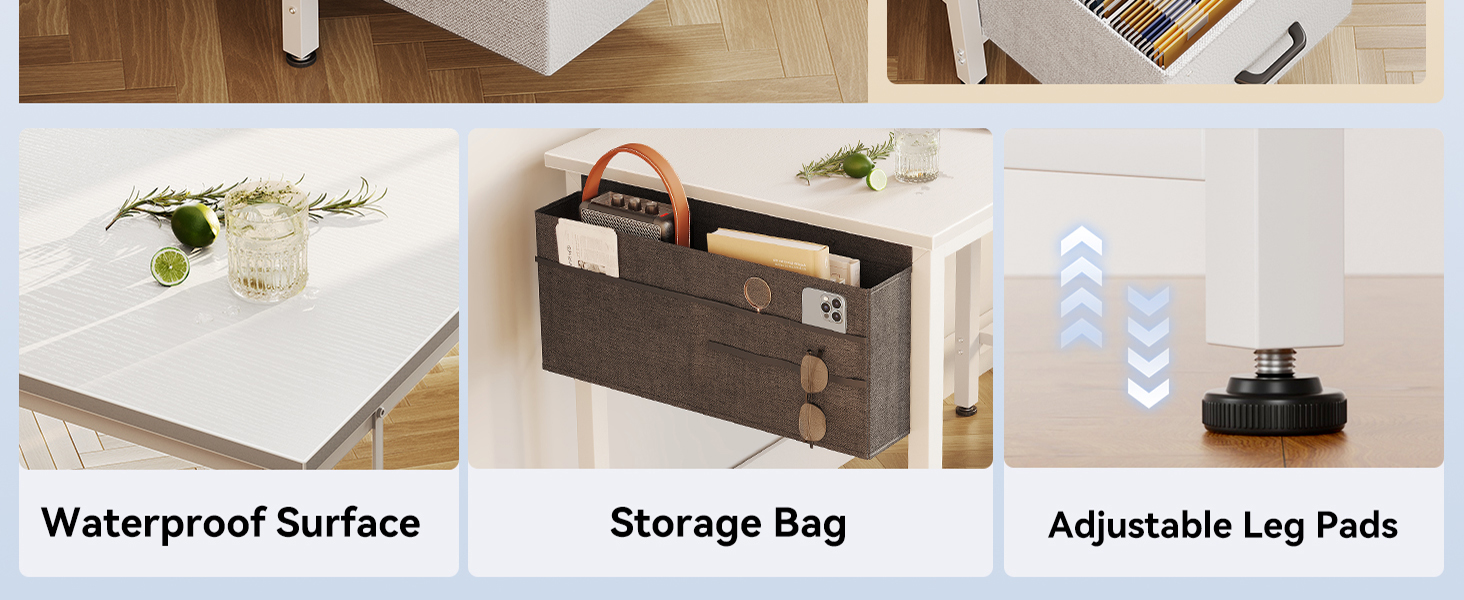
Image: Desk Features. This image highlights the waterproof surface, the practical side storage bag, and the adjustable leg pads for stability.
6. Maintenance and Care
To ensure the longevity and appearance of your Casaottima desk, follow these care instructions:
- Cleaning the Desktop: The high-quality MDF board desktop is waterproof, scratch-resistant, and easy to clean. Wipe the surface with a dry cloth to remove dust and spills. For stubborn marks, use a slightly damp cloth and mild cleaner, then dry immediately.
- Cleaning Fabric Drawers: The fabric drawers are designed for easy cleaning. Spot clean with a damp cloth and mild detergent as needed. Allow to air dry completely before reinserting.
- Frame Care: Wipe the metal frame with a dry cloth to prevent dust buildup.
- Regular Checks: Periodically check all screws and connections to ensure they remain tight and secure.
7. Troubleshooting
If you encounter any issues with your desk, please refer to the following common solutions:
- Desk Wobbles: Ensure all screws are tightened securely. Adjust the non-slip foot pads on the bottom of the legs to stabilize the desk on uneven surfaces.
- Drawers Not Sliding Smoothly: Check for any obstructions in the drawer slots. Ensure the fabric drawers are correctly assembled and inserted.
- Missing Parts: If you find any parts missing upon unboxing, please contact customer support with your purchase details.
8. Specifications
| Feature | Detail |
|---|---|
| Brand | Casaottima |
| Model Number | 2100 |
| Product Dimensions (L x W x H) | 39.4" x 18.9" x 29.2" (for 40-inch model) |
| Color | White |
| Material | Engineered Wood (Top), Metal (Base) |
| Item Weight | 27.6 Pounds |
| Maximum Weight Recommendation | 110 Pounds |
| Number of Drawers | 3 (1 file cabinet, 2 standard drawers) |
| Assembly Required | Yes |
| Included Components | Desk, Headphone Hook, Cloth Storage Bag |
| Special Features | Desk with Storage, Reversible Design, Adjustable Leg Pads |
9. Warranty Information
This Casaottima desk comes with a Limited Warranty. Please refer to the warranty card included in your package or contact Casaottima customer support for specific terms and conditions regarding coverage and duration.
10. Customer Support
For any questions, concerns, or assistance with your Casaottima desk, please contact our customer support team. Refer to your purchase documentation for contact information or visit the official Casaottima website.