
1. Introduction
Thank you for choosing the HYZQ 4-Seat Sectional Sofa with Smart Module. This manual provides essential information for the proper setup, operation, maintenance, and troubleshooting of your new furniture. Please read these instructions carefully before assembly and use to ensure optimal performance and longevity of your product.

Image 1.1: Overview of the HYZQ 4-Seat Sectional Sofa in white, highlighting its integrated smart features and modular design.
2. Product Features
- Smart Module: Integrated Bluetooth speaker for audio playback, RGB LED light strip with 7 dynamic and 7 static modes, music sync function, wireless charging station (15W Max), 1 USB charging port (DC 5V/2A), and 1 Type-C charging port (DC 5V/2A).
- Versatile Storage: Includes two movable storage ottomans, two side pockets, and a hidden storage box within the smart module for convenient organization.
- Comfort & Material: Upholstered in premium skin-friendly teddy fleece fabric. Features upgraded double-layer cushions made of high-density sponge with built-in box springs for enhanced comfort and resilience.
- Sturdy Construction: Built with a durable metal and solid wood frame, designed for stability and long-term use. Each seat has a weight capacity of 350 lbs.
- Thoughtful Design: Seat height of 19 inches. Features a short side seat depth of 21 inches and a long side seat depth of 46.5 inches, allowing for various seating and lounging positions. Overall length is 120 inches.

Image 2.1: Detail of the soft teddy fleece fabric and the double-layer high-density foam cushions, illustrating the comfort features.
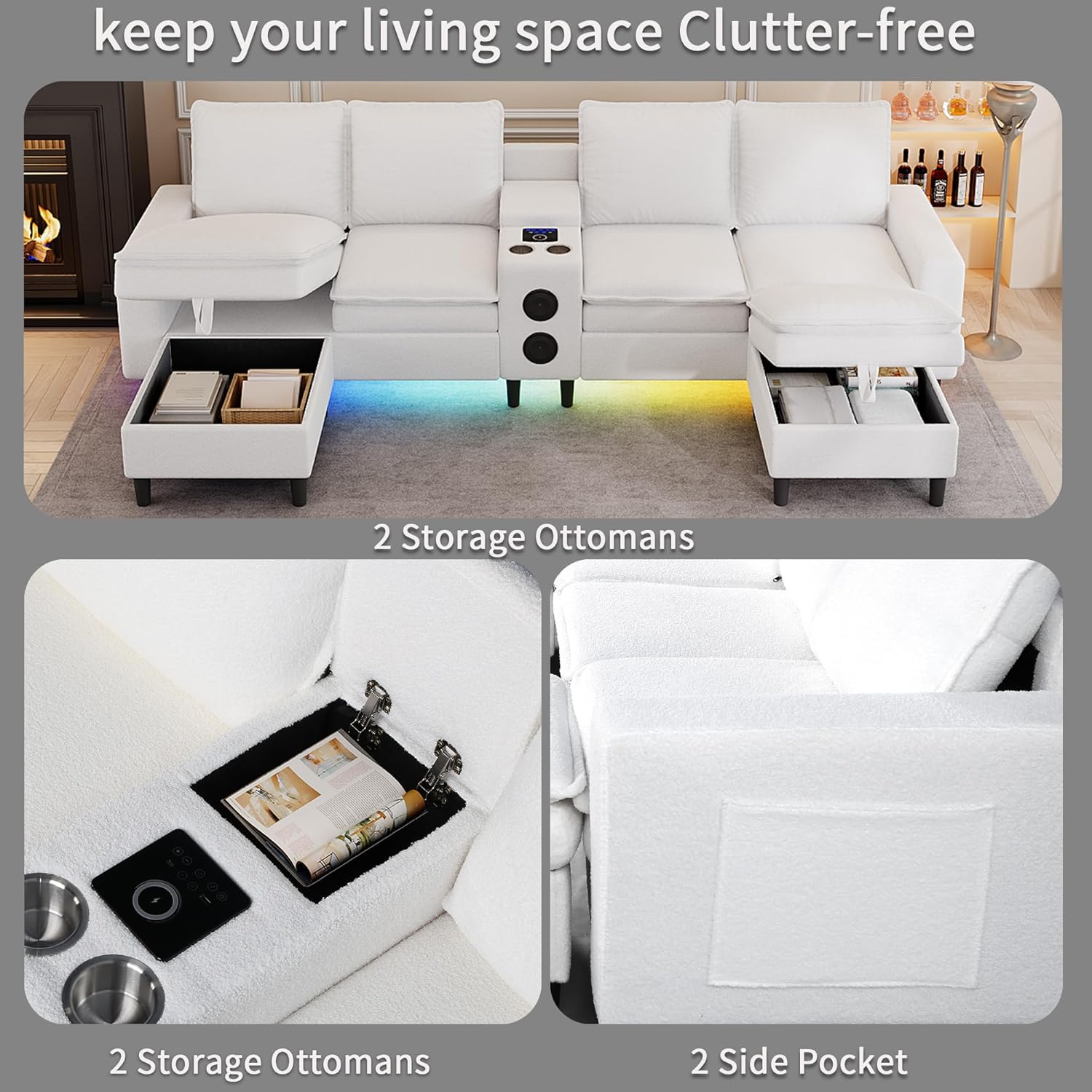
Image 2.2: Illustration of the sofa's storage capabilities, including two storage ottomans and convenient side pockets.
3. Package Contents
The HYZQ 4-Seat Sectional Sofa is shipped in 3 separate boxes. These packages may arrive at different times. Please ensure all boxes have been received before beginning assembly.
- Sofa pieces (various sections)
- Smart module with integrated electronics
- Two movable storage ottomans
- Assembly hardware and tools (if included, check packaging)
- Instruction manual
Important Note: The cushions are vacuum-compressed for shipping. After opening the package, allow 48 hours for them to fully expand and return to their original shape and firmness.

Image 3.1: Product dimensions and packaging information, indicating shipment in three separate boxes.
4. Setup & Assembly
Assembly of the HYZQ Sectional Sofa is designed to be straightforward. Follow the included step-by-step instructions provided in the packaging. Ensure all components are present before starting.
- Unpack all components carefully, laying them out on a clean, soft surface to prevent damage.
- Connect the individual sofa sections using the provided connectors.
- Attach the legs to the sofa sections and ottomans.
- Place the cushions onto the sofa frame. Remember to allow 48 hours for vacuum-compressed cushions to fully expand.
- Integrate the smart module into its designated section, ensuring all electrical connections are secure.
The modular design allows for flexible configuration of the chaise lounge and ottomans to suit your living space.

Image 4.1: Various configurations of the convertible chaise lounge and ottomans, demonstrating the sofa's adaptability.
5. Operating Instructions - Smart Module
5.1 Smart Panel Controls

Image 5.1: Detailed view of the smart panel controls, indicating functions for power, lighting, music, and charging.
- Power On/Off: After power is turned on, the key will turn red. Press the key for 3 seconds to turn on (blue light). Press for 3 seconds again to turn off.
- Mode Key: Adjusts the RGB light with different light modes.
- Music Mode: Activates music sync LED light mode, where colors and brightness change with music rhythm.
- Brightness -: Reduces the brightness of the LED lamp.
- Brightness +: Increases the brightness of the LED lamp.
- Wireless Charging Area: Place compatible devices here for wireless charging (15W Max).
- Single Color Key: Adjusts the LED light strip to a single static color.
- USB Charging Port: DC 5V/2A output for charging devices.
- Bluetooth Switch: Long press to turn on the Bluetooth speaker power, and long press again to turn off.
- Type-C Charging Port: DC 5V/2A output for charging devices.
5.2 Bluetooth Speaker Operation
To use the built-in Bluetooth speaker:
- Long press the Bluetooth switch button on the smart panel to power on the speaker.
- On your mobile device, search for available Bluetooth devices and select the sofa's Bluetooth name (refer to product packaging or smart module for specific name if not generic).
- Once paired, you can play audio from your device through the sofa's speakers.
5.3 RGB LED Lighting
The RGB LED light strip offers various modes:
- Use the 'Mode Key' to cycle through 7 dynamic lighting patterns.
- Use the 'Single Color Key' to select from 7 static color options.
- Activate 'Music Mode' to synchronize the lights with your audio playback.
- Adjust brightness using the 'Brightness +' and 'Brightness -' buttons.

Image 5.2: The sofa's smart LED lighting in action, showcasing adjustable brightness, static, and dynamic modes.
5.4 Charging Station
The smart module provides multiple charging options:
- Wireless Charging: Place your Qi-compatible device on the designated wireless charging area.
- USB Charging: Connect your device to the USB-A port using a compatible cable.
- Type-C Charging: Connect your device to the Type-C port using a compatible cable.
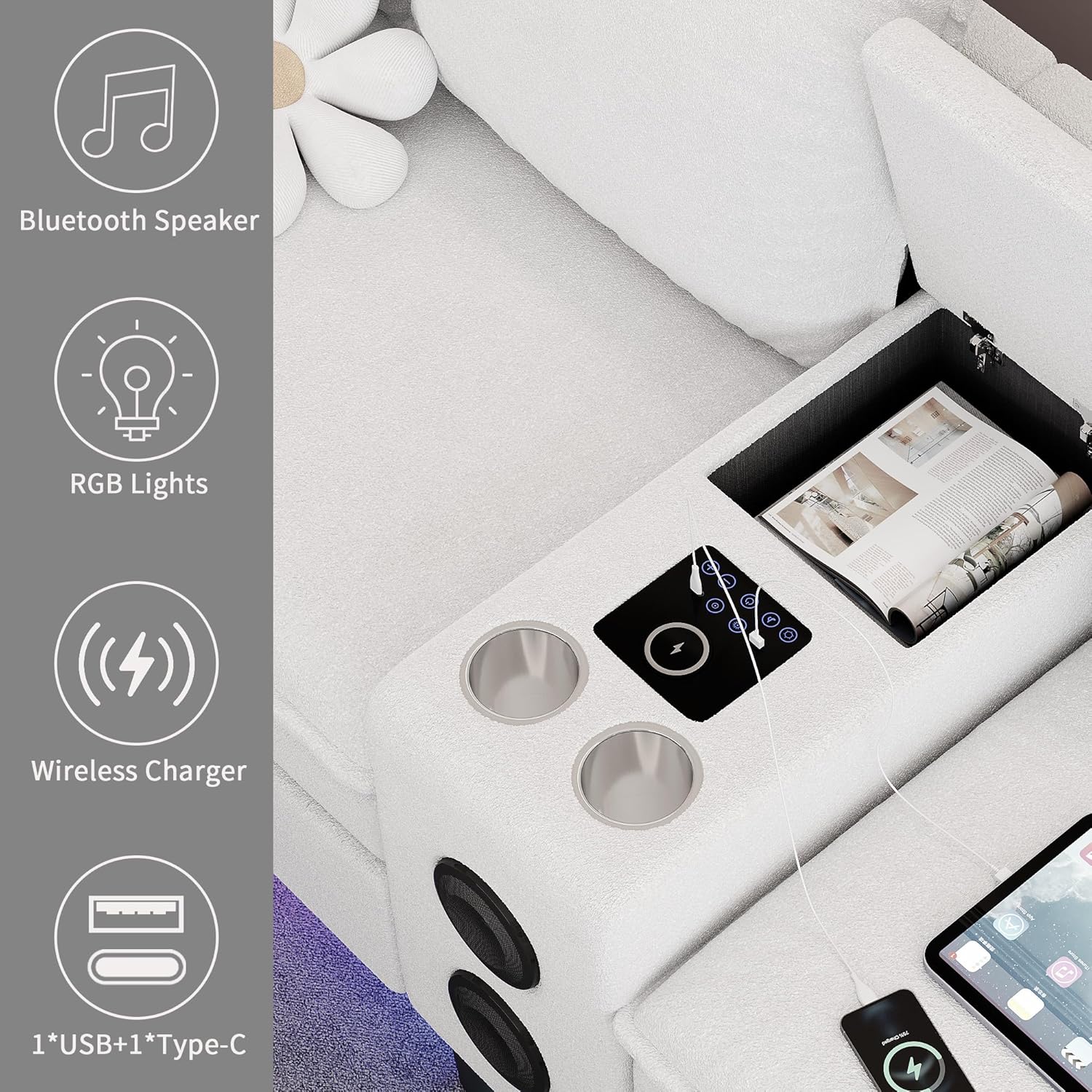
Image 5.3: The smart module in use, demonstrating wireless charging, USB/Type-C ports, and cup holders.
5.5 Official Product Video
Video 5.1: This video from HYZQ-Shop highlights the key features of the smart sectional sofa, including the RGB lights, storage options, and integrated charging station.
6. Maintenance & Care
- Fabric Care: The teddy fleece fabric can be wiped clean with a dry cloth. For spills, gently blot with a clean, damp cloth and mild soap, then dry thoroughly. Avoid harsh chemicals.
- Cushion Care: Periodically fluff and rotate cushions to maintain their shape and even wear.
- Frame Care: Check all connections and hardware periodically and tighten if necessary to ensure stability.
- Electronics: Keep the smart module and charging ports free from dust and moisture. Do not attempt to disassemble the electronic components.
7. Troubleshooting
- Cushions not fully expanded: Allow up to 48 hours after unpacking for vacuum-compressed cushions to fully regain their shape. Gentle fluffing can assist the process.
- Packages arrived separately: It is normal for the sofa to ship in multiple boxes that may arrive on different days. Please be patient and track all provided tracking numbers. Contact customer support if a package is significantly delayed.
- Smart Module not powering on: Ensure the sofa is properly plugged into a working power outlet. Check all internal connections of the smart module. If issues persist, refer to the power on/off instructions in Section 5.1.
- Bluetooth speaker not pairing: Ensure the Bluetooth speaker is powered on (long press the Bluetooth switch). Check your device's Bluetooth settings and ensure it is discoverable. Try restarting both the sofa's Bluetooth and your device.
- Charging ports not working: Verify the sofa's smart module is powered on. Ensure cables are securely connected and devices are compatible with wireless charging (Qi standard).
8. Specifications
| Feature | Detail |
|---|---|
| Brand | HYZQ |
| Model Number | B0F1FKYPSK |
| Product Dimensions | 57"D x 120"W x 36"H |
| Item Weight | 256 Pounds |
| Seating Capacity | 4 |
| Weight Limit (per seat) | 350 Pounds |
| Material Type | Teddy Fleece |
| Frame Material | Wood, Metal |
| Seat Fill Material | High Density Foam |
| Seat Height | 19 Inches |
| Seat Depth (Short Side) | 21 Inches |
| Seat Depth (Long Side) | 46.5 Inches |
| Arm Height | 24 Inches |
| Arm Width | 6 Inches |
| Leg Length | 4.7 Inches |
| Additional Features | Bluetooth Speaker, Charging Station (Wireless, USB, Type-C), Cup Holder, RGB LED Lighting, Reversible Chaise |
9. Warranty & Support
This HYZQ Sectional Sofa comes with a 12-Month Warranty covering manufacturing defects. Please retain your proof of purchase for warranty claims.
For technical support, missing parts, or warranty inquiries, please contact HYZQ customer service through the retailer where the product was purchased.
10. Safety Information
- All foam and upholstered surfaces meet flammability standards.
- Keep the sofa away from open flames or high heat sources.
- Supervise children and pets to avoid entrapment risks, especially with storage compartments.
- Do not exceed the maximum weight capacity of 350 lbs per seat.
- Ensure all connections are secure after assembly and periodically check for any loosening.


