Introduction
Thank you for choosing the BUCOTOD WR5028-2000Q15 Replacement Scarifier Blade. This manual provides essential information for the safe and effective installation, operation, and maintenance of your new blade. Please read these instructions carefully before use and retain them for future reference.
Safety Information
Always prioritize safety when handling power tool components. Failure to follow these safety guidelines may result in serious injury or property damage.
- Disconnect Power: Before attempting any installation, maintenance, or inspection, ensure the scarifier's power source is completely disconnected (e.g., unplugged, battery removed).
- Wear Protective Gear: Always wear heavy-duty gloves and eye protection when handling blades to prevent cuts and injuries.
- Sharp Edges: Blades are sharp. Handle with extreme care.
- Stable Work Area: Perform all work on a stable, flat surface.
- Correct Tools: Use only the appropriate tools for installation and removal to avoid damaging the blade or scarifier.
- Inspect for Damage: Before each use, inspect the blade for any signs of damage, cracks, or excessive wear. Do not use a damaged blade.
Package Contents
Verify that all items are present upon opening the package:
- 1 x BUCOTOD WR5028-2000Q15 Replacement Scarifier Blade (Model: 16INSP2)
Setup and Installation
Follow these steps to safely replace the scarifier blade:
- Prepare the Scarifier: Ensure the scarifier is turned off and completely disconnected from its power source. Position the scarifier on a stable surface, allowing easy access to the blade assembly.
- Remove Old Blade: Using appropriate wrenches or tools, carefully loosen and remove the bolt(s) securing the old scarifier blade. Note the orientation of the old blade for correct installation of the new one. Remove the old blade and any washers or spacers.
- Clean Blade Area: Clean any debris, dirt, or grass clippings from the blade mounting area on the scarifier.
- Install New Blade: Position the new BUCOTOD WR5028-2000Q15 Replacement Scarifier Blade onto the scarifier shaft, ensuring it is correctly oriented. The cutting edge should face the direction of rotation as indicated by the scarifier's design.
- Secure Blade: Reinstall any washers or spacers, then securely fasten the bolt(s). Tighten the bolt(s) to the manufacturer's recommended torque specifications for your scarifier. Over-tightening or under-tightening can lead to damage or unsafe operation.
- Verify Installation: Manually rotate the blade a few times to ensure it spins freely and is properly seated without wobbling.
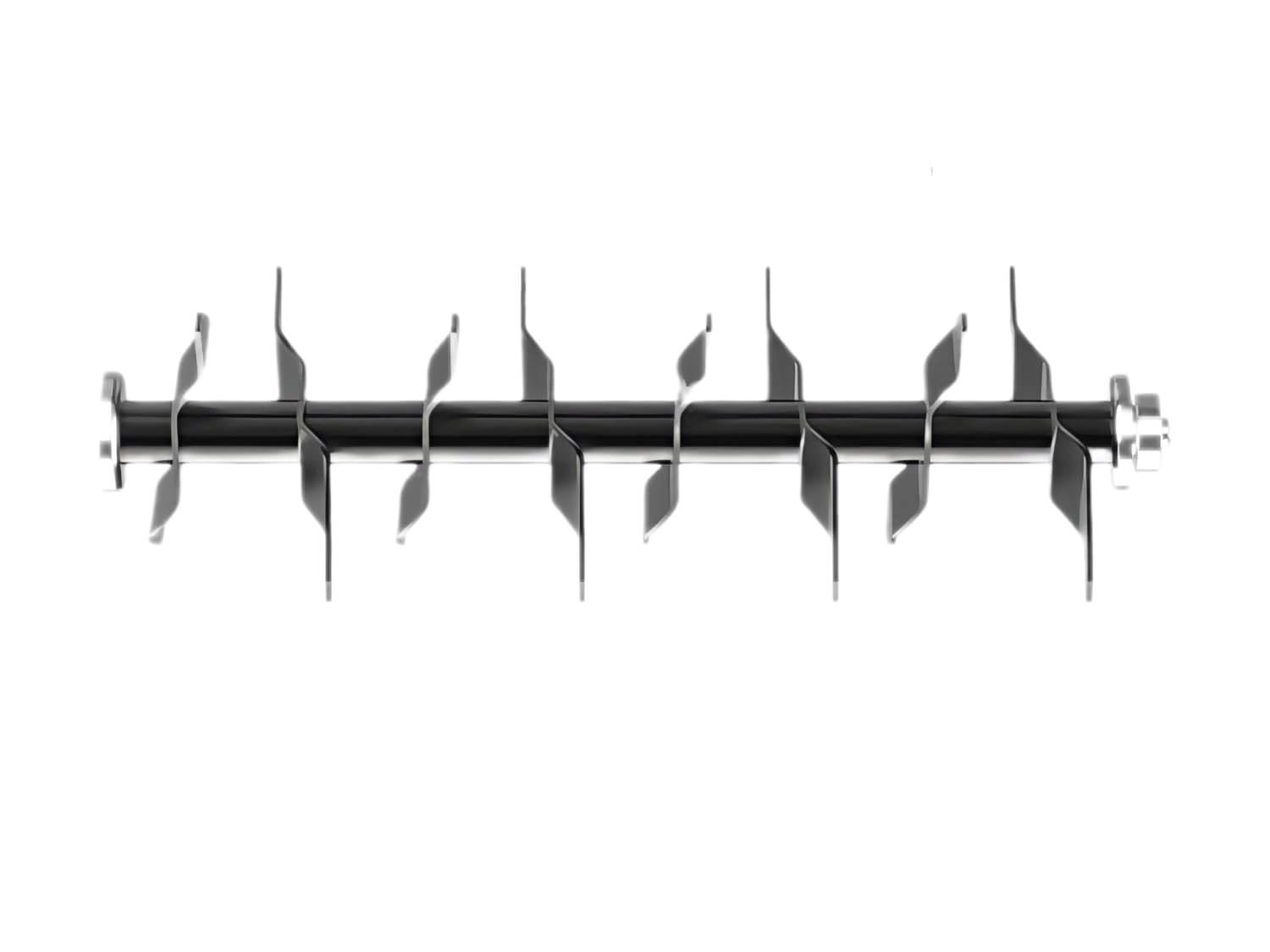
Image: The BUCOTOD WR5028-2000Q15 Replacement Scarifier Blade, showing its design and mounting points. This image illustrates the blade's physical appearance for identification and installation reference.
Operating Instructions
Once the replacement blade is securely installed, operate your scarifier according to its original manufacturer's instructions. Before starting, always perform a visual check:
- Ensure the blade is firmly attached and shows no signs of looseness.
- Confirm that all safety guards are in place and functional.
- Clear the work area of any debris or obstacles that could interfere with the blade.
Listen for unusual noises or vibrations during initial operation. If any occur, immediately shut down the scarifier and inspect the blade installation.
Maintenance
Proper maintenance extends the life of your blade and ensures consistent performance:
- Cleaning: After each use, disconnect power and carefully clean the blade to remove grass, dirt, and debris. This prevents rust and maintains balance.
- Inspection: Regularly inspect the blade for signs of wear, nicks, bends, or cracks. A worn or damaged blade can reduce scarifying effectiveness and potentially cause imbalance or vibration.
- Storage: Store the blade in a dry, protected area to prevent rust and corrosion. If storing for an extended period, consider applying a light coat of oil to the metal surfaces.
- Replacement: Replace the blade when it becomes excessively dull, bent, or damaged. Using a dull blade can strain your scarifier and lead to poor results.
Troubleshooting
If you encounter issues related to the blade, consider the following:
- Excessive Vibration: This often indicates an unbalanced or bent blade. Disconnect power, inspect the blade for damage, and ensure it is securely tightened. If the blade is bent or significantly worn unevenly, it should be replaced.
- Poor Scarifying Performance: A dull or improperly installed blade can lead to ineffective scarifying. Check the blade's sharpness and ensure it is installed with the correct orientation.
- Unusual Noises: Immediately shut down the scarifier. Disconnect power and inspect the blade and its mounting hardware for any loose components or obstructions.
Specifications
| Product Name | BUCOTOD WR5028-2000Q15 Replacement Scarifier Blade |
| Model Number | 16INSP2 |
| ASIN | B0F1FB45Z1 |
| Manufacturer | BUCOTOD |
| Product Dimensions | 17.32 x 4.33 x 4.72 inches |
| Item Weight | 2.64 pounds |
Warranty and Support
For warranty information or technical support regarding your BUCOTOD WR5028-2000Q15 Replacement Scarifier Blade, please refer to the documentation provided with your original scarifier or contact BUCOTOD customer service directly. Contact details are typically available on the manufacturer's official website or product packaging.