
1. Introduction
Thank you for choosing the PHOINIKAS Wired & Wireless Gaming Headset bundle. This package includes both the PHOINIKAS Q6 Wireless Gaming Headset and the PHOINIKAS H1 Wired Gaming Headset, providing versatile audio solutions for your gaming and multimedia needs. This manual provides detailed instructions for setup, operation, and maintenance to ensure optimal performance and longevity of your headsets.
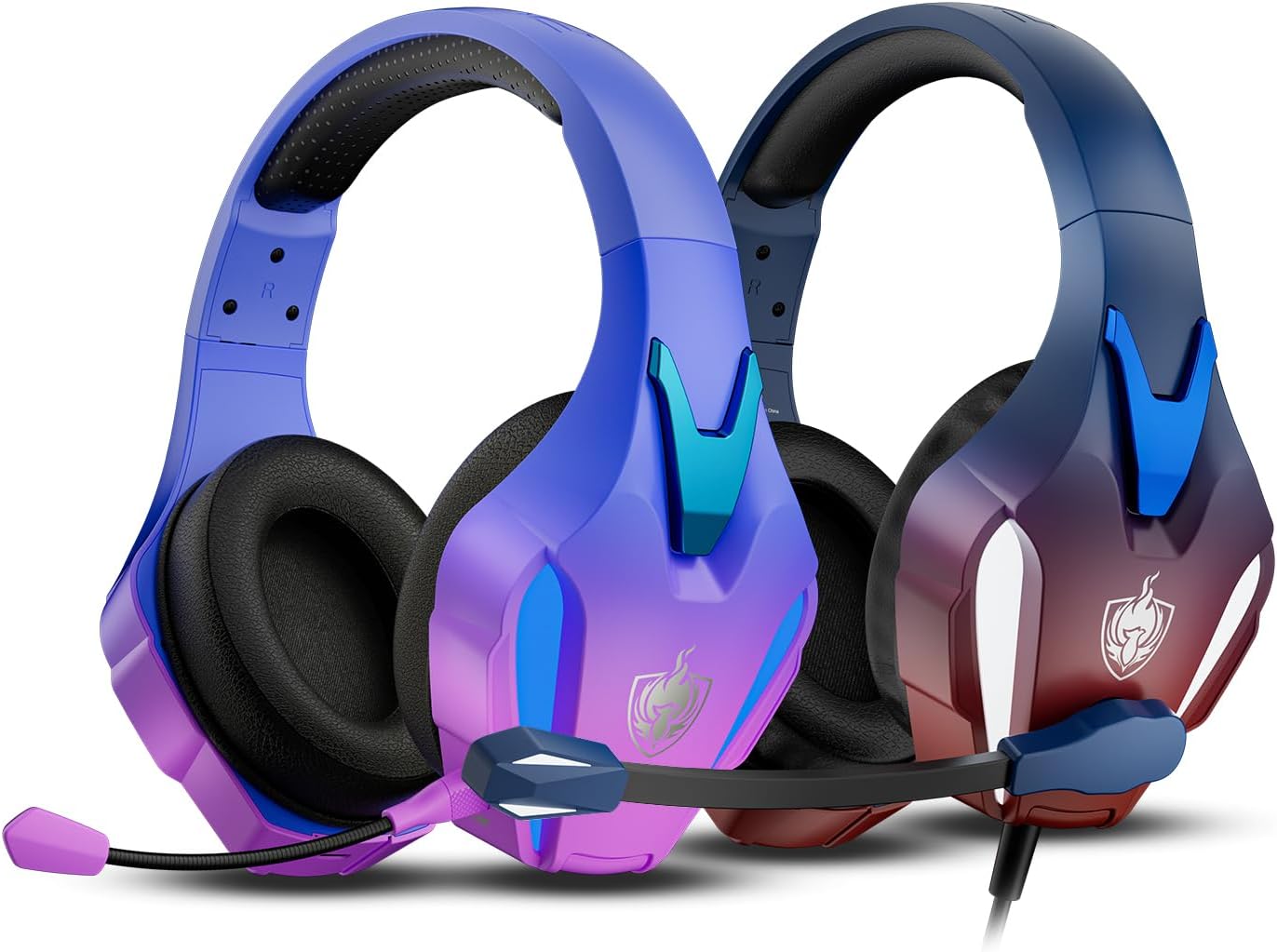
Image 1.1: The PHOINIKAS Q6 Wireless Headset (left) and H1 Wired Headset (right).
2. Package Contents
Upon opening your PHOINIKAS headset bundle, please verify that all the following items are included:
- PHOINIKAS Q6 Wireless Gaming Headset
- PHOINIKAS H1 Wired Gaming Headset
- 2.4GHz USB Dongle (for Q6 Wireless Headset)
- Detachable Omnidirectional Noise-Cancelling Microphone
- USB Charging Cable (for Q6 Wireless Headset)
- 3.5mm Audio Cable
- User Manual
3. Product Overview
3.1 PHOINIKAS Q6 Wireless Gaming Headset
The Q6 Wireless Headset offers flexible connectivity options including 2.4GHz wireless, Bluetooth 5.3, and a 3.5mm wired connection. It features an adjustable headband, soft memory foam ear cushions, and a detachable microphone.

Image 3.1: PHOINIKAS Q6 Wireless Gaming Headset with 2.4GHz USB Dongle.
3.2 PHOINIKAS H1 Wired Gaming Headset
The H1 Wired Headset provides a reliable 3.5mm audio connection for broad compatibility. It shares the comfortable design elements of the Q6, including an adjustable headband and breathable ear cushions, and features an integrated microphone.

Image 3.2: PHOINIKAS H1 Wired Gaming Headset.
3.3 Key Features
- Multi-Platform Compatibility: Supports PS5, PS4, PC, Mac, smartphones, tablets, and Switch. Xbox series compatible via 3.5mm wired mode only.
- Stable Connection: 2.4GHz lossless wireless technology for Q6, offering up to 49 feet range with ultra-low latency (≤25ms).
- 7.1 Stereo Sound: 40mm drivers deliver immersive 3D stereo surround sound.
- Comfortable Design: Adjustable headband and soft, breathable memory foam ear cushions. Lightweight at 15 ounces.
- Noise-Cancelling Mic: Detachable omnidirectional microphone with one-touch mute (wireless mode only).

Image 3.3: Design features emphasizing comfort and adjustability.
4. Setup
4.1 PHOINIKAS Q6 Wireless Headset Setup
The Q6 headset supports three connection modes:
4.1.1 2.4GHz USB Dongle Connection
- Insert the 2.4GHz USB dongle into an available USB port on your PS4, PS5, PC, Mac, Laptop, or Switch console.
- Power on the Q6 headset. It will automatically attempt to connect to the dongle.
- Ensure the headset is selected as the audio output and input device in your system's sound settings.
- Note: Microphone functionality is not supported on Switch via 2.4GHz dongle.
4.1.2 Bluetooth 5.3 Connection
- Power on the Q6 headset and put it into Bluetooth pairing mode (refer to headset controls for specific button press).
- On your smartphone, tablet, PC, or Mac, navigate to Bluetooth settings and search for available devices.
- Select "PHOINIKAS Q6" from the list to pair.
4.1.3 3.5mm Wired Connection
- Connect one end of the 3.5mm audio cable to the headset's 3.5mm port.
- Connect the other end to the 3.5mm audio jack on your PS5, PS4, PC, Mac, smartphone, tablet, Switch, or Xbox controller.
- Note: When using the 3.5mm wired mode, certain functions like LED lighting and one-touch mute may be inactive.
4.2 PHOINIKAS H1 Wired Headset Setup
The H1 headset connects exclusively via a 3.5mm audio cable.
- Connect the 3.5mm audio cable from the H1 headset to the 3.5mm audio jack on your PS5, PS4, PC, Mac, smartphone, tablet, Switch, or Xbox controller.
- Ensure the headset is selected as the audio output and input device in your system's sound settings.

Image 4.1: Multi-platform compatibility overview for PHOINIKAS headsets.
5. Operating Instructions
5.1 Power On/Off (Q6 Wireless Headset Only)
Locate the power button on the Q6 headset. Press and hold for approximately 3 seconds to power on or off. An indicator light will confirm the status.
5.2 Volume Control
Both headsets feature an integrated volume roller or buttons on the earcup or inline control. Adjust the volume to your preferred level.
5.3 Microphone Usage
The detachable omnidirectional noise-cancelling microphone can be extended and adjusted for optimal voice pickup. Ensure it is positioned close to your mouth for clear communication.
- Noise-Cancelling: The microphone is designed to reduce background noise, enhancing voice clarity.
- One-Touch Mute: On the Q6 Wireless Headset, a dedicated button allows for instant microphone muting. This function is available only in wireless mode.

Image 5.1: Illustration of the noise-cancelling microphone in use.
5.4 Charging (Q6 Wireless Headset Only)
To charge the PHOINIKAS Q6 Wireless Headset, connect the provided USB charging cable to the headset's charging port and a USB power source (e.g., computer USB port, wall adapter).
- Battery Capacity: 1200mAh
- Charging Time: Approximately 3 hours
- Battery Life: 25-30 hours (without lighting), 15-20 hours (with lighting)

Image 5.2: Battery life and charging specifications for the Q6 Wireless Headset.
6. Maintenance
Proper maintenance ensures the longevity and performance of your headsets.
- Cleaning: Use a soft, dry cloth to clean the earcups and headband. Avoid using harsh chemicals or abrasive materials.
- Storage: Store the headsets in a cool, dry place away from direct sunlight and extreme temperatures.
- Cable Care: Avoid sharp bends or excessive pulling on the cables to prevent damage.
- Battery Care (Q6): For optimal battery health, avoid fully discharging the headset frequently. Charge it regularly, even if not in use for extended periods.
7. Troubleshooting
If you encounter issues with your PHOINIKAS headsets, please refer to the following common solutions:
- No Sound:
- Check volume levels on both the headset and your connected device.
- Ensure the headset is properly connected (wired) or paired (wireless).
- Verify that the headset is selected as the default audio output device in your system settings.
- For Q6, ensure it is charged.
- Microphone Not Working:
- Ensure the microphone is securely attached and not muted (check the one-touch mute button on Q6).
- Verify the microphone is selected as the default input device in your system settings.
- Check for compatibility notes (e.g., Switch microphone not supported via 2.4GHz dongle).
- Wireless Connection Issues (Q6):
- Ensure the headset is within the 49-foot range of the dongle/Bluetooth device.
- Re-pair the headset with the dongle or Bluetooth device.
- Avoid sources of strong electromagnetic interference.
8. Specifications
Technical specifications for the PHOINIKAS Q6 and H1 headsets:
| Feature | Specification |
|---|---|
| Model Names | Q6 (Wireless), H1 (Wired) |
| Connectivity Technology | Wired (3.5mm), Wireless (2.4GHz, Bluetooth 5.3) |
| Wireless Communication | 2.4GHz, Bluetooth 5.3 |
| Bluetooth Range | Up to 49 Feet (Q6) |
| Audio Driver Type | Dynamic Driver |
| Driver Size | 40mm |
| Frequency Range | 20 Hz - 20,000 Hz |
| Earpiece Shape | Over Ear |
| Microphone | Detachable Omnidirectional Noise-Cancelling |
| Battery Capacity (Q6) | 1200mAh |
| Charging Time (Q6) | Approx. 3 hours |
| Battery Life (Q6) | 25-30 hours (no lighting), 15-20 hours (with lighting) |
| Weight | Approx. 15 ounces |
| Compatible Devices | Laptops, Desktops, Gaming Consoles (PS4, PS5, Switch, Xbox*), Tablets, Smartphones, Mac, PC (*Xbox via 3.5mm only) |

Image 8.1: Illustration of 40mm precision drivers and 3D surround sound technology.
9. Warranty and Support
PHOINIKAS products are manufactured to high-quality standards. For warranty information or technical support, please refer to the contact details provided with your purchase documentation or visit the official PHOINIKAS website. Please retain your proof of purchase for warranty claims.