
1. Introduction
This manual provides instructions for the proper installation, operation, and maintenance of your MINGFENG Rotating Protective Case, designed specifically for the Bigme Color E-Ink Screen Tablet models B1051C and B1051 Pro. This case is not compatible with other tablet models.
The case offers comprehensive protection, a 360-degree rotatable design for versatile viewing, a dedicated pen slot, and supports the tablet's automatic wake-up/sleep function.
2. Setup and Installation
Installing your Bigme B1051C/Pro tablet into the MINGFENG protective case is a straightforward process. The case utilizes a secure Velcro fastening system to hold your device firmly in place.
- Prepare the Case: Open the protective case completely. Locate the internal frame designed to hold the tablet.
- Insert the Tablet: Carefully align your Bigme B1051C or B1051 Pro tablet with the internal frame. Ensure all ports and buttons are accessible and not obstructed.
- Secure with Velcro: Gently press the tablet into the frame. The Velcro mechanism will secure the tablet, preventing it from slipping. Ensure the tablet is snug and centered.

Image: Internal structure of the case, illustrating the tablet insertion area and the Velcro fastening system for secure installation.
3. Operating Instructions and Features
3.1. 360-Degree Rotation
The case features a 360-degree rotatable design, allowing you to position your tablet in both horizontal (landscape) and vertical (portrait) orientations. This provides flexibility for various viewing and usage scenarios.
- Adjusting Orientation: Gently rotate the tablet within its frame to switch between landscape and portrait modes. The rotating mechanism is designed for smooth movement.
- Using the Stand: The case cover can be folded to create a stable stand for hands-free viewing in either orientation.

Image: The 360-degree rotation feature, enabling flexible tablet positioning for optimal viewing.
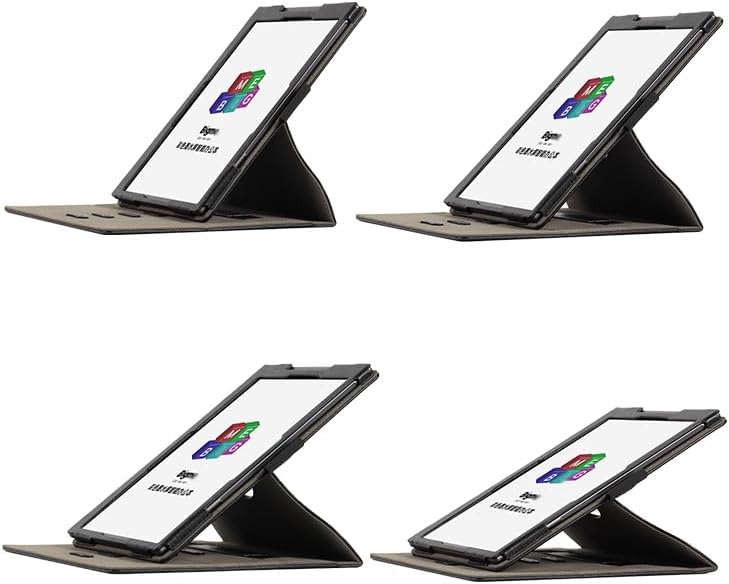
Image: The tablet positioned in landscape mode using the integrated stand.
3.2. Automatic Wake-up/Sleep Function
The MINGFENG case supports the automatic wake-up and sleep function of your Bigme B1051C/Pro tablet. Closing the cover will put the tablet to sleep, and opening it will wake the tablet, conserving battery life and providing convenience.

Image: Magnetic points within the case that enable the automatic wake-up and sleep functionality of the tablet.
3.3. Integrated Pen Slot
A dedicated pen slot is integrated into the case design, allowing you to securely store the handwriting pen that accompanies your Bigme B1051C/Pro tablet. This ensures your pen is always accessible and protected.

Image: The integrated pen slot, designed for secure storage of the tablet's stylus.
3.4. Hand Strap
For enhanced portability and secure handling, the case includes a comfortable hand strap. This allows for a firm grip on your tablet, reducing the risk of accidental drops during use.

Image: A user demonstrating the use of the integrated hand strap for secure tablet handling.
3.5. Port and Button Access
The case is precisely cut to ensure full access to all ports, buttons, and cameras of your Bigme B1051C/Pro tablet without needing to remove the case.

Image: Detailed view of the case's precise cutouts, ensuring unobstructed access to the tablet's charging port and other functionalities.
4. Maintenance
To ensure the longevity and appearance of your MINGFENG protective case, follow these simple maintenance guidelines:
- Cleaning: Wipe the exterior of the case with a soft, damp cloth. For stubborn stains, a mild soap solution can be used, followed by wiping with a clean, damp cloth. Avoid harsh chemicals or abrasive cleaners.
- Storage: When not in use, store the case in a cool, dry place away from direct sunlight and extreme temperatures.
- Avoid Over-Stretching: While the case is durable, avoid excessive force or over-stretching of the material, especially around the tablet frame and hand strap.
5. Troubleshooting
This section addresses common inquiries regarding the MINGFENG protective case.
- Tablet does not fit: Ensure your tablet is a Bigme Color E-Ink Screen Tablet B1051C or B1051 Pro. This case is specifically designed for these models and is not compatible with others.
- Automatic wake-up/sleep not working: Verify that the tablet is correctly seated within the case and that the cover is fully closed. Ensure there are no obstructions preventing the magnetic sensors from engaging.
- Tablet feels loose: Re-check the Velcro fastening system to ensure the tablet is securely pressed into the frame.
6. Specifications
| Brand | MINGFENG |
| Compatible Devices | Bigme Color E-Ink Screen Tablet B1051C/Pro |
| Material | PU Leather (as inferred from 'PU material' in description and '線颜' which translates to leather) |
| Product Dimensions | 9.53 x 7.68 x 0.79 inches |
| Item Weight | 10.6 ounces |
| Special Features | 360-degree rotation, Automatic Wake-up/Sleep, Pen Slot, Hand Strap |
| What's in the Box | Case x 1 |
7. Warranty and Support
For warranty information or technical support regarding your MINGFENG protective case, please refer to the retailer or platform where the product was purchased. Keep your proof of purchase for any warranty claims.
For further assistance, you may contact MINGFENG customer service through the contact information provided by your retailer.


