1. Introduction
This manual provides detailed instructions for the safe and efficient operation of your ANVAR VEDO AK-55 Bluetooth 5.0 HiFi Audio Amplifier. Please read this manual thoroughly before using the product and retain it for future reference. The AK-55 is a versatile 600W dual-channel amplifier designed for home audio systems, offering multiple input options including Bluetooth, AUX, USB, FM, and microphone inputs with echo and reverb effects.
2. Safety Instructions
- Do not expose this appliance to rain or moisture to prevent fire or electric shock.
- Do not open the amplifier casing. There are no user-serviceable parts inside. Refer all servicing to qualified personnel.
- Ensure proper ventilation around the unit. Do not block ventilation openings.
- Use only the specified power adapter (AC 110-240V or DC 12V/5A).
- Connect speakers with an impedance between 4-16Ω. Connecting speakers outside this range may damage the amplifier.
- Keep the unit away from heat sources, direct sunlight, and strong magnetic fields.
- Avoid placing heavy objects on top of the amplifier.
3. Package Contents
Verify that all items are present in the package:
- ANVAR VEDO AK-55 Power Amplifier x1
- Remote Control x1
- FM Antenna x1
- Power Adapter (12V 5A) x1
- User Manual x1

Image: Contents of the AK-55 package, including the amplifier, remote, antenna, power adapter, and manual.
4. Product Overview
4.1 Front Panel

Image: Front panel of the AK-55 amplifier with remote control.

Image: Labeled diagram of the front panel controls.
- POWER Switch: Turns the amplifier on or off.
- BASS Knob: Adjusts low-frequency audio output.
- TREBLE Knob: Adjusts high-frequency audio output.
- AUX Input: 3.5mm jack for auxiliary audio devices.
- Display: Shows current mode, track information, or FM frequency.
- Mode Selection Buttons (VOL-, SCAN, VOL+, MODE): Navigate menus, change tracks, scan FM stations, and switch input modes.
- USB MP3 Player: USB port for playing MP3 files from a USB drive.
- VOLUME Knob: Main volume control for the amplifier.
- MIC VOL Knob: Adjusts microphone volume.
- MIC 1/2 Inputs: 6.35mm jacks for connecting microphones.
- ECHO Knob: Adjusts the echo effect for microphones.
- DELAY Knob: Adjusts the delay effect for microphones.
4.2 Rear Panel

Image: Rear panel of the AK-55 amplifier.

Image: Labeled diagram of the rear panel connections.
- AUDIO INPUT (AUX1, AUX2): RCA stereo inputs for external audio sources (e.g., CD player, DVD player, TV).
- SPEAKER SYSTEM (4-16Ω): Terminals for connecting passive speakers. Ensure correct polarity (+ to + and - to -).
- FM ANTENNA: Connector for the included FM antenna.
- OPTICAL/COAXIAL INPUT: Digital audio inputs for compatible devices.
- DC 12V/5A POWER INPUT: Input for DC power supply (e.g., car, outdoor use).
- AC 110-240V POWER INPUT: Input for AC mains power supply.
5. Setup Instructions
Follow these steps to set up your amplifier:
- Connect Speakers: Connect your passive speakers (4-16Ω impedance) to the SPEAKER SYSTEM terminals on the rear panel. Ensure the positive (+) terminal of the amplifier connects to the positive (+) terminal of the speaker, and the negative (-) terminal connects to the negative (-).
- Connect FM Antenna: Attach the included FM antenna to the FM ANTENNA connector on the rear panel for improved radio reception.
- Connect Audio Sources:
- AUX (RCA): Use RCA cables to connect external audio devices (e.g., TV, DVD player) to the AUDIO INPUT (AUX1 or AUX2) jacks.
- AUX (3.5mm): Use a 3.5mm audio cable to connect devices to the front panel AUX input.
- USB: Insert a USB drive containing MP3 files into the USB port on the front panel.
- Microphones: Connect microphones to the MIC 1 or MIC 2 jacks on the front panel.
- Bluetooth: Bluetooth connection will be established during operation (see Section 6.1).
- Connect Power: Connect the power adapter to the appropriate power input (DC 12V/5A or AC 110-240V) on the rear panel, then plug it into a power outlet.
6. Operating Instructions
6.1 Power On/Off and Mode Selection
- Press the POWER switch on the front panel to turn the amplifier on. The display will light up.
- Press the MODE button on the front panel or remote control to cycle through available input modes: Bluetooth, AUX1, AUX2, USB, FM, Optical, Coaxial.
6.2 Bluetooth Operation

Image: Bluetooth 5.0 connectivity with a smartphone.
- Select "Bluetooth" mode using the MODE button. The display will show "BLUE" or a similar indicator.
- On your mobile device, enable Bluetooth and search for available devices.
- Select "AK-55" (or similar name) from the list to pair. A confirmation sound will indicate successful pairing.
- You can now play audio from your device through the amplifier.
6.3 USB Playback
- Insert a USB drive with MP3 files into the USB port.
- Select "USB" mode using the MODE button. The amplifier will automatically start playing MP3 files.
- Use the VOL- / VOL+ buttons (or remote) to skip tracks.
6.4 FM Radio Operation
- Select "FM" mode using the MODE button.
- Press the SCAN button to automatically scan and save available FM stations. The amplifier can store up to 20 stations.
- Use the VOL- / VOL+ buttons (or remote) to navigate through saved stations.
6.5 Microphone and Karaoke Functions
- Connect one or two microphones to the MIC 1 and MIC 2 jacks.
- Adjust the MIC VOL knob to control the microphone volume.
- Use the ECHO and DELAY knobs to add vocal effects as desired.
6.6 Volume, Bass, and Treble Control

Image: Bass and Treble equalization controls.
- VOLUME Knob: Rotate clockwise to increase volume, counter-clockwise to decrease.
- BASS Knob: Adjusts the level of low frequencies.
- TREBLE Knob: Adjusts the level of high frequencies.
6.7 Remote Control

Image: Using the remote control with the home stereo system.
The included remote control allows for convenient operation from a distance. Functions include power on/off, mode selection, volume adjustment, track skipping, FM station tuning, and EQ presets.
7. Maintenance
- Cleaning: Use a soft, dry cloth to clean the amplifier's exterior. Do not use liquid cleaners or abrasive materials.
- Ventilation: Ensure the ventilation openings are clear of dust and debris to prevent overheating.
- Storage: If storing the unit for an extended period, disconnect it from power and store it in a cool, dry place.
8. Troubleshooting
| Problem | Possible Cause | Solution |
|---|---|---|
| No power | Power cable not connected; Power outlet faulty; Power switch off. | Check power cable connection; Try a different outlet; Ensure power switch is ON. |
| No sound | Volume too low; Incorrect input mode selected; Speaker cables loose or incorrectly connected; Audio source not playing. | Increase volume; Select correct input mode; Check speaker connections and polarity; Verify audio source is playing. |
| Poor sound quality | Loose audio cables; Incorrect speaker impedance; High/low bass/treble settings. | Check all audio cable connections; Ensure speakers are 4-16Ω; Adjust BASS/TREBLE knobs. |
| Bluetooth not connecting | Amplifier not in Bluetooth mode; Device too far; Device already connected to another amplifier. | Select Bluetooth mode; Move device closer; Disconnect from other devices and try again. |
| FM radio static | Antenna not connected or poorly positioned; Weak signal. | Connect FM antenna securely; Adjust antenna position for better reception. |
9. Specifications
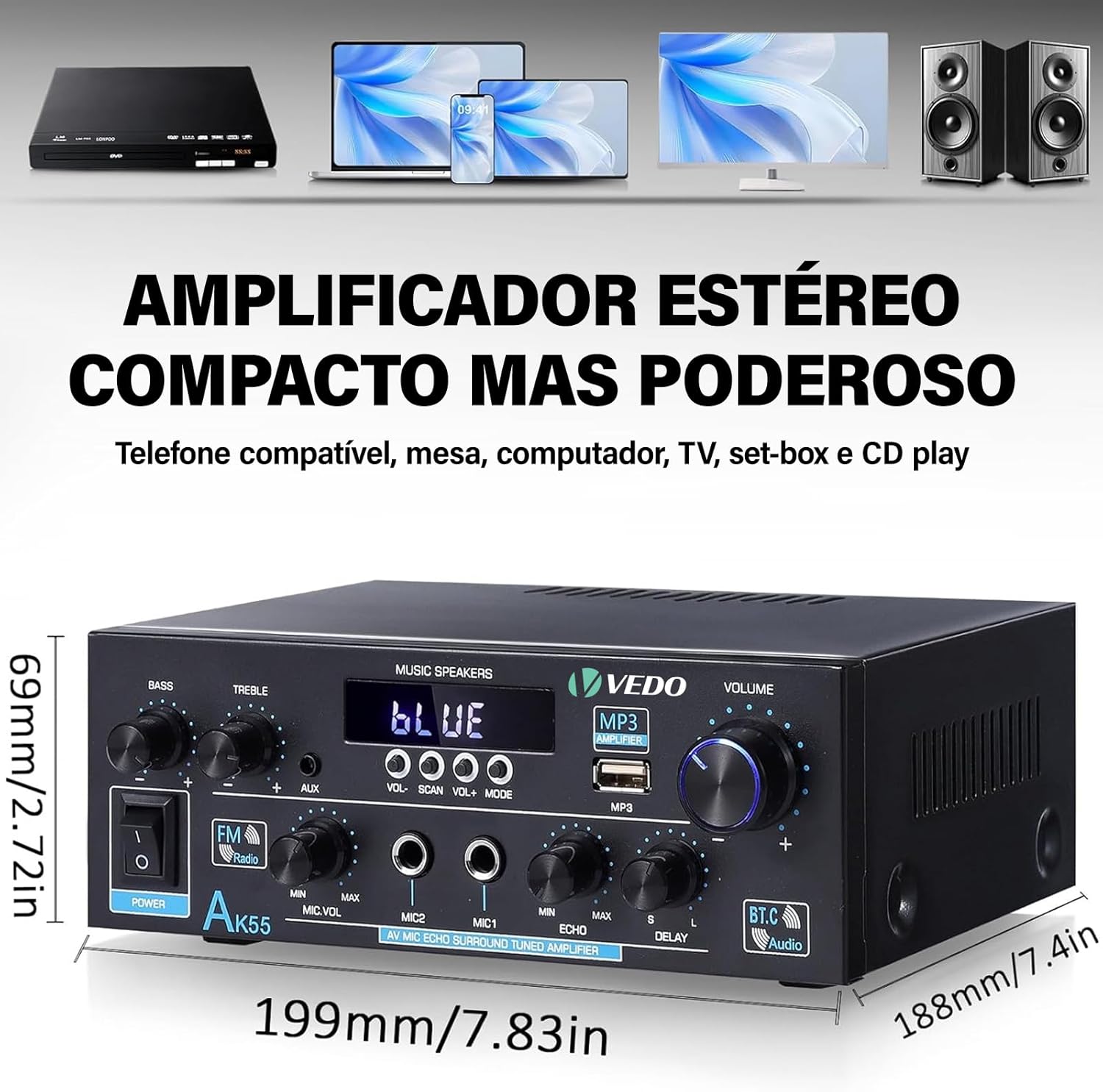
Image: Dimensions of the AK-55 amplifier.
- Brand: ANVAR
- Model: AK-55
- Power Output: 70W + 70W RMS (600W PMPO x2)
- Bluetooth Version: 5.0
- Speaker Impedance: 4-16Ω
- Signal-to-Noise Ratio (SNR): 85dB
- Frequency Response: 20Hz - 20kHz (typical)
- Inputs: Bluetooth, AUX (RCA), USB, FM, Microphone (6.35mm), Optical, Coaxial
- Power Supply: AC 110-240V or DC 12V/5A
- Dimensions (L x W x H): 18 x 14 x 7 cm (approximately 7.09 x 5.51 x 2.76 inches)
- Weight: 1 kg (approximately 2.2 lbs)
- Features: Echo and Reverb effects for microphones, Bass and Treble control, Remote control, Integrated MP3 player, FM radio with 20 station memory.
10. Warranty and Support
The ANVAR VEDO AK-55 amplifier comes with a satisfaction guarantee and priority technical support. For any issues or questions not covered in this manual, please contact ANVAR customer service. Keep your purchase receipt as proof of purchase for warranty claims.