
Poounur T80
Poounur Smartwatch T80 User Manual
Model: T80 | Brand: Poounur
Introduction
This manual provides comprehensive instructions for the Poounur Smartwatch T80. It covers setup, operation, maintenance, and troubleshooting to ensure you get the most out of your device. The T80 smartwatch is designed to enhance your daily life with features like Bluetooth calling, smart notifications, extensive sports tracking, and all-day health monitoring.
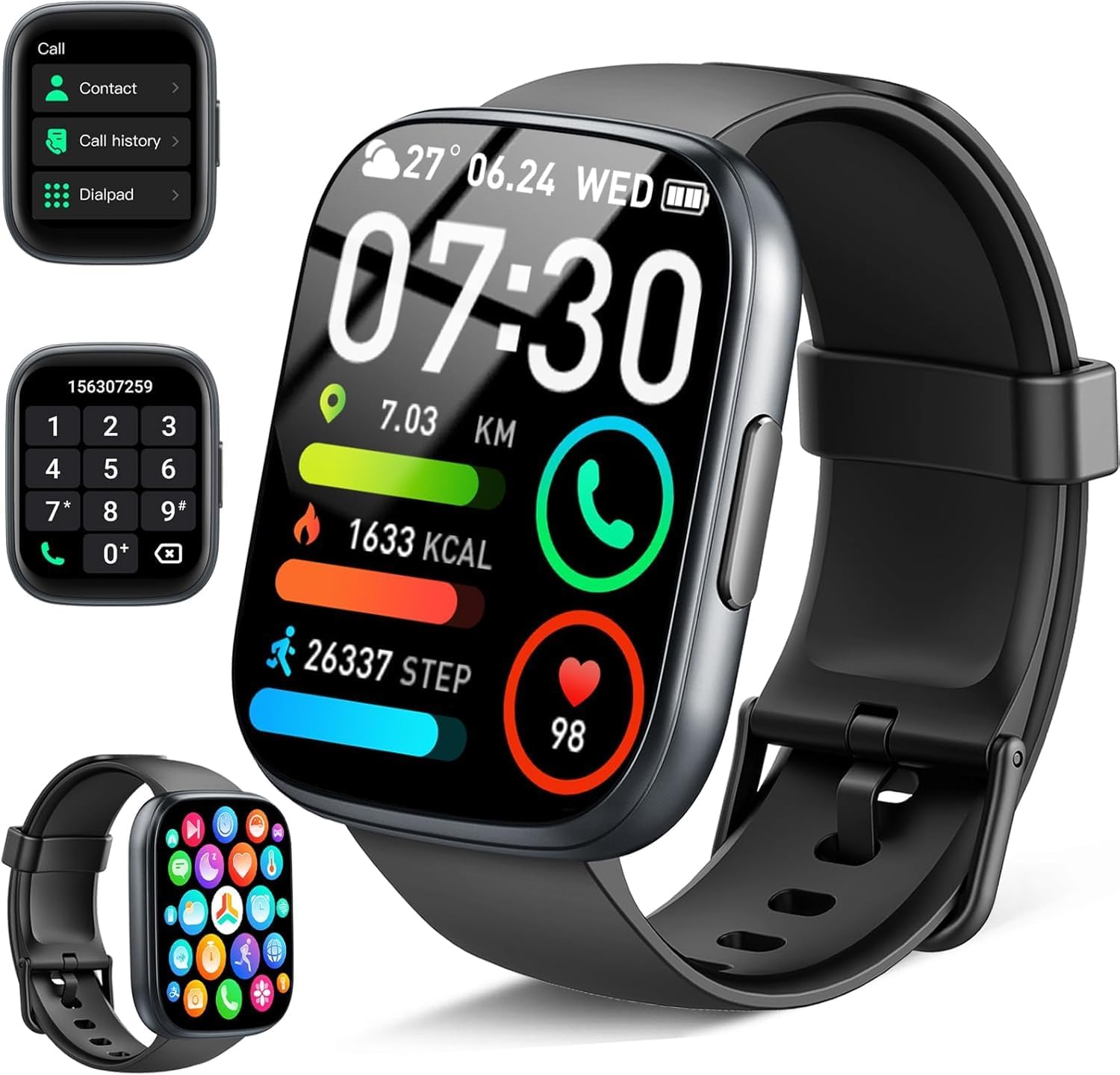
Figure 1: Poounur Smartwatch T80 with its main display and call functions.
What's in the Box
Upon unboxing your Poounur Smartwatch T80, please verify that all components are present:
- 1 x Poounur Smartwatch T80
- 1 x Magnetic Charging Cable
- 1 x User Manual (this document)

Figure 2: Package contents of the Poounur Smartwatch T80.
Setup Guide
1. Charging the Smartwatch
Before initial use, fully charge your smartwatch. Connect the magnetic charging cable to the charging points on the back of the watch and plug the USB end into a power adapter (not included) or a computer's USB port. A full charge takes approximately 1.5 hours.

Figure 3: Charging the smartwatch and battery life overview.
2. App Installation and Pairing (GloryFit App)
To unlock the full functionality of your smartwatch, download and install the "GloryFit" app on your smartphone. The app is compatible with Android 5.0+ and iOS 9.0+ devices.
- Download the App: Search for "GloryFit" in your smartphone's app store (Google Play Store for Android or Apple App Store for iOS) and install it.
- Enable Bluetooth: Ensure Bluetooth is enabled on your smartphone.
- Open GloryFit App: Launch the GloryFit app and follow the on-screen instructions to create an account or log in.
- Pair the Device: In the app, navigate to the device section and search for your smartwatch (usually identified as "T80"). Select it to initiate the pairing process. Keep the smartwatch close to your phone during pairing.
- Grant Permissions: The app will request various permissions (e.g., notifications, location, contacts). Grant the necessary permissions for full functionality.

Figure 4: Steps for connecting the smartwatch to the GloryFit app.
3. Activating Bluetooth Call Function
After successfully pairing the smartwatch with the GloryFit app, you need to enable the Bluetooth call function separately:
- Ensure App Connection: Confirm that the GloryFit app is connected to your smartwatch.
- Go to Phone's Bluetooth Settings: On your smartphone, open the Bluetooth settings.
- Find "T80" for Calls: Look for another Bluetooth device named "T80" (or similar, often with a headset icon) in the list of available devices. This is separate from the data connection.
- Pair for Calls: Tap on this "T80" device to pair it for call audio. Once connected, you will be able to make and receive calls directly from your smartwatch.

Figure 5: Bluetooth call functionality on the smartwatch.
Operating Instructions
Basic Navigation
The Poounur Smartwatch T80 features a 1.95-inch TFT-LCD touchscreen for intuitive navigation. Swipe left, right, up, or down to access different functions and menus. Tap to select items.

Figure 6: The 1.95-inch HD Color Screen and customizable dials.
Bluetooth Calls & Smart Notifications
Once the Bluetooth call function is activated, you can make and receive calls directly from your wrist. The smartwatch also synchronizes real-time messages and notifications from various apps (e.g., WhatsApp, Facebook, Twitter, Instagram, Skype) on your connected smartphone.

Figure 7: Bluetooth Call and Smart Notification features.
Sport Modes
The smartwatch offers over 110 indoor and outdoor sport modes. Select your desired activity from the sport mode menu to accurately record data such as steps, distance, calories burned, and exercise duration. This data helps in scientifically formulating your workout plan.

Figure 8: Over 110 Sport Modes available on the smartwatch.

Figure 9: Fitness tracking capabilities of the smartwatch.
Health Monitoring
Equipped with high-performance sensors, the smartwatch provides precise all-day health monitoring. This includes:
- Heart Rate Monitoring: Continuously tracks your heart rate, providing real-time data.
- Blood Oxygen Monitoring: Measures your blood oxygen saturation levels.
- Sleep Monitoring: Tracks your sleep patterns and breathing to help improve sleep duration and quality.
Note: This device is not intended for medical use and should not replace professional medical advice.

Figure 10: Heart Rate and Sleep Monitoring features.

Figure 11: Comprehensive health monitoring capabilities.
Other Features
The Poounur Smartwatch T80 includes a variety of practical functions to assist in your daily life:
- Alarm Clock: Set multiple alarms for reminders.
- Stopwatch & Timer: For precise timekeeping during activities.
- Find Phone: Locate your misplaced smartphone through the watch.
- Camera Control: Remotely control your phone's camera.
- Music Control: Manage music playback on your phone.
- Weather Forecast: Get real-time weather updates.
- Calculator: Perform basic calculations.
- Sedentary Reminder: Prompts you to move after periods of inactivity.
- Breathing Exercise: Guided breathing for relaxation.
- Flashlight: Use the screen as a light source.

Figure 12: Additional smart features of the T80 smartwatch.
Maintenance
Cleaning Your Smartwatch
Regularly clean your smartwatch to maintain its appearance and functionality. Use a soft, lint-free cloth to wipe the screen and strap. For stubborn dirt, slightly dampen the cloth with water. Avoid using harsh chemicals or abrasive materials.
Water Resistance (IP68)
The Poounur Smartwatch T80 is IP68 waterproof, meaning it is resistant to dust and can withstand immersion in water up to 1.5 meters for 30 minutes. It is suitable for daily use, such as washing hands, showering, and exposure to rain. However, it is not recommended for hot water baths, saunas, or diving, as steam and high temperatures can compromise the seal.

Figure 13: IP68 Waterproof capabilities.
Battery Care
To prolong battery life, avoid fully discharging the battery frequently. Charge the device when the battery level is low. Store the smartwatch in a cool, dry place when not in use for extended periods.
Troubleshooting
| Problem | Possible Cause | Solution |
|---|---|---|
| Smartwatch won't turn on. | Low battery. | Charge the smartwatch for at least 10 minutes before attempting to turn it on. |
| Cannot pair with phone. | Bluetooth is off on phone/watch; watch is too far from phone; app not open. | Ensure Bluetooth is enabled on both devices. Keep the watch within close proximity to the phone. Open the GloryFit app and try pairing again. Restart both devices if necessary. |
| Notifications not received. | App permissions not granted; notification settings off in app/phone. | Check GloryFit app permissions in your phone's settings and ensure notification access is granted. Verify notification settings within the GloryFit app. |
| Bluetooth call function not working. | Separate Bluetooth connection for calls not established. | Go to your phone's Bluetooth settings and manually pair with the "T80" device specifically for calls (it might appear as a second "T80" or similar). |
| Inaccurate health data. | Watch not worn correctly; sensor dirty. | Ensure the watch is worn snugly on your wrist, not too tight or too loose. Clean the sensors on the back of the watch. |
Specifications
| Feature | Detail |
|---|---|
| Model | T80 |
| Brand | Poounur |
| Screen Size | 1.95 inches |
| Display Type | TFT-LCD |
| Resolution | 240 x 282 pixels |
| Battery Capacity | 300 mAh |
| Charging Time | Approx. 1.5 hours |
| Typical Usage Time | Up to 7 days |
| Standby Time | Up to 30 days |
| Water Resistance | IP68 |
| Connectivity | Bluetooth 4.0 |
| Compatibility | Android 5.0+ / iOS 9.0+ |
| Weight | 2 grams (device only) |
| Dimensions | 17.5 x 9.5 x 1.9 cm (package) |
Warranty and Support
For warranty information and customer support, please refer to the contact details provided on the product packaging or the official Poounur website. Keep your purchase receipt as proof of purchase for any warranty claims.
If you encounter any issues not covered in this manual, please contact Poounur customer service for assistance.
Related Documents - T80
 |
Smart Sport Watch Product Operating Instructions Operating instructions for the Smart Sport Watch Product, covering appearance, functions, charging, app installation and connection, precautions, and FAQs. |
 |
T80 Smartwatch User Manual and Guide Comprehensive user manual for the T80 smartwatch, detailing setup, app connection with GloryFit, watch functions, charging, precautions, and troubleshooting FAQs. Learn to maximize your T80 wearable device. |
 |
T80 Smartwatch User Manual and Guide User manual for the T80 smartwatch, detailing setup with the GloryFit app, features like call functions, health tracking, exercise modes, and troubleshooting tips. |
 |
Handheld Terminal (PDA) Quick Guide This quick guide provides essential information for operating the Handheld Terminal (PDA), including device overview, installation procedures, charging, scanning, NFC, firmware updates, and troubleshooting FAQs. |
 |
T80 Smart Device: EU Data Act Transparency Statement | Poounur Data Transparency Statement for the Poounur T80 smart device, detailing data collection, usage, sharing, storage, and security measures in compliance with the EU Data Act. |