
Ylzyxal office chair
Ylzyxal Office Desk Chair Instruction Manual (Model: office chair)
Comprehensive guide for assembly, operation, and maintenance of your Ylzyxal Ergonomic Computer Chair.
Introduction
Thank you for choosing the Ylzyxal Office Desk Chair. This manual provides detailed instructions for the assembly, operation, and maintenance of your new ergonomic computer chair. Please read this manual thoroughly before assembly and use to ensure proper function and longevity of the product.

Image: Ylzyxal Office Desk Chair, highlighting its ergonomic design and flip-up armrests.
Important Safety Information
Please read and follow all safety instructions to prevent injury or damage.
- Do not exceed the maximum weight capacity of 400 pounds.
- Ensure proper assembly following the provided instructions.
- Use the chair on recommended surfaces such as hard floors or carpet.
- Keep small parts away from children during assembly.
- Regularly check all bolts and screws to ensure they are tightened.
Parts List
Before beginning assembly, verify that all components are present and undamaged. If any parts are missing or damaged, please contact customer support.
- Arm Pads
- Casters (Wheels)
- Chair Back
- Cushion (Seat)
- Instruction Manual
- Chair Base (Star-shaped)
- Gas Lift Cylinder
- Mechanism Plate (attaches to seat)
- Armrest Assemblies (Left and Right)
- Hardware (screws, washers, Allen wrench)
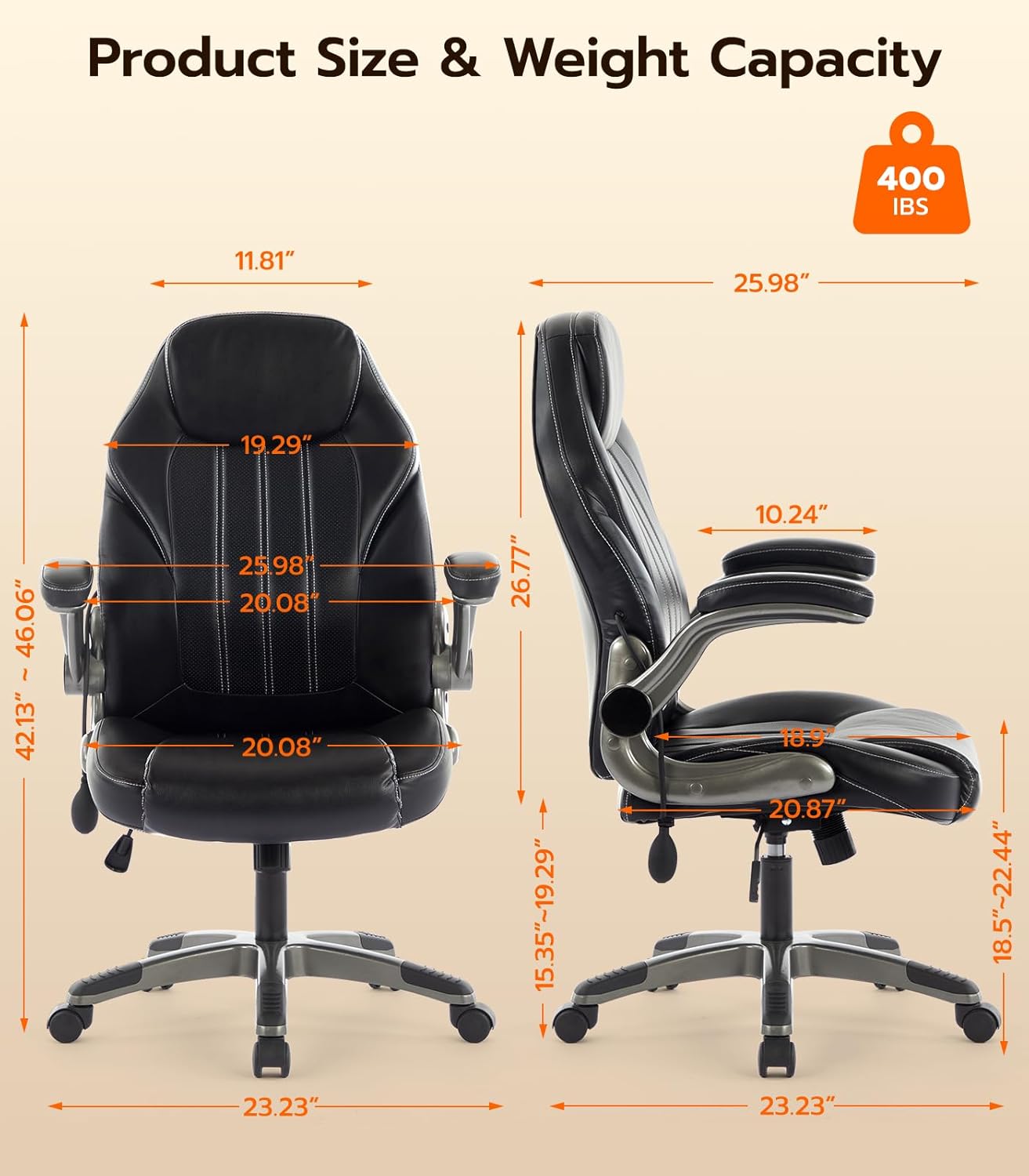
Image: All components of the Ylzyxal Office Desk Chair laid out for assembly.
Setup and Assembly
Follow these steps to assemble your Ylzyxal Office Desk Chair. An official installation video is provided for visual guidance.
Step 1: Attach Casters to the Chair Base
- Insert each of the five casters into the holes at the end of each leg of the star-shaped chair base. Push firmly until they click into place.
- Insert the gas lift cylinder into the center hole of the assembled chair base.
Video: Detailed installation steps for the Ylzyxal Office Chair, covering base and seat assembly.
Step 2: Attach the Mechanism Plate to the Seat Cushion
- Locate the seat cushion and the mechanism plate. Ensure the "FRONT" label on the mechanism plate aligns with the front of the seat cushion.
- Align the holes on the mechanism plate with the pre-drilled holes on the underside of the seat cushion.
- Secure the mechanism plate using the appropriate screws and washers (refer to the included hardware pack for specific screw types, typically labeled). Tighten all screws with the provided Allen wrench.
Step 3: Attach the Seat Assembly to the Gas Lift Cylinder
- Carefully place the assembled seat cushion (with mechanism plate attached) onto the gas lift cylinder, ensuring the center hole of the mechanism plate aligns with the top of the gas lift cylinder.
- Press down firmly on the seat to secure it onto the gas lift cylinder.
Step 4: Attach the Armrests to the Seat and Backrest
- Identify the left and right armrests. Each armrest has two attachment points: one for the seat and one for the backrest.
- Align the armrest's lower holes with the corresponding holes on the side of the seat cushion. Secure with screws.
- Align the armrest's upper holes with the corresponding holes on the side of the backrest. Secure with screws.
- Repeat for the other armrest. Ensure all screws are tightened securely.
Video: Overview of the Ylzyxal Home Desk Office Chair with Flip-up Arms, demonstrating features and assembly steps.
Operating Instructions
Adjustable Air Lumbar Support
The chair features an innovative inflatable lumbar system for customized back support. Adjust the lumbar support as follows:
- To increase lumbar support, press the air pump located on the side of the chair. This inflates the lumbar cushion, pushing it outwards.
- To reduce lumbar support, press and hold the deflation button on the air pump until the desired firmness is achieved.
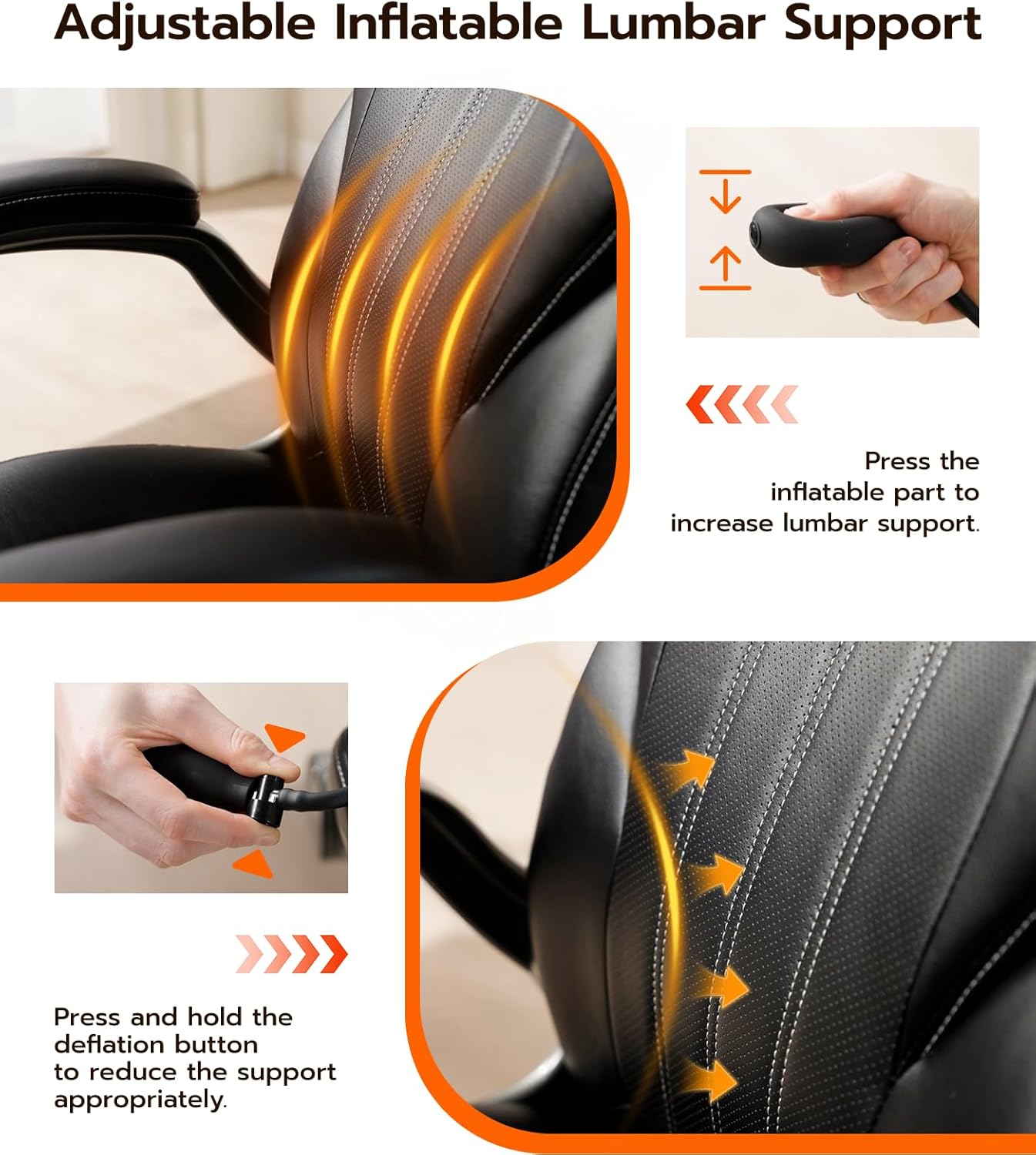
Image: Demonstrating the inflation and deflation of the adjustable lumbar support.
90° Flip-Up Armrests
The armrests can be flipped up vertically by 90° to save space or allow the chair to be pushed closer to a desk.
- To flip up the armrests, grasp each armrest and rotate it upwards until it locks into a vertical position.
- To return the armrests to the down position, gently pull them downwards until they lock horizontally.

Image: The chair with its 90° flip-up armrests, illustrating space-saving functionality.
Reclining Backrest with Rocking Function (90°-115° Tilt)
The chair offers a reclining backrest and a rocking function for personalized comfort.
- To recline the backrest, pull the lever located on the right side of the seat outwards. Lean back to the desired angle (between 90° and 115°). Push the lever back in to lock the position.
- To activate the rocking function, pull the lever outwards without locking a specific recline angle. The chair will then allow for a gentle rocking motion.
- To adjust the rocking amplitude (tension), turn the round knob located underneath the seat. Turn clockwise to increase tension (less rocking), and counter-clockwise to decrease tension (more rocking).
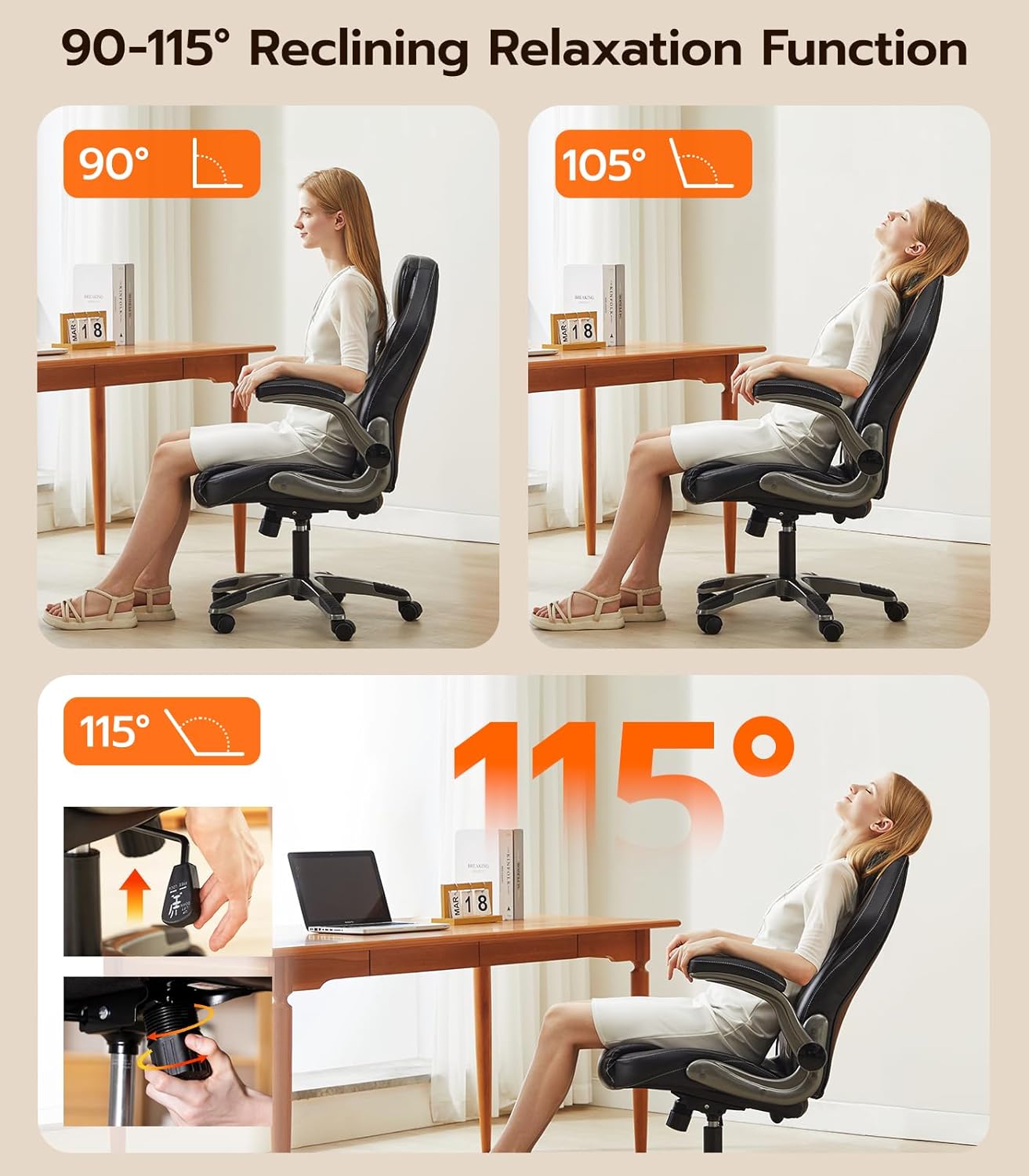
Image: Visual representation of the chair's reclining and rocking capabilities.
Height Adjustment
Adjust the seat height to find your optimal ergonomic position.
- To raise the seat height, lift the lever on the right side of the seat (the same lever used for recline) while taking your weight off the seat.
- To lower the seat height, lift the lever while remaining seated, allowing your weight to push the seat down.
360° Swivel and Rolling Casters
The chair is designed for easy movement and rotation.
- The chair can swivel 360 degrees for full range of motion.
- The silent casters allow for smooth and quiet movement across various floor types, including hard floors and carpets.
Maintenance
To ensure the longevity and appearance of your Ylzyxal Office Desk Chair, follow these simple maintenance guidelines:
- Cleaning: Wipe clean with a damp cloth. Avoid harsh chemicals or abrasive cleaners that may damage the faux leather.
- Regular Checks: Periodically inspect all screws and bolts to ensure they are tight. Re-tighten as necessary to maintain stability and safety.
- Avoid Direct Sunlight: Prolonged exposure to direct sunlight can cause the faux leather to fade or crack.
- Weight Capacity: Do not exceed the maximum weight capacity of 400 pounds.
Troubleshooting
If you encounter any issues with your Ylzyxal Office Desk Chair, please refer to the following common solutions or contact customer support.
Chair is Wobbly:
- Ensure all assembly screws are securely tightened.
- Check that the casters are fully inserted into the chair base.
Height Adjustment Not Working:
- Verify that the gas lift cylinder is correctly installed and not obstructed.
- Ensure the height adjustment lever is functioning properly and not stuck.
Lumbar Support Not Adjusting:
- Check the air pump and deflation button for any blockages or damage.
- Ensure the air hose connecting the pump to the lumbar cushion is not kinked or disconnected.
Specifications
| Brand | Ylzyxal |
| Model Name | office chair |
| Color | Black |
| Product Dimensions | 29.9"D x 25.9"W x 47.3"H |
| Material | Faux Leather, Sponge |
| Weight Capacity | Up to 400 lbs |
| Special Features | Adjustable Backrest, Adjustable Height, Adjustable Lumbar, Arm Rest, Reclining, Flip-up Arm Style |
| Reclining Position Count | 90-115° |
| Seat Depth | 18.89 inches |
| Arm Height | 9.45 Inches |
| Surface Recommendation | Hard Floor/Carpet |
Image: Detailed product dimensions and maximum weight capacity.
Support
For any questions regarding assembly, usage, or other issues, please contact Ylzyxal customer support. We guarantee a response within 24 hours.
Contact information is typically found on the product packaging or the seller's official website.
Related Documents - office chair
 |
Genuine White Leather Office Chair Installation Manual A comprehensive guide for installing your Genuine White Leather Office Chair. This manual provides step-by-step instructions for assembling the mid-back executive desk chair with aluminum arms, wheels, swivel functionality, thickened backrest, and ergonomic lumbar support. |
 |
Office Chair C-1368-1B Assembly and User Manual Comprehensive assembly guide and instructions for use for the C-1368-1B office chair. Includes package contents, step-by-step assembly instructions, operating instructions, safety guidelines, and warranty information. |
 |
Ergonomic Office Chair Assembly Instructions and User Guide Step-by-step assembly guide and user manual for an ergonomic office chair. Includes safety warnings, parts list, detailed assembly steps, and instructions for adjusting tilt tension, tilt lock, and seat height. Ensure proper setup for optimal comfort and safety. |
 |
Office Chair C-2892-1A Assembly and User Manual Comprehensive assembly guide and safety instructions for the Office Chair model C-2892-1A. Learn how to assemble, use, and maintain your ergonomic office chair. |
 |
Office Chair Assembly Instructions: Step-by-Step Guide Detailed assembly instructions for an office chair, including a comprehensive parts list and clear, step-by-step guidance for putting together your new ergonomic chair. |
 |
Ergonomic Office Chair C-5025: Assembly and Safety Manual Comprehensive instruction manual for the C-5025 ergonomic office chair, covering safety guidelines, package contents, assembly steps, and maintenance tips. Ensure proper setup and long-term use of your office chair. |
Ask a question about this manual
Ask about setup, troubleshooting, compatibility, parts, safety, or missing instructions. Manuals+ will review the question and use this page’s manual context to help answer it.