
1. Introduction
Thank you for purchasing the VOCRS PTC-903B Portable Electric Space Heater. This manual provides essential information for the safe operation, maintenance, and troubleshooting of your new heater. Please read this manual thoroughly before use and retain it for future reference.
This heater is designed to provide supplemental warmth for indoor spaces such as bedrooms and home offices, featuring multiple heating modes, a remote control, and a timer function.
2. Important Safety Instructions
WARNING: To reduce the risk of fire, electric shock, or injury, observe the following safety precautions:
- Read all instructions before using this heater.
- This heater is hot when in use. To avoid burns, do not let bare skin touch hot surfaces.
- Always use the carry handle when moving this heater.
- Keep combustible materials, such as furniture, pillows, bedding, papers, clothes, and curtains at least 3 feet (0.9 meters) from the front of the heater and keep them away from the sides and rear.
- Extreme caution is necessary when any heater is used by or near children or invalids and whenever the heater is left operating and unattended.
- Always unplug the heater when not in use.
- Do not operate any heater with a damaged cord or plug or after the heater malfunctions, has been dropped, or damaged in any manner.
- Do not use outdoors.
- This heater is not intended for use in bathrooms, laundry areas, or similar indoor locations. Never locate heater where it may fall into a bathtub or other water container.
- Do not run cord under carpeting. Do not cover cord with throw rugs, runners, or similar coverings. Arrange cord away from traffic area and where it will not be tripped over.
- To disconnect heater, turn controls to OFF, then remove plug from outlet.
- Do not insert or allow foreign objects to enter any ventilation or exhaust opening as this may cause an electric shock or fire, or damage the heater.
- To prevent a possible fire, do not block air intakes or exhaust in any manner. Do not use on soft surfaces, like a bed, where openings may become blocked.
- This heater has an automatic tip-over safety switch and overheat protection. If the heater tips over or overheats, it will automatically shut off.
- Always plug heaters directly into a wall outlet/receptacle. Never use with an extension cord or relocatable power tap (outlet/power strip).

Image: Safety features including tip-over protection, flame retardant material, and overheat protection.
3. Product Overview
3.1 Package Contents
- VOCRS PTC-903B Space Heater
- Remote Control (2 AAA batteries not included)
- User Manual
3.2 Heater Components
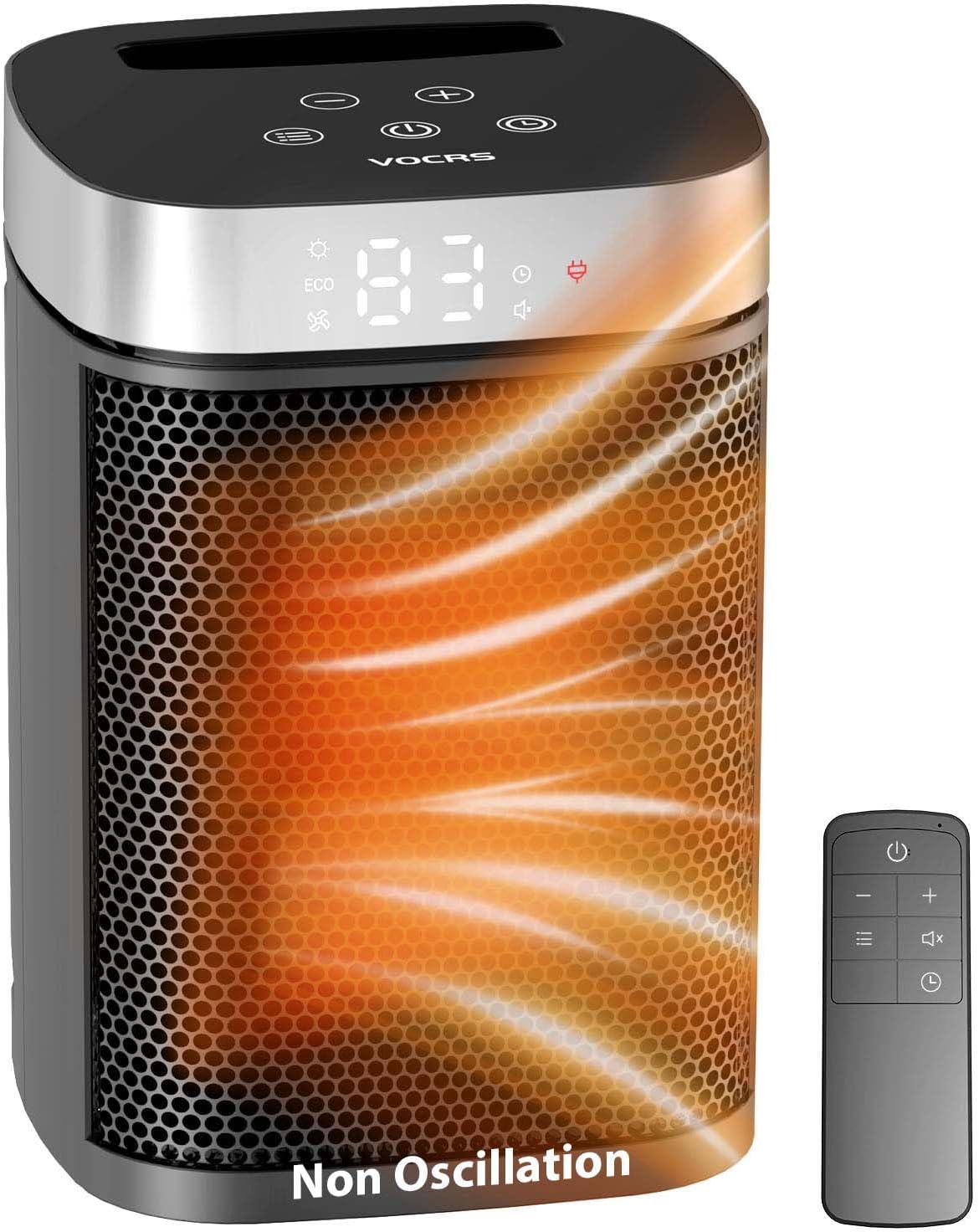
Image: Front view of the VOCRS PTC-903B heater and its remote control.

Image: Dimensions of the VOCRS PTC-903B heater (5.8"D x 5.5"W x 8.5"H) and its carry handle.
- Control Panel: Located on the top of the heater, featuring touch buttons and a digital display.
- Air Outlet Grille: Front grille where heated air is expelled.
- Air Inlet: Rear opening for air intake.
- Power Cord: For connecting to an electrical outlet.
- Carry Handle: Integrated into the top for easy portability.
- Remote Control: For convenient operation from a distance.
4. Setup
- Unpack: Carefully remove the heater and all accessories from the packaging. Retain packaging for storage if needed.
- Placement: Place the heater on a firm, level surface. Ensure there is at least 3 feet (0.9 meters) of clear space around the heater from walls, furniture, and other objects. Do not place on soft surfaces like carpets or rugs that could block air inlets.
- Power Connection: Plug the power cord directly into a 120V AC wall outlet. Do not use extension cords or power strips.
- Remote Control Batteries: Open the battery compartment on the remote control and insert 2 AAA batteries (not included), ensuring correct polarity.
5. Operating Instructions

Image: Control panel with Power, Heat Level/Temperature, Timer, and Mode buttons.
5.1 Power On/Off
- Press the Power button (
 ) on the control panel or remote control to turn the heater ON or OFF.
 - When turned off, the heater will enter a cool-down phase for a few seconds before completely shutting down.
5.2 Heating Modes
Press the Mode button ( ) on the control panel or remote control to cycle through the following modes:
- High Heat (1500W): Provides maximum heating power for rapid warming.
- Medium Heat (1000W): Offers moderate heating for comfortable warmth.
- Low Heat (700W): Provides gentle heating for sustained warmth or smaller spaces.
- Fan Mode: Circulates air without heat.
5.3 Temperature Adjustment
In heating modes, use the + and - buttons on the control panel or remote control to set the desired temperature. The digital display will show the target temperature.
- The heater will automatically adjust its heating output to maintain the set temperature.
5.4 Timer Function
Press the Timer button ( ) on the control panel or remote control to set an automatic shut-off timer from 1 to 12 hours. Each press increases the timer by one hour. The display will show the remaining time.
- The heater will automatically turn off once the set time has elapsed.
5.5 Eco Mode
The Eco Mode is designed to optimize energy consumption by automatically adjusting the heating power to maintain the set temperature efficiently.
- Activate Eco Mode by cycling through the modes until the ECO indicator appears on the display.
5.6 Remote Control Operation
The remote control duplicates the functions of the control panel, allowing for convenient adjustments from a distance. Ensure the remote control is pointed towards the heater's display for optimal signal reception.
6. Maintenance
WARNING: Always unplug the heater and allow it to cool completely before performing any maintenance.
6.1 Cleaning
- Exterior: Wipe the exterior surfaces of the heater with a soft, damp cloth. Do not use abrasive cleaners or solvents.
- Air Inlets/Outlets: Use a vacuum cleaner with a brush attachment to remove dust and lint from the air inlet and outlet grilles. Ensure these areas are clear to maintain proper airflow.
- Do not immerse the heater in water or allow water to drip into the interior.
6.2 Storage
- If storing the heater for an extended period, clean it thoroughly as described above.
- Store the heater in its original packaging in a cool, dry place.
- Avoid placing heavy objects on top of the heater during storage.
7. Troubleshooting
| Problem | Possible Cause | Solution |
|---|---|---|
| Heater does not turn on. | No power to the unit. Tip-over switch activated. Overheat protection activated. | Ensure the power cord is securely plugged into a working 120V outlet. Place the heater on a firm, level surface. Unplug the heater, allow it to cool for 30 minutes, then plug it back in. Clear any obstructions from air inlets/outlets. |
| Heater stops unexpectedly. | Overheat protection activated. Tip-over switch activated. Timer function has ended. | Unplug the heater, allow it to cool for 30 minutes, then plug it back in. Clear any obstructions. Ensure the heater is on a stable, level surface. Check if the timer was set. Reset if necessary. |
| No heat output in heating modes. | Heater is in Fan Mode. Temperature setting is too low. | Press the Mode button to select a heating mode (High, Medium, Low). Increase the target temperature using the '+' button. |
| Remote control not working. | Batteries are dead or incorrectly inserted. Obstruction between remote and heater. | Replace batteries with 2 new AAA batteries, ensuring correct polarity. Ensure a clear line of sight between the remote and the heater's display. |
8. Specifications
| Feature | Detail |
|---|---|
| Brand | VOCRS |
| Model Number | PTC-903B |
| Power Output | 700W / 1000W / 1500W |
| Voltage | 120 Volts (AC) |
| Dimensions (D x W x H) | 5.8" x 5.5" x 8.5" |
| Item Weight | 2.61 pounds |
| Special Features | Fast Heating, On/Off Timer, Portable, Remote Control, Thermostat, Eco Mode |
| Safety Features | Overheat Protection, Tip-over Automatic Shut-off, ETL-Certified |
| Indoor/Outdoor Usage | Indoor Only |
| Room Type | Bedroom, Home Office |
9. Warranty and Customer Support
The VOCRS PTC-903B Space Heater comes with an ETL-Certified safety guarantee. We offer a 30-day return policy and a 12-month exchange guarantee for peace of mind.
For any questions, concerns, or support needs, please contact our customer service team. We aim to respond to all inquiries within 24 hours.
Customer Service Contact: Please refer to the contact information provided on your product packaging or the retailer's website where you purchased the product.


