
1. Product Overview
The Ant Esports MK1300 V2 is a 60% form factor mini mechanical keyboard designed for portability and desk space efficiency. It features a sleek and compact design, making it an ideal choice for gamers and users with limited desk space. This keyboard supports USB 2.0 full-speed connection and N-key rollover for accurate input. It is equipped with Outemu Brown Mechanical Switches, providing a tactile feel and a super-fast 1ms response time.
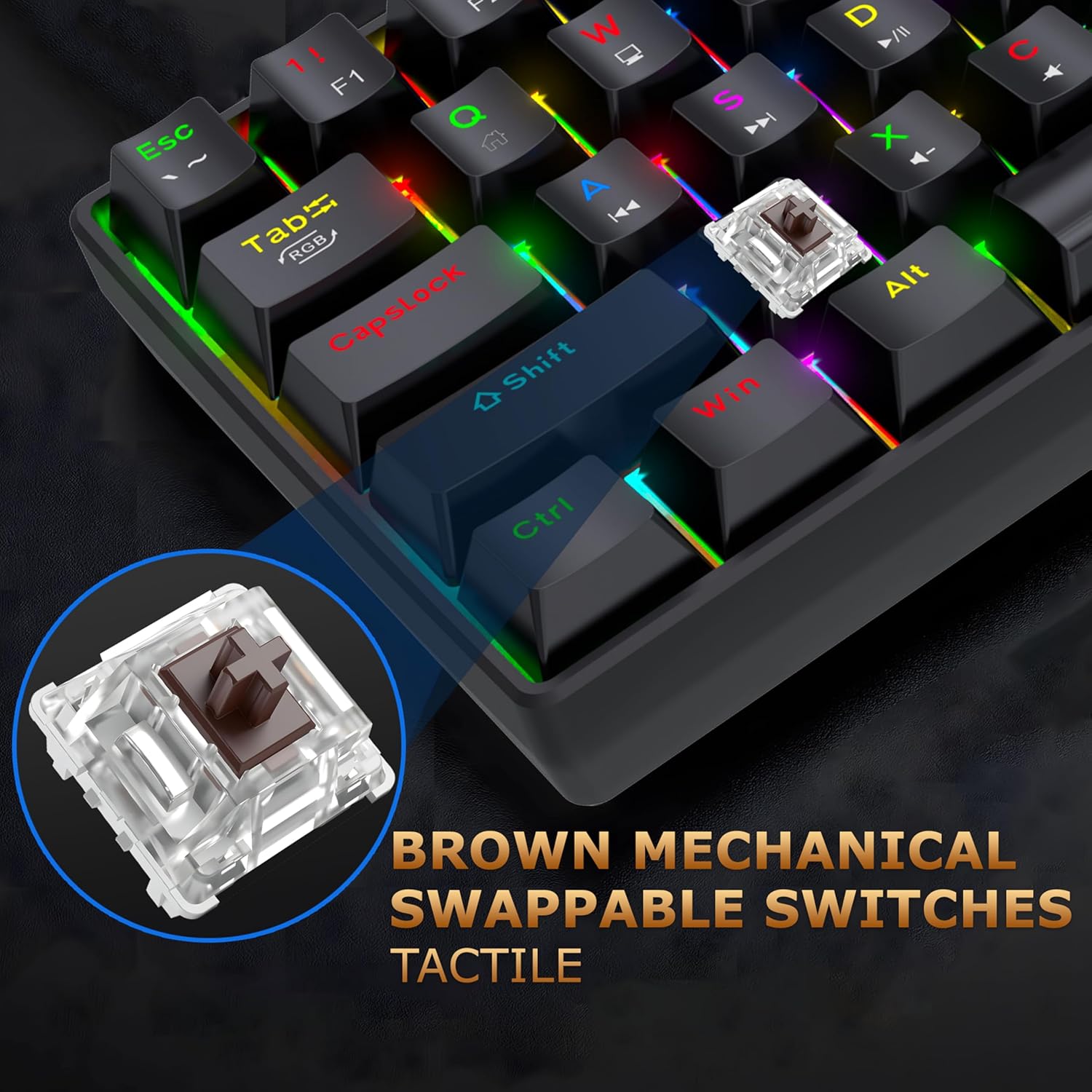
Image: Front view of the Ant Esports MK1300 V2 mechanical keyboard, showcasing its compact 60% layout and RGB backlighting.

Image: Side view of the Ant Esports MK1300 V2 keyboard, highlighting its ergonomic profile and keycap design.
2. Setup and Connectivity
The MK1300 V2 keyboard is designed for plug-and-play convenience, requiring no driver installation for basic functionality.
2.1 Connecting the Keyboard
- Locate the USB-C port on the keyboard and the USB-A port on your computer.
- Connect the provided USB-C to USB-A cable to both the keyboard and your computer.
- The keyboard will automatically be detected by your operating system.
2.2 System Compatibility
The keyboard is compatible with various operating systems, including:
- Windows (XP/Vista, 7/8, 10, 11)
- macOS
- Linux OS

Image: Diagram illustrating the wide compatibility of the Ant Esports MK1300 V2 keyboard with Windows, macOS, and Linux operating systems.
2.3 Software Installation (Optional)
For advanced customization of RGB lighting, macro recording, and custom key functions, dedicated software is available. You can download the software from the official Ant Esports website:
Download Link: https://antesports.com/downloads/

Image: The keyboard on a desk with a monitor, illustrating software support for macro definitions and lighting effects. A QR code for software download is visible.
3. Operating Instructions
The Ant Esports MK1300 V2 features a compact 61-key layout. Many functions are accessed using the Function (Fn) key in combination with other keys.
3.1 Basic Key Functions (Fn Combinations)
To access F1-F12 keys and other standard functions, press and hold the Fn key, then press the corresponding key as indicated below:
| Combination | Function | Combination | Function |
|---|---|---|---|
| Fn + 1 | F1 | Fn + Q | Home |
| Fn + 2 | F2 | Fn + W | End |
| Fn + 3 | F3 | Fn + E | Page Up |
| Fn + 4 | F4 | Fn + R | Page Down |
| Fn + 5 | F5 | Fn + T | Print Screen |
| Fn + 6 | F6 | Fn + Y | Scroll Lock |
| Fn + 7 | F7 | Fn + U | Pause Break |
| Fn + 8 | F8 | Fn + I | Insert |
| Fn + 9 | F9 | Fn + O | Delete |
| Fn + 0 | F10 | Fn + P | Backspace |
| Fn + - | F11 | Fn + [ | Volume Down |
| Fn + = | F12 | Fn + ] | Volume Up |
| Fn + \ | Mute | Fn + A | Left Arrow |
| Fn + S | Down Arrow | Fn + D | Right Arrow |
| Fn + F | Up Arrow | Fn + G | Win Lock |
| Fn + H | Calculator | Fn + J | My Computer |
| Fn + K | Web Browser | Fn + L | |
| Fn + ; | Media Player | Fn + ' | Play/Pause |
| Fn + , | Previous Track | Fn + . | Next Track |
| Fn + / | Stop |
3.2 RGB Backlight Control
The keyboard supports various dazzling LED lighting effects. Use the following Fn combinations to control the backlighting:
- Fn + Alt: Switch Lighting Mode
- Fn + Ctrl: Switch Lighting Color
- Fn + Z: Decrease Light Speed
- Fn + X: Increase Light Speed
- Fn + C: Decrease Light Brightness
- Fn + V: Increase Light Brightness
- Fn + B: Fly On (Specific lighting effect)
- Fn + N: Fly Off (Specific lighting effect)

Image: The Ant Esports MK1300 V2 keyboard displaying vibrant RGB lighting effects across its keys.
3.3 Anti-Ghosting and N-Key Rollover
The keyboard supports 26-key anti-ghosting and N-key rollover, ensuring that multiple simultaneous key presses are registered accurately, which is crucial for gaming and fast typing.

Image: The keyboard highlighting 26 keys with red arrows, indicating its anti-ghosting capability for simultaneous key presses.
3.4 Swappable Mechanical Switches
The MK1300 V2 features Outemu Brown Mechanical Switches, which are tactile and provide a satisfying typing experience. These switches are swappable, allowing for customization and easy replacement.

Image: A close-up of the keyboard showing a brown mechanical switch removed, with an inset of the switch itself, emphasizing its swappable nature.
4. Maintenance
Proper maintenance ensures the longevity and optimal performance of your keyboard.
4.1 Cleaning
- Disconnect the keyboard from your computer before cleaning.
- Use a soft, dry cloth to wipe the surface of the keyboard.
- For dust and debris between keycaps, use compressed air.
- For stubborn stains, lightly dampen a cloth with water or a mild cleaning solution (avoid harsh chemicals).
4.2 Switch Replacement (for Swappable Switches)
If a switch needs replacement, use a switch puller tool (not included unless specified) to carefully remove the old switch and insert a new compatible Outemu mechanical switch.
5. Troubleshooting
If you encounter issues with your keyboard, refer to the following common solutions:
- Keyboard not responding: Ensure the USB cable is securely connected to both the keyboard and the computer. Try a different USB port or a different cable.
- RGB lighting not working or stuck: Try cycling through lighting modes with Fn + Alt. If issues persist, perform a factory reset by pressing Fn + Space for 3 seconds. Ensure the software (if installed) is not overriding settings.
- Specific keys not working: If you have swappable switches, carefully remove and re-insert the affected switch. If the issue continues, the switch may need replacement.
- Windows Key (Win) is locked: If the Win key is locked, its corresponding LED light will be on. Press Fn + Win to unlock it.
- Software issues: Ensure you have the correct software version for your keyboard model. Reinstall the software if necessary.
6. Technical Specifications
Detailed specifications for the Ant Esports MK1300 V2 keyboard:
| Feature | Specification |
|---|---|
| Keyboard Type | 60% Form Factor Mechanical Keyboard |
| Connectivity | Type C to USB (Wired) |
| Key Count | 61 Keys |
| Layout | US English (Mini) |
| Switch Type | Outemu Brown Series Mechanical Switches (Swappable) |
| Keycap Type | Double Injection Keycaps |
| Cable Length | 1.5 meters |
| Rated Voltage | 5V DC +/- 5% |
| Working Current | <250mA |
| Operating Temperature | 0°C ~ 40°C |
| Storage Temperature | -20°C ~ 60°C |
| Net Weight | 450g |
| Gross Weight | 550g |
| Dimensions (LxWxH) | 290mm x 100mm x 39mm |
| Keystroke Lifespan | 50 Million Keystrokes |

Image: The keyboard on a desk, emphasizing its 50 million keystroke lifespan, indicating durability.
7. Warranty Information
The Ant Esports MK1300 V2 60% Mechanical Keyboard comes with a 1-year warranty from the date of purchase. Please retain your proof of purchase for warranty claims.
8. Support
For further assistance, technical support, or warranty inquiries, please contact Ant Esports customer support:
- Email: support@antesports.com
- Website for software downloads: https://antesports.com/downloads/


