
for Richmat Model HJH37 C121480H370017
Remote Control User Manual
Model: for Richmat Model HJH37 C121480H370017
Introduction
This remote control is a replacement unit specifically designed for certain adjustable bed base control boxes. It is not a universal remote. To ensure proper functionality and compatibility, it is essential that your existing control box model number matches the compatible models listed for this remote, and that your old remote is identical in appearance and function.
This manual provides detailed instructions for battery installation, pairing the remote with your bed base, and troubleshooting common issues.

Image: Front view of the remote control, displaying its six primary buttons: head up, head down, foot up, foot down, 'M' for memory, and 'FLAT' for flat position.

Image: A visual guide emphasizing the importance of verifying compatibility by sending clear pictures of your control box and old remote (front and back) to the seller before purchase.
Setup
Battery Installation
The remote control requires two AAA batteries (not included). Follow these steps to install the batteries:
- Locate the battery compartment on the back of the remote control.
- Slide the battery cover downwards to open it.
- Insert two AAA batteries, ensuring the correct polarity (+ and -) as indicated inside the compartment.
- Slide the battery cover back into place until it clicks securely.

Image: Rear view of the remote control with the battery compartment open, showing the slots for two AAA batteries.
Operating Instructions
Pairing the Remote Control
To ensure proper functionality, the remote control must be paired with your adjustable bed base's control box. Follow these steps carefully:
- Prepare the Bed Base: Unplug the bed base from the power outlet. Wait for 5 seconds, then plug it back in.
- Locate Reset Button: Find the reset coding button on the control box under the bed. This button is often labeled "Learn" or "Reset Coding".
- Initiate Pairing on Remote: On the remote control, simultaneously press and hold the "head up" button and the "foot up" button together for 10 seconds.
- Activate Control Box: While still holding the two buttons on the remote, quickly press and release the reset coding button on the control box. Do not press and hold the control box button.
- Confirm Pairing: You will hear beeps from the control box, indicating that the remote is successfully synced.
Important Note: The pairing process must be completed within 15 seconds of plugging the bed base back in and pressing the reset button. If 15 seconds pass, you must unplug the power again and restart from Step 1. Ensure the indicator light on the control box is on when attempting to pair, as the light will go out if not paired within 15 seconds.
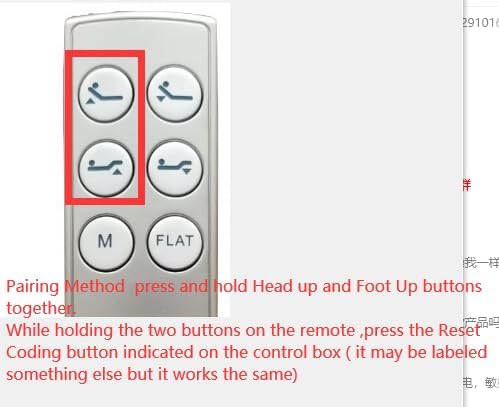
Image: A visual representation highlighting the 'head up' and 'foot up' buttons on the remote, indicating their simultaneous press for initiating the pairing sequence.

Image: A schematic diagram illustrating the adjustable bed base control box, its power input, and connections to the bed motors, with the control box itself clearly outlined.
Troubleshooting
Remote Not Responding
- Check Batteries: Ensure batteries are correctly installed and not depleted. Replace with fresh AAA batteries if necessary.
- Re-pair Remote: Follow the "Pairing the Remote Control" steps in the Operating Instructions section. This is the most common solution for unresponsive remotes.
- Power Cycle Bed Base: Unplug the bed base from the wall outlet for 30 seconds, then plug it back in. This can reset the control box.
- Verify Compatibility: This remote is not universal. Ensure your control box model number matches the compatible models listed for this remote (e.g., Richmat NL200ULB 12778C0180410, NL300B-L1 12778C0180412). If unsure, contact the seller with pictures of your control box and old remote for verification.
Specifications
| Feature | Detail |
|---|---|
| Model Number | for Richmat Model HJH37 C121480H370017 |
| Brand | Generic |
| Compatible Devices | Adjustable bed base (specifically Richmat NL200ULB 12778C0180410, NL300B-L1 12778C0180412 Control box) |
| Power Source | 2 x AAA Batteries (not included) |
| Color | Black |
| Max Supported Devices | 1 |
| Manufacturer | Easytry |
| Country of Origin | China |
Warranty and Support
For warranty information or technical support, please contact the seller or manufacturer directly. It is recommended to retain your purchase receipt for warranty claims.
For specific compatibility questions, especially if your control box model is not explicitly listed, please provide clear pictures of your control box and the front and back of your old remote control to the seller for verification.
You can often find contact information for the seller on the platform where you purchased the product.
Ask a question about this manual
Ask about setup, troubleshooting, compatibility, parts, safety, or missing instructions. Manuals+ will review the question and use this page’s manual context to help answer it.