
F019
Turbo Fan Turbine Jet Blower User Manual
Model: F019
Product Overview
The Turbo Fan Turbine Jet Blower is a powerful electric air duster designed for various cleaning and blowing tasks, including computer keyboards and other electronics. It features adjustable wind speed, a robust motor, and a durable construction for efficient performance.

Figure 1: Front view of the Turbo Fan Turbine Jet Blower, showcasing its compact and ergonomic design.
Safety Instructions
- Always ensure the device is turned off before cleaning or maintenance.
- Do not expose the device to water or excessive moisture.
- Keep out of reach of children.
- Use only the specified charging cable and compatible battery packs.
- Avoid directing airflow directly at eyes or sensitive body parts.
- Do not block the air intake or outlet during operation.
Components
The Turbo Fan Turbine Jet Blower consists of the main blower unit and a detachable battery pack.
- Main Blower Unit: Contains the motor, fan, and control mechanisms.
- Detachable Battery Pack: Provides power to the unit and may include additional features like a light source.
- Charging Cable: For recharging the battery pack.

Figure 2: The detachable battery pack, which also features a warm light source with three gear designs for reading or illumination.
Setup
- Charge the Battery: Before first use, fully charge the battery pack using the provided charging cable. Charging time is approximately 8-14 hours.
- Attach the Battery Pack: Align the battery pack with the base of the main blower unit and slide it into place until it clicks securely.
- Inspect the Unit: Ensure there are no obstructions in the air intake or outlet.
Operating Instructions
Powering On/Off
Locate the power button on the handle of the blower. Press and hold to turn the device on or off.
Adjusting Wind Speed
The blower features stepless speed control. A sliding mechanism allows you to adjust the wind force from a gentle breeze to a powerful jet. Slide the control up for increased power and down for decreased power.

Figure 3: Illustration of the variable speed wind regulation slider, allowing precise control over airflow.
Typical Usage Scenarios
- Computer and Electronics Cleaning: Use low to medium speed to dust keyboards, computer cases, and other sensitive electronics.
- General Dusting: Effectively remove dust from hard-to-reach areas in your home or office.
- Outdoor Use: The powerful airflow is suitable for clearing leaves or debris from small areas.
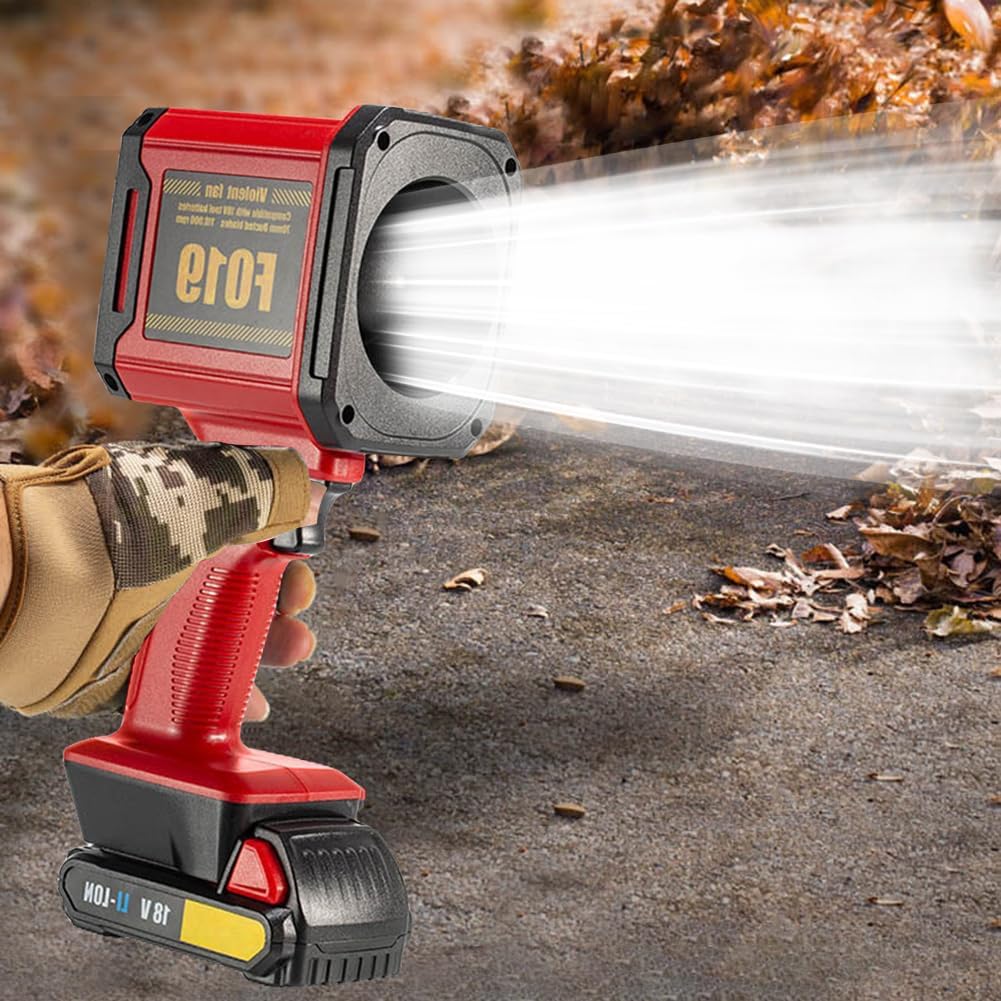
Figure 4: The Turbo Fan in operation, showcasing its powerful air output for effective cleaning and blowing tasks.
Battery Information
The device is powered by a 5-pack 18650 7500mAh battery. It offers prolonged usage, with approximately 12 hours on low gear and 15 minutes on high gear.
The battery pack is compatible with various battery brands (e.g., X005, X006, Milwaukee X007, X008), offering flexible power solutions.
Charging the Battery
- Disconnect the battery pack from the blower unit.
- Connect the charging cable to the battery pack's charging port.
- Plug the other end of the charging cable into a suitable power source.
- Allow 8-14 hours for a full charge.
Maintenance
- Cleaning: Wipe the exterior of the blower with a soft, dry cloth. Do not use harsh chemicals or abrasive cleaners.
- Air Vents: Periodically check and clear any dust or debris from the air intake and outlet vents to ensure optimal performance.
- Storage: Store the blower in a cool, dry place away from direct sunlight and extreme temperatures. If storing for extended periods, ensure the battery is partially charged (around 50%) to prolong its lifespan.
Troubleshooting
| Problem | Possible Cause | Solution |
|---|---|---|
| Blower does not turn on. | Battery is not charged or not properly attached. | Ensure battery is fully charged and securely attached to the unit. |
| Weak airflow. | Low battery charge; obstructed air vents. | Recharge battery; clear any obstructions from air intake/outlet. |
| Unusual noise during operation. | Debris inside the fan; internal malfunction. | Turn off and inspect for visible debris. If noise persists, discontinue use and contact support. |
Specifications
- Brand: Generic
- Model: F019
- Working Voltage: 12V
- Maximum Power: Approximately 1000W
- Rated Power: 500W
- Full Power Thrust: 600-650g
- Motor Speed: 0-3300 RPM (Maximum Speed: 45m/s)
- Usage Time (Low Gear): Approximately 12 Hours
- Usage Time (High Gear): Approximately 15 Minutes
- Charging Time: Approximately 8-14 Hours
- Battery: 5 x 18650 7500mAh Battery Packs (compatible with X005, X006, Milwaukee X007, X008)
- Material: ABS
- Product Dimensions (Excluding Battery Pack): 120 x 95 x 270mm
- Product Weight (Excluding Battery Pack): 534g
- Accessories: 1 x Charging Cable

Figure 5: Key features of the Lithium Electric Turbine Fan, including stepless speed change, 650G thrust, storm force, and long endurance, indicative of its high-power industrial grade design.
Warranty and Support
For warranty information or technical support, please refer to the contact details provided with your purchase documentation or visit the manufacturer's official website. Keep your purchase receipt as proof of purchase.
This product is designed for reliable performance. In case of any issues not covered by the troubleshooting guide, please contact customer service for assistance.