1. Introduction
This manual provides essential instructions for the safe and efficient operation, maintenance, and troubleshooting of your Generic Cool Mist Humidifier, Model NU5289. Please read this manual thoroughly before using the appliance and retain it for future reference.

Figure 1: Generic Cool Mist Humidifier, Model NU5289. This image shows the humidifier with its transparent blue water tank and white base, placed on a wooden surface.
2. Important Safety Instructions
- Always place the humidifier on a firm, flat, water-resistant surface at least 12 inches (30 cm) away from walls and appliances.
- Do not operate the humidifier without water in the tank.
- Do not move the humidifier when the water tank is filled.
- Unplug the appliance before filling, cleaning, or performing any maintenance.
- Keep out of reach of children and pets.
- Do not block air vents.
- Use only clean, cool tap water. Distilled water is recommended to minimize mineral buildup.
3. Product Components
Your humidifier consists of the following main components:
- Water Tank (1.1 Gallon Capacity)
- Humidifier Base
- Wicking Filter
- Control Knob (for power and mist settings)

Figure 2: Humidifier components. This image displays the humidifier from an angle, highlighting the transparent water tank, the white base, and the filter visible inside the tank.
4. Setup Instructions
- Unpack: Carefully remove all packaging materials and place the humidifier on a flat, stable surface.
- Remove Tank: Lift the water tank from the humidifier base using the easy-grip handle.
- Fill Tank: Invert the water tank and unscrew the cap. Fill the tank with cool, clean water. Distilled water is recommended. Do not add essential oils or medication to the water tank.
- Replace Cap: Screw the cap back onto the water tank securely.
- Place Tank: Place the filled water tank back onto the humidifier base, ensuring it is seated correctly.
- Plug In: Plug the power cord into a standard electrical outlet.
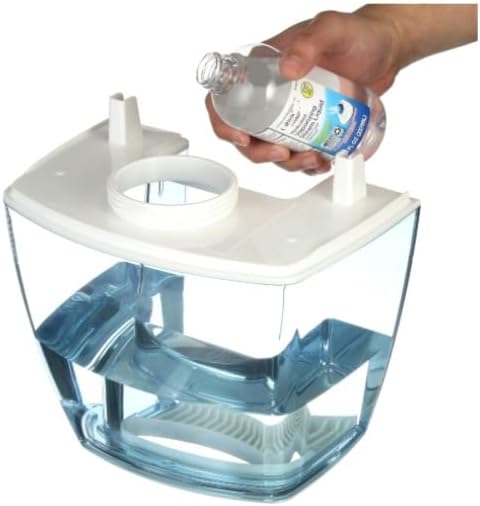
Figure 3: Filling the water tank. A hand is shown pouring water from a bottle into the inverted humidifier tank.
5. Operating Instructions
The humidifier features a simple control knob for power and mist output settings.
- Power On/Off: Rotate the control knob clockwise to turn the humidifier on. Rotate counter-clockwise until it clicks to turn it off.
- Mist Settings:
- Low Mist: Rotate the knob to the first setting for a gentle mist output.
- High Mist: Rotate the knob further to the second setting for maximum mist output.
- The humidifier will operate for up to 24 hours on a single full tank, depending on the mist setting.
6. Maintenance and Cleaning
Regular cleaning is essential to maintain optimal performance and hygiene. Always unplug the humidifier before cleaning.
- Daily Maintenance:
- Empty any remaining water from the tank and base.
- Rinse the tank and base with fresh water.
- Allow all parts to air dry completely before reassembly or storage.
- Weekly Cleaning (Filter and Tank):
- Remove the water tank and the wicking filter.
- Clean the wicking filter by rinsing it under cool tap water. Do not use soap or detergents on the filter.
- To remove mineral buildup from the tank and base, fill the tank with a mixture of 1 cup (240ml) white vinegar and 1 cup (240ml) water. Let it soak for 20 minutes, then rinse thoroughly.
- Wipe the exterior of the humidifier with a soft, damp cloth.
- Filter Replacement: The wicking filter should be replaced every 1-3 months, depending on water hardness and usage. Refer to the product packaging for compatible replacement filters.

Figure 4: Key features of the humidifier. This graphic highlights features such as invisible cool mist, 24-hour runtime, filtered moisture, and coverage for up to 250 sq ft.
7. Troubleshooting
| Problem | Possible Cause | Solution |
|---|---|---|
| No mist output | No water in tank; Unit not plugged in; Filter clogged. | Fill water tank; Ensure power cord is securely plugged in; Clean or replace filter. |
| Unusual odor | Stagnant water; Dirty tank/filter. | Empty and clean the water tank and filter thoroughly. Use fresh water daily. |
| White dust around humidifier | Hard water mineral buildup. | Use distilled water. Clean the tank and filter regularly to remove mineral deposits. |
8. Product Specifications
| Feature | Detail |
|---|---|
| Brand | Generic |
| Model Name | Cool Mist Humidifier |
| Model Number | NU5289 |
| Operation Mode | Cool Mist |
| Tank Capacity | 1.1 Gallons |
| Coverage Area | Up to 250 Square Feet |
| Runtime | Up to 24 hours (on a single fill) |
| Settings | High, Low |
| Color | White and Blue |
| Product Dimensions | 9"D x 8.5"W x 11"H |
| Item Weight | 3.5 Pounds |
| Wattage | 25 watts |
| Included Components | 1.1 Gallon Tank, Humidifier Base, Wicking Filter |
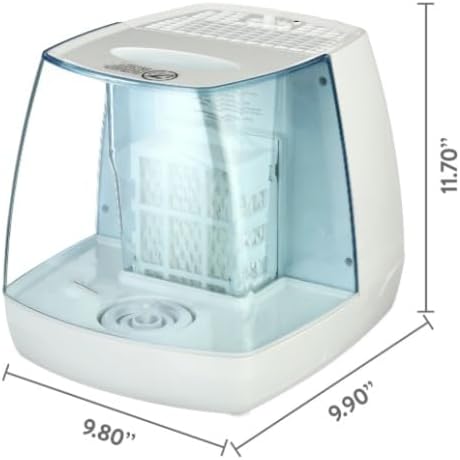
Figure 5: Humidifier dimensions. This image shows the humidifier with measurements indicating its depth (9.80"), width (9.90"), and height (11.70").
9. Warranty and Support
For warranty information or product support, please refer to the warranty card included with your purchase or contact the manufacturer directly. Keep your proof of purchase for warranty claims.
Manufacturer: Reliance Trading