
1. Product Overview
The Tulbeys K19 AI Translation Earbuds are designed to facilitate real-time communication across language barriers. These wireless open-ear headphones offer three intelligent translation modes, long battery life, and comfortable wear, making them suitable for travel, business, and learning.
Key features include support for 134 languages, Bluetooth 5.4 connectivity, and an ergonomic open-ear design for comfort and situational awareness. The K19 earbuds are also designed with a lanyard option for secure wearing around the neck, preventing loss.
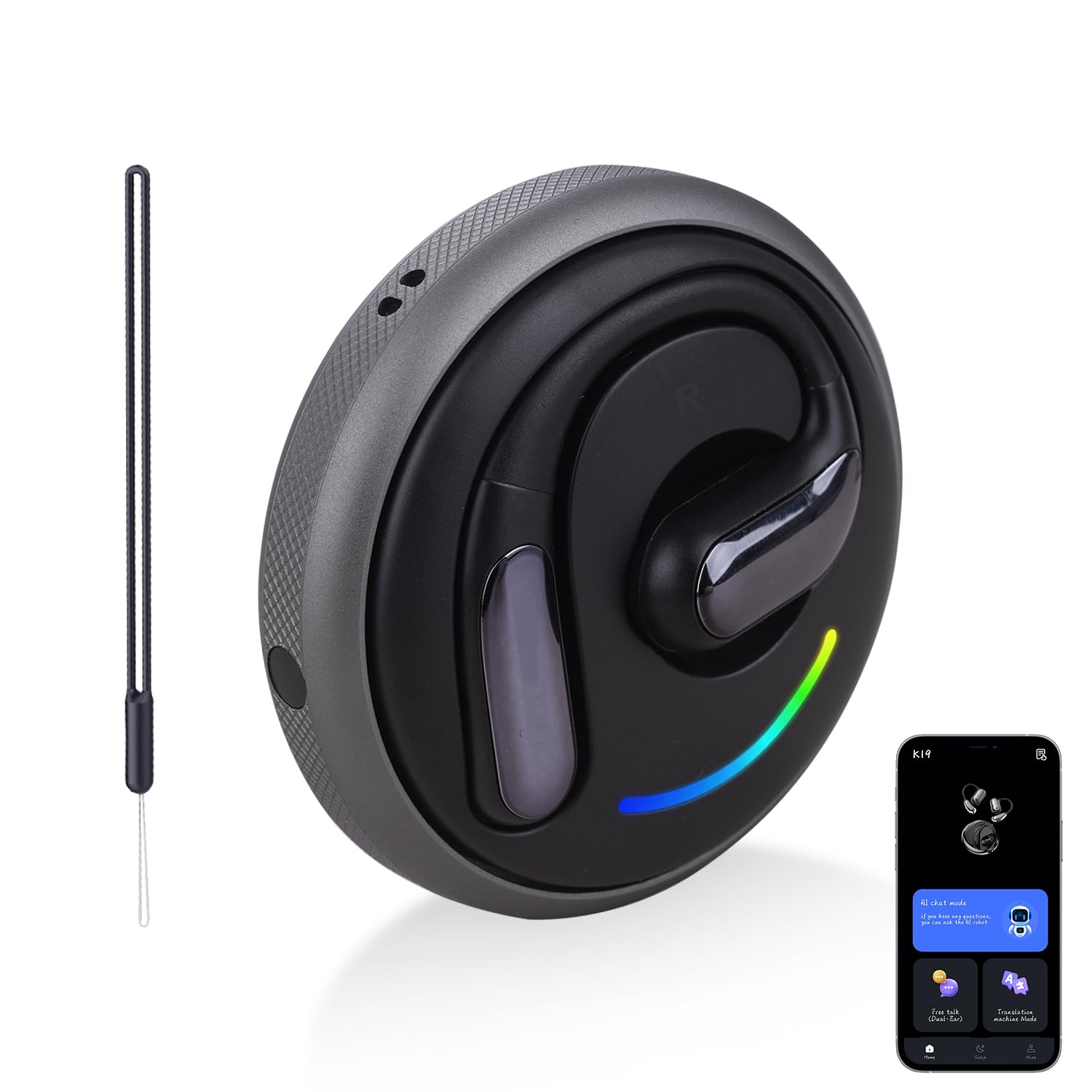
Image: Tulbeys K19 AI Translation Earbuds, showing the earbuds and their charging case.

Image: An exploded view illustrating the internal components of a K19 earbud, highlighting its acoustic structure.
2. Package Contents
Please verify that all items are present in the package:
- Tulbeys K19 AI Translation Earbuds (Left and Right)
- Charging Case
- Charging Cable (USB-C)
- User Manual (this document)
- Note: The product specifications mention "Blu-ray" as an included component, which is an error. Please disregard this item.
3. Setup and First Use
3.1 Charging the Earbuds and Case
Before first use, fully charge the earbuds and the charging case. Place the earbuds into the charging case and connect the USB-C cable to a power source.
- Earbuds charging time: Approximately 1.5 hours for a full charge.
- Charging case charging time: Approximately 1-2 hours.
- Battery life: Up to 8 hours on a single charge for earbuds, and up to 50 hours total playtime with the charging case.

Image: Illustration of the K19 earbuds and charging case, highlighting 8 hours single charge, 50 hours with charging case, and 1.5 hours full charge time.
3.2 Connecting to the "ear dance" App
The Tulbeys K19 AI Translation Earbuds require the "ear dance" application for full functionality, especially for translation features.
- Download the App: Scan the QR code provided in the manual or search for "ear dance" in the Google Play Store (for Android) or Apple App Store (for iOS). You can also visit earjoy-dance.com/app-download-h5.
- Enable Bluetooth: Turn on Bluetooth on your smartphone.
- Open the App: Launch the "ear dance" app and navigate to the interface for device binding.
- Bind Device: Click the "bound device" option within the app. Scan the exclusive QR code (usually found in the product packaging or a dedicated section of the physical manual) or enter the binding code to connect your K19 translation earbuds.

Image: Visual guide detailing the four steps to connect the K19 AI Earbuds to the "ear dance" application, including QR code for app download, Bluetooth settings, app interface, and translation mode selection.
3.3 Bluetooth Pairing (General)
For general audio use without the translation app, you can pair the earbuds directly via Bluetooth.
- Ensure the earbuds are charged and in pairing mode (refer to the app or product instructions for specific pairing mode activation if needed).
- On your device (smartphone, tablet), go to Bluetooth settings.
- Select "K19" from the list of available devices to pair.
- Once paired, the earbuds are ready for audio playback and calls.
4. Operating Instructions
4.1 Intelligent Translation Modes
The K19 earbuds offer three primary translation modes via the "ear dance" app:
- Free Talk Mode: Ideal for natural conversations between two people. Each person wears an earbud, and the app facilitates real-time translation of spoken words.
- Translation Machine Mode: Suitable for one-on-one interactions where one person speaks into the phone/earbud, and the translation is played through the other earbud or phone speaker.
- Headphones + Phone Mode: Allows one person to wear the earbuds for listening to translations, while the other person speaks into the phone, and the translation is heard by the earbud wearer.

Image: Depicts the three intelligent translation modes: Free Talk Mode (two people with earbuds), Translation Machine Mode (one person speaking, translation heard by another), and Headphones+Phone Mode (one person with earbuds, another speaking into phone).
The earbuds support 134 languages with real-time translation, achieving high accuracy in approximately 0.3 seconds.

Image: Illustrates the AI translation technology within the K19 earbuds, emphasizing 134 languages and 0.3-second real-time translation.
4.2 Audio Playback and Calls
Beyond translation, the K19 earbuds function as standard wireless headphones for music and phone calls.
- Music Playback: Once paired via Bluetooth, you can stream audio from your device.
- Phone Calls: Answer, end, or reject calls using the earbud controls (refer to the app or product instructions for specific touch controls).

Image: A person wearing K19 earbuds, with icons representing the three-in-one functionality: Translate Everywhere, Music Playing, and Phone Calls.
4.3 Open-Ear Design and Comfort
The open-ear design allows sound to enter the ear naturally, reducing pressure on the eardrum and maintaining awareness of your surroundings. This design is intended for comfortable, all-day wear.

Image: Comparison showing the ergonomic open-ear design of the K19 earbuds versus traditional in-ear headphones, highlighting comfort and reduced ear pressure.
4.4 App Features: Sleep-Aid Music
In addition to translation modes, the "ear dance" app also provides a selection of free sleep-aid music to enhance relaxation.

Image: Screenshot of the "ear dance" app displaying various sleep-aid music categories like Heaven, Graceful, As Dream, Depth, Moon Tides, and Dream Piano.
5. Use Cases
The Tulbeys K19 AI Translation Earbuds are versatile and can be used in various scenarios:
- International Travel: Communicate with locals, ask for directions, or order food without language barriers.
- International Business Meetings: Facilitate real-time understanding and communication among participants from different linguistic backgrounds.
- Learning & Training: Aid in understanding foreign language content during study or training sessions.
- Academic Communication: Support comprehension of lectures and discussions at international conferences or seminars.

Image: A person interacting with a vendor in a market, demonstrating the use of K19 earbuds for international travel communication.

Image: Individuals in a business meeting setting, illustrating how K19 earbuds can aid in international business communication.

Image: A student using K19 earbuds while studying, demonstrating their utility for language learning and training.

Image: People in an academic setting, showing K19 earbuds assisting in academic communication and understanding.
6. Maintenance and Care
Proper maintenance ensures the longevity and optimal performance of your K19 earbuds.
- Cleaning: Gently wipe the earbuds and charging case with a soft, dry, lint-free cloth. Avoid using abrasive materials, solvents, or harsh chemicals.
- Storage: When not in use, store the earbuds in their charging case to protect them from dust and damage.
- Water Resistance: The product is not specified as waterproof. Avoid exposure to water, rain, or excessive moisture.
- Temperature: Do not expose the earbuds to extreme temperatures (hot or cold) or direct sunlight for extended periods.
7. Troubleshooting
If you encounter issues with your Tulbeys K19 AI Translation Earbuds, refer to the following common solutions:
| Problem | Possible Solution |
|---|---|
| Earbuds not turning on/charging |
|
| Cannot pair with device |
|
| Translation not working or inaccurate |
|
| Low audio quality or disconnections |
|
8. Specifications
| Feature | Detail |
|---|---|
| Model Name | K19 |
| Brand | Tulbeys |
| Connectivity Technology | Wireless (Bluetooth 5.4) |
| Wireless Communication Technology | Bluetooth |
| Bluetooth Version | 5.4 |
| Special Feature | AI Translation Technology, Open Ear Design |
| Noise Control | Adaptive Noise Cancellation |
| Ear Placement | Over Ear |
| Form Factor | On Ear |
| Material | Plastic, Silicone |
| Battery Life | 8 Hours (earbuds), 50 Hours (with charging case) |
| Charging Time | 1.5 Hours (earbuds), 1-2 Hours (charging case) |
| Control Method | App |
| Compatible Devices | Smartphones (iOS & Android) |
| Item Weight | 140 Grams / 4.9 ounces |
| Product Dimensions | 1.97 x 0.67 x 1.81 inches |
| Languages Supported | 134 Languages |
| Translation Speed | Approximately 0.3 seconds |
9. Warranty and Support
For warranty information, technical support, or customer service inquiries, please refer to the contact details provided with your purchase or visit the official Tulbeys website. Keep your proof of purchase for warranty claims.
Official Tulbeys Store: Tulbeys Smart Life Store