
1. Introduction
This manual provides essential instructions for the safe operation, setup, and maintenance of your Aetheria WL-FPV64 1/64 Mini RC Car. Please read this manual thoroughly before operating the product to ensure proper function and to prevent damage.
The Aetheria WL-FPV64 is a 1:64 scale APP-controlled mini RC car featuring an HD FPV camera, LED ambient lights, and interactive controls, designed for enthusiasts aged 16 and above.
Safety Note: This product is recommended for users aged 16 years and up.
2. Package Contents
Verify that all items listed below are included in your package:
- Aetheria WL-FPV64 RC Car x 1
- FPV Camera x 1
- USB Charging Cable x 1
- User Manual x 1 (This document)
3. Product Overview
Familiarize yourself with the components of your Aetheria WL-FPV64 Mini RC Car.

Figure 3.1: Aetheria WL-FPV64 Mini RC Car with FPV camera and USB cable, packaged.
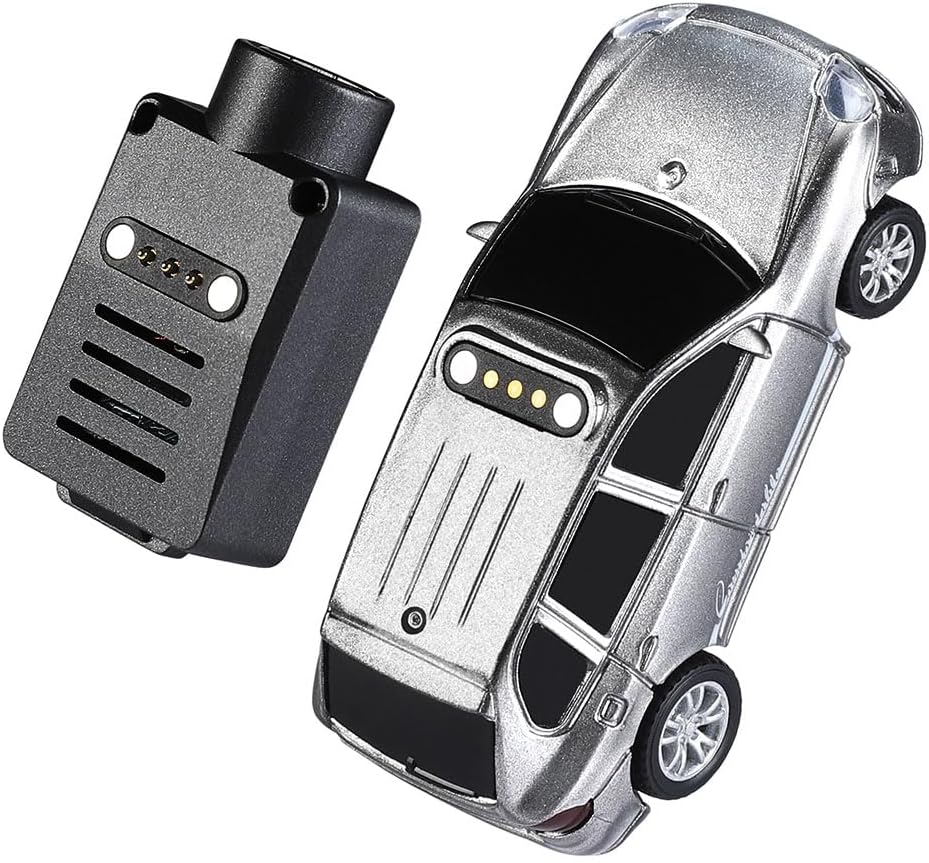
Figure 3.2: Top view of the RC car and its FPV camera module, highlighting connection interfaces.

Figure 3.3: Rear view of the RC car with the FPV camera attached.

Figure 3.4: Underside of the RC car, detailing the power switch and charging port.

Figure 3.5: Front view of the RC car with the FPV camera.

Figure 3.6: Top view of the RC car with the FPV camera attached.
4. Setup
4.1 Battery Charging
- Locate the USB charging port on the underside of the RC car (refer to Figure 3.4).
- Connect the provided USB charging cable to the car's charging port.
- Plug the other end of the USB cable into a standard USB power adapter (not included) or a computer USB port.
- The charging indicator light (if present) will illuminate during charging and turn off or change color when fully charged.
- Charging time is approximately 0.5 hours for a full charge. Do not overcharge the battery.
4.2 FPV Camera Attachment
- Ensure the RC car is powered off.
- Align the FPV camera module with the designated mounting points on the roof of the RC car (refer to Figure 3.2).
- Gently press the camera module into place until it securely clicks or locks. Ensure the connection pins are properly engaged.
4.3 App Installation and Connection
- Download the official Aetheria RC control application from your smartphone's app store (iOS App Store or Google Play Store). Search for "Aetheria RC" or refer to the QR code on the product packaging (if available).
- Install the application on your smartphone.
- Power on the RC car using the ON/OFF switch on its underside.
- Open the Aetheria RC application on your smartphone.
- Follow the in-app instructions to connect to the RC car via Wi-Fi or Bluetooth. The app will typically guide you to connect to the car's Wi-Fi network for FPV streaming.
5. Operating Instructions
5.1 Powering On/Off
- To power on: Slide the ON/OFF switch on the underside of the car to the "ON" position.
- To power off: Slide the ON/OFF switch to the "OFF" position.
5.2 Basic Controls (via App)
Once connected to the Aetheria RC app, you will find virtual controls for driving the car. These typically include:
- Steering: Use the virtual joystick or tilt controls on your smartphone to steer left and right.
- Acceleration/Brake: Use the virtual throttle slider or joystick to move forward, backward, and brake.
- Speed Modes: The car features three speed modes. Select the desired speed mode within the app interface:
- First Gear: Approximately 1.7 km/h
- Second Gear: Approximately 2.5 km/h
- Third Gear: Approximately 3 km/h
5.3 FPV Camera Operation
The FPV camera streams live 720P video directly to your smartphone screen through the Aetheria RC app. Ensure a stable Wi-Fi connection for optimal video quality.
- The live video feed will appear automatically in the app once connected.
- Use the FPV view for an immersive driving experience, especially for precision maneuvers and exploring tight spaces.
5.4 Drifting
The 1:64 scale chassis features a 4WD drift suspension system. Practice controlling the car at higher speeds and initiating turns to achieve controlled drifts. Experiment with different speed modes to find the optimal setting for drifting.
6. Maintenance
6.1 Cleaning
- Use a soft, dry cloth to wipe down the car's body and wheels after use.
- Avoid using water or harsh chemicals, as these can damage electronic components.
- Gently remove any debris from the wheels and axles to ensure smooth operation.
6.2 Battery Care
- Always fully charge the battery before first use.
- Do not leave the battery charging unattended for extended periods.
- If storing the car for a long time, charge the battery to approximately 50% to prolong its lifespan.
- Avoid exposing the battery to extreme temperatures.
6.3 Storage
Store the RC car in a cool, dry place away from direct sunlight and moisture when not in use.
7. Troubleshooting
- Car not responding:
- Ensure the car is powered on.
- Check if the battery is charged. Recharge if necessary.
- Verify that the app is correctly connected to the car.
- FPV video feed is choppy or disconnected:
- Ensure your smartphone's Wi-Fi is connected to the car's network.
- Move closer to the car to improve signal strength.
- Minimize interference from other Wi-Fi devices.
- Short running time:
- Ensure the battery is fully charged before each use.
- Battery performance may decrease over time with repeated use and charging cycles.
- Car drifts unexpectedly or does not drive straight:
- Check for debris in the wheels or axles.
- Ensure the steering trim in the app is centered (if available).
8. Specifications
| Product Name | 1:64 Scale APP-Controlled Mini RC Car |
| Model | WL-FPV64 (also referred to as 6401) |
| Scale | 1:64 |
| Speed Modes | First Gear: 1.7 km/h, Second Gear: 2.5 km/h, Third Gear: 3 km/h |
| Drive Mode | Rear-Wheel Drive (RWD) |
| Motor | 0610 Coreless Motor |
| Control Distance | ≥30m |
| Running Time | Approximately 15 minutes (at full speed) |
| Charging Time | Approximately 0.5 hours |
| Battery | 3.7V 100mAh LiPo Battery with Protection Board |
| Charger | USB Charger |
| Product Weight | 29.3g (approx. 1.03 ounces) |
| Product Dimensions | 6.8 x 3.2 x 3.9 cm (approx. 2.68 x 1.2 x 1.5 inches) |
| Recommended Age | 16 years and up |
9. Warranty and Support
Your Aetheria WL-FPV64 Mini RC Car is backed by a 12-month warranty from the date of purchase. This warranty covers manufacturing defects and ensures the product meets its specified performance standards under normal use.
For warranty claims, technical support, or any questions regarding your product, please contact Aetheria customer service through the retailer's platform or the official Aetheria website. Please have your purchase receipt and product model number (WL-FPV64) ready when contacting support.