Introduction
This manual provides essential information for the safe and efficient operation, maintenance, and troubleshooting of your LOTOS LTP8500 85AMP Non-Touch Pilot Arc Plasma Cutter. Please read this manual thoroughly before operating the equipment.
The LOTOS LTP8500 is an 85AMP non-touch pilot arc plasma cutter designed for precise cutting of various metals, including stainless steel, alloy steel, mild steel, copper, and aluminum. It features a drag cut function for smoother, more accurate cuts and an intuitive LED display for easy monitoring and control.
Safety Information
WARNING: Plasma cutting can be dangerous. Always follow safety precautions to prevent injury or death.
- Always wear appropriate personal protective equipment (PPE), including welding helmet, gloves, protective clothing, and safety shoes.
- Ensure adequate ventilation to avoid inhaling fumes.
- Do not operate in wet conditions or near flammable materials.
- Ensure proper grounding of the equipment.
- Keep children and unauthorized personnel away from the work area.
- Disconnect power before performing any maintenance or changing consumables.
Product Components
The LOTOS LTP8500 plasma cutter package includes the main unit, plasma torch, ground clamp, and a drag cut consumable kit.
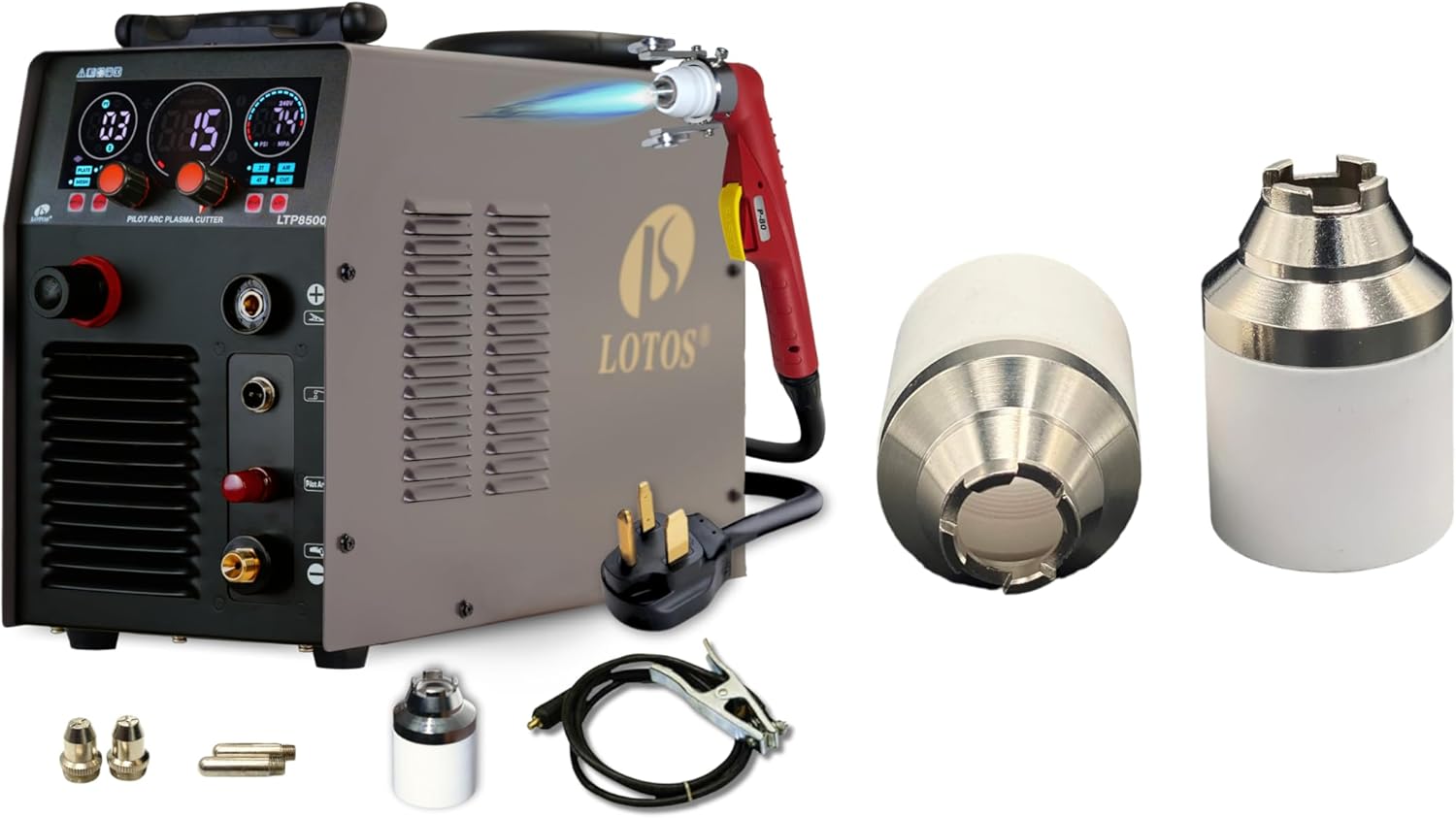
Image: The LOTOS LTP8500 plasma cutter unit with its included accessories, including the plasma torch, ground clamp, and various consumables. The unit is grey with a red and black control panel, and the torch is red.
Control Panel Overview
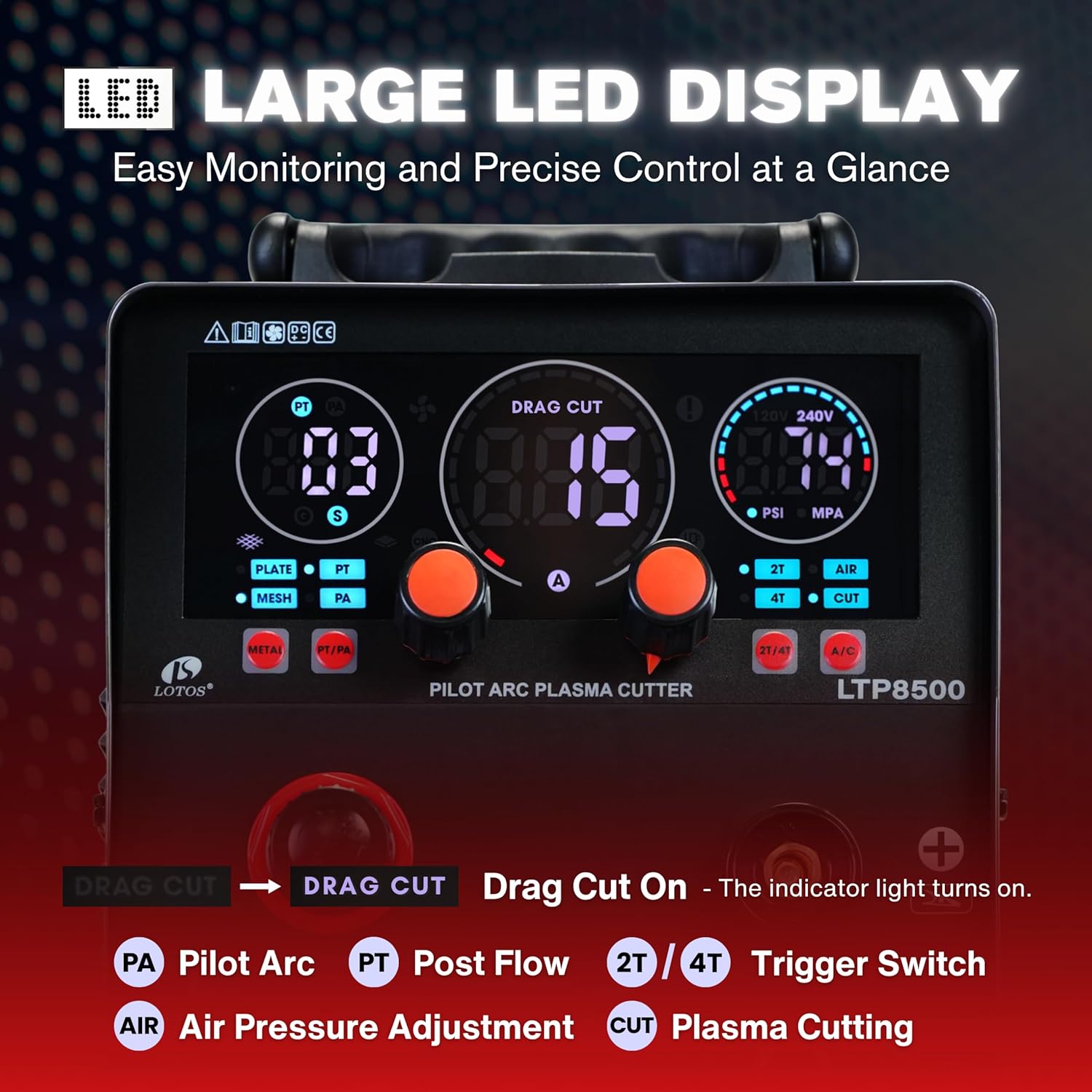
Image: Close-up view of the LOTOS LTP8500's large LED display and control panel. It shows indicators for Pilot Arc (PA), Post Flow (PT), Trigger Switch (2T/4T), Air Pressure Adjustment (AIR), and Plasma Cutting (CUT). The display shows numerical values for current, time, and air pressure.
- Large LED Display: Provides real-time information on cutting parameters.
- Pilot Arc Time Adjustment: (6–15s) for cutting through mesh metal.
- Input Air Pressure Range Reminder: Ensures precise output.
- Post-Flow Time Adjustment: (2–10s) to cool the torch and extend its life.
- Drag Cut On/Off Indicator: Indicates when the drag cut function is active.
Setup Instructions
- Unpacking: Carefully remove all components from the packaging. Inspect for any shipping damage.
- Power Connection: Connect the plasma cutter to a suitable power source. The unit operates on 210-245V. A 50A breaker is recommended at 220V.
- Air Compressor Connection: Connect a clean, dry air supply to the air inlet on the back of the unit. Ensure the air pressure is within the recommended range for optimal performance. The unit features an input air pressure range reminder.
- Torch and Ground Clamp Connection:
- Connect the plasma torch to the designated port on the front panel.
- Attach the ground clamp to the workpiece or work table, ensuring a clean, secure connection for proper electrical contact.
- Consumable Installation: Install the appropriate consumables (electrode, nozzle, shield cup, retaining cup) into the plasma torch. Refer to the "Maintenance" section for detailed consumable replacement.
Operating Instructions
Basic Operation
- Power On: Turn on the main power switch located on the unit.
- Adjust Settings: Use the control knobs to set the desired cutting current (15-85A) and air pressure based on the material thickness and type. Monitor the large LED display for precise control.
- Pilot Arc Time: Adjust the Pilot Arc Time (6-15 seconds) as needed, especially for cutting expanded metal or mesh.
- Post-Flow Time: Set the Post-Flow Time (2-10 seconds) to ensure proper torch cooling after cutting.
- Select Mode: Choose between 2T (two-touch) or 4T (four-touch) trigger mode depending on your cutting preference.
- Initiate Cut: Position the torch over the workpiece. Press the trigger to initiate the pilot arc and begin cutting.
Drag Cutting
The LTP8500 is designed for drag cutting, allowing the torch to rest directly on the workpiece for smoother, more accurate cuts.

Image: A visual comparison illustrating stand-off cutting versus drag cutting. Stand-off cutting requires a consistent gap and can result in rough edges, while drag cutting allows the torch to rest on the workpiece, leading to cleaner, smoother edges and easier operation for beginners. This method is ideal for tracing templates or freehand lines.
- Advantages of Drag Cutting:
- Torch rests on workpiece for better stability.
- Fewer burrs and a cleaner cut line.
- Ideal for template tracing or freehand cutting.
- To engage drag cut, ensure the drag cut indicator on the control panel is illuminated.
- Gently rest the torch shield directly on the material surface and move it along the desired cut path.
Cutting Capacity
- Clean Cut: Up to 1 inch (25mm)
- Severance Cut: Up to 1.5 inches (38mm)

Image: An infographic highlighting the cutting capabilities of the LOTOS LTP8500, showing a 1-inch clean cut and 1.5-inch severance cut. It also mentions a 15% boost in cutting speed and features like enhanced PC boards, drag cut readiness, cleaner cutting edges, minimal slag, enhanced precision, and longer consumable life.
Non-Touch Pilot Arc Advantage
The non-touch pilot arc feature allows for cutting through painted, rusted, or dirty surfaces without needing to clean the material first, and extends consumable life.

Image: A comparison demonstrating the benefits of a non-touch pilot arc plasma cutter. It shows that the LOTOS pilot arc cutter can effectively cut through rough, clean, painted, and rusted surfaces, whereas a standard plasma cutter without pilot arc is limited to clean surfaces only.
Maintenance
Regular maintenance ensures the longevity and optimal performance of your plasma cutter.
Consumable Replacement
The drag cut consumable kit includes retaining cups and drag shields. Inspect consumables regularly for wear and replace as needed to maintain cut quality.
- Electrode: Replace when the emitter is pitted or worn.
- Nozzle: Replace when the orifice is enlarged or out of round.
- Shield Cup: Replace if cracked or severely damaged.
- Retaining Cup: Replace if damaged or unable to hold other consumables securely.
Always disconnect power before changing consumables.
Air Filter Maintenance
Check and drain the moisture from the air filter/regulator regularly. Replace the filter element if it becomes clogged or excessively dirty to ensure a clean and dry air supply.
General Cleaning
Keep the unit clean and free from dust and debris. Use a dry cloth to wipe down the exterior. Do not use solvents or abrasive cleaners.
Troubleshooting
| Problem | Possible Cause | Solution |
|---|---|---|
| No pilot arc or cutting arc |
|
|
| Poor cut quality (rough, excessive dross) |
|
|
| Torch misfires or cuts intermittently |
|
|
If problems persist, contact LOTOS customer support.
Specifications
| Feature | Detail |
|---|---|
| Model | LTP8500 |
| Input Voltage | 210-245V |
| Output Current | 15-85A DC |
| Clean Cut Capacity | 1 inch (25mm) |
| Severance Cut Capacity | 1.5 inches (38mm) |
| Recommended Breaker (220V) | 50A |
| Pilot Arc | Non-Touch Pilot Arc |
| Technology | IGBT Technology |
| Display | Large LED Display |
| Pilot Arc Time Adjustment | 6-15 seconds |
| Post-Flow Time Adjustment | 2-10 seconds |
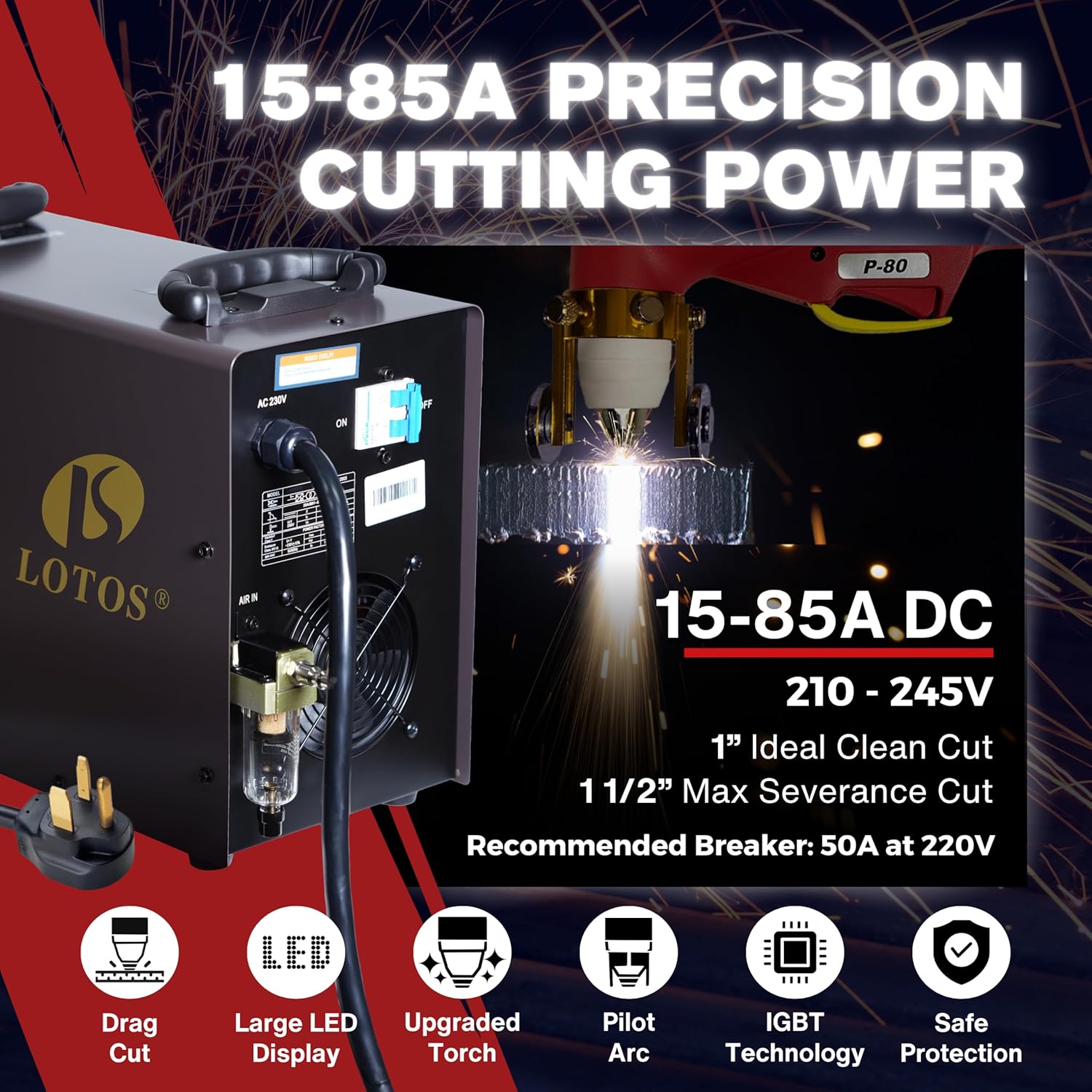
Image: An image detailing the 15-85A precision cutting power of the LOTOS LTP8500. It highlights the 210-245V input, 1-inch ideal clean cut, 1/2-inch max severance cut, and recommended 50A breaker at 220V. Icons represent features such as Drag Cut, Large LED Display, Upgraded Torch, Pilot Arc, IGBT Technology, and Safe Protection.
Warranty and Support
LOTOS Technology provides comprehensive support for its products.
- 30-Day Money-Back Guarantee: If you are not satisfied with your purchase, you may return it within 30 days.
- 1-Year New Replacement: The product is eligible for a new replacement within one year of purchase for manufacturing defects.
- 3-Year Hardware Coverage: Covers hardware defects for three years from the date of purchase.
- Lifetime Technical Support: Access to USA-based technical support for the lifetime of the product.
For technical assistance or warranty claims, please contact LOTOS customer service. Refer to the official LOTOS website for contact information.


