
1. Introduction
This instruction manual provides essential information for the installation, operation, and maintenance of the CFguang compatible Samsung Monitor Main Board, models BN41-02548A and BN91-18993A. Please read this manual thoroughly before attempting any installation or repair to ensure proper function and safety. This main board is designed as a replacement component for specific Samsung monitor models.
2. Product Overview
The CFguang Main Board is a replacement component for Samsung monitors, designed to restore or maintain display functionality. It ensures reliable performance and consistent functionality for all compatible models.
2.1 Key Features
- Ensures reliable performance for your monitor display.
- Durable and designed for ease of installation.
- Simplifies repair tasks, extending the life of your monitor.
- Offers consistent functionality across compatible models.
2.2 Package Contents
- 1 x CFguang Samsung Monitor Main Board (BN41-02548A / BN91-18993A)
2.3 Compatible Monitor Models
This main board is compatible with, but not limited to, the following Samsung monitor models:
- C24FG70FQN
- C24FG70FQU
- C24FG70FQL
- C27FG70FQN
- C27FG70FQU
- C27FG70FQL

Figure 1: Top-down view of the CFguang Samsung Monitor Main Board, showing various integrated circuits and connectors.
3. Safety Information
WARNING: Risk of electric shock. Only qualified service personnel should attempt installation or repair.
- Always disconnect the monitor from the power source before beginning any installation or repair work.
- Wear anti-static wrist straps to prevent electrostatic discharge (ESD) damage to sensitive electronic components.
- Handle the main board by its edges to avoid touching components directly.
- Ensure all connections are secure and correctly oriented before reapplying power.
- Keep small components away from children.
4. Setup and Installation
The installation of a monitor main board requires technical expertise. If you are not comfortable performing this procedure, it is recommended to seek assistance from a certified technician.
4.1 Pre-Installation Steps
- Power Disconnection: Ensure the monitor is completely unplugged from the wall outlet and all other connected devices.
- Disassembly: Carefully open the monitor casing according to the specific service manual for your Samsung monitor model.
- Old Board Removal: Disconnect all cables and connectors from the existing main board. Note their positions for reassembly. Remove any screws securing the old main board.
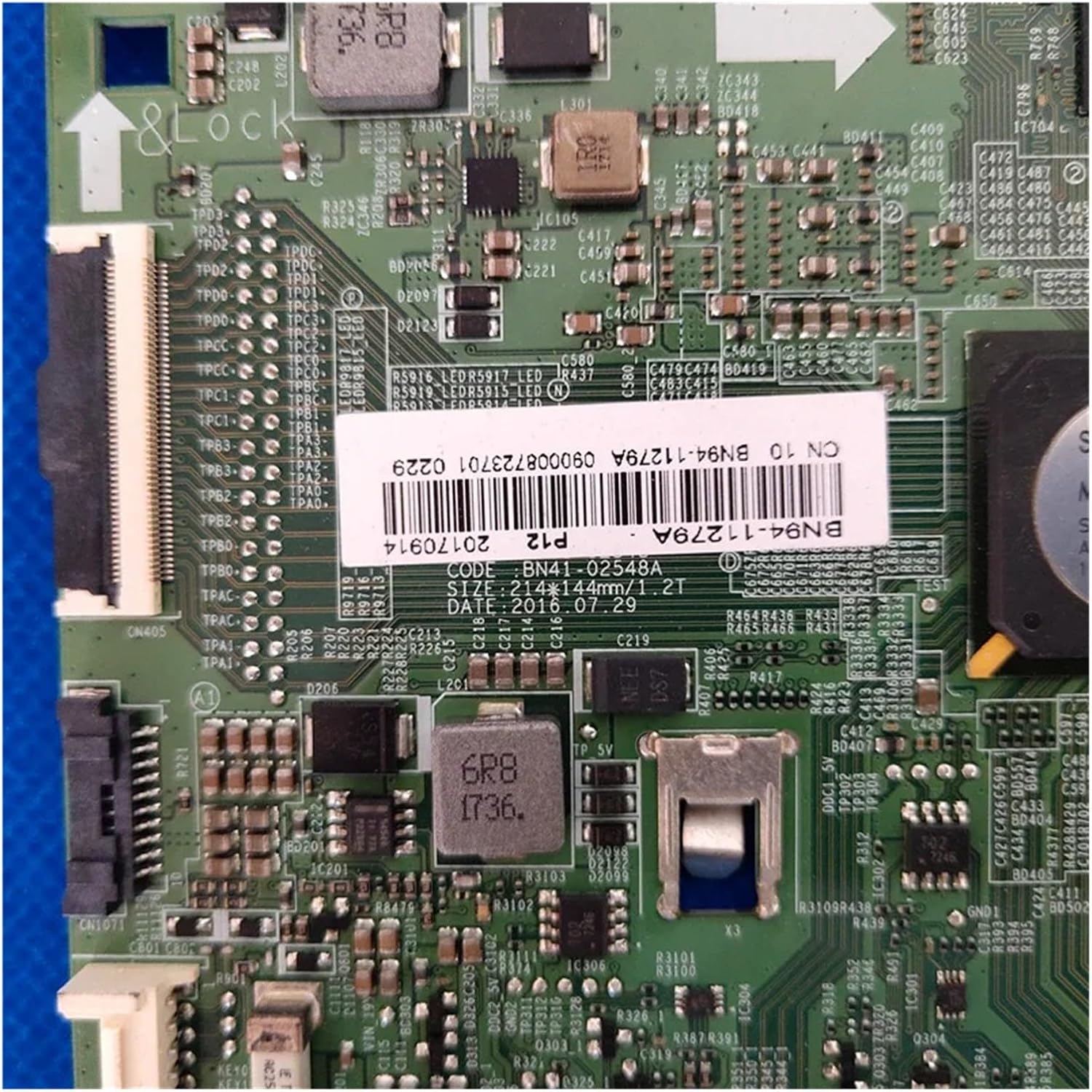
Figure 2: Close-up view of the main board, highlighting the product label with model numbers BN41-02548A and BN91-18993A.
4.2 Main Board Installation
- Positioning: Carefully place the new CFguang main board into the monitor casing, aligning it with the screw holes and connectors.
- Securing: Secure the new main board with the appropriate screws. Do not overtighten.
- Connecting Cables: Reconnect all cables and connectors to their corresponding ports on the new main board. Refer to your monitor's service manual or your notes from disassembly. Ensure all ribbon cables are seated correctly and latched.

Figure 3: Detailed view of the main board's various connectors, including HDMI ports and control buttons, essential for proper reassembly.

Figure 4: Close-up of another section of the main board, illustrating power delivery components and smaller connectors that require careful handling.
4.3 Post-Installation
- Initial Test: Before fully reassembling the monitor, connect it to a power source and a video input. Power on the monitor to verify basic functionality (e.g., display, OSD menu).
- Reassembly: If the test is successful, disconnect power and carefully reassemble the monitor casing.
5. Operating Instructions
Once the main board is correctly installed, the monitor should operate as intended by the original manufacturer. There are no specific operating instructions for the main board itself, as its function is integrated into the monitor's overall operation.
- Power on the monitor using its power button.
- Select the appropriate input source using the monitor's OSD (On-Screen Display) menu.
- Adjust display settings (brightness, contrast, color) as needed via the OSD.
6. Maintenance
The CFguang main board is designed for long-term reliability and generally requires no routine maintenance. However, adhering to general electronic device care practices can prolong its lifespan.
- Keep Clean: Ensure the monitor's interior remains free of dust and debris, which can impede cooling and lead to component failure. Use compressed air for cleaning, ensuring the monitor is powered off and unplugged.
- Environmental Conditions: Operate the monitor within its specified temperature and humidity ranges. Avoid extreme conditions.
- Ventilation: Ensure the monitor's ventilation openings are not blocked to allow for proper heat dissipation.

Figure 5: Underside view of the main board, illustrating the solder points and circuit traces. This side should be protected from physical damage and moisture.
7. Troubleshooting
If you encounter issues after installing the main board, consider the following troubleshooting steps:
- No Power:
- Verify the power cable is securely connected to both the monitor and the wall outlet.
- Check the power supply unit (if external) for proper function.
- Ensure all internal power connectors to the main board are firmly seated.
- No Display / Black Screen:
- Confirm the video input cable (HDMI, DisplayPort, etc.) is securely connected to both the monitor and the source device.
- Ensure the correct input source is selected on the monitor.
- Check the internal display panel cable (LVDS or eDP) connection to the main board.
- Test with a different video source or cable.
- Distorted Image / Incorrect Colors:
- Check the video input cable for damage or loose connections.
- Reset monitor display settings to factory defaults via the OSD.
- Ensure the display panel cable is correctly seated.
- Monitor Not Responding to Buttons:
- Verify the button board cable is properly connected to the main board.
- Ensure no buttons are stuck.
If these steps do not resolve the issue, professional diagnosis and repair may be necessary.
8. Specifications
| Attribute | Detail |
|---|---|
| Brand | CFguang |
| Product Name | Smart TV Main Board |
| Part Models | BN41-02548A, BN91-18993A |
| Applicable TV/Monitor Models | C24FG70FQN, C24FG70FQU, C24FG70FQL, C27FG70FQN, C27FG70FQU, C27FG70FQL |
| Quantity | 1 Piece |
| Item Weight | 50 Grams |
9. Warranty and Support
Specific warranty information for this CFguang replacement part is typically provided by the seller at the time of purchase. Please refer to your purchase documentation or contact the seller directly for details regarding warranty coverage and support services.
For technical assistance or further inquiries, please contact the CFguang customer support channel provided with your purchase or through the retailer.