
Jogdous K039
Jogdous Neck Fan User Manual
Model: K039
Introduction
The Jogdous Neck Fan is a portable personal cooling device designed for comfort and convenience. Featuring an ergonomic design, it provides 360° airflow and instant cooling with its high-efficiency NTC chip and superconducting aluminum plate. This wearable fan offers customizable cooling with multiple fan speeds and cooling modes, powered by an 8000mAh rechargeable battery for extended use.

Image: The Jogdous Neck Fan, showcasing its design and cooling plate.
Product Features
- Instant Cooling: Equipped with a high-efficiency NTC chip and superconducting aluminum, it cools skin by up to 30°F in one second.
- 3D Surround Airflow: Provides 360° airflow around the neck and back for comprehensive cooling, with a hair-safe, tangle-free design.
- Ergonomic & Silent Operation: Lightweight and comfortable silicone arms adapt to any neck size. Operates quietly below 30dB.
- Customizable Modes: Offers 3 fan speeds (F1-F3) and 3 cooling modes (C1-C3): Blowing Only, Refrigeration Only, or both. Features a crisp LED display for smart controls.
- Long-lasting Battery: Built-in 8000mAh battery provides 2 to 12 hours of operation. Rechargeable via USB-C, can be used while charging.

Image: Illustrates the 3D Surround Cooling feature, providing comprehensive airflow.

Image: Detail of the NTC Refrigeration Technology for rapid cooling.
Setup
1. Charging the Device
Before first use, fully charge your Jogdous Neck Fan. Connect the provided USB-C cable to the charging port on the device and the other end to a compatible USB power adapter (not included). The LED display will indicate the charging status. A full charge typically takes approximately 3 hours. The device can be used while charging.

Image: Type-C charging port for convenient power replenishment.
2. Wearing the Neck Fan
Gently place the neck fan around your neck. The ergonomic design with soft, adjustable silicone arms ensures a comfortable and secure fit for various neck sizes. Position the cooling plate at the back of your neck for optimal contact and cooling effect.

Image: Demonstrates the ergonomic and adjustable fit of the neck fan.
Operating Instructions
1. Power On/Off
Press and hold the power button (usually indicated by a fan icon) for 2-3 seconds to turn the device on or off. The LED screen will illuminate upon activation.
2. Adjusting Fan Speed
Once powered on, short press the fan button to cycle through the 3 available fan speeds: F1 (low), F2 (medium), and F3 (high). The current fan speed will be displayed on the LED screen.
3. Selecting Cooling Mode
Short press the snowflake button to cycle through the 3 cooling modes: C1 (slight cold), C2 (medium cold), and C3 (strong cold). The device supports three combined modes: Blowing Only, Refrigeration Only, or both simultaneously for maximum cooling. The LED display will show the active cooling mode.
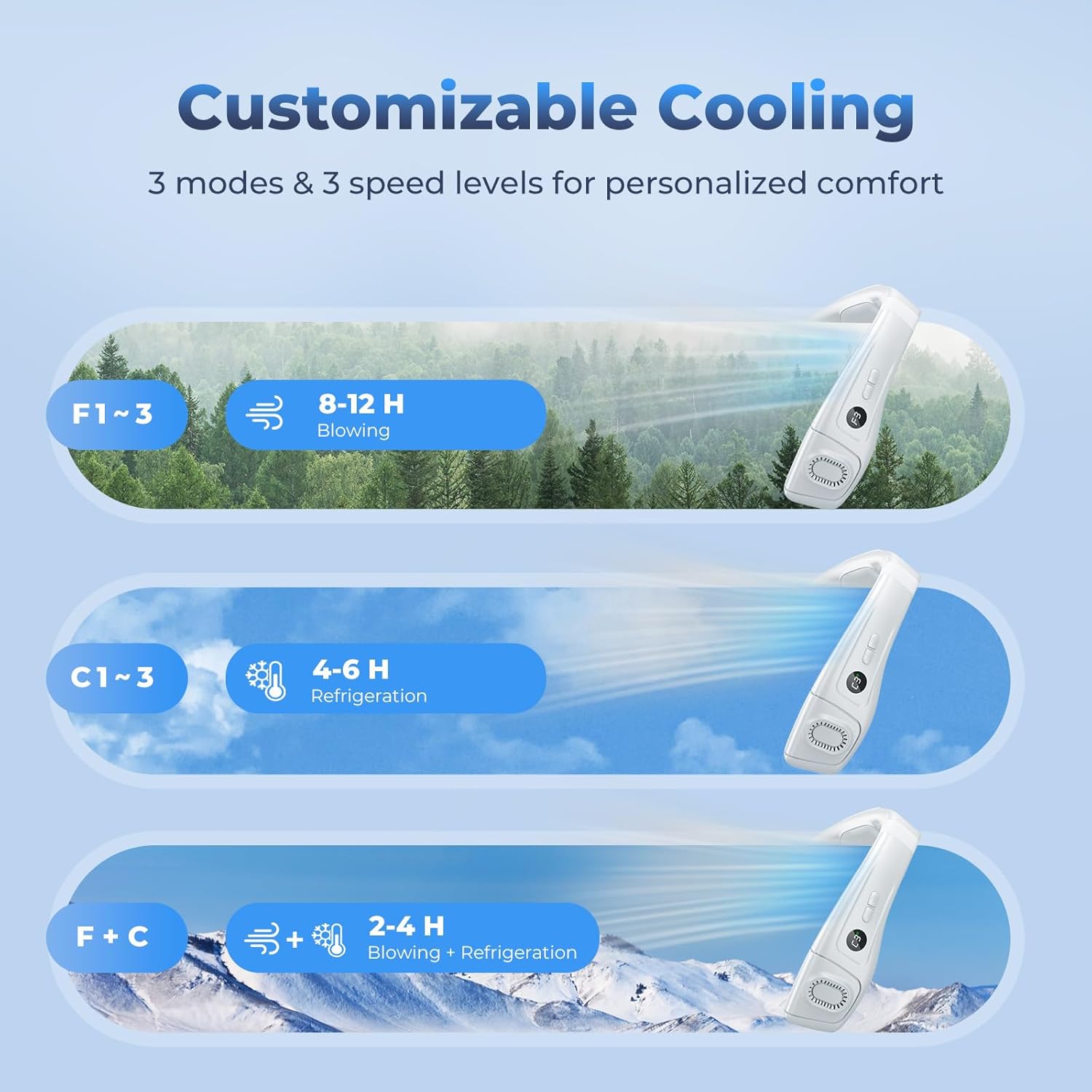
Image: Customizable cooling options with fan speeds and refrigeration levels.
4. LED Display
The integrated LED screen provides real-time information on the selected fan speed, cooling mode, and battery level, allowing for easy monitoring and control.

Image: Real-time monitoring of settings via the LED display.
Maintenance
1. Cleaning
To maintain optimal performance, regularly wipe the surface of the neck fan with a soft, dry cloth. Ensure the air inlets and outlets are free from dust and debris. Do not immerse the device in water or use harsh chemicals for cleaning.
2. Storage
When not in use for extended periods, store the neck fan in a cool, dry place away from direct sunlight and extreme temperatures. Ensure the device is fully charged before storing to prolong battery life.
Troubleshooting
| Problem | Possible Cause | Solution |
|---|---|---|
| Device not turning on | Low battery; Power button not pressed correctly. | Charge the device fully. Press and hold the power button for 2-3 seconds. |
| Weak airflow | Low battery; Air inlets/outlets blocked; Fan speed set too low. | Recharge the device. Clear any obstructions from air vents. Increase fan speed. |
| Cooling plate not cold | Cooling mode not activated; Cooling mode set too low; Low battery. | Activate refrigeration mode using the snowflake button. Increase cooling level. Recharge the device. |
| Short battery life | Using high fan speed/cooling mode; Frequent use. | Reduce fan speed or cooling mode. Ensure full charge before use. |
Specifications
| Feature | Detail |
|---|---|
| Brand | Jogdous |
| Model Name | K039 |
| Color | White |
| Power Source | Battery Powered |
| Battery Capacity | 8000mAh |
| Charging Type | USB-C |
| Voltage | 5 Volts |
| Fan Speeds | 3 Levels (F1, F2, F3) |
| Cooling Modes | 3 Levels (C1, C2, C3) |
| Noise Level | Below 30dB |
| Item Weight | 1.32 pounds |
| Product Dimensions | 7.8"D x 7.5"W x 3.2"H |
| Control Method | Touch |
| Included Components | Neck Fan |
Warranty & Support
Jogdous offers a 12-month satisfaction warranty for this product. For any inquiries, technical support, or warranty claims, please contact Jogdous customer service. Our support team is available 24 hours online to assist you.
Please refer to your purchase documentation for specific contact details or visit the official Jogdous website for further assistance.

Image: Jogdous customer support is available 24/7.
Related Documents - K039
 |
M5Stack ATOM HUB PROTO: Versatile DIY Prototyping Module Explore the M5Stack ATOM HUB PROTO (SKU: K039), a flexible DIY proto board module for ATOM series devices. Features multiple interfaces, compact design, and extensive mounting options for industrial and hobbyist applications. Learn about its specifications, included components, and usage examples. |
 |
Kidde Series 65 Conventional Fire Detectors & Series 60 Intrinsically Safe Detectors | Product Overview Detailed overview of Kidde Fire Protection's Series 65 conventional fire detectors (ionisation, optical smoke, heat) and Series 60 intrinsically safe detectors. Includes features, benefits, specifications, and part numbers. |
Ask a question about this manual
Ask about setup, troubleshooting, compatibility, parts, safety, or missing instructions. Manuals+ will review the question and use this page’s manual context to help answer it.