
1. Introduction
This manual provides detailed instructions for the installation, operation, and maintenance of your Rivix S20 Pro Smart Toilet. Please read this manual thoroughly before installation and use to ensure proper function and safety. Keep this manual for future reference.
2. Safety Information
Observe the following safety precautions to prevent injury or damage to the product:
- Always disconnect power to the unit before performing any maintenance, cleaning, or installation procedures.
- Ensure the electrical outlet is properly grounded and meets local electrical codes.
- Do not use abrasive cleaners, solvents, or harsh chemicals on any part of the toilet, as this may damage surfaces or internal components.
- Avoid spraying water directly onto the main unit or electrical components.
- Do not attempt to repair or modify the unit yourself. Contact qualified service personnel for assistance.
- Ensure all water connections are secure and leak-free before operating the toilet.
3. Package Contents
Verify that all components are present in the package:
- Rivix S20 Pro Smart Toilet Unit
- Wireless Remote Control
- Installation Hardware (bolts, washers, nuts)
- T-Valve
- Flange
- Battery Box
- Screws
- User Manual (this document)
- Installation Instruction Guide

Figure 3.1: Overview of included components and toilet dimensions. The image displays the smart toilet unit with dimensions (15.59" height, 26.97" length, 12" rough-in) and a box showing the remote control, screws, T-valve, installation instruction, flange, and battery box.
4. Product Features
The Rivix S20 Pro Smart Toilet integrates advanced technology for enhanced comfort, hygiene, and convenience:
- Automatic Lid Operation: The lid automatically opens and closes as you approach or depart.
- Foot Sensor: A foot sensor allows for hands-free lid opening and flushing.
- Heated Bidet Seat: Provides adjustable warm water washing and a heated seat for comfort.
- Warm Air Dryer: Integrated dryer with adjustable temperature settings.
- Versatile Nozzle Wash: Offers Rear Wash, Feminine Wash, Moving Wash, and Children Wash functions. The nozzle is removable for easy cleaning.
- Multiple Flushing Options: Includes Remote Flush, Off-seat Flush, Knob Flush, and Foot Kick Flush.
- Dual Flush System: Efficient water usage with options for different flush volumes.
- Zero Pressure Compatible: Designed to operate effectively even in low water pressure environments, featuring a built-in tank and 360° siphon jet flow.
- UV LED Sterilization: Automatic UV light sterilization for the toilet bowl to maintain hygiene.
- LED Display: Provides clear status indicators.
- Wireless Remote Control: Full control over all functions from a convenient remote.

Figure 4.1: The Rivix S20 Pro Smart Toilet demonstrating its automatic lid opening feature and wireless remote control.

Figure 4.2: Illustration of the automatic lid and seat opening/closing functionality, differentiating between male and female user interactions with the foot sensor and off-seat flush.

Figure 4.3: Detail of the versatile bidet nozzle, highlighting its removability for cleaning and illustrating different wash modes: Rear Wash, Feminine Wash, Moving Wash, and Children Wash.

Figure 4.4: Visual representation of the three adjustable levels for both the heated seat (OFF, 91°F, 95°F, 100°F) and the warm air dryer, allowing users to select their preferred comfort temperature.

Figure 4.5: Depiction of the double protection system, showing a clean, protected seat and the UV LED sterilization process for the toilet bowl, ensuring enhanced hygiene.
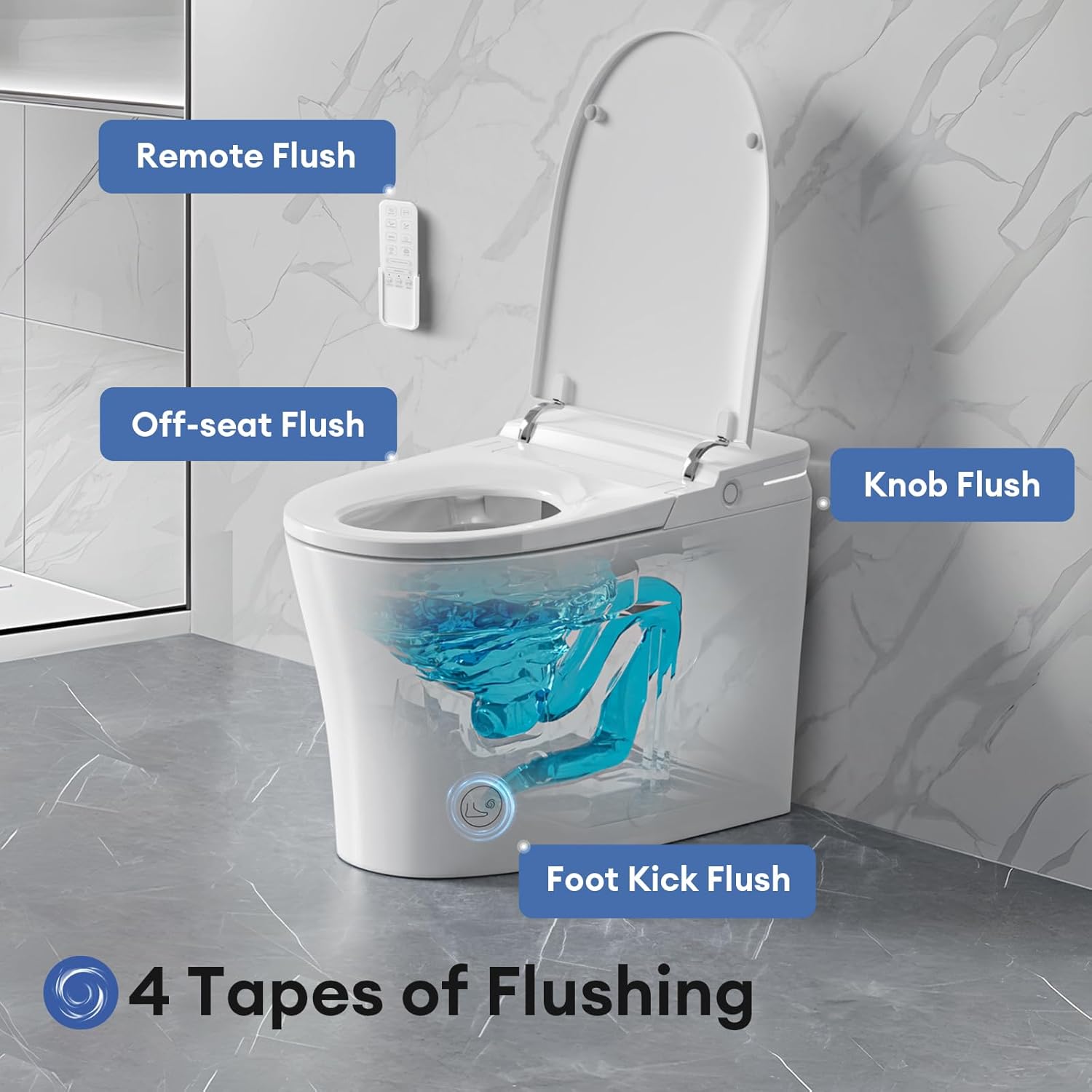
Figure 4.6: Illustration of the four flushing methods available: Remote Flush, Off-seat Flush, Knob Flush, and Foot Kick Flush, providing multiple convenient options for activation.

Figure 4.7: Diagram illustrating the toilet's ability to operate without a water pressure limit, featuring a powerful flush, built-in tank, jet flow push, and 360° siphon flush mechanism.
5. Setup and Installation
The Rivix S20 Pro Smart Toilet is designed for floor-mounted installation. Due to its integrated features, installation requires careful attention to both water and electrical connections. It is recommended to consult a professional plumber and electrician for installation to ensure compliance with local codes and proper functionality.
5.1 Pre-Installation Checks
- Ensure adequate space for the toilet, considering its dimensions: 68.58 cm (26.97 inches) depth, 38.1 cm (15.00 inches) width, and 60.96 cm (24.00 inches) height.
- Verify the rough-in measurement is 12 inches from the wall to the center of the drain pipe.
- Confirm availability of a dedicated GFCI-protected electrical outlet near the installation area.
- Ensure a cold water supply line is accessible.
5.2 Installation Steps
Refer to the separate Installation Instruction Guide included in your package for detailed, step-by-step instructions, diagrams, and safety warnings specific to the physical installation of the toilet, water connections, and electrical hook-up. This guide will cover:
- Mounting the toilet to the floor flange.
- Connecting the water supply using the provided T-valve.
- Making electrical connections.
- Initial water fill and leak checks.
6. Operating Instructions
The Rivix S20 Pro Smart Toilet offers various ways to interact with its features:
6.1 Automatic Lid and Seat
- Proximity Sensor: The lid will automatically open when a user approaches the toilet.
- Foot Sensor: Gently tap the foot sensor located at the base of the toilet to open the lid or seat, or to initiate a flush.
- Automatic Closing: The lid and seat will close automatically after a period of inactivity or after flushing, depending on the user's interaction.
6.2 Bidet Functions
Use the wireless remote control to activate and adjust bidet functions:
- Rear Wash: For posterior cleansing.
- Feminine Wash: A softer, wider spray for feminine hygiene.
- Moving Wash: The nozzle oscillates for a broader cleaning area.
- Children Wash: A gentle wash setting suitable for children.
- Water Temperature: Adjust the water temperature to your preference using the remote.
- Nozzle Position: Adjust the nozzle's forward/backward position.
6.3 Heated Seat and Dryer
- Heated Seat: Activate and adjust the seat temperature (OFF, 91°F, 95°F, 100°F) via the remote control.
- Warm Air Dryer: After washing, activate the dryer and adjust the air temperature (3 levels) for comfortable drying.
6.4 Flushing the Toilet
- Remote Flush: Press the flush button on the wireless remote control.
- Off-seat Flush: The toilet may automatically flush after a user stands up and moves away.
- Knob Flush: A manual flush knob is located on the side of the toilet for traditional flushing.
- Foot Kick Flush: Use the foot sensor to initiate a flush.
7. Maintenance
Regular maintenance ensures the longevity and hygienic operation of your smart toilet.
7.1 Cleaning the Nozzle
- The bidet nozzle is removable for thorough cleaning. Refer to the Installation Instruction Guide for specific steps on how to detach and reattach the nozzle.
- Clean the nozzle with a soft cloth and mild, non-abrasive soap.
7.2 General Cleaning
- Wipe down the exterior surfaces of the toilet with a soft, damp cloth and a mild, non-abrasive cleaner.
- For the toilet bowl, use standard toilet bowl cleaners. Avoid cleaners that are highly acidic or abrasive, as they may damage the ceramic finish.
- Do not use harsh chemicals or abrasive pads, especially on the seat or electronic components.
7.3 UV LED Sterilization
The toilet features an automatic UV LED sterilization function for the bowl. No user intervention is typically required for this feature to operate.
8. Troubleshooting
If you encounter issues with your Rivix S20 Pro Smart Toilet, refer to the following general troubleshooting advice. For more detailed solutions, consult the comprehensive troubleshooting section in the included Installation Instruction Guide or contact customer support.
- No Power: Check if the power cord is securely plugged into a working GFCI outlet. Verify the circuit breaker has not tripped.
- No Water Flow: Ensure the water supply valve is fully open. Check for any kinks in the water supply hose.
- Remote Control Not Working: Replace the batteries in the remote control. Ensure there are no obstructions between the remote and the toilet's sensor.
- Lid/Seat Not Opening Automatically: Ensure the proximity sensor is clean and unobstructed.
- Bidet Functions Not Activating: Check water supply. Ensure the toilet seat is occupied for bidet functions to activate.
If problems persist after attempting these steps, please contact Rivix customer support.
9. Specifications
| Feature | Specification |
|---|---|
| Brand | Rivix |
| Model Number | S20 Pro (1S00320D) |
| Part Number | 1S525-320 |
| Product Dimensions (L x W x H) | 68.58 x 38.1 x 60.96 cm (26.97 x 15.00 x 24.00 inches) |
| Item Weight | 45.1 kg (99.5 lbs) |
| Colour | White |
| Material | Ceramic, Plastic |
| Shape | Oval |
| Installation Method | Floor Mounted |
| Heated Seat Temperature | Adjustable (OFF, 91°F, 95°F, 100°F) |
| Dryer Temperature | 3 Adjustable Levels |
| Power Source | AC (requires GFCI outlet) |
10. Warranty and Support
For information regarding the product warranty, please refer to the warranty card included with your purchase or visit the official Rivix website. For technical support, replacement parts, or service inquiries, please contact Rivix customer service through the contact information provided in your purchase documentation.