
uhzz 23474570
User Manual: 23474570 Pressure Switch
For Ingersoll-Rand Air Compressors Models 2340, 2475, 2545, 7100
Brand: uhzz | Model: 23474570
1. Introduction
This manual provides essential information for the installation, operation, and maintenance of the uhzz 23474570 Pressure Switch. This component is designed as a replacement part for specific Ingersoll-Rand air compressor models, ensuring proper pressure regulation and safe operation.

Figure 1: The uhzz 23474570 Pressure Switch, a replacement component for air compressors.
2. Product Features
The 23474570 Pressure Switch is engineered for reliable performance in air compressor systems. Key features include:
- Direct Replacement: Specifically designed to replace the original 23474570 Pressure Switch.
- Pressure Range: Features a cut-in pressure of 135 psi and a cut-off pressure of 175 psi.
- Integrated Components: Comes equipped with an unloader valve and a 4-port manifold for comprehensive functionality.
- Durable Construction: Manufactured from steel and aluminum, providing resistance against rust and corrosion.
- Ease of Installation: Designed for straightforward operation and convenient replacement of existing pressure switches.

Figure 2: Detailed view highlighting the switch, 4-port manifold, and unloader valve components of the pressure switch.

Figure 3: Multiple views of the pressure switch, showing its right front, left front, right rear, and left rear perspectives.
3. Model Compatibility
This pressure switch is compatible with a range of Ingersoll-Rand reciprocating air compressor models. Verify your compressor model against the list below to ensure compatibility:
- Three-Phase Models: 2340, 2475, 2545, 7100
- Single-Phase Models: Also compatible with 5-7.5 HP single-phase 2475 models.

Figure 4: Visual representation of the pressure switch and its compatibility with various air compressor models.
4. Product Specifications
| Specification | Detail |
|---|---|
| Manufacturer | uhzz |
| Part Number | 23474570 |
| Item Weight | 14 ounces |
| Package Dimensions | 4.33 x 3.86 x 3.82 inches |
| Item Model Number | 23474570 |
| Color | Black |
| Material | Metals, Plastics |
| Power Source | AC |
| Included Components | Air compressor pressure switch |
| Cut-in Pressure | 135 psi |
| Cut-off Pressure | 175 psi |

Figure 5: Product dimensions, showing height, width, and depth measurements.
5. Installation and Setup
Follow these steps for proper installation of the 23474570 Pressure Switch. Always ensure the air compressor is powered off and depressurized before beginning any maintenance or installation work.
- Step 1: Remove Old Compressor Screws. Carefully locate and remove the screws securing the old pressure switch to the air compressor.
- Step 2: Remove Old Air Compressor. Disconnect and remove the old pressure switch unit from its connections. Note the wiring and port connections for reference.
- Step 3: Install New Compressor. Position the new 23474570 Pressure Switch in the correct location, aligning it with the mounting points and connections.
- Step 4: Screw in New Compressor. Secure the new pressure switch by screwing it firmly into place. Reconnect all electrical and pneumatic lines as they were on the old unit.
Safety Warning: If you are unsure about any step, consult a qualified technician. Improper installation can lead to equipment damage or personal injury.
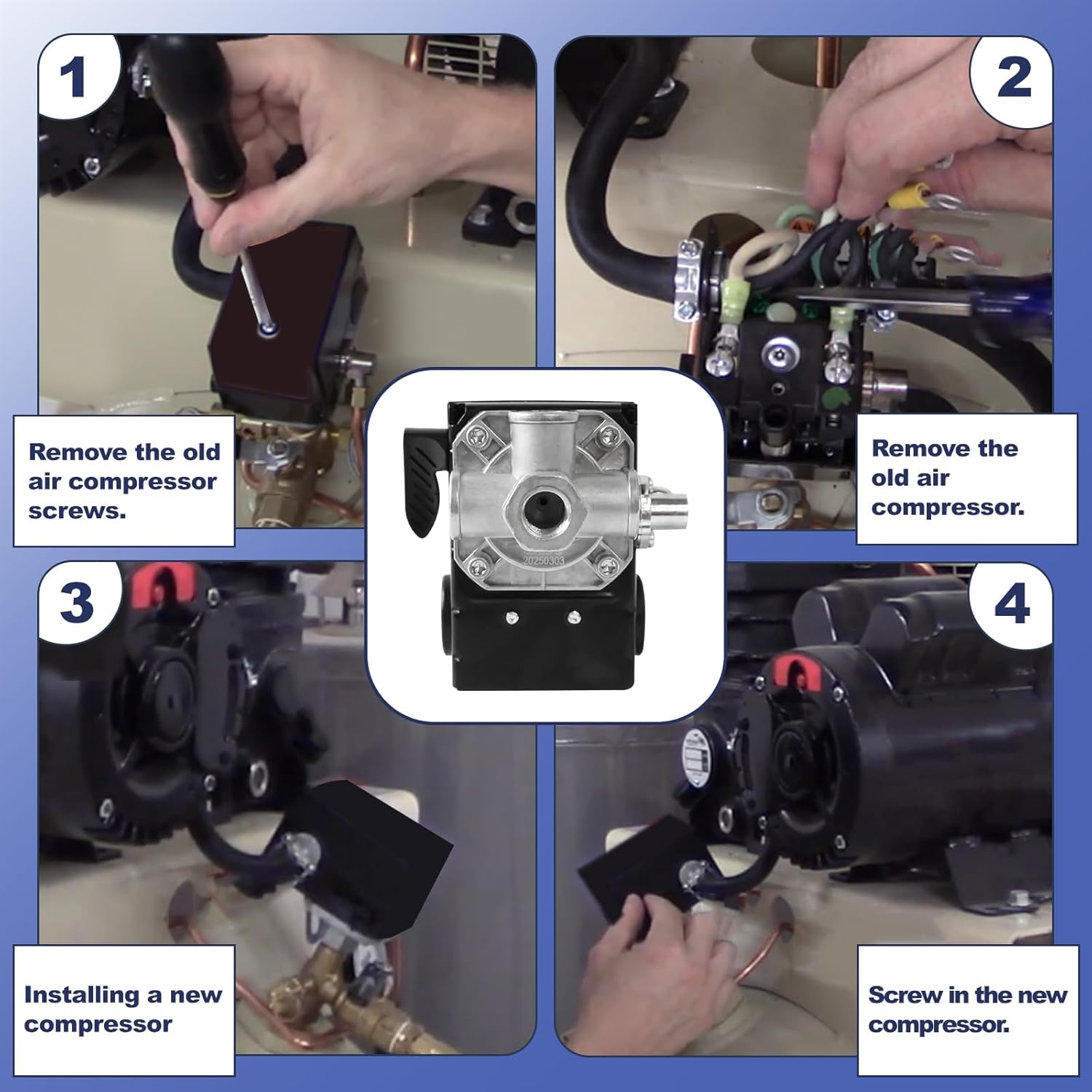
Figure 6: Visual guide illustrating the four key steps for replacing the air compressor pressure switch.
6. Operation
The 23474570 Pressure Switch automatically controls the air compressor's operation based on the tank pressure. When the tank pressure drops to the cut-in pressure (135 psi), the switch activates the compressor to refill the tank. Once the tank reaches the cut-off pressure (175 psi), the switch deactivates the compressor, preventing over-pressurization. The integrated unloader valve releases air from the compressor head when the motor stops, allowing for an easier restart.
7. Maintenance
Regular maintenance of your air compressor system, including the pressure switch, is crucial for longevity and safe operation. While the pressure switch itself requires minimal maintenance, ensure its connections are secure and free from corrosion. Periodically inspect the unloader valve for proper function. Keep the area around the pressure switch clean and free of debris.
8. Troubleshooting
The pressure switch is a critical component for regulating air compressor pressure. If your air compressor exhibits the following symptoms, the pressure switch may need replacement:
- The compressor does not turn on when the tank pressure drops below the lower setpoint (135 psi).
- The compressor does not turn off when the tank pressure reaches the upper setpoint (175 psi), potentially causing the safety valve on the tank to activate (pop off).
These issues indicate that the internal mechanisms of the pressure switch are no longer accurately sensing or responding to pressure changes, necessitating replacement to prevent damage to the compressor or safety hazards.

Figure 7: Illustration explaining the conditions under which the 23474570 pressure switch typically requires replacement, such as failure to turn on or off at set pressure points.
9. Warranty and Support
For information regarding warranty coverage or technical support for your uhzz 23474570 Pressure Switch, please refer to the product packaging or contact the manufacturer directly through their official website or customer service channels. Keep your purchase receipt as proof of purchase.
Ask a question about this manual
Ask about setup, troubleshooting, compatibility, parts, safety, or missing instructions. Manuals+ will review the question and use this page’s manual context to help answer it.