
1. Introduction
Thank you for choosing the EliteBloom Dehumidifier Model ACCPHIJQW841258. This appliance is designed to efficiently remove excess moisture from your indoor environment, creating a healthier and more comfortable living space. It features intelligent humidity control, quiet operation, and continuous drainage capability.
This manual provides essential information for the safe operation, installation, maintenance, and troubleshooting of your dehumidifier. Please read it thoroughly before use and retain it for future reference.
2. Safety Instructions
General Safety Precautions
- Ensure the power supply voltage matches the rating label on the dehumidifier.
- Do not operate the unit with a damaged power cord or plug.
- Keep the dehumidifier away from heat sources, flammable materials, and direct sunlight.
- Do not immerse the unit, power cord, or plug in water or other liquids.
- Always unplug the dehumidifier before cleaning, maintenance, or when not in use.
- Do not block the air inlet or outlet vents. Ensure proper air circulation around the unit.
- This appliance is for indoor use only. Do not use it outdoors.
- Supervise children and individuals with reduced physical, sensory, or mental capabilities when the unit is in operation.
- Place the unit on a stable, level surface to prevent tipping and water spillage.
3. Package Contents
What's Included
Please check the package contents upon unpacking:
- EliteBloom Dehumidifier Unit
- Remote Control
- Drain Hose
- User Manual (this document)
4. Product Overview
Components and Control Panel
Familiarize yourself with the main parts of your dehumidifier:
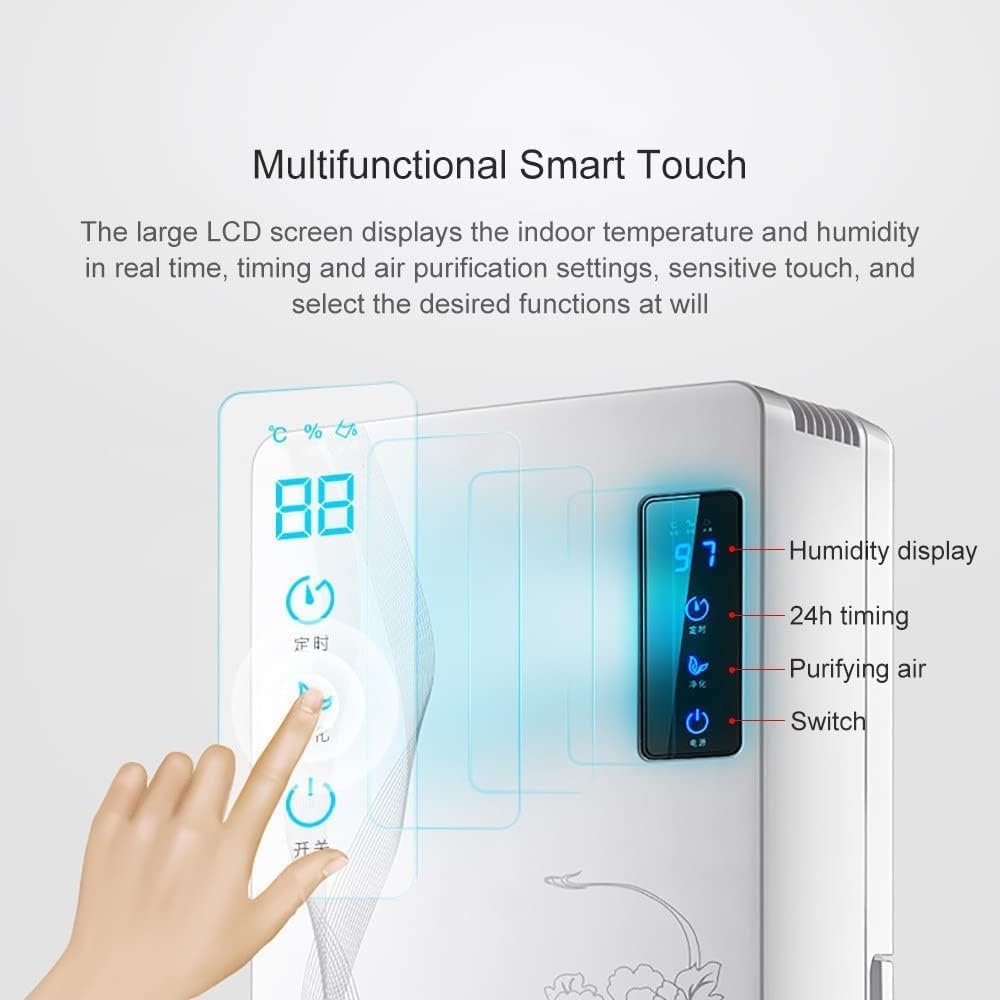
This image displays the intelligent LED liquid crystal control panel. It shows real-time indoor temperature and humidity, along with touch controls for 24-hour timing, air purification, and power on/off. The display allows for easy adjustment of settings.

This image highlights the automatic water full downtime feature. The dehumidifier will automatically stop operating when the water tank is full, indicated by a red flash reminder on the control panel. An electromagnetic float water alarm device ensures safe and reliable operation, preventing overflow.

This image demonstrates the continuous drainage option. A drain hose can be connected to the designated port on the back of the unit, allowing for uninterrupted operation without needing to manually empty the water tank. Airflow arrows indicate the dehumidification process.
5. Setup
Unpacking
Carefully remove the dehumidifier and all accessories from the packaging. Retain the packaging for future storage or transport.
Placement
For optimal performance, place the dehumidifier on a firm, level surface in the area where dehumidification is desired. Ensure there is at least 20 cm (8 inches) of space around the air inlet and outlet for proper air circulation.

This image illustrates the dehumidifier's effective coverage area, suitable for spaces up to 30 square meters (323 sq ft). It also indicates the ideal indoor humidity range of 40%-60% Relative Humidity (RH) for comfort and health. Examples of suitable rooms include cloakrooms, kitchens, bathrooms, bedrooms, and living rooms.

This image illustrates the compact dimensions of the EliteBloom Dehumidifier, measuring 36 cm (14 inches) in height, 24 cm (9 inches) in width, and 13 cm (5 inches) in depth. These measurements are important for determining suitable placement locations.
Power Connection
Plug the power cord into a grounded electrical outlet that meets the specified voltage requirements.
Continuous Drainage Setup (Optional)
For continuous operation without manually emptying the water tank, connect the provided drain hose to the drainage port on the back of the unit. Ensure the hose is routed downwards to a suitable drain or container, allowing gravity to facilitate water flow.
This image demonstrates the continuous drainage option. A drain hose can be connected to the designated port on the back of the unit, allowing for uninterrupted operation without needing to manually empty the water tank. Airflow arrows indicate the dehumidification process.
6. Operating Instructions
Power On/Off
Press the power button on the control panel or remote control to turn the unit on or off.
Setting Desired Humidity
Use the control panel to set your desired humidity level. The intelligent humidity control system will automatically operate the dehumidifier to maintain this level. When the humidity reaches the set value, the machine will automatically shut down. It will restart automatically if the humidity rises 5% above the set value.
Timer Function
The 24-hour timer allows you to schedule the dehumidifier to turn on or off automatically after a set period. Refer to the control panel interface for specific timer setting steps.
Sleep Mode
Activate Sleep Mode for quieter operation, ideal for use during the night or in noise-sensitive environments. In this mode, the fan speed is reduced, and display lights may dim.

This image emphasizes the quiet operation of the dehumidifier, rated at approximately 25 decibels (dB). This low noise level is comparable to a soft whisper or rustling leaves, making it suitable for use in quiet environments like bedrooms or offices without disturbance.
Dry Clothes Mode
This mode is designed to assist in drying laundry faster by continuously operating at a high fan speed to remove moisture from the air around drying clothes.
Air Purification
The dehumidifier includes an air purification function to help improve indoor air quality by filtering airborne particles.
Automatic Defrost
The unit is equipped with an automatic defrost function. If frost builds up on the evaporator coils, the dehumidifier will temporarily stop dehumidifying and run the fan to melt the frost, ensuring efficient operation.
7. Maintenance
Emptying the Water Tank
When the water tank is full, the dehumidifier will automatically stop operating, and a red flash reminder will appear on the control panel. Carefully pull out the water tank, empty the collected water, and then reinsert it firmly into the unit until it clicks into place.
This image highlights the automatic water full downtime feature. The dehumidifier will automatically stop operating when the water tank is full, indicated by a red flash reminder on the control panel. An electromagnetic float water alarm device ensures safe and reliable operation, preventing overflow.
Cleaning the Unit
Always unplug the dehumidifier before cleaning.
- Exterior: Wipe the exterior with a soft, damp cloth. Do not use abrasive cleaners or solvents.
- Air Inlets/Outlets: Use a soft brush or vacuum cleaner to remove dust and debris from the air inlet and outlet grilles.
- Water Tank: Clean the water tank regularly with mild soap and water to prevent mold and mildew growth. Rinse thoroughly.
Storage
If storing the dehumidifier for an extended period, ensure the water tank is empty and clean. Unplug the unit, coil the power cord neatly, and store it in a cool, dry place, preferably in its original packaging.
8. Troubleshooting
Common Issues and Solutions
- Unit does not turn on:
- Check if the power cord is securely plugged into a working outlet.
- Ensure the water tank is correctly inserted and not full.
- Verify the power button has been pressed.
- No water collected or low dehumidification:
- Check if the room temperature or humidity is too low for effective dehumidification.
- Ensure air inlets and outlets are not blocked.
- Close doors and windows in the room to prevent outside moisture from entering.
- Verify the desired humidity setting is lower than the current room humidity.
- Water tank full indicator is on, but tank is not full:
- Remove and reinsert the water tank to ensure it is properly seated.
- Check if the float sensor inside the tank is stuck.
- Unit is noisy:
- Ensure the unit is placed on a stable, level surface.
- Check for any loose parts or obstructions.
9. Specifications
Technical Data
| Name | Value |
| Product Power | 90W |
| Rated Frequency | 50HZ |
| Dehumidification Area | 0-30㎡ / 322.9 Sq Ft |
| Product Size (L×W×H) | 24×13×36cm / 9×5×14in |
| Water Tank Capacity | 2200ML / 74oz |
| Max Daily Extraction | 1400ml / 47oz (at 30°C, 80% RH) |
| Humidity Setting Function | Yes |
| Sleep Mode Function | Yes |
| Automatic Defrost Function | Yes |
| Model Number | ACCPHIJQW841258 |
This image illustrates the compact dimensions of the EliteBloom Dehumidifier, measuring 36 cm (14 inches) in height, 24 cm (9 inches) in width, and 13 cm (5 inches) in depth. These measurements are important for determining suitable placement locations.
10. Warranty and Support
Customer Support
EliteBloom is committed to providing excellent customer service. If you have any questions, concerns, or require assistance with your dehumidifier, please do not hesitate to contact us. Our 7*24 service team is available to help you solve any problems you may encounter.
Please refer to your purchase documentation or the product packaging for specific contact details, typically via email.