
1. Introduction
Thank you for choosing the Monyhigh S48 Wireless Earbuds. This manual provides detailed instructions on how to set up, operate, and maintain your earbuds to ensure optimal performance and longevity. Please read this manual thoroughly before use.

Image 1: Monyhigh S48 Wireless Earbuds and Charging Case
The Monyhigh S48 earbuds feature Bluetooth 5.4 connectivity, IPX7 waterproofing, environmental noise cancellation (ENC) for calls, and an LED battery display. They are designed for comfort and high-quality audio experience across various activities.
2. What's in the Box
Upon unpacking, please ensure all the following items are present:
- 1 x Charging Case
- 2 x Wireless Earbuds (Left and Right)
- 2 x Extra Ear Caps (Pairs, S/M/L sizes included)
- 1 x Type-C Charging Cable
- 1 x User Manual (this document)
- 1 x Packaging Box

Image 2: Package Contents
3. Product Features
- Bluetooth 5.4 Connectivity: Experience stable connections up to 15 meters and ultra-low latency (≤ 40 milliseconds), ideal for gaming and synchronized audio.
- IPX7 Waterproof: Designed to withstand sweat and rain, making them suitable for workouts and outdoor activities.
- HiFi Stereo Sound: Advanced audio technology delivers crisp highs, rich mids, and deep bass for an immersive listening experience.
- ENC Noise Reduction: Equipped with 4 noise-cancelling microphones to reduce up to 95% of background noise, ensuring clear calls even in noisy environments.
- Extended Battery Life: Up to 6 hours of continuous playback per charge, with the charging case providing over 36 hours of total battery life (approximately 42 hours total).
- LED Battery Display: The charging case features a digital LED screen showing real-time battery levels (1% to 100%) for both the case and individual earbuds.
- Ergonomic Design: Designed for a secure and comfortable fit, with three sizes (S/M/L) of soft silicone ear tips to suit various ear shapes.

Image 3: Premium Stereo Sound Technology

Image 4: Ergonomic Design and Ear Tips
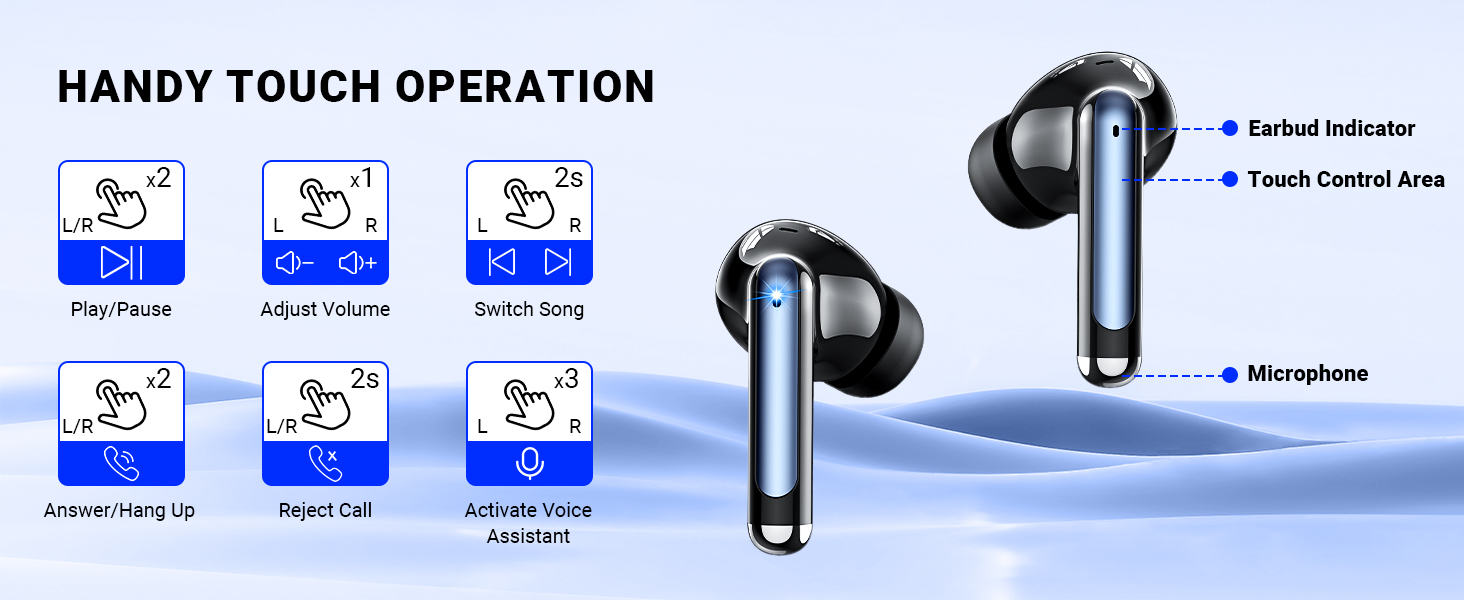
Image 5: Bluetooth 5.4 Technology
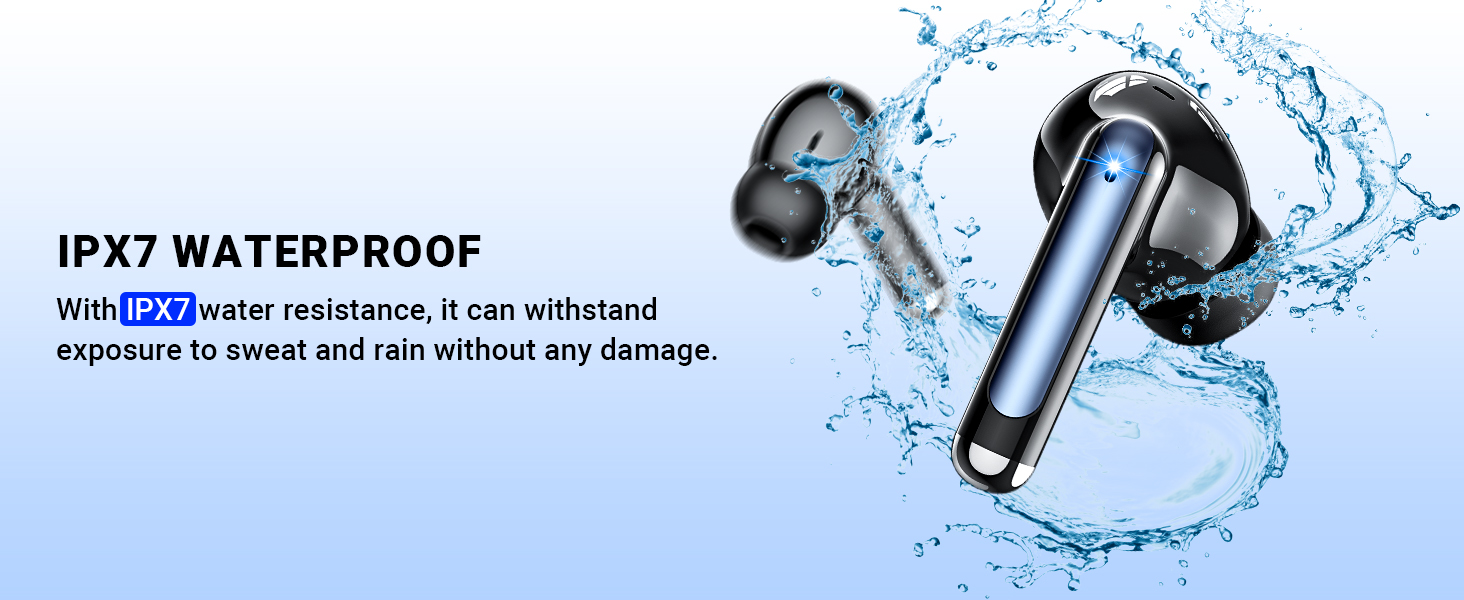
Image 6: IPX7 Waterproof Rating
4. Setup
4.1 Charging the Earbuds and Case
Before first use, fully charge the earbuds and charging case. Connect the provided Type-C charging cable to the charging port on the case and a USB power source. The LED display on the case will show the charging progress.
- The digital LED screen displays the charging case's power level from 1% to 100%.
- Individual battery indicators for left (L) and right (R) earbuds show their charging status.
- A full charge for the case typically takes 1.5 hours.

Image 7: LED Digital Power Display
4.2 Pairing with Your Device
The Monyhigh S48 earbuds feature one-step auto-pairing for convenience.
- Step 1: Open the lid of the charging case. The earbuds will automatically power on and enter pairing mode.
- Step 2: On your smartphone or Bluetooth-enabled device, open the Bluetooth settings.
- Step 3: Search for available devices and select "S48" from the list to connect.
Once paired, the earbuds will automatically connect to your device when removed from the case. To disconnect, simply place them back into the charging case and close the lid.

Image 8: One-Step Auto Pairing
5. Operating Instructions
The Monyhigh S48 earbuds are controlled via touch sensors located on the stem of each earbud.
5.1 Touch Controls
| Action | Gesture | Function |
|---|---|---|
| Music Playback | Double-tap L/R | Play/Pause |
| Volume Adjustment | Single-tap L (Volume -), Single-tap R (Volume +) | Adjust Volume |
| Track Navigation | Long press L (2s) for Previous Track, Long press R (2s) for Next Track | Switch Song |
| Call Management | Double-tap L/R | Answer/Hang Up Call |
| Call Management | Long press L/R (2s) | Reject Call |
| Voice Assistant | Triple-tap L/R | Activate Voice Assistant |

Image 9: Handy Touch Operation Guide
5.2 Making and Receiving Calls
The Monyhigh S48 earbuds utilize Environmental Noise Cancellation (ENC) technology with four microphones to ensure clear communication.
- Answering/Ending Calls: Double-tap either earbud.
- Rejecting Calls: Long press either earbud for 2 seconds.
- The ENC microphones actively reduce background noise, making your voice clearer to the person on the other end.

Image 10: Crystal Clear Calls with ENC
6. Maintenance
To ensure the longevity and optimal performance of your Monyhigh S48 Wireless Earbuds, follow these maintenance guidelines:
- Cleaning: Regularly clean the earbuds and charging case with a soft, dry, lint-free cloth. Do not use harsh chemicals or abrasive materials.
- Ear Tips: Remove the silicone ear tips and clean them with mild soap and water. Ensure they are completely dry before reattaching.
- Storage: When not in use, store the earbuds in their charging case to protect them from dust and damage.
- Water Exposure: While IPX7 waterproof, avoid prolonged submersion in water. If exposed to sweat or rain, wipe them dry before placing them back in the charging case.
- Charging: Use only the provided Type-C cable or a certified equivalent for charging. Avoid overcharging.
7. Troubleshooting
If you encounter any issues with your Monyhigh S48 earbuds, please refer to the following common solutions:
- Earbuds not pairing:
- Ensure both earbuds are charged.
- Turn off Bluetooth on your device, then turn it back on.
- Forget "S48" from your device's Bluetooth list and attempt to re-pair.
- Place earbuds back in the case, close the lid, wait a few seconds, then open and try pairing again.
- No sound from one earbud:
- Ensure both earbuds are charged.
- Try placing both earbuds back in the case and taking them out again.
- Clean the charging contacts on both the earbuds and the case.
- Poor sound quality:
- Ensure the earbuds are properly seated in your ears and you are using the correct size ear tips.
- Check the audio source for quality issues.
- Move closer to your connected device to avoid interference.
- Earbuds not charging:
- Ensure the charging cable is securely connected to both the case and the power source.
- Verify the power source is active.
- Clean the charging contacts on the earbuds and inside the case.
If these steps do not resolve the issue, please contact customer support.
8. Specifications
| Feature | Detail |
|---|---|
| Model Name | S48 |
| Brand | Monyhigh |
| Connectivity Technology | Wireless (Bluetooth) |
| Bluetooth Version | 5.4 |
| Bluetooth Range | 15 Meters |
| Noise Control | Environmental Noise Cancellation (ENC) |
| Water Resistance Level | IPX7 Waterproof |
| Battery Life (Earbuds) | Up to 6 Hours |
| Total Playtime (with Case) | Up to 42 Hours |
| Control Method | Touch |
| Ear Placement | In Ear |
| Material | Plastic |
| Item Weight | 3.2 ounces |
| Included Components | Type-C Charging Cable*1 |
9. Warranty and Support
The Monyhigh S48 Headphones come with an 18-month warranty period from the date of purchase, ensuring peace of mind. This warranty covers manufacturing defects and issues arising from normal use.
For any questions, technical support, or warranty claims, please contact Monyhigh customer service through the retailer where you purchased the product or visit the official Monyhigh website for contact information.