
AsiaHorse DAWN
Asiahorse Dawn 120mm Case Fan Instruction Manual
Model: DAWN | Brand: AsiaHorse
Introduction
The Asiahorse Dawn 120mm Case Fan is designed to provide superior cooling performance and stunning ARGB lighting for your PC. Featuring an innovative modular daisy chain connection, high-performance Hydro-Dynamic Bearings (HDB), and a unique infinity mirror design, this fan ensures efficient airflow, quiet operation, and a clean, aesthetically pleasing build. This manual provides detailed instructions for installation, operation, and maintenance to help you maximize your fan's performance and lifespan.
Key Features
- Modular Connection & Simplified Cable Management: Innovative daisy chain design reduces cable clutter, ensuring a clean and organized PC interior. Easy installation and maintenance.
- Infinity Mirror & ARGB Sync: Unique ARGB LED layout provides clean, uniform lighting. Compatible with ASUS Aura Sync, GIGABYTE RGB Fusion, and MSI Mystic Light Sync for seamless system-wide lighting synchronization.
- Ultra-High Performance HDB Bearing: Hydro-Dynamic Bearing (HDB) reduces friction and wear for smoother, quieter operation and extended lifespan. Ultra-low noise design (max 29 dBA).
- Superior Cooling Efficiency: Optimized blade design with PWM 900-1850 RPM delivers up to 71 CFM airflow and 2.6 mmH₂O static pressure, ensuring powerful cooling even at low speeds.
- Unique Light Strip Layout & Minimalist Aesthetics: Distinctive ARGB light strip integrates seamlessly with modern PC builds, adding a touch of luxury without overwhelming the setup.
- Forward & Reverse Blade Design: Offers versatility for different installation needs, balancing wind direction and aesthetics for optimal airflow and visual appeal.
Package Contents
Please verify that all components are present before beginning installation.
| Component | Quantity (1-pack) | Quantity (3-pack) |
|---|---|---|
| Asiahorse Dawn 120mm Case Fan | 1 | 3 |
| Mounting Screws | 8 | 24 |
| Instruction Manual | 1 | 1 |
| PWM & ARGB Cables | 1 set | 1 set |

Image: Package contents for a single Asiahorse Dawn 120mm Case Fan.

Image: Package contents for a 3-pack Asiahorse Dawn 120mm Case Fan set.
Installation Guide
1. Fan Orientation (Forward vs. Reverse Blade)
The Asiahorse Dawn fans come in both forward and reverse blade designs to accommodate various airflow requirements and aesthetic preferences within your PC case. Ensure you select the correct fan type for your desired airflow direction (intake or exhaust).
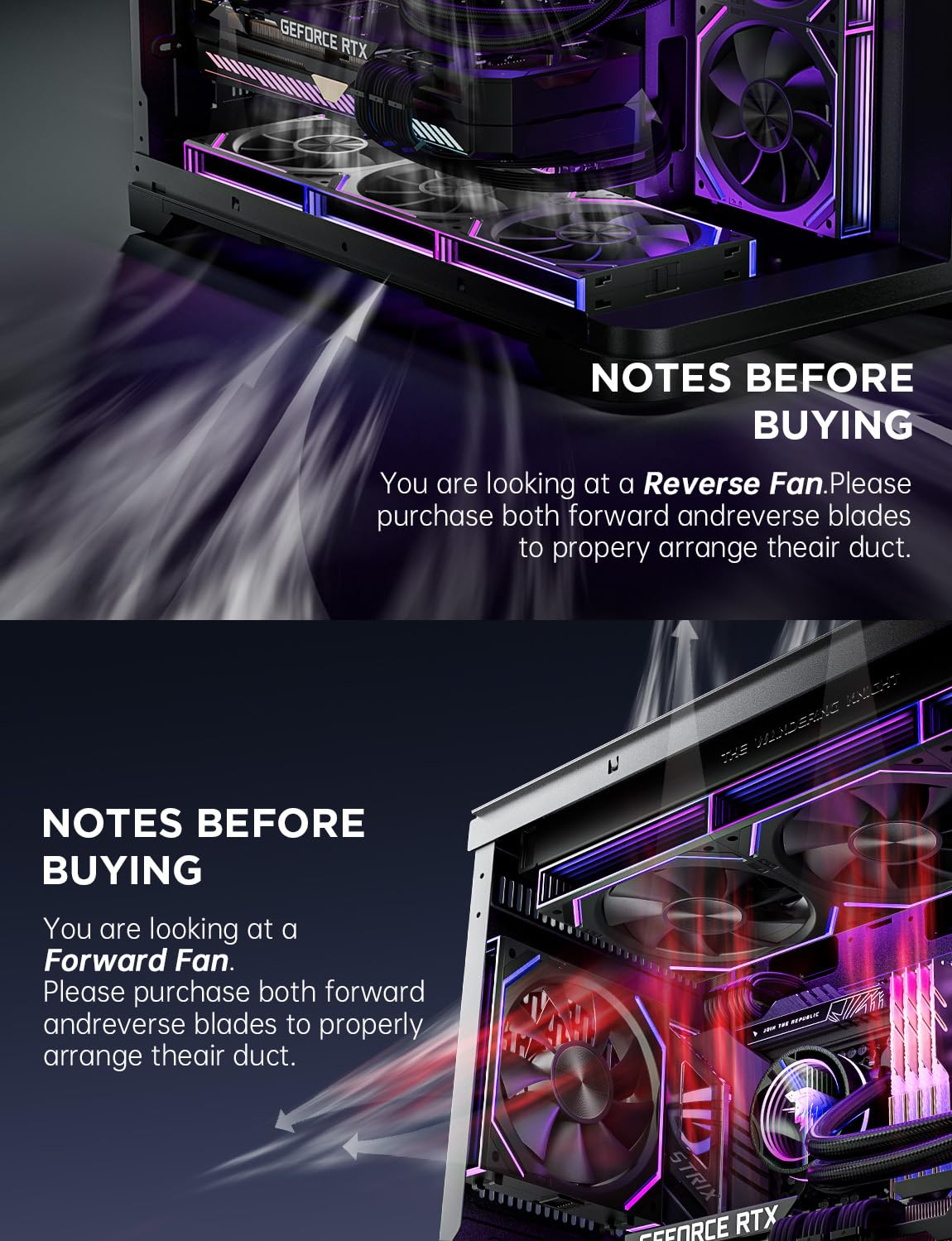
Image: Illustration of forward and reverse blade fan types and their respective airflow directions.
2. Modular Daisy Chain Connection
The Dawn fans feature a modular daisy chain design, allowing multiple fans to be connected directly to each other, significantly reducing the number of cables required for your build. This simplifies cable management and provides a cleaner look.

Image: Step-by-step guide for fan assembly using the modular daisy chain mechanism.

Image: Instructions for connecting the power and ARGB cables to the daisy chained fan module.
- Align the Slot: Position the fans so that the connection slots align perfectly.
- Slide to Align: Gently slide the fans together until they click into place, forming a secure connection.
- Connect Cables: Attach the provided PWM (4-pin) and ARGB (5V 3-pin) cables to the designated ports on the last fan in the chain. Connect these cables to your motherboard or a compatible fan/ARGB controller.
Tip: For optimal aesthetics and performance, consider installing fans on liquid cooling radiators using the same modular connection method.

Image: Asiahorse Dawn fans integrated with a liquid cooling system.
Operating Instructions
Fan Speed Control (PWM)
The Asiahorse Dawn fans support Pulse Width Modulation (PWM) control, allowing your motherboard or fan controller to dynamically adjust fan speed based on system temperature. This ensures efficient cooling when needed and quiet operation during lighter loads.
- Connect the 4-pin PWM cable from the fan module to a compatible 4-pin fan header on your motherboard.
- Configure fan curves and speed settings through your motherboard's BIOS/UEFI or dedicated software (e.g., ASUS AI Suite, GIGABYTE SIV, MSI Dragon Center).
ARGB Lighting Control
The integrated ARGB lighting can be synchronized with your motherboard's lighting software for a cohesive aesthetic. The unique infinity mirror effect provides a high-density multi-layer light display.
- Connect the 5V 3-pin ARGB cable from the fan module to a compatible 5V ARGB header on your motherboard. Do not connect to a 12V RGB header, as this will damage the LEDs.
- Use your motherboard's ARGB control software (e.g., ASUS Aura Sync, GIGABYTE RGB Fusion, MSI Mystic Light Sync, ASRock Polychrome Sync) to customize lighting effects, colors, and patterns.
Video: Demonstration of various ARGB lighting effects on Asiahorse Dawn fans within a PC build. Note: Lighting effects are controlled via motherboard ARGB software.
Video: Overview of Asiahorse Dawn 120mm fan features, including daisy chain connection, infinity mirror, and motherboard software compatibility for ARGB control.

Image: Detailed view of the seamless infinity mirror lighting effect on the fan.

Image: An example of the overall ARGB lighting effect when Asiahorse Dawn fans are installed in a PC case.
Maintenance
Regular maintenance helps ensure optimal performance and longevity of your Asiahorse Dawn fans.
- Dust Cleaning: Periodically clean fan blades and frames using compressed air or a soft brush to remove dust buildup. Dust can impede airflow and increase noise levels.
- Bearing Care: The Hydro-Dynamic Bearings are designed for long-term, maintenance-free operation. Avoid disassembling the fan hub, as this can damage the bearing and void the warranty.
- Cable Inspection: Occasionally check all connected cables for any signs of wear, fraying, or loose connections.
Troubleshooting
If you encounter issues with your Asiahorse Dawn fans, refer to the following common troubleshooting steps:
- Fans Not Spinning:
- Ensure the 4-pin PWM cable is securely connected to the motherboard fan header.
- Check BIOS/UEFI settings to confirm the fan header is enabled and configured correctly (e.g., not set to "disabled" or "manual 0 RPM").
- Verify power supply connections to the motherboard.
- ARGB Lights Not Working/Incorrect Colors:
- Confirm the 5V 3-pin ARGB cable is correctly connected to a 5V ARGB header on the motherboard. Do NOT connect to a 12V RGB header.
- Ensure the ARGB software (e.g., Aura Sync, RGB Fusion) is installed and updated to the latest version.
- Check for conflicts with other lighting software. Try disabling other RGB software temporarily.
- Verify that the daisy chain connections between fans are secure.
- Excessive Noise:
- Check for dust buildup on fan blades and clean if necessary.
- Ensure fans are securely mounted and not vibrating against the PC case.
- Adjust fan speed settings in your motherboard's BIOS/UEFI or software to a lower RPM if noise is a concern and temperatures allow.
- Poor Airflow:
- Verify fan orientation (forward/reverse blade) matches your desired airflow direction (intake/exhaust).
- Ensure there are no obstructions blocking airflow paths inside the PC case.
- Clean dust filters and fan blades.
Specifications
| Attribute | Value |
|---|---|
| Size | 120x120x25mm |
| Speed | 900-1850 RPM/min (PWM) |
| Noise Level | 6-29 dB(A) (Max 29 dB) |
| Airflow | 71 CFM |
| Static Pressure | 2.6 mmH₂O |
| Bearing Type | Hydro-Dynamic Bearing (HDB) |
| Power Connector Type | 4-Pin (PWM) |
| ARGB Connector Type | 5V 3-Pin |
| Compatible Devices | Desktop PCs |
| Product Dimensions | 5.91 x 5.12 x 1.18 inches |
| Item Weight | 7.83 ounces |
| Country of Origin | China |

Image: Visual representation of key performance specifications for the Asiahorse Dawn fan.

Image: Diagram highlighting the quiet operation and HDB bearing technology.
Warranty and Support
AsiaHorse products are manufactured to the highest quality standards. For warranty information, technical support, or customer service inquiries, please refer to the official AsiaHorse website or contact their customer support team directly. Keep your purchase receipt as proof of purchase for warranty claims.
Official AsiaHorse Store: Visit AsiaHorse Store on Amazon
Related Documents - DAWN
 |
Dawn Creme Cake Base Red Velvet Box RSPO MB 4x3.5KG - Product Specification 6.00354.003 Detailed product specification for Dawn Creme Cake Base Red Velvet Box RSPO MB (4x3.5KG, Model 6.00354.003). This document outlines ingredients, nutritional values, allergen information, dietary suitability, microbiological parameters, regulatory compliance, storage conditions, and packaging details for this professional bakery ingredient. Source: https://www.cfw.co.uk/Media/PDF%20Spec%20Sheets/Dawn%20Foods/Spec-Sheet-Dawn-Red-Velvet.PDF |
 |
Charge Amps Dawn User Manual Comprehensive user manual for the Charge Amps Dawn electric vehicle charging station, covering safety, technical specifications, product overview, usage instructions, maintenance, and support. |
 |
GKOLED LED Dusk to Dawn Installation Guide Installation guide for GKOLED LED Dusk to Dawn lighting fixtures, covering wall and arm mounting procedures, safety warnings, and accessory lists. Includes details on parts and assembly. |
 |
Zebronics ZEB-DAWN 50 User Manual and Operation Guide Comprehensive user manual for the Zebronics ZEB-DAWN 50, covering operation, safety precautions, and charging indicators. Learn how to use your device effectively. |
 |
Maxax 7040-3BK Dusk to Dawn Outdoor Wall Light Installation and Operations Manual Comprehensive installation and operations manual for the Maxax 7040-3BK outdoor wall light, featuring an elegant design and an intelligent dusk-to-dawn sensor. Includes detailed placement guides, assembly steps, parts list, wiring diagram, warnings, and troubleshooting tips. |
 |
EcoSmart BR30 Motion and Dusk to Dawn Sensor Bulb: Use and Care Guide This guide provides detailed instructions for the EcoSmart BR30 Motion and Dusk to Dawn Sensor Bulb (Model 14BR3065WCCTM0). Learn about color temperature settings, motion sensor configurations, installation, performance tips, and FCC compliance information. |