
FITHOOD CS-MCH180SL
FITHOOD CS-MCH180SL Ni-MH AA 1800mAh 1.2V Battery Replacement Manual
For Braun Shavers and Compatible Devices
Introduction
This manual provides essential information and instructions for the FITHOOD CS-MCH180SL Ni-MH AA 1800mAh 1.2V replacement battery. It covers product specifications, safety guidelines, installation procedures, and maintenance tips to ensure proper function and longevity of your device after battery replacement. Please read this manual thoroughly before proceeding with any installation.
Safety Information
Observe the following safety precautions to prevent injury or damage to the battery and your device:
- Do not disassemble, crush, puncture, or short-circuit the battery.
- Do not expose the battery to extreme temperatures (above 60°C/140°F or below -20°C/-4°F), direct sunlight, or fire.
- Keep the battery away from water and moisture.
- Do not use the battery if it shows signs of damage, swelling, or leakage.
- Dispose of used batteries according to local regulations. Do not dispose of with household waste.
- Keep out of reach of children.
Compatible Models and Part Numbers
This FITHOOD CS-MCH180SL battery is designed as a replacement for the 180AAH battery part number and is compatible with various Braun shaver models, including but not limited to:
- 5476, 4515, 7630, 8595
- interface 3775
- 5596, 5419
- Micron Vario 5564
- 5311, 7493, 5475, 8781, 5503, 5479
- 3614, 5426, 6513, 3305, 5647
- 550, Serie 5 540, 5550, 6518, 5413
Always verify your device's model and existing battery part number before purchase and installation.
Product Specifications

Image: The FITHOOD CS-MCH180SL Ni-MH AA 1800mAh 1.2V replacement battery, showing its cylindrical shape and terminal tabs.
| Feature | Detail |
|---|---|
| Model Number | CS-MCH180SL |
| Battery Type | Ni-MH (Nickel-Metal Hydride) |
| Capacity | 1800mAh |
| Watt-Hours (Wh) | 2.16Wh |
| Voltage | 1.2V |
| Dimensions | 49.9 x 14.3 x 14.3 mm (1.96 x 0.56 x 0.56 inches) |
| Weight | 52.0g (1.83 ounces) |
| Certifications | ISO9001, RoHS, CE, UN38.3, MSDS |
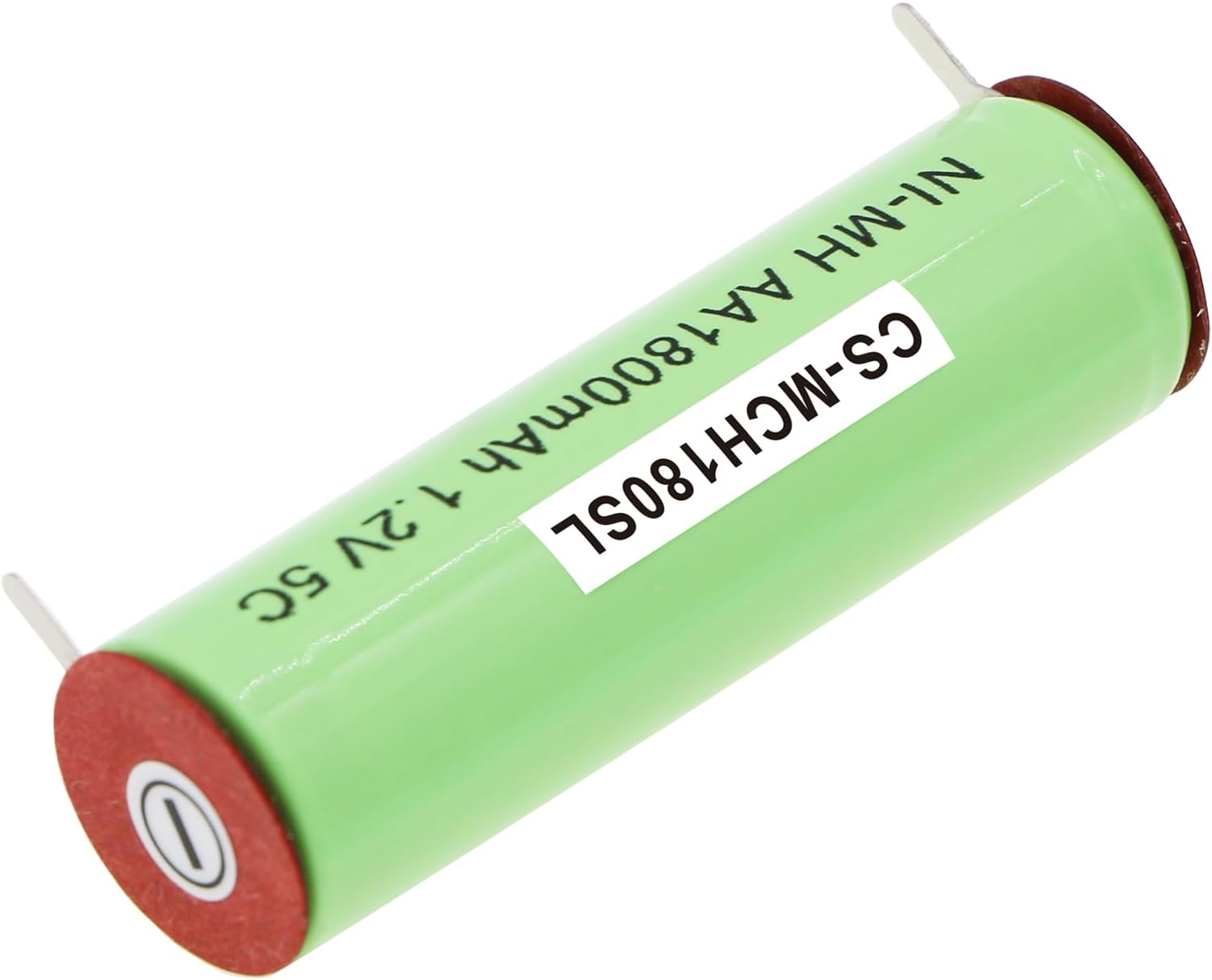
Image: Close-up view of the FITHOOD CS-MCH180SL battery, highlighting the positive terminal and part of the label.
Installation (Battery Replacement Guide)
Replacing the battery in your shaver requires careful handling. If you are unsure about any step, it is recommended to seek professional assistance or consult your device's original service manual.
- Preparation: Ensure your shaver is turned off and disconnected from any power source. Gather necessary tools, which may include small screwdrivers, prying tools, and soldering equipment if the original battery is soldered.
- Disassembly: Carefully open the shaver casing. This often involves removing screws, clips, or prying open sealed sections. Refer to your shaver's specific disassembly instructions if available.
- Locate Old Battery: Identify the existing battery within the shaver. Note its orientation and how it is connected (e.g., soldered tabs, spring contacts).
- Remove Old Battery: Carefully disconnect or desolder the old battery. Exercise caution to avoid damaging surrounding components or circuit boards.
- Install New Battery: Place the FITHOOD CS-MCH180SL battery into the shaver, ensuring correct polarity (+ and - terminals match the device's markings). Connect or solder the new battery securely.
- Reassembly: Carefully reassemble the shaver casing, ensuring all components are properly seated and secured.
- Initial Charge: After reassembly, fully charge the shaver for the recommended duration as per its original instructions before first use.

Image: The FITHOOD CS-MCH180SL battery, displaying its full label with model number, type, capacity, and voltage, along with both terminal tabs.
Operating
Once the new battery is installed and fully charged, your shaver should operate as intended. For optimal performance, always allow the battery to fully charge before use and avoid frequently interrupting the charging cycle.
Maintenance
Proper maintenance can extend the life of your Ni-MH battery:
- Regular Charging: Charge the battery regularly, even if the device is not in frequent use, to prevent deep discharge.
- Avoid Overcharging/Over-discharging: Modern devices typically have built-in protection, but avoid leaving the device on charge indefinitely after it's full, or letting it completely drain to 0% frequently.
- Storage: If storing the device for an extended period, ensure the battery is partially charged (around 50%) and store in a cool, dry place.
- Cleaning: Keep the battery contacts and surrounding area clean and free from debris.
Troubleshooting
If your device does not function correctly after battery replacement, consider the following:
- Device Not Turning On:
- Ensure the battery is fully charged.
- Verify correct battery polarity during installation.
- Check all connections for secure contact or proper soldering.
- Confirm the battery is the correct model and voltage for your device.
- Short Operating Time:
- Ensure the battery has completed a full charge cycle.
- The battery may require a few charge/discharge cycles to reach its full capacity.
- Charging Issues:
- Verify the charger is functioning correctly.
- Check for any obstructions or corrosion on charging contacts.
If issues persist, consult the original shaver manual or contact a qualified technician.
Warranty and Support
For specific warranty information regarding your FITHOOD replacement battery, please refer to the product packaging or the seller's terms of sale. For technical support or inquiries, please contact the manufacturer, FITHOOD, or the retailer from whom the battery was purchased.