
Introduction
This manual provides comprehensive instructions for the safe and effective use of your CROSSHIP Hitch Game Carrier Lifting System. This system is designed to assist in loading heavy items, such as game animals or equipment, into the bed of a truck or SUV with a 2-inch hitch receiver. Please read all instructions carefully before assembly and operation to ensure safety and optimal performance.
Safety Information
WARNING: Failure to follow these safety instructions may result in serious injury or property damage.
- Always ensure the hitch receiver is properly secured to your vehicle and rated for the load.
- Do not exceed the maximum lifting capacity of 250 pounds for the platform.
- Ensure the support foot is firmly planted on a stable, level surface before lifting any load.
- Keep hands and clothing clear of moving parts, especially the winch and cable.
- Inspect all components for damage or wear before each use. Do not use if any part is damaged.
- Do not operate the hoist on uneven terrain or slopes.
- Always use caution when rotating the platform, especially with a load.
- This product is designed for lifting and loading; it is not intended for transporting items while attached to the vehicle in a lifted position.
Package Contents
Verify that all components are present before beginning assembly:
- Hitch-mounted base frame
- Vertical support post
- Lifting arm with winch assembly
- Platform tray
- Adjustable support foot
- All necessary pins, bolts, and hardware

Image: Overview of the CROSSHIP Hitch Game Carrier Lifting System components.
Setup and Assembly
Assembly is designed to be quick and straightforward, typically taking less than 10 minutes.
- Attach Base Frame to Hitch: Insert the main hitch-mounted base frame into your vehicle's 2-inch hitch receiver. Secure it with the appropriate hitch pin and clip (not included, typically supplied with vehicle hitch).
- Install Vertical Support Post: Slide the vertical support post into the designated receiver on the base frame. Secure it using the provided pins.
- Mount Lifting Arm and Winch: Attach the lifting arm, which includes the winch assembly, to the top of the vertical support post. Ensure all connection points are secure with pins.
- Attach Platform Tray: Connect the platform tray to the lifting arm. The tray should be able to pivot freely when the rotation pin is disengaged.
- Adjust Support Foot: Extend the adjustable support foot to the ground and ensure it is stable. The support foot provides additional balance and security during lifting operations.

Image: Product dimensions and adjustable height mechanism. The platform measures 35.4 inches long and 19.5 inches wide. The vertical post has four holes for 3-inch spacing height adjustment.
Operating Instructions
Follow these steps for safe and efficient operation of your lifting system:
- Prepare the Load: Position the item to be lifted onto the platform tray. Ensure the load is centered and stable.
- Engage Support Foot: Verify the adjustable support foot is firmly on the ground, providing maximum stability.
- Lift the Load: Use the hand winch to slowly raise the platform. The system offers an ascending height of 25 inches. Crank steadily and avoid sudden movements.
- Rotate the Platform (if needed): Once the load is lifted to the desired height, pull out the rotation pin to allow the platform to pivot 360 degrees. Carefully rotate the platform to align with your truck bed or desired position. Re-insert the pin to fix the angle before lowering.
- Lower the Load: Slowly release the winch to lower the platform and its contents into your truck bed. Guide the load as it descends.
- Secure the Load: Once the item is in your truck bed, remove it from the platform and secure it for transport.
- Retract and Store: After use, retract the support foot, lower the platform, and secure all pins. The system can be folded for compact storage or left attached to the hitch.
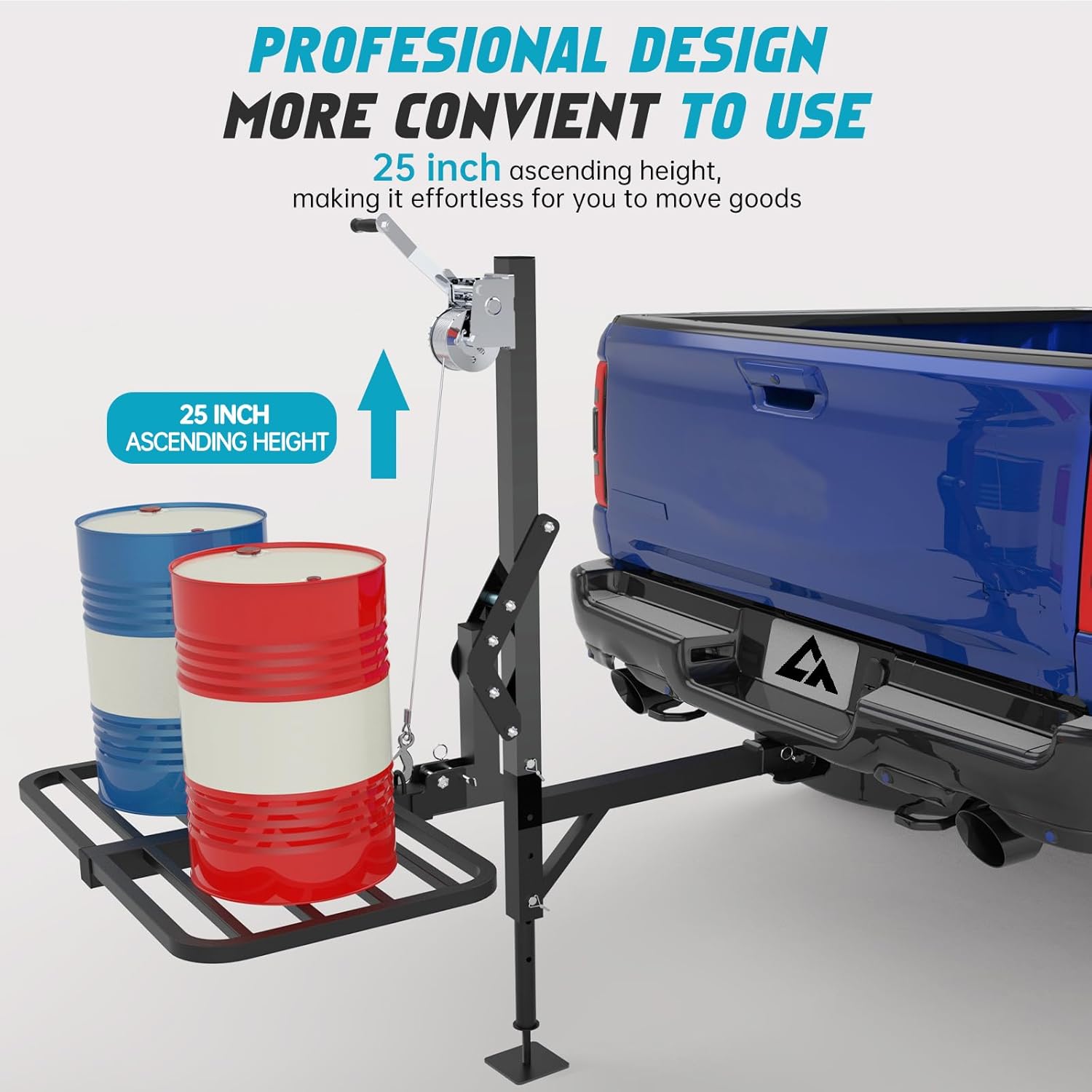
Image: Demonstration of the platform's lifting and 360-degree rotation capabilities for easy loading.

Image: The lifting system demonstrating its 25-inch ascending height.
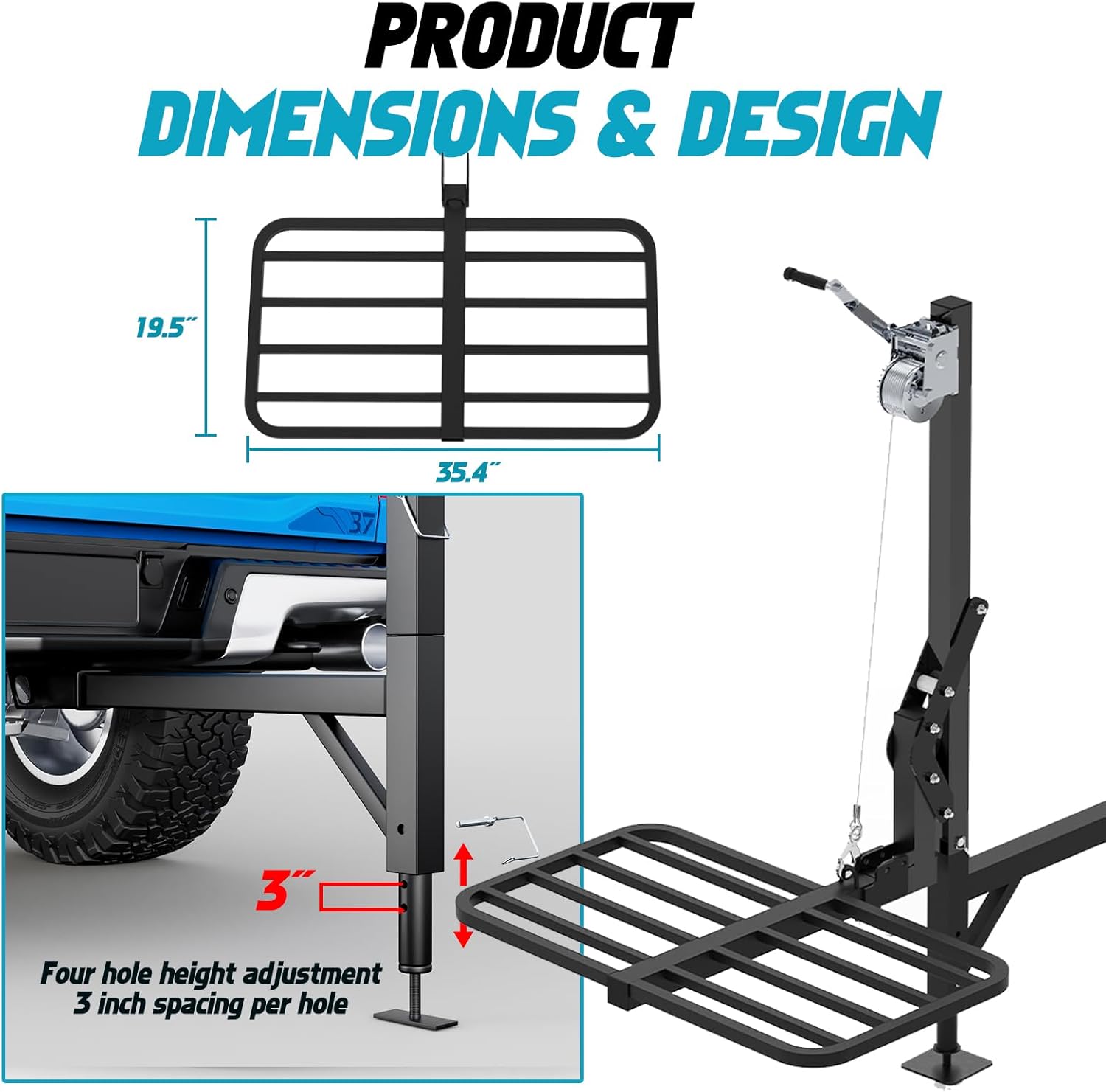
Image: Details of the 360-degree rotation and durable powder-coated steel construction.

Image: The CROSSHIP lifting system in use, hoisting a deer for transport.
Maintenance
Regular maintenance ensures the longevity and safe operation of your lifting system:
- Cleaning: After each use, especially in dirty or wet conditions, clean the system with a damp cloth. Dry thoroughly to prevent rust.
- Lubrication: Periodically apply a light lubricant to moving parts, such as the winch mechanism and pivot points, to ensure smooth operation.
- Inspection: Before and after each use, inspect all bolts, pins, and connections for tightness. Check the winch cable for fraying or damage. Inspect the powder coating for chips or rust.
- Storage: Store the system in a dry place when not in use. If stored outdoors, consider a protective cover.
Troubleshooting
| Problem | Possible Cause | Solution |
|---|---|---|
| Winch is difficult to operate or stiff. | Lack of lubrication; rust; damaged mechanism. | Apply lubricant to the winch gears and cable. Inspect for rust or damage; replace if necessary. |
| Platform does not rotate smoothly. | Rotation pin engaged; dirt/debris in pivot point; lack of lubrication. | Ensure rotation pin is fully disengaged. Clean and lubricate the pivot point. |
| System feels unstable during lifting. | Support foot not properly engaged; uneven ground; overloaded. | Ensure support foot is firmly planted on level ground. Reduce load if exceeding 250 lbs. |
| Hitch connection feels loose. | Hitch pin not fully secured; incorrect hitch size. | Verify hitch pin and clip are fully engaged. Ensure vehicle has a standard 2-inch hitch receiver. |
Specifications
- Model: MYUSQCR084
- Brand: CROSSHIP
- Material: Alloy Steel
- Finish: Powder Coated
- Lifting Capacity (Platform): 250 lbs
- Platform Dimensions: 35.4 inches (Length) x 19.5 inches (Width)
- Product Weight: 54 lbs
- Hitch Receiver Compatibility: 2-inch standard receiver
- Maximum Ascending Height: 25 inches
- Height Adjustment: 3-inch spacing per hole (four holes)
- Rotation: 360-degree flexible rotation
- Vehicle Service Type: Truck, SUV
- Automotive Fit Type: Universal Fit

Image: The CROSSHIP lifting system's 250 lbs load capacity and 2-inch hitch compatibility.
Warranty and Support
For warranty information or technical support, please contact CROSSHIP customer service. Details are typically provided with your purchase documentation or can be found on the official CROSSHIP website.
Customer Service: Refer to your product packaging or the CROSSHIP official website for contact information.
Online Resources: Visit the CROSSHIP Store on Amazon for additional product information and support.


