1. Product Overview
The Xgody S200 is a user-friendly flip phone specifically designed for seniors and individuals who prefer simplicity and ease of use. It features a large keypad, a clear 2.4-inch color display, and a loud speaker for enhanced accessibility.

Figure 1.1: Xgody S200 Big Button Flip Phone, open, displaying its screen and large keypad.
Key Features:
- Large Buttons & Clear Display: Easy-to-read UI with enlarged fonts and icons.
- Loud Speaker: High-volume speaker for clear conversations.
- Long-lasting Battery: 1300mAh battery providing up to 200 hours standby and 6 hours talk time.
- Type-C Charging: Convenient and modern charging interface.
- Dual SIM Support: Flexible management of communication needs.
- SD Card Expansion: For additional storage.
- Multi-functional Tools: Built-in flashlight, FM radio, and Bluetooth.
- SOS Emergency Calls: Supports up to 5 emergency contacts for quick access.
- Durable Flip Design: Protects the screen and enhances portability.
2. Safety Information
Please read this safety information carefully before using your Xgody S200 phone to ensure safe and proper operation. Keep this manual for future reference.
- Battery Safety: Use only the original or approved charger and battery. Do not short-circuit, puncture, or expose the battery to extreme temperatures. Dispose of batteries properly.
- Charging: Ensure the charger is connected to a compatible power source. Do not charge in damp conditions.
- Hearing Protection: Avoid prolonged exposure to high volume levels to prevent hearing damage.
- Driving Safety: Do not use your phone while driving. Always prioritize road safety.
- Medical Devices: Maintain a safe distance between the phone and medical devices like pacemakers. Consult your physician and medical device manufacturer for specific guidelines.
- Water Resistance: This phone is not waterproof. Avoid exposure to liquids.
3. Getting Started
3.1 Package Contents
Verify that all items are present in your product package:
- Xgody S200 Flip Phone
- Phone Case
- Screen Protector
- USB Cable (Type-C)
- Lanyard
3.2 Battery Installation and Charging
The Xgody S200 comes with a 1300mAh Lithium Ion battery. For optimal performance, fully charge the battery before first use.
- Open the back cover of the phone.
- Insert the battery, ensuring the gold contacts align with the phone's terminals.
- Replace the back cover.
- Connect the provided Type-C USB cable to the phone's charging port and the other end to a compatible USB power adapter.
- The phone will indicate charging status on the screen. A full charge typically takes a few hours.

Figure 3.1: Charging the Xgody S200 via Type-C port.
3.3 SIM Card and SD Card Installation
The S200 supports dual SIM cards (2G GSM networks) and a microSD card for expandable storage.
- Power off the phone and remove the back cover and battery.
- Locate the SIM card slots. Insert your SIM cards into the designated slots, ensuring the gold contacts face downwards.
- If using an SD card, insert it into the microSD card slot until it clicks into place.
- Replace the battery and back cover.
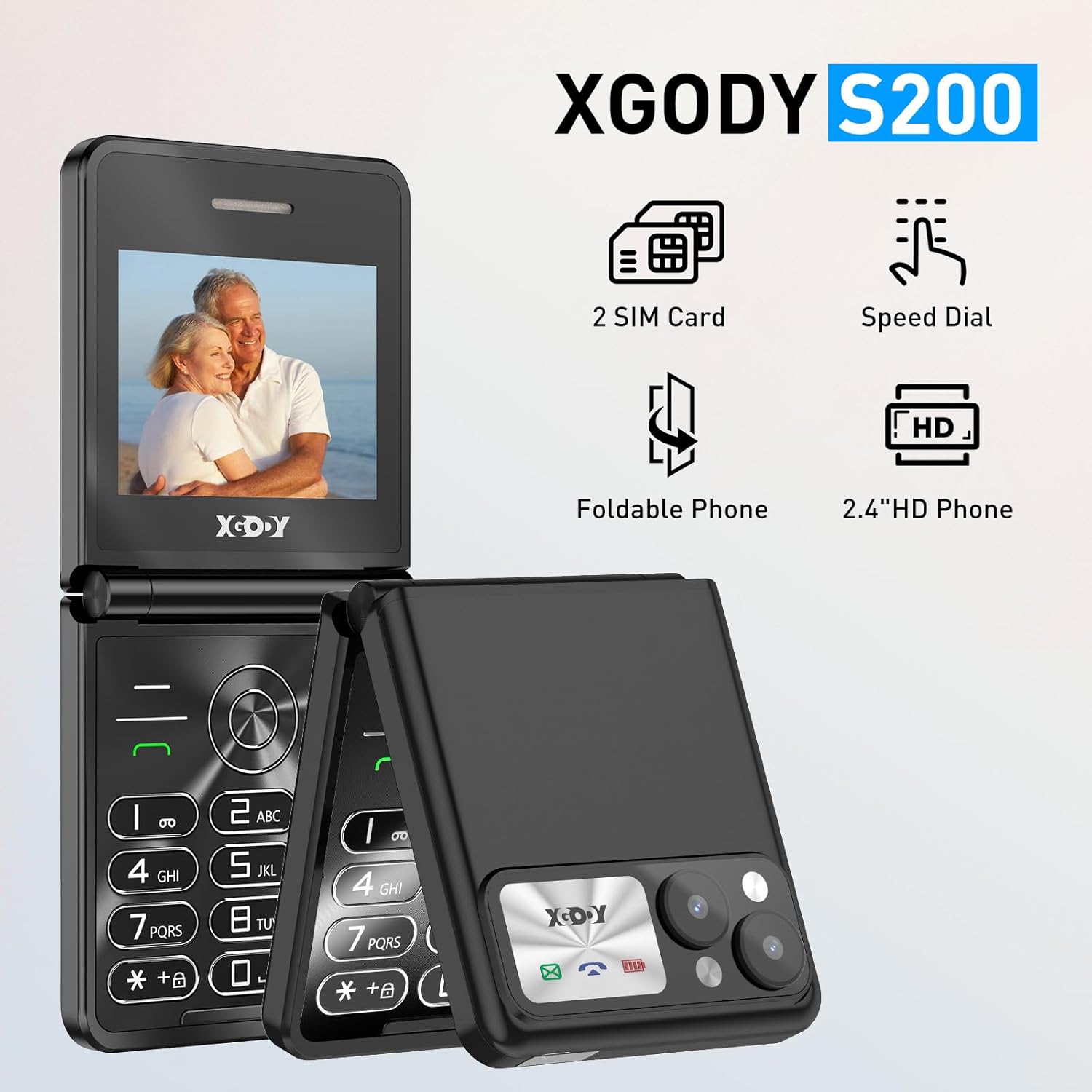
Figure 3.2: The Xgody S200 supports dual SIM cards.
4. Operating Your Phone
4.1 Power On/Off
- To Power On: Press and hold the Power/End Call button (red button) until the screen lights up.
- To Power Off: Press and hold the Power/End Call button until the power-off options appear, then select 'Power off'.
4.2 Making and Receiving Calls
The large buttons and clear audio make calling simple.
- To Make a Call: Dial the number using the keypad and press the Call button (green button).
- To Receive a Call: When the phone rings, press the Call button to answer.
- To End a Call: Press the Power/End Call button.

Figure 4.1: Using the Xgody S200 for calls, demonstrating ease of use with large buttons.

Figure 4.2: The Xgody S200 provides loud and clear phone volume.
4.3 SOS Emergency Calls
The SOS function allows you to quickly contact pre-set emergency numbers.
- Setting Up SOS Contacts: Navigate to the SOS settings in the phone's menu to add up to 5 emergency contact numbers.
- Activating SOS: In standby mode, press and hold the dedicated SOS button (usually located on the back or side of the phone) for 3 seconds. The phone will automatically dial the pre-set emergency contacts in sequence until one answers.

Figure 4.3: SOS Emergency Call feature for quick assistance.
4.4 Flashlight
The built-in flashlight provides convenient illumination.
- To Turn On/Off: Press and hold the dedicated flashlight button (often a side button or a key on the keypad) for 3 seconds.

Figure 4.4: Activating the flashlight on the Xgody S200.
4.5 FM Radio
The phone includes a built-in FM radio for entertainment.
- Accessing FM Radio: Navigate to the 'FM Radio' option in the phone's main menu.
- Using Headphones: For best reception, connect headphones (not included) to the 3.5mm audio jack, as they often act as an antenna.
4.6 Bluetooth
Connect your phone to other Bluetooth-enabled devices.
- Enabling Bluetooth: Go to 'Settings' and then 'Bluetooth' to turn it on.
- Pairing Devices: Search for available devices and select the one you wish to pair with. Follow on-screen prompts to complete the pairing process.
5. Care and Maintenance
Proper care will extend the life of your Xgody S200 phone.
- Cleaning: Use a soft, dry cloth to clean the phone's surface. Avoid using harsh chemicals or abrasive materials.
- Storage: Store the phone in a cool, dry place away from direct sunlight and extreme temperatures.
- Avoid Drops: While durable, avoid dropping the phone. The flip design offers screen protection when closed.
- Battery Care: Do not leave the phone connected to the charger for excessively long periods after it is fully charged.

Figure 5.1: The durable flip design protects the screen.
6. Troubleshooting
If you encounter issues with your Xgody S200, refer to the following common problems and solutions.
| Problem | Possible Cause | Solution |
|---|---|---|
| Phone does not power on | Battery is drained or not properly installed. | Charge the battery for at least 30 minutes. Ensure the battery is correctly inserted. |
| Cannot hear calls clearly / Low speaker volume | Volume setting is too low; speaker obstructed; network issue. | Increase the call volume using the side buttons. Ensure the speaker is not covered. Check network signal strength. |
| Cannot make or receive calls | No SIM card; SIM card not activated; out of network coverage. | Ensure SIM card is inserted correctly. Contact your network provider to activate SIM. Move to an area with better network coverage. |
| Battery drains quickly | Frequent usage; background features active; aging battery. | Reduce screen brightness. Turn off Bluetooth when not in use. Limit continuous talk time. |
7. Product Specifications
| Feature | Specification |
|---|---|
| Model Name | XGODY S200 |
| Brand | Xgody |
| Operating System | Nucleus OS |
| Screen Size | 2.4 Inches |
| Battery Capacity | 1300mAh Lithium Ion (included) |
| Charging Port | Type-C |
| Wireless Carrier | Unlocked for All Carriers |
| Cellular Technology | 2G GSM |
| SIM Card Slot Count | Dual SIM |
| Memory Storage Capacity | 0.03 GB (internal) |
| Package Dimensions | 21.1 x 9.2 x 5.2 cm |
| Item Weight | 260 g |
| Manufacturer | XGODY |
8. Warranty and Support
For warranty information and technical support, please refer to the documentation provided with your purchase or contact your retailer. Keep your proof of purchase for warranty claims.
If you require further assistance or have questions not covered in this manual, please reach out to Xgody customer service or the authorized dealer from whom you purchased the product.