
1. Introduction
This manual provides essential information for the safe and efficient operation of your TGPKPGTCTA SDM630MCT ETL Three-Phase Digital Din Rail Power Meter. This device is designed for measuring energy consumption, with a measuring range of up to 999999.99 kWh, a maximum operating current of 19A, and a rated voltage of 230V. Please read this manual thoroughly before installation and use.
2. Safety Information
- Installation and maintenance should only be performed by qualified personnel.
- Ensure the power supply is disconnected before any wiring or maintenance.
- Observe all local and national electrical codes and regulations.
- Do not operate the device if it appears damaged.
- This device is for indoor use only.
3. Product Overview
The TGPKPGTCTA SDM630MCT ETL is a compact and versatile three-phase digital power meter designed for DIN rail mounting. It offers accurate energy measurement and features an RS485 port for Modbus communication.

Front view of the TGPKPGTCTA SDM630MCT ETL power meter, showing the digital display and control buttons.
Key Features:
- Small size: Portable and space-efficient.
- Easy to install: Simple installation process.
- Versatility: Measures a wide range of energy parameters.
- Low maintenance: Designed for reduced wear and tear.
- Sensitive response: No mechanical inertia for accurate readings.
4. Setup and Installation
The SDM630MCT ETL power meter is designed for DIN rail mounting. Follow the wiring diagrams carefully to ensure correct and safe installation.
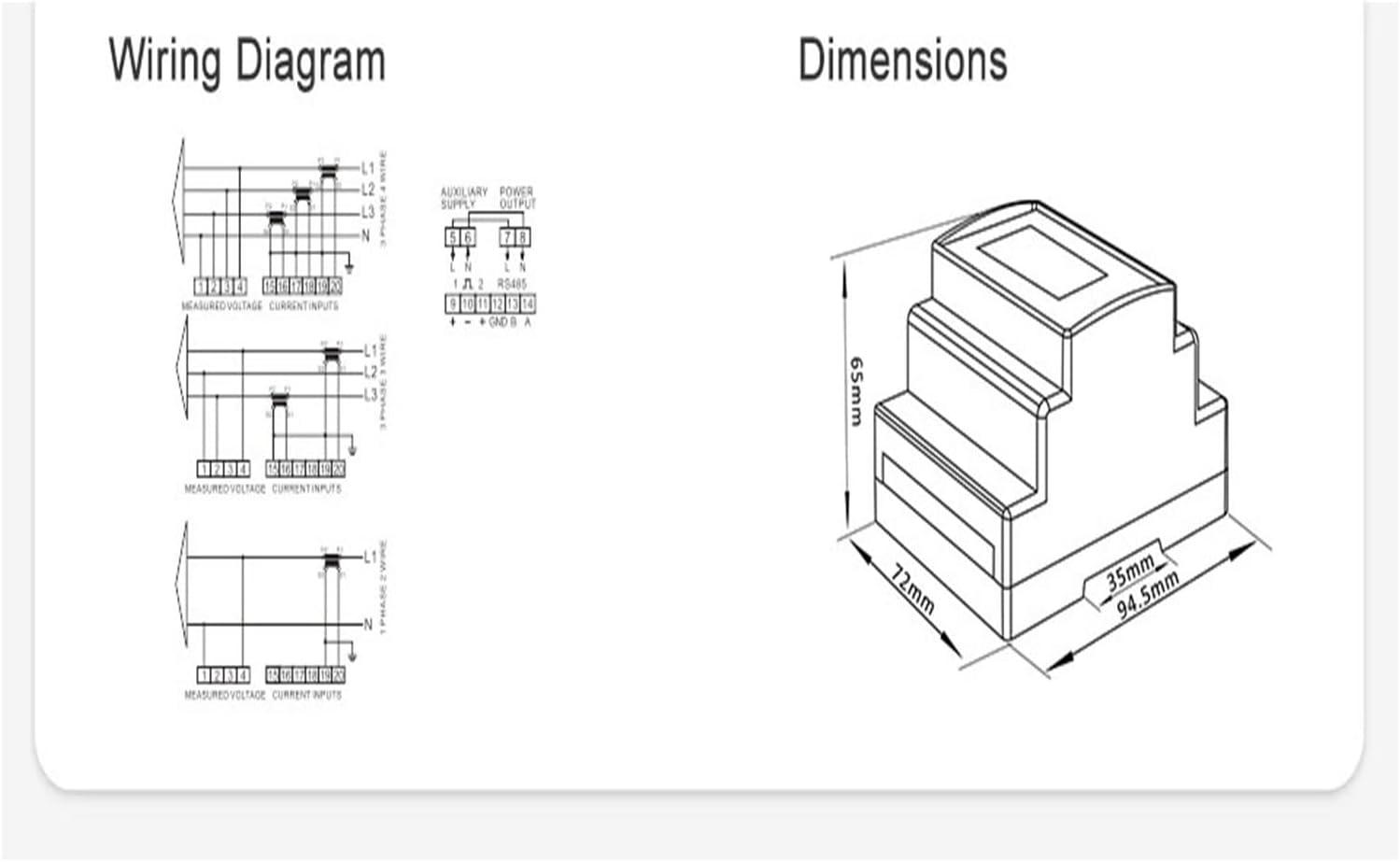
This image displays detailed wiring diagrams for 3-phase 4-wire, 3-phase 3-wire, and 1-phase 2-wire configurations, along with auxiliary power supply and RS485 connections. It also includes a dimensional drawing of the power meter with measurements: 65mm height, 72mm width, and 94.5mm depth.
Installation Steps:
- Mount the power meter onto a standard 35mm DIN rail.
- Ensure all power is disconnected from the circuit where the meter will be installed.
- Connect the voltage inputs (L1, L2, L3, N) according to the appropriate wiring diagram for your system (3-phase 4-wire, 3-phase 3-wire, or 1-phase 2-wire).
- Connect the Current Transformers (CTs) to the corresponding current inputs (I1, I2, I3). Ensure the CTs are correctly oriented (P1/K to source, P2/L to load).
- If using, connect the RS485 communication wires (A, B) and auxiliary power supply as shown in the diagram.
- Double-check all connections for tightness and correctness before restoring power.
5. Operating Instructions
Once installed and powered, the SDM630MCT ETL will display various electrical parameters on its digital screen. Use the front panel buttons to navigate through the display modes and access different measurements.
Display Navigation:
- The display typically cycles through primary measurements like total energy (kWh), voltage, current, and power.
- Refer to the button labels (e.g., U/L, M, P, E) on the device for specific functions such as cycling through phases, accessing menu options, or resetting certain values.
- Detailed parameter settings and advanced functions are typically accessed via the RS485 Modbus interface using compatible software.
6. Specifications
Below are the technical specifications for the TGPKPGTCTA SDM630MCT ETL Power Meter.

A table detailing the input and output specifications. Input current options include CT Primary (1-9999A) and CT Secondary (1A/5A). Input voltage specifications are Rated Voltage (Un) at 100-277V 3~L-N and 100-480V 3~L-L, with an Operational Voltage range of 80%~120% of Un.
| Parameter | Value |
|---|---|
| Measuring Energy Range | 999999.99 kWh |
| Max Operating Current | 19A & Under |
| Rated Voltage | 230V |
| Package Dimensions | 1.18 x 0.79 x 0.39 inches |
| Item Weight | 1.1 pounds |
| Manufacturer | TGPKPGTCTA |
| Item Model Number | SDM630MCT |
| Assembly Required | No |
| Number of Pieces | 1 |
| Batteries Required | No |
7. Maintenance
The TGPKPGTCTA SDM630MCT ETL power meter is designed for low maintenance. Regular checks should include:
- Periodically inspect wiring connections to ensure they remain secure.
- Keep the device clean and free from dust and moisture. Use a dry, soft cloth for cleaning.
- Do not use abrasive cleaners or solvents.
8. Troubleshooting
If you encounter issues with your power meter, consider the following common troubleshooting steps:
- No Display: Check the power supply connections. Ensure the rated voltage is within the operational range.
- Incorrect Readings: Verify all wiring, especially CT connections and orientation. Ensure the CT ratio settings (if configurable) match your installed CTs.
- Communication Issues (RS485): Check RS485 wiring (A/B polarity), baud rate, and device address settings. Ensure the Modbus master software is correctly configured.
- Device Not Responding: Disconnect power, wait a few minutes, and then reconnect. If the issue persists, contact customer support.
9. Warranty and Support
For warranty information and technical support, please refer to the documentation provided with your purchase or contact TGPKPGTCTA customer service. Keep your purchase receipt as proof of purchase.