1. Introduction
This manual provides essential information for the proper setup, operation, and maintenance of your FancyWhoop ESP32-WROOM-32D Development Board. The ESP32-WROOM-32D is a powerful, generic Wi-Fi+BT+BLE MCU module that targets a wide variety of applications, ranging from low-power sensor networks to the most demanding tasks, such as voice encoding, music streaming, and MP3 decoding. Please read this manual thoroughly before using the device.
2. Product Overview
2.1 Key Features
- Dual-Core Processor: Equipped with a high-performance dual-core 32-bit processor (ESP32-D0WD-V3) with a maximum operating frequency of 240MHz, providing robust computing power.
- Wireless Communication: Supports 802.11 b/g/n Wi-Fi and Bluetooth 4.2 (including BLE), suitable for various wireless applications.
- Rich GPIO Interfaces: Provides multiple general-purpose input/output pins, facilitating easy connection with various sensors and peripherals.
- Low Power Consumption: Supports multiple low-power modes, making it suitable for battery-powered applications.
- Storage: Built-in 520KB SRAM and expandable SPI flash memory for storing applications and data.
- Module Interface: Features SD card UART, SPI, SDIO, I2C, LED PWM, Motor PWM, I2S, IR, Pulse counter, GPIO, Capacitive touch sensor, ADC, DAC, and dual-line automotive interface (TWAI®) compatible with ISO11898-1 protocol (CAN specification 2.0).
2.2 Component Identification and Pin Layout
Familiarize yourself with the board's components and pin assignments for proper connection and programming.

Figure 1: Detailed pin layout of the ESP32-WROOM-32D Development Board. Note that pins SCK/CLK, SDO/SD0, SDI/SD1, SHD/SD2, SWP/SD3, SCS/CMD (GPIO6 to GPIO11) are connected to SPI flash and are not recommended for other functions.

Figure 2: Overview of key components including the Type-C USB port, AMS1117 voltage regulator, CP2102 USB-to-UART bridge, and the ESP32-WROOM-32D module.

Figure 3: Illustration of how external QSPI Flash memory and SRAM can be accessed via a high-speed cache, mapping to CPU instructions and data space.
3. Setup Instructions
3.1 Connecting the Board
- Connect the ESP32-WROOM-32D Development Board to your computer using a Type-C USB cable.
- Ensure the cable is capable of data transfer, not just charging.
3.2 Driver Installation (CP2102)
The board uses a CP2102 USB-to-UART bridge. Drivers may be required for your operating system (Windows, macOS, Linux) to recognize the board. Download the latest drivers from the Silicon Labs website (search for 'CP210x USB to UART Bridge VCP Drivers').
3.3 Development Environment Setup
The ESP32-WROOM-32D is compatible with various development environments.
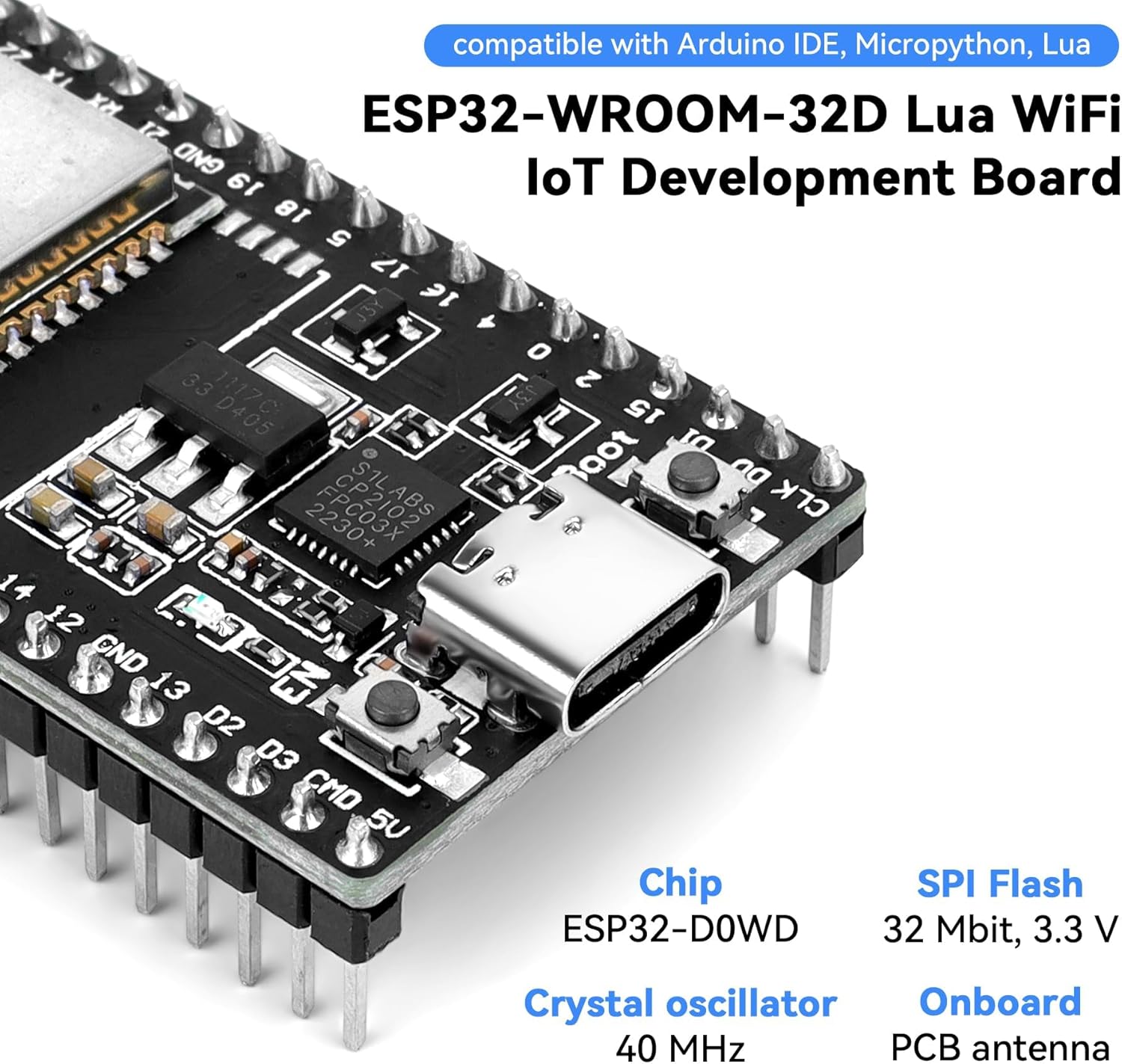
Figure 4: The ESP32-WROOM-32D is compatible with popular development environments such as Arduino IDE, Micropython, and Lua.
- Arduino IDE: Install the ESP32 board package through the Arduino IDE Boards Manager. Detailed instructions are available on the Espressif GitHub page or various online tutorials.
- Micropython: Flash the Micropython firmware onto the ESP32 board. Refer to the official Micropython documentation for ESP32.
- ESP-IDF (Espressif IoT Development Framework): For advanced development, install the official ESP-IDF.
4. Operating Instructions
4.1 Uploading Code
- Open your chosen IDE (e.g., Arduino IDE).
- Select the correct board (e.g., ESP32 Dev Module) and COM port from the Tools menu.
- Write or load your code (sketch).
- Press the 'Upload' button. During the upload process, you may need to press and hold the 'BOOT' button on the ESP32 board until the upload starts, then release it. Some boards may require this manual intervention.
4.2 Using Wi-Fi and Bluetooth
The ESP32-WROOM-32D supports 802.11 b/g/n Wi-Fi and Bluetooth v4.2. Libraries and examples for both functionalities are available within the ESP32 development frameworks. Refer to the respective documentation for detailed programming guides.
4.3 GPIO and Peripheral Usage
The board offers numerous GPIO pins for connecting sensors, actuators, and other peripherals. Consult the pinout diagram (Figure 1) and the ESP32 datasheet for specific pin capabilities (ADC, DAC, PWM, I2C, SPI, UART, etc.).

Figure 5: The module interface supports various protocols including SD card UART, SPI, SDIO, I2C, LED PWM, Motor PWM, I2S, IR, Pulse counter, GPIO, capacitive touch sensor, ADC, DAC, and TWAI®.
5. Maintenance
5.1 General Care
- Handle the board with care to avoid damaging components or bending pins.
- Store the board in an anti-static bag when not in use.
- Keep the board away from moisture, extreme temperatures, and direct sunlight.
- Avoid applying excessive force to the USB-C port or other connectors.
5.2 Firmware Updates
Regularly check for updates to the ESP32 core for your chosen IDE (e.g., Arduino IDE ESP32 core) or the ESP-IDF to benefit from bug fixes, performance improvements, and new features.
6. Troubleshooting
If you encounter issues, consider the following troubleshooting steps:
- Board Not Detected: Ensure CP2102 drivers are correctly installed. Try a different USB-C cable and USB port. Restart your computer.
- Upload Failures: Verify the correct board and COM port are selected in your IDE. Ensure you are pressing the 'BOOT' button at the correct time during the upload process if required by your specific board variant. Check for proper power supply.
- Code Not Running/Unexpected Behavior: Review your code for errors. Check pin assignments against the pinout diagram. Ensure external components are correctly wired. Verify power supply stability.
- Wi-Fi/Bluetooth Connectivity Issues: Double-check network credentials. Ensure antennas (if external) are properly connected. Verify power supply is sufficient for wireless operations.
- Blue LED Behavior: If a blue LED illuminates unexpectedly when pressing the BOOT button, it might indicate a specific board variant or a potential issue. Consult community forums for similar experiences with your board model.
7. Specifications
Below are the technical specifications for the FancyWhoop ESP32-WROOM-32D Development Board:
| Feature | Detail |
|---|---|
| Model Name | ESP32-WROOM-32D |
| Processor | ESP32-D0WD-V3 (Dual-core 32-bit LX6 MCU) |
| Clock Speed | Up to 240 MHz |
| Wi-Fi | 802.11 b/g/n (up to 150 Mbps) |
| Bluetooth | Bluetooth v4.2 (including BLE) |
| SRAM | 520 KB on-chip |
| Flash Memory | 4 MB (expandable SPI flash) |
| USB Interface | Type-C (via CP2102) |
| Operating System Compatibility | Linux (and other OS via IDEs like Arduino) |
| Dimensions | 55mm x 28mm x 14mm (approx. 2.16 x 1.10 x 0.55 inches) |
| Weight | Approx. 1.13 ounces |

Figure 6: Physical dimensions of the ESP32-WROOM-32D Development Board.

Figure 7: Details of the ESP32-D0WD built-in dual-core processor, including ROM, SRAM, eFuse, and RTC memory specifications.
8. Warranty Information
For specific warranty terms and conditions, please refer to the documentation provided at the time of purchase or contact the seller directly. Standard return policies typically apply for manufacturing defects within a specified period.
9. Support
If you require technical assistance or have questions not covered in this manual, please contact the FancyWhoop customer support or refer to online community forums dedicated to ESP32 development. Many resources and active communities exist to help with programming and project development.