
Introduction
This manual provides detailed instructions for the setup, operation, maintenance, and troubleshooting of your Terloogee Voice Replacement Samsung TV Remote Control. Please read this manual carefully to ensure proper use and to maximize the functionality of your new remote control.
Product Overview
The Terloogee Voice Replacement Samsung TV Remote Control is designed to provide seamless control over your compatible Samsung Smart TV. It features voice control capabilities and dedicated shortcut buttons for popular streaming services, enhancing your viewing experience.
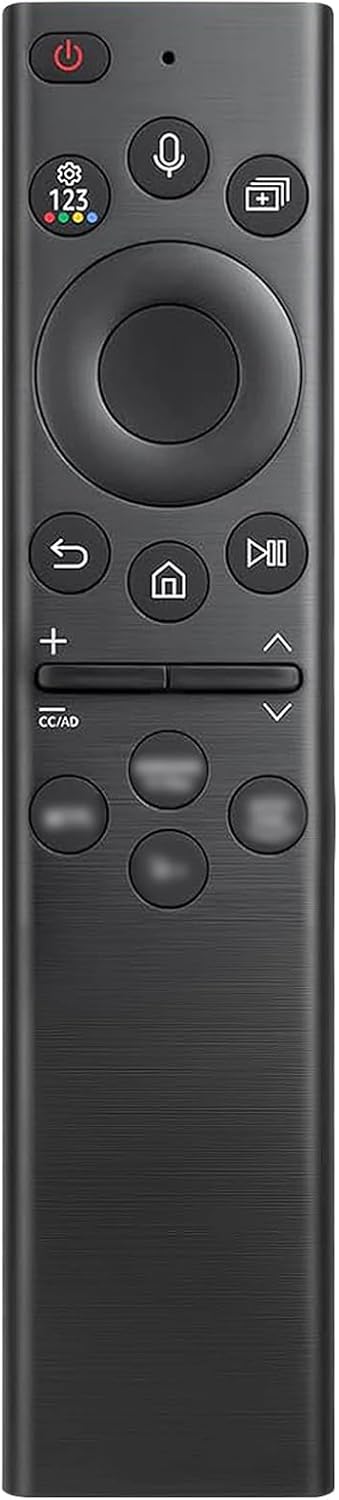
Image: Front view of the Terloogee Voice Replacement Samsung TV Remote Control, showcasing its sleek black design and button layout.
Key Features:
- Voice Function: Enables intuitive control of your TV's volume, app launching, and content search using voice commands. Requires a stable network connection for voice recognition.
- 4 Shortcut Buttons: Provides quick access to popular streaming channels, allowing you to reach your favorite content efficiently.
- Ergonomic Design: Engineered for comfortable grip and easy access to all frequently used buttons, minimizing hand fatigue.
- Durable Construction: Made from high-quality ABS plastic for long-lasting performance.
- Fast Response: Offers a 0.3-second response time for immediate command execution.
- Long-Distance Control: Effective transmission signal range of over 48 feet.
Compatibility:
This replacement remote control is compatible with most 2018 to 2024 Samsung Smart TVs that feature voice control functionality. It is designed to replace various Samsung remote models, including but not limited to:
- BN59-01312A, BN59-01312F, BN59-01312D, BN59-01312E, BN59-01312G, BN59-01312K, BN59-01312L, BN59-01312M, BN59-01312X, BN59-01312U, BN59-01312T
- BN59-01329A, BN59-01329C, BN59-01329F
- BN59-01330A, BN59-01330C, BN59-01330H, BN59-01330N, BN59-01330Q, BN59-01330M
- And other similar models.
Note: This remote control only works for Samsung TVs with voice function. If your Samsung TV does not have voice function, please do not purchase this product.

Image: Visual representation of the Terloogee remote's compatibility with various Samsung TV remote models.
Setup
Pairing Instructions:
To connect your Terloogee Voice Replacement Samsung TV Remote Control to your Samsung Smart TV, follow these simple steps:
- Ensure your TV is powered on and in a ready state.
- Point the remote control towards your TV.
- Press and hold the Back/Exit button (
 ) and the Play/Pause button () simultaneously for 3 to 6 seconds.
 - A message stating "Pairing complete" will appear on your TV screen, indicating successful connection.
If pairing fails, please repeat the steps above. Ensure there are no obstructions between the remote and the TV, and that the remote has sufficient battery power.
Image: Visual guide demonstrating the pairing process, showing the remote and TV screen prompts for searching, connecting, and completing pairing.
Operating Instructions
Voice Control Function:
To utilize the voice control feature, press the dedicated voice button on your remote. Speak clearly into the remote's microphone. Ensure your TV is connected to the internet for optimal voice recognition performance.
- Volume Control: Say commands like "Increase the volume" or "Set volume to 20".
- App Launching: Say "Open Netflix" or "Launch YouTube".
- Content Search: Ask "Search for action movies" or "Find comedies".
- General Commands: Use phrases like "Turn off" or "How's the weather today?".

Image: Depiction of a family using the voice control feature of the remote to interact with their Samsung Smart TV.
Shortcut Buttons:
The remote features four dedicated shortcut buttons for quick access to popular applications. Simply press the corresponding button to launch the desired service instantly.

Image: Close-up of the remote highlighting the four shortcut buttons for quick access to streaming services.
General Navigation:
- Use the directional pad (D-pad) for navigating menus and selecting items.
- The Home button returns you to the TV's main smart hub.
- The Volume Up/Down buttons control the audio output.
- The Channel Up/Down buttons change TV channels.
Maintenance
To ensure the longevity and optimal performance of your remote control, please follow these maintenance guidelines:
- Cleaning: Use a soft, dry cloth to clean the remote control. For stubborn dirt, slightly dampen the cloth with water. Avoid using harsh chemicals, abrasive cleaners, or solvents, as these can damage the remote's surface and internal components.
- Battery Replacement: While this remote does not require frequent battery replacement due to its design, if you notice a decrease in responsiveness or range, consider replacing the batteries (if applicable, refer to your TV's original remote battery type for guidance if this is a direct replacement).
- Storage: Store the remote in a cool, dry place away from direct sunlight, extreme temperatures, and high humidity.
- Handling: Avoid dropping the remote control or subjecting it to strong impacts, as this can cause internal damage.
Troubleshooting
If you encounter any issues with your Terloogee Voice Replacement Samsung TV Remote Control, please refer to the following common problems and solutions:
| Problem | Possible Cause | Solution |
|---|---|---|
| Remote not responding to TV. | Not paired correctly, low battery, or obstruction. | Repeat the pairing process as described in the Setup section. Ensure line of sight to the TV. Check or replace batteries if applicable. |
| Voice control not working. | No internet connection, TV does not support voice, or microphone issue. | Ensure your TV is connected to a stable internet network. Verify your Samsung TV model supports voice control. Speak clearly and directly into the remote's microphone. |
| Shortcut buttons not launching apps. | TV software issue or app not installed/updated. | Ensure your TV's software is up to date. Check if the specific app is installed and functioning correctly on your TV. |
| Remote feels sluggish or delayed. | Low battery or interference. | Replace batteries if applicable. Minimize sources of interference (e.g., other electronic devices). |
If you continue to experience problems after attempting these troubleshooting steps, please do not hesitate to contact Terloogee customer support for further assistance.
Specifications
| Feature | Detail |
|---|---|
| Model Number | BN59-01385A (Replacement) |
| Brand | Terloogee |
| Color | Black |
| Special Feature | Voice Search |
| Compatible Devices | Samsung Smart Televisions (2018-2024 models with voice function) |
| Max Number of Supported Devices | 1 |
| Item Weight | 1.44 ounces (approximately 40.8 grams) |
| Package Dimensions | 6.57 x 2.2 x 0.67 inches (approximately 16.7 x 5.6 x 1.7 cm) |

Image: Diagram illustrating the precise dimensions of the remote control in both centimeters and inches.
Warranty and Support
Terloogee is committed to providing high-quality, user-friendly products. If you encounter any issues or have questions regarding your Voice Replacement Samsung TV Remote Control, please do not hesitate to contact our customer support team. We are dedicated to resolving any concerns to your satisfaction.
For support, please refer to the contact information provided with your purchase or visit the official Terloogee store on Amazon: Terloogee Store