
1. Product Overview
The RichBird Smart Hummingbird Feeder with Camera offers an interactive birdwatching experience. This solar-powered feeder features a 3MP HD camera with instant motion detection, 140° wide-angle lens, and clear night vision for 24/7 monitoring. It connects to the COOLFLY app for AI identification of birds, instant notifications, and community features. Designed to attract hummingbirds with vibrant red feeding ports, it also includes built-in ant guards and leak-proof food-grade plastic for safe and worry-free feeding. The feeder is IP65 waterproof, ensuring durability in various weather conditions.
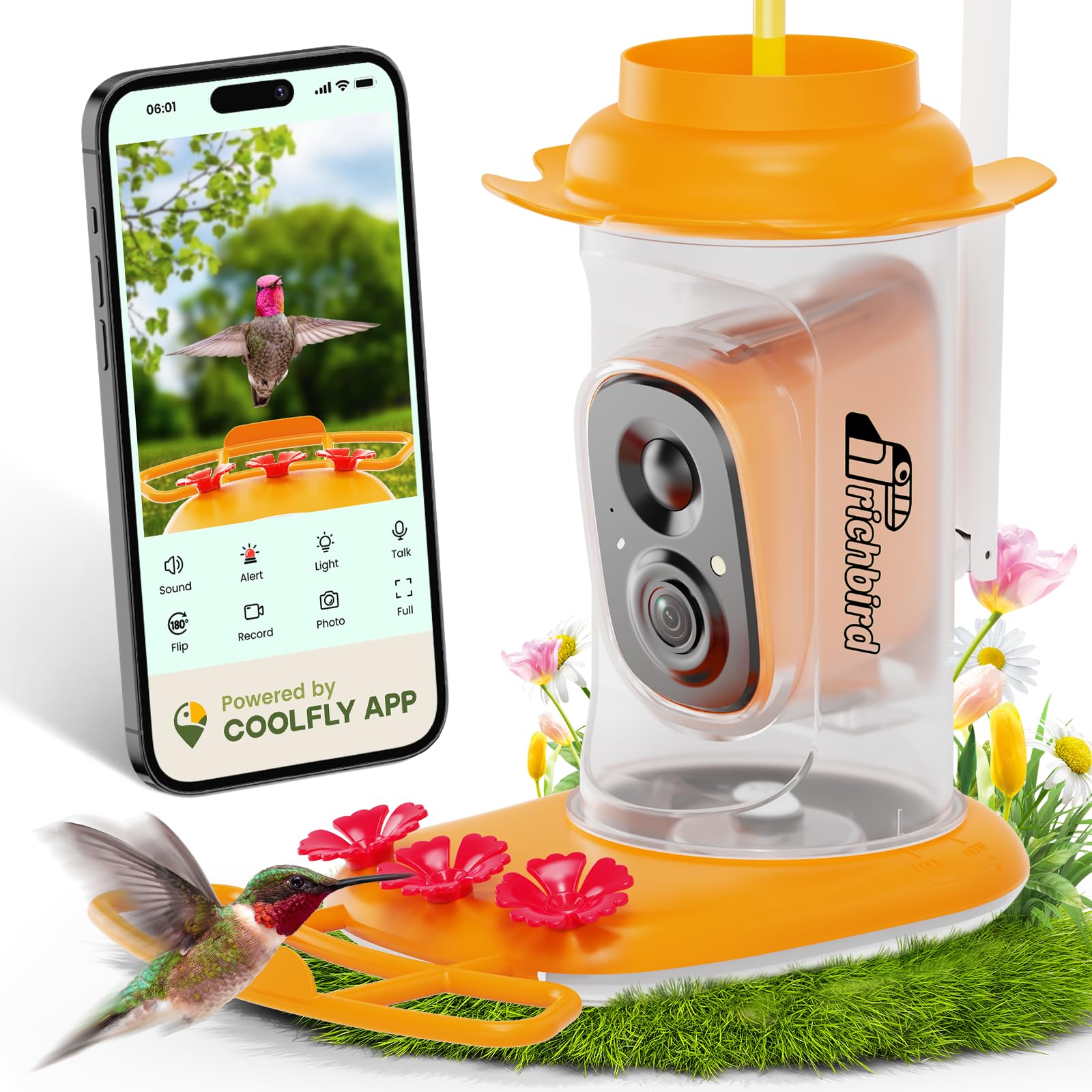
Image: RichBird Smart Hummingbird Feeder with Camera (Orange variant).
2. What's in the Box
Upon unboxing, ensure all components are present:
- Feeder (x1)
- RichBird Camera (x1)
- Feeding Port (x3)
- Solar Panel (x1)
- Perch (x1)
- User Manual (x1)
- Charging cable (x1)
- Clean Brushes (x2)
- Installation package (x1)

Image: All components included in the RichBird Smart Hummingbird Feeder package.
For a visual guide on the package contents, please refer to the video below:
Video: An official RichBird video demonstrating the unboxing and contents of the Smart Hummingbird Feeder.
3. Setup Instructions
Follow these steps to assemble and prepare your RichBird Smart Hummingbird Feeder:
- Prepare the Feeder: Ensure the silicone gasket is properly sealed. Secure the top cover firmly. Press the feeding port flowers until they are snug. Rotate the fill line to align with the 'LOCK' position.
- Fill with Nectar: Pull out the stopper from the bottom of the feeder. Fill the feeder approximately 3/4 full with hummingbird nectar. Push the stopper back in securely.
- Install Camera and Antenna: Insert the RichBird Camera into the designated slot in the feeder body. Screw the antenna into the camera's port.
- Mount the Feeder: Use the provided metal hook to hang the feeder in a suitable outdoor location. Ensure it is securely mounted to prevent accidental falls.
- Install Solar Panel: Attach the solar panel to the solar panel bracket. Mount the bracket in a location that receives ample sunlight to ensure continuous charging of the camera. Connect the solar panel cable to the camera's charging port.

Image: RichBird Smart Hummingbird Feeder with Camera and Solar Panel installed.

Image: Visual guide for initial setup steps of the feeder.

Image: Visual guide for filling and hanging the feeder.
For a detailed video on how to set up your feeder, please watch:
Video: Official RichBird guide on setting up the Smart Hummingbird Feeder.
4. Operating Instructions
The RichBird Smart Hummingbird Feeder operates via the COOLFLY app, offering advanced features for birdwatching:
- COOLFLY App: Download the COOLFLY app from Google Play or the App Store. The app provides an interactive platform for birdwatching, including video sharing, likes, comments, and group chats.
- AI Identification: The app features lifetime free AI bird identification, allowing you to identify different hummingbird species visiting your feeder.
- Live HD Birdwatching: Connect the feeder to your 2.4GHz Wi-Fi network to access live 3MP HD video streams. The 140° wide-angle lens and clear night vision ensure comprehensive coverage.
- Instant Notifications: Receive real-time alerts on your smartphone when hummingbirds are detected by the camera's motion sensor.
- Solar Power: The integrated solar panel ensures continuous operation and charging, providing 24/7 birdwatching without manual recharging.

Image: The COOLFLY app interface showing birdwatching features.

Image: COOLFLY app features including AI bird ID and community interaction.
For an in-depth look at the COOLFLY app and its functionalities, refer to this video:
Video: A detailed overview of the COOLFLY app and its features for the RichBird feeder.
5. Maintenance
Regular cleaning is essential to ensure the health of visiting hummingbirds and the longevity of your feeder:
- Disassembly: To clean, first remove the top cover and the sealing plug. Press down the latch on the feeder body to remove the camera. Spin the bottle around to detach the bottle body from the bottom bracket. Remove the mouthpiece flowers.
- Cleaning: Wash the top cover, clean the sealing plug, and clean the bottle body using the provided tube cleaning brushes. Clean the mouthpiece flowers thoroughly.
- Reassembly: Ensure all parts are dry before reassembling. Reattach the mouthpiece flowers, then the bottle body to the bottom bracket. Insert the camera back into its slot, ensuring the latch clicks into place. Secure the top cover and sealing plug.
- Ant-Proof & Leak-Proof Design: The feeder features built-in ant guards to keep nectar pure and leak-proof food-grade plastic to prevent spills. Regularly check the ant moat for water and refill as needed.

Image: Visual guide for quick cleaning of the feeder components.
6. Troubleshooting
If you encounter issues with your RichBird Smart Hummingbird Feeder, consider the following:
- No Power/Charging: Ensure the solar panel is positioned in direct sunlight for optimal charging. Check the connection between the solar panel and the camera. If necessary, charge the camera directly using the provided USB-C cable.
- Wi-Fi Connection Issues: Verify that your Wi-Fi network is 2.4GHz, as the feeder only supports this frequency. Ensure the feeder is within range of your Wi-Fi router. Restart the camera and your router if connection persists.
- App Connectivity: Make sure the COOLFLY app is updated to the latest version. Check your smartphone's internet connection.
- Motion Detection Not Triggering: Adjust the motion detection sensitivity settings within the COOLFLY app. Ensure there are no obstructions blocking the camera's view.
- Poor Video Quality: Clean the camera lens with a soft cloth. Check your Wi-Fi signal strength in the app.
- Hummingbirds Not Visiting: Ensure the nectar is fresh and the feeder is clean. Position the feeder in a visible, safe location away from predators.
7. Specifications
| Feature | Detail |
|---|---|
| Brand | RichBird |
| Model Number | rapidity |
| Target Species | Hummingbird |
| Material | ABS Plastic |
| Special Features | AI Identify, Built-In Ant Moat, Built-In Camera, Instant Notification, Leakproof |
| Mounting Type | Hanging Mount |
| Product Dimensions | 6.54"L x 9.92"W x 6.73"H |
| Power Source | Solar Powered |
| Capacity | 20 oz (1.3 Pounds) |
| Item Weight | 2.77 pounds |
| Waterproof Rating | IP65 |
8. Safety Guidelines
To ensure safe operation and protect wildlife, please observe the following:
- Always mount the feeder securely to prevent it from being knocked down by larger animals or falling due to wind.
- Be aware that the camera feature may attract unwanted attention, and take appropriate precautions to secure the feeder and protect your property.
- Always follow local regulations and guidelines for feeding wildlife.
- Do not pour nectar from the top of the feeder. Always fill from the bottom instead to prevent leakage and maintain hygiene.
9. Warranty and Support
RichBird is committed to customer satisfaction. Your Smart Hummingbird Feeder comes with:
- 1 Year Warranty: Covering manufacturing defects and malfunctions under normal use.
- 24-hour Customer Service: For any inquiries or support needs, please contact RichBird customer service.

Image: RichBird's commitment to customer satisfaction, including warranty and support details.