
1. Introduction
This manual provides detailed instructions for the installation, operation, and maintenance of the TGPKPGTCTA SDM120-Modbus Energy Meter. This device is designed for measuring energy consumption in a 1-phase, 2-wire electrical system, featuring RS485 Modbus communication for integration into monitoring systems. Please read this manual thoroughly before installation and operation to ensure safe and correct usage.
2. Product Overview
The SDM120-Modbus is a compact and efficient energy meter designed for DIN rail mounting. It accurately measures energy consumption and provides data via an RS485 Modbus interface.
Key Features:
- Small size: Portable and space-saving design.
- Easy to install: Simple installation process, suitable for DIN rail mounting.
- Versatility: Measures a wide range of energy parameters.
- Low maintenance: Designed for reduced wear and tear, ensuring long-term reliability.
- Sensitive response: Operates without mechanical inertia for precise measurements.

Figure 2.1: Front view of the SDM120-Modbus Energy Meter, showing the digital display for kWh readings and the model designation 'SDM120M'.

Figure 2.2: Angled view of the SDM120-Modbus Energy Meter, highlighting its compact form factor and DIN rail mounting clips.
3. Safety Information
Please observe the following safety precautions to prevent injury and damage to the device:
- Installation and maintenance should only be performed by qualified personnel.
- Ensure the power supply is disconnected before any installation or wiring work.
- Do not operate the device in wet or damp conditions.
- Verify all connections are secure and correct according to the wiring diagram.
- Do not exceed the specified voltage and current ratings.
4. Package Contents
The package typically includes:
- 1 x SDM120-Modbus Energy Meter
- 1 x User Manual (this document)
5. Setup and Installation
The SDM120-Modbus is designed for easy installation on a standard DIN rail.
5.1 Mounting
- Ensure the power supply to the installation area is completely off.
- Attach the energy meter to a standard 35mm DIN rail by pressing it down until it clicks into place.
5.2 Wiring
Refer to the wiring diagram below for correct electrical connections. The meter is designed for a 1-phase, 2-wire system.
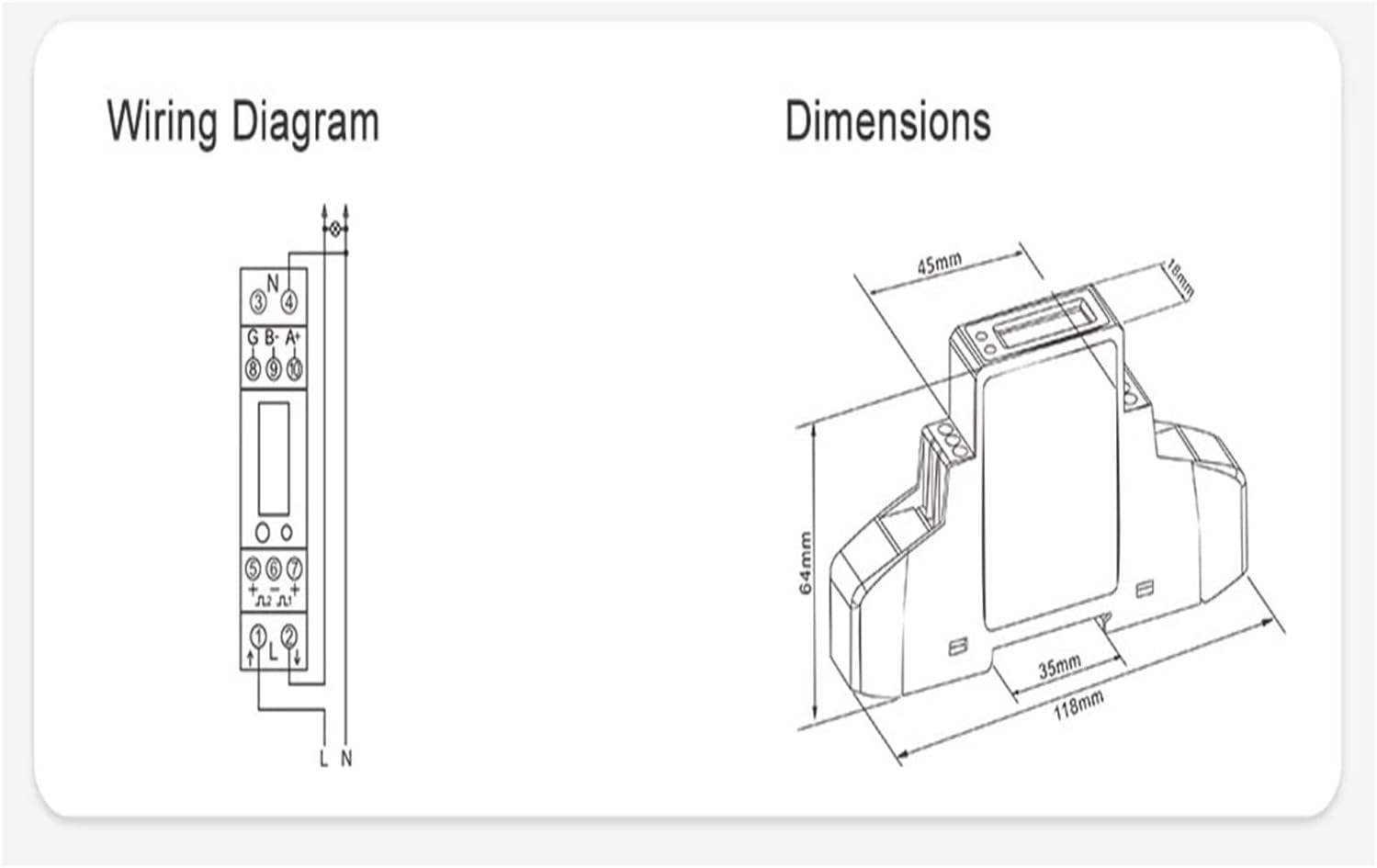
Figure 5.1: Wiring Diagram and Dimensions. The wiring diagram illustrates connections for Live (L), Neutral (N), and RS485 (A+, B-, G) terminals. Dimensions are provided in millimeters.
- Connect the incoming Live (L) and Neutral (N) wires to the designated input terminals.
- Connect the outgoing Live (L) and Neutral (N) wires to the load terminals.
- For Modbus communication, connect the RS485 A+ and B- terminals to your Modbus network. Ensure proper polarity.
- Double-check all connections for tightness and correctness before restoring power.
6. Operating Instructions
Once properly installed and powered, the SDM120-Modbus will begin measuring energy consumption.
6.1 Display Readings
The digital display shows the accumulated energy (kWh). A circular button on the front panel allows cycling through different display parameters, if available, such as instantaneous voltage, current, power, frequency, and power factor. Refer to the device's specific firmware for the exact sequence of parameters.
6.2 Modbus Communication
The RS485 interface allows the meter to communicate with a Modbus master device. This enables remote reading of energy data and other parameters. Consult the Modbus protocol documentation for the SDM120-Modbus for details on register addresses and communication settings (e.g., baud rate, parity).
7. Specifications
The following table details the electrical input and output specifications of the SDM120-Modbus Energy Meter:
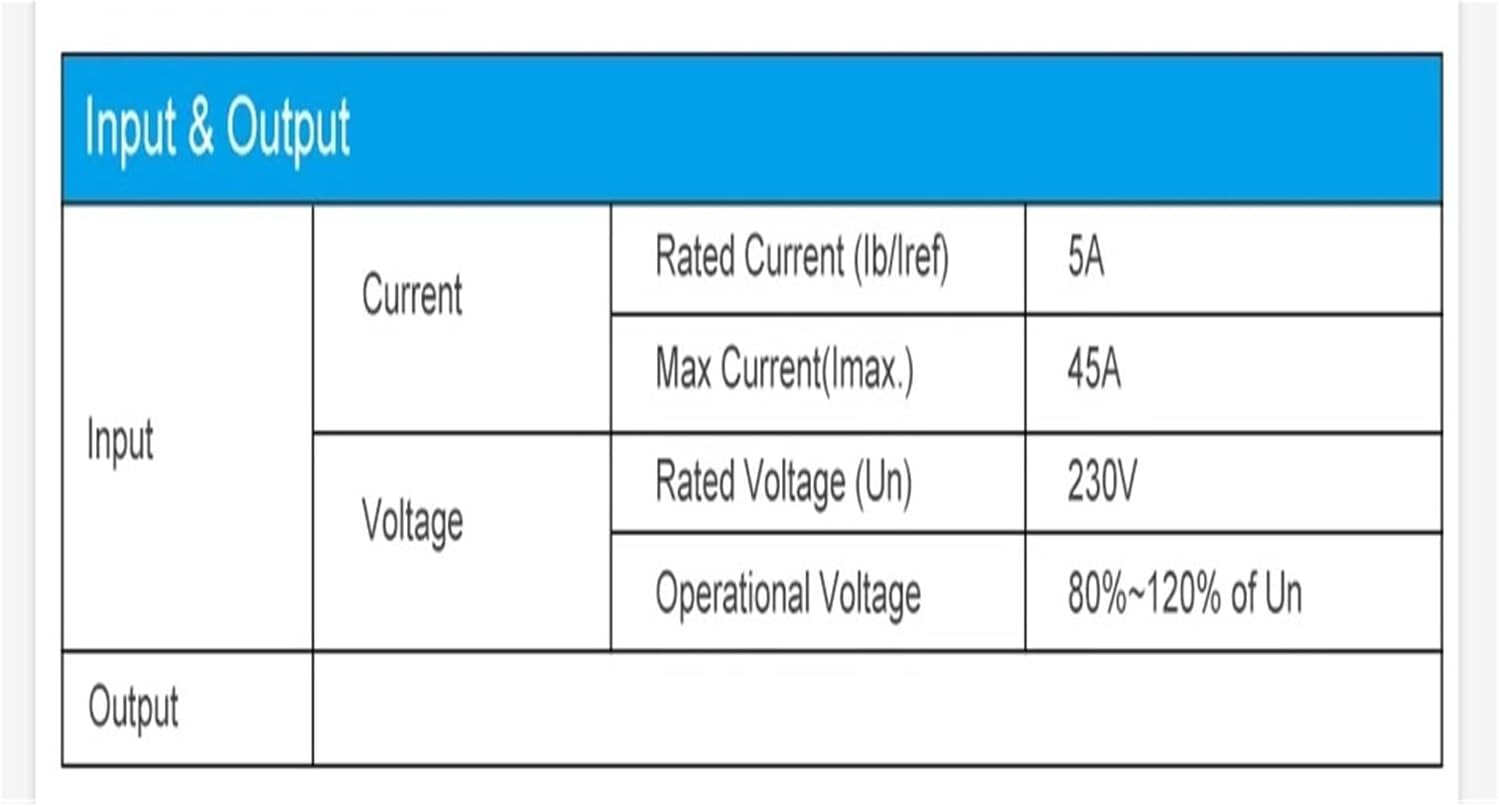
Figure 7.1: Input and Output Specifications Table. This table provides detailed electrical ratings for current and voltage.
| Parameter | Value |
|---|---|
| Package Dimensions | 1.18 x 0.79 x 0.39 inches |
| Item Weight | 1.1 pounds |
| Manufacturer | TGPKPGTCTA |
| ASIN | B0F11S9SM4 |
| Item Model Number | TGPKPGTCTA |
| Assembly Required | No |
| Number of Pieces | 1 |
| Batteries Required | No |
8. Maintenance
The SDM120-Modbus Energy Meter is designed for low maintenance. Follow these guidelines to ensure optimal performance:
- Keep the device clean and free from dust. Use a soft, dry cloth for cleaning.
- Do not use abrasive cleaners or solvents.
- Periodically inspect wiring connections to ensure they remain secure.
- Ensure the operating environment is within the specified temperature and humidity ranges.
9. Troubleshooting
If you encounter issues with your SDM120-Modbus Energy Meter, consider the following:
- No Display/No Power: Check the main power supply and all wiring connections. Ensure the voltage is within the operational range.
- Incorrect Readings: Verify that the current and voltage connections are correct and that the meter is properly configured for your system.
- Modbus Communication Failure: Check RS485 wiring polarity (A+ to A+, B- to B-). Verify Modbus settings (baud rate, parity, slave ID) match between the meter and the master device. Ensure termination resistors are correctly applied if necessary.
- Device Malfunction: If the device exhibits unusual behavior or damage, disconnect power immediately and contact customer support. Do not attempt to repair the device yourself.
10. Warranty and Support
Specific warranty terms and conditions for the TGPKPGTCTA SDM120-Modbus Energy Meter are not provided in the available product information. For warranty claims, technical support, or service inquiries, please contact your point of purchase or the manufacturer directly using the contact information provided with your product packaging or on the manufacturer's official website.