
1. Product Overview
The TGPKPGTCTA SDM120M is a compact, single-phase kWh meter designed for accurate measurement of active energy consumption. It features a clear digital display and an RS485 communication interface for remote data acquisition. This meter is suitable for various applications requiring precise energy monitoring in a 220/230V electrical system.
Key Features:
- Compact size for easy DIN rail installation.
- Measures a wide range of energy up to 99999.9 kWh.
- Designed for low maintenance and long-term reliability.
- Sensitive response without mechanical inertia.
- Integrated RS485 communication for data integration.
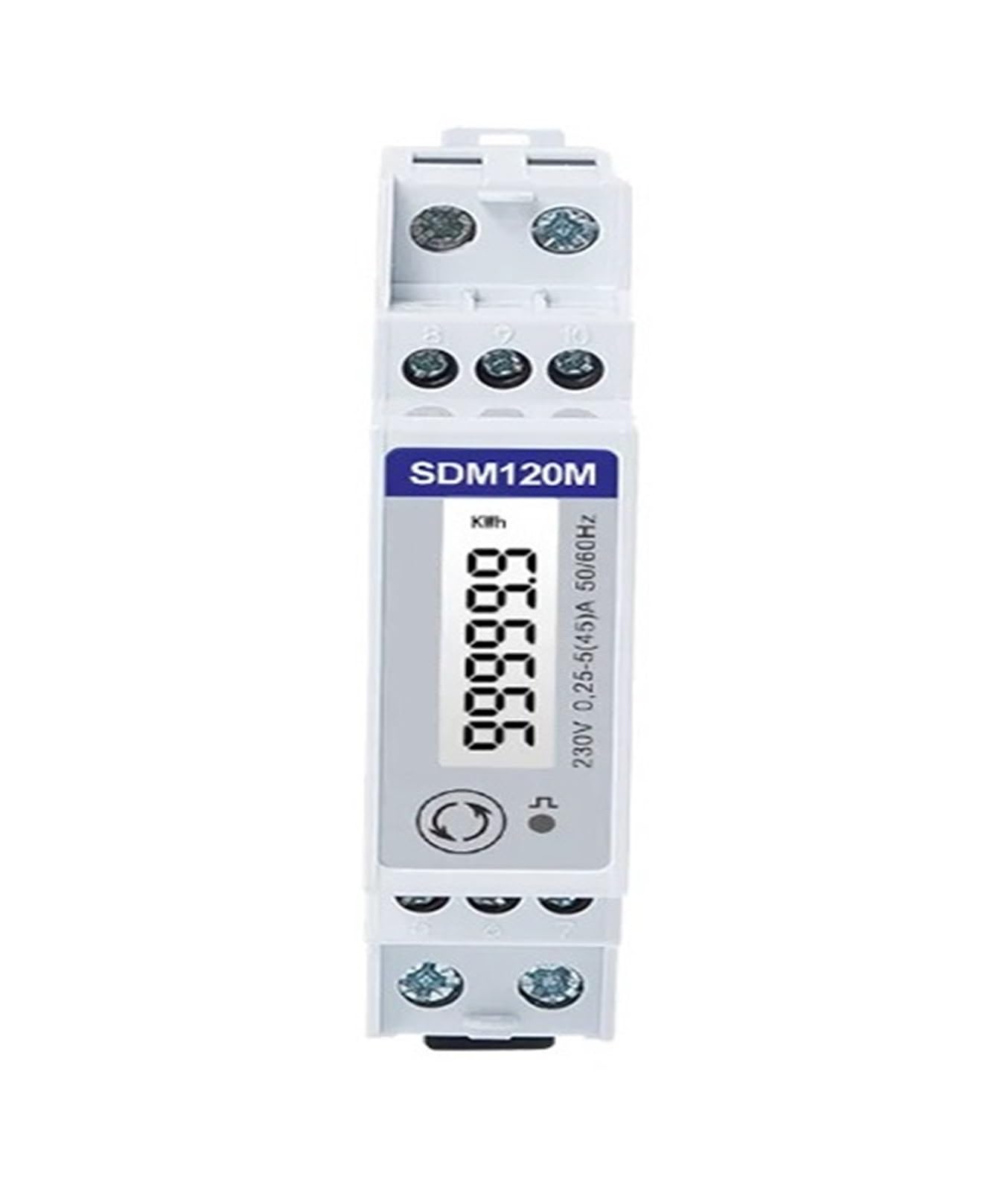
Figure 1: Front view of the TGPKPGTCTA SDM120M kWh Meter, displaying the digital readout and model identification.
2. Safety Information
Please read this manual thoroughly before attempting installation or operation. Failure to adhere to these safety guidelines may result in equipment damage, personal injury, or electric shock.
- All installation, wiring, and maintenance procedures must be performed by qualified and authorized personnel.
- Ensure that all power to the circuit is completely disconnected and locked out before commencing any installation or wiring work.
- Do not operate the meter in environments that exceed its specified temperature and humidity limits.
- Never open the meter casing. There are no user-serviceable parts inside, and doing so will void the warranty and expose you to hazardous voltages.
- Verify all wiring connections for correctness and tightness to prevent loose contacts, overheating, and potential fire hazards.
3. Setup and Installation
3.1 Mounting
The SDM120M meter is designed for standard 35mm DIN rail mounting. Ensure the meter is securely clipped onto the DIN rail within an appropriate electrical enclosure, providing adequate ventilation and protection from environmental factors.
3.2 Wiring Connections
Refer to the wiring diagram below for precise connection instructions. It is critical to ensure all connections are firm and correctly aligned to prevent operational issues or damage.

Figure 2: Wiring Diagram for the SDM120M Meter. This diagram illustrates the connections for Line (L), Neutral (N), and RS485 communication (A+, B-).
- Terminals 1 & 2 (Input): Connect the incoming Line (L) and Neutral (N) from the power source.
- Terminals 3 & 4 (Output): Connect the outgoing Line (L) and Neutral (N) to the electrical load.
- Terminals 7 & 8 (RS485): Connect the RS485 communication lines, A+ and B-, to your communication network.
- Terminals 9 & 10 (Pulse Output): These terminals provide a pulse output for energy measurement, typically used for external data logging or control systems. Refer to detailed specifications for pulse rate.
Confirm that the nominal input voltage of your electrical system matches the meter's rated voltage of 220/230V.
4. Operating Instructions
4.1 Power On
After successful installation and wiring, restore power to the circuit. The meter's digital display will illuminate, and it will begin to measure and display energy consumption data.
4.2 Reading the Display
The primary display shows the total accumulated active energy in kilowatt-hours (kWh). The meter has a maximum display capacity of 99999.9 kWh. If your meter model includes a button on the front panel, pressing it will typically cycle through various measurement parameters such as instantaneous voltage, current, active power, reactive power, frequency, and power factor.
4.3 RS485 Communication
The integrated RS485 interface supports the Modbus RTU protocol, enabling remote reading and configuration of the meter. To utilize this feature, connect the meter to a compatible Modbus master device. Refer to the specific Modbus protocol documentation provided by the manufacturer for detailed communication parameters (e.g., baud rate, parity, stop bits) and register addresses for data access.
5. Maintenance
The TGPKPGTCTA SDM120M meter is designed for minimal maintenance. Adhering to these simple guidelines will help ensure its continued accuracy and longevity:
- Keep the meter's exterior clean and free from dust and debris. Use a soft, dry cloth for cleaning.
- Avoid using abrasive cleaners, solvents, or harsh chemicals, as these can damage the casing or display.
- Ensure the operating environment remains within the specified temperature and humidity ranges to prevent condensation or overheating.
- Periodically inspect all wiring connections for tightness, especially in environments subject to vibration, to prevent intermittent operation or potential hazards.
6. Troubleshooting
If you encounter any issues with your SDM120M meter, consult the following troubleshooting guide before contacting support:
- No Display or Power: Verify that the main power supply to the meter's Line (L) and Neutral (N) terminals is active and within the specified 220/230V operational range. Check for tripped circuit breakers or blown fuses.
- Incorrect Energy Readings: Double-check all wiring connections against the diagram in Section 3.2. Ensure that the input and output connections are not reversed.
- RS485 Communication Failure: Confirm the correct wiring of the A+ and B- terminals. Verify that the communication parameters (baud rate, data bits, parity, stop bits) configured in your Modbus master software match the meter's settings. Ensure the RS485 converter (if used) is functioning correctly.
- Meter Not Registering Energy: Confirm that an electrical load is connected to the meter's output terminals and is actively drawing power. Check for any open circuits in the load wiring.
If these troubleshooting steps do not resolve the issue, please contact customer support for further assistance.
7. Specifications
Detailed technical specifications for the TGPKPGTCTA SDM120M kWh Meter are provided below:
| Parameter | Value |
|---|---|
| Model | SDM120M |
| Rated Voltage (Un) | 230V AC |
| Operational Voltage Range | 80% ~ 120% of Un |
| Rated Current (Ib/Iref) | 5A |
| Max Operating Current (Imax) | 45A |
| Measuring Energy Range | 0 to 99999.9 kWh |
| Frequency | 50/60Hz |
| Communication Interface | RS485 (Modbus RTU) |
| Installation Type | 35mm DIN Rail |
| Item Weight | 1.1 pounds (approx. 0.5 kg) |
| Package Dimensions | 1.18 x 0.79 x 0.39 inches (approx. 30 x 20 x 10 mm) |

Figure 3: Input and Output Specifications for the SDM120M Meter, detailing current and voltage ratings.

Figure 4: Dimensions of the SDM120M Meter, illustrating its physical measurements for installation planning.
8. Warranty and Support
This TGPKPGTCTA product is covered by a standard manufacturer's warranty. For detailed information regarding warranty terms, duration, and conditions, please refer to the warranty documentation included with your purchase or contact your authorized retailer.
For technical assistance, troubleshooting guidance beyond this manual, or any product-related inquiries, please contact the seller or the manufacturer's customer support. When seeking support, please have your product model number (SDM120M) and purchase details readily available to facilitate a quicker resolution.