Introduction
This manual provides comprehensive instructions for the installation, operation, and maintenance of your Honeywell TH2320U4006 FocusPRO P200 Programmable Thermostat. Please read this manual thoroughly before installation and use to ensure proper functionality and to maximize energy efficiency.
Product Overview
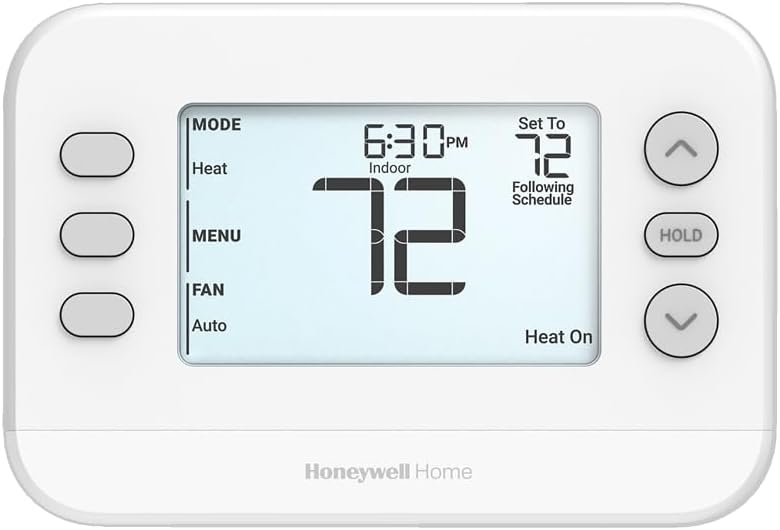
Image 1: Front view of the Honeywell TH2320U4006 FocusPRO P200 Programmable Thermostat. It features a large LCD display showing time, indoor temperature, set temperature, and current operating mode. Buttons for MODE, MENU, FAN are on the left, and up/down arrows with a HOLD button are on the right.
The Honeywell TH2320U4006 FocusPRO P200 is a versatile programmable thermostat designed for residential heating and cooling systems. It features a large, clear display for easy readability and touch controls for intuitive operation. Key features include flexible scheduling options, broad system compatibility, and maintenance reminders.
Setup and Installation
This thermostat is designed for straightforward installation, utilizing the UWP wall plate for quick setup and potential future upgrades. It is compatible with a wide range of HVAC systems.
System Compatibility:
- Up to 3 Heat/2 Cool heat pump systems.
- Up to 2 Heat/2 Cool conventional systems.
- Compatible with dual fuel systems and wired outdoor sensors.
Power Requirements:
- Requires 2 AA batteries (included) for operation.
- Operates on 24 Volts (AC).
Note: For detailed wiring instructions, please refer to the separate installation guide provided with your thermostat or consult a qualified HVAC professional if you are unsure about the installation process.
Operating Instructions
The TH2320U4006 thermostat features a user-friendly interface with touch controls and a large LCD for clear information display.
Basic Controls:
- MODE Button: Press to cycle through system modes: Heat, Cool, Off, Auto, Em Heat (if applicable).
- FAN Button: Press to cycle through fan settings: Auto (fan runs only when heating/cooling), On (fan runs continuously).
- MENU Button: Access advanced settings and programming options.
- Up/Down Arrows: Adjust temperature settings or navigate menu options.
- HOLD Button: Temporarily or permanently override the programmed schedule. Press once to hold the current temperature until you press HOLD again or resume schedule.
Programming Schedules:
The thermostat offers flexible scheduling options to optimize comfort and energy savings:
- 5-1-1 Day Programming: Weekdays (5 days), Saturday (1 day), Sunday (1 day) with separate schedules.
- 5-2 Day Programming: Weekdays (5 days) and Weekend (2 days) with separate schedules.
- 7-Day Programming: Individual schedules for each day of the week.
- Non-Programmable Mode: For manual control without a set schedule.
Refer to the MENU options on your thermostat for detailed steps on setting up your preferred schedule.
Display Settings:
The display settings are customizable, including an optional always-on backlight when the unit is hardwired, enhancing readability in various lighting conditions.
Maintenance
Regular maintenance ensures optimal performance and longevity of your thermostat and HVAC system.
Filter Change Reminders:
The thermostat can be set to provide reminders for air filter changes, helping to maintain system efficiency and air quality. Follow the on-screen prompts or consult the MENU for setting up these reminders.
Battery Replacement:
When the battery indicator appears on the display, replace the two AA batteries promptly to ensure continuous operation. Use fresh alkaline batteries for best performance.
Troubleshooting
If you encounter issues with your thermostat, consider the following common troubleshooting steps:
- No Display or Blank Screen: Check if the batteries are correctly installed and have sufficient charge. Replace batteries if necessary. Ensure the thermostat is properly seated on its wall plate.
- System Not Responding: Verify that the system mode (Heat, Cool, Off) is correctly selected. Check circuit breakers for your HVAC system. Ensure the temperature setting is above (for heat) or below (for cool) the current room temperature.
- Inaccurate Temperature Readings: Ensure the thermostat is not exposed to direct sunlight, drafts, or heat sources that could affect its sensor.
- Programming Issues: Double-check your schedule settings in the MENU. Ensure the thermostat is not in HOLD mode, which overrides the schedule.
For persistent issues, refer to the full product manual or contact Honeywell customer support.
Specifications
| Brand | Honeywell |
| Model Name | TH2320U4006 |
| Item Model Number | TH2320U4006/U |
| Controller Type | Amazon Alexa, Apple HomeKit, Google Assistant, SmartThings (Note: Requires compatible smart home hub/device for integration) |
| Color | White |
| Temperature Control Type | Programmable |
| Connectivity Technology | Wired |
| Item Weight | 13.1 ounces |
| Voltage | 24 Volts (AC) |
| Display Type | LCD |
| Control Method | Touch |
| Batteries | 2 AA batteries required (included) |
| UPC | 194159017443 |
| Manufacturer | Honeywell |
| Date First Available | March 10, 2025 |
Warranty and Support
For warranty information and details regarding your Honeywell TH2320U4006 thermostat, please refer to the warranty card included with your product or visit the official Honeywell website. For technical support, troubleshooting assistance, or to inquire about replacement parts, please contact Honeywell customer service.
You can find more information and support resources by visiting the Honeywell Store on Amazon.