
1. Introduction
Thank you for choosing the Leten Thunder Cannon King Luxury Edition Electric Personal Massager. This manual provides essential information for the safe and effective use, maintenance, and care of your device. Please read it thoroughly before first use and retain it for future reference.
This advanced personal massager is designed to provide a customizable experience with cutting-edge technology, including multiple intensity settings, a digital interface with LED visualization, and an intelligent telescopic function. Its ergonomic design ensures comfortable handling, combining high-speed movements with wave-like sensations for an enhanced experience.

Image 1.1: The Leten Thunder Cannon King Luxury Edition device shown alongside its retail packaging.
2. Safety Information
Please observe the following safety precautions to prevent injury or damage to the device:
- This device is intended for adult use only.
- Consult a healthcare professional before use if you have any medical conditions or concerns.
- Discontinue use immediately if you experience any discomfort, pain, or irritation.
- Do not use the device if it appears damaged or malfunctioning.
- Keep out of reach of children.
- Ensure the device is fully dry before charging. Do not charge in wet conditions.
- Use only the provided charging cable or a compatible charger.
- Avoid exposing the device to extreme temperatures, direct sunlight, or corrosive liquids.
3. Package Contents
Verify that all items are present in the package:
- Leten Thunder Cannon King Luxury Edition Electric Personal Massager
- USB Charging Cable
- User Manual (this document)
4. Product Features
The Leten Thunder Cannon King Luxury Edition is equipped with several advanced features for a personalized experience:
- Digital Display: Features an intelligent dual-screen interface showing operation modes and settings with blue LED visualization.
- Multiple Modes: Includes nine distinct pattern settings with adjustable intensity levels for a customized experience.
- Ergonomic Design: Crafted with premium soft material and telescopic functionality for comfortable handling.
- Smart Features: Equipped with automatic operation modes and an intuitive one-button control interface.
- Compact Size: Portable and discreet design with rechargeable capability for convenience.
- Telescopic Function: Provides dynamic internal movement for varied sensations.

Image 4.1: The device's digital display and transparent section revealing the internal mechanism.

Image 4.2: Overview of the device highlighting key features such as telescopic function and various sensations.
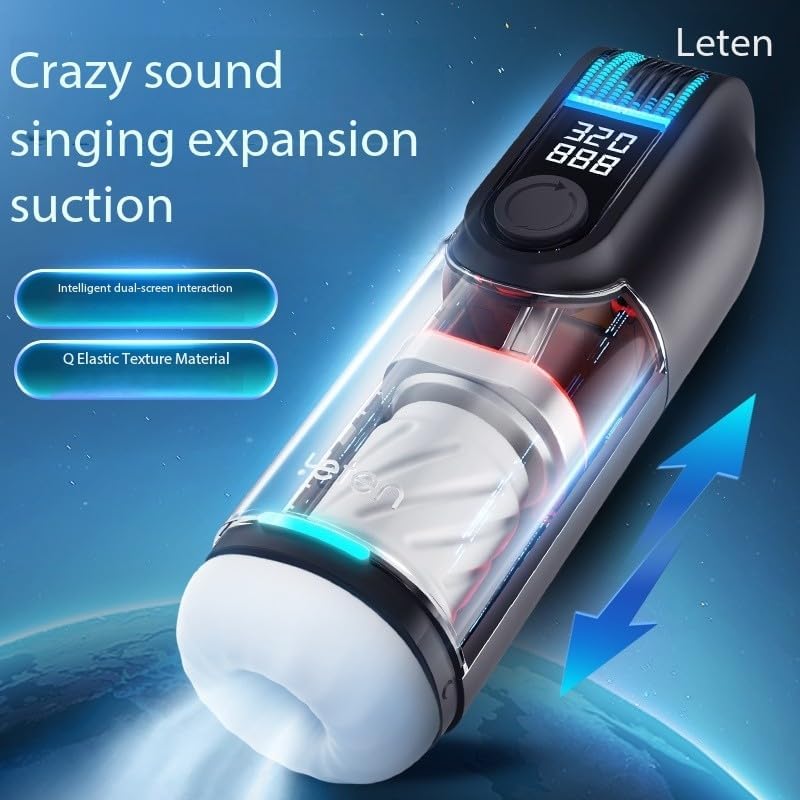
Image 4.3: The device demonstrating its telescopic movement and highlighting the intelligent dual-screen and elastic texture.

Image 4.4: The device showcasing its high-speed piston mechanism and advanced material properties.
5. Setup
- Unpack: Carefully remove the device and all accessories from the packaging.
- Initial Charge: Before first use, fully charge the device. Refer to the "Charging" section for detailed instructions.
- Clean: Clean the device according to the "Maintenance and Cleaning" section before its first use.
6. Operation
The device features an intuitive one-button control interface and a digital display for easy operation.
- Power On/Off: Press and hold the power button (usually the central button) for a few seconds to turn the device on or off. The digital display will illuminate upon activation.
- Mode Selection: Once powered on, short press the power button to cycle through the nine distinct pattern settings. The digital display will show the current mode.
- Intensity Adjustment: Use the designated intensity control buttons (if present, often indicated by '+' and '-' symbols or a rotating dial) to adjust the intensity levels within each mode. The digital display will show the current intensity setting.
- Telescopic Function: The telescopic function operates automatically with certain modes. Observe the internal mechanism for its dynamic movement.
- Digital Display: The dual-screen interface provides real-time feedback on the selected mode and intensity settings.
7. Charging
The device is equipped with a built-in rechargeable battery.
- Connect: Locate the charging port on the device. Insert the small end of the USB charging cable into the device's charging port.
- Power Source: Connect the larger end of the USB charging cable to a compatible USB power adapter (e.g., phone charger, computer USB port) or a power bank.
- Charging Indicator: The digital display or an LED indicator light on the device will show the charging status. It typically blinks while charging and becomes solid when fully charged.
- Charging Time: Allow approximately 2-4 hours for a full charge. Actual charging time may vary.
- Disconnect: Once fully charged, disconnect the charging cable from both the device and the power source.
8. Maintenance and Cleaning
Proper cleaning and maintenance ensure hygiene and prolong the lifespan of your device.
- Before/After Each Use: Clean the device thoroughly before and after each use.
- Cleaning Method: Wash the soft-touch internal sleeve with mild soap and warm water. Rinse thoroughly to remove all soap residue. The main body can be wiped clean with a damp cloth.
- Avoid: Do not use harsh detergents, alcohol-based cleaners, or abrasive materials, as these can damage the device's materials.
- Drying: Ensure the device, especially the internal sleeve, is completely dry before reassembling or storing. Air dry or gently pat dry with a lint-free cloth.
- Storage: Store the device in a clean, dry, and cool place, away from direct sunlight and extreme temperatures.
9. Troubleshooting
If you encounter any issues with your device, refer to the following common problems and solutions:
| Problem | Possible Cause | Solution |
|---|---|---|
| Device does not turn on. | Low battery or no charge. | Charge the device fully. |
| Device not charging. | Charging cable not properly connected or faulty. | Ensure cable is securely connected. Try a different USB port or power adapter. |
| Modes or intensity not changing. | Control buttons not responding. | Ensure device is powered on. Try turning off and on again. If issue persists, contact support. |
| Unusual noise or vibration. | Internal component issue. | Discontinue use and contact customer support. |
10. Specifications
- Model Name: Thunder Cannon King Luxury Edition
- Brand: Leten
- Product Dimensions: 3.66 x 3.15 x 10.83 inches
- Weight: 2.2 Pounds
- Material: ABS Plastic, Soft-touch internal materials
- Color: Black/Blue
- Battery: Built-in Rechargeable Battery
- Manufacturer: Leten
11. Warranty and Support
For warranty information, technical support, or any inquiries regarding your Leten Thunder Cannon King Luxury Edition Electric Personal Massager, please refer to the retailer where the product was purchased or contact the manufacturer directly. Keep your proof of purchase for warranty claims.