
Introduction
Thank you for choosing the VGVGV Digital Crane Scale OCS-S1. This manual provides essential information for the safe and efficient operation, maintenance, and troubleshooting of your new crane scale. Please read this manual thoroughly before use and retain it for future reference.
The VGVGV OCS-S1 is a robust and accurate electronic weighing instrument designed for industrial and heavy-duty applications. It combines a sound mechanical design with advanced electronics to deliver reliable performance in various environments, including storage, textile, metallurgy, farm, and construction.
Product Components
Familiarize yourself with the main components of your VGVGV Digital Crane Scale OCS-S1:

Figure 1: Overview of the VGVGV Digital Crane Scale OCS-S1, highlighting key components such as the stainless steel rings, LED display, power off button, HOLD/UNIT button, and TARE/ZERO button.
- Stainless Steel Rings: For secure suspension of the scale.
- LED Display: High-visibility digital display for weight readings.
- Power Off Button: To turn the scale off.
- HOLD/UNIT Button: Used to hold the displayed weight and switch between weighing units (e.g., kg, lbs).
- TARE/ZERO Button: Used to zero the scale or tare the weight of a container.
- Alloy Steel Hook: For attaching items to be weighed.
- Battery Compartment: Located on the back for battery installation.

Figure 2: The remote control for the VGVGV Digital Crane Scale OCS-S1, showing buttons for Zero, Tare, Hold, Delete, F1, F2, 2nd, OFF, and ACC. Also shown is the battery compartment on the back of the scale.
Setup Instructions
1. Battery Installation
- Locate the battery compartment on the back of the scale (refer to Figure 2).
- Open the battery compartment cover.
- Insert four (4) AA 1.5V batteries, ensuring correct polarity (+/-). Batteries are not included.
- Close the battery compartment cover securely.
2. Initial Inspection
Before first use, visually inspect the scale for any signs of damage during shipping. Ensure the hook, shackle, and rings are securely attached and free from defects.
3. Mounting the Scale
Attach the stainless steel rings of the crane scale to a suitable, secure overhead lifting device or structure capable of safely supporting the scale's weight plus the maximum load capacity (1000KG / 2000LBS). Ensure the connection is stable and free from obstruction.
Operating Instructions
1. Power On/Off
- Power On: Press the "Power Off" button (refer to Figure 1) briefly to turn on the scale. The display will show "88888" and then settle at "0.00".
- Power Off: Press and hold the "Power Off" button for a few seconds until the display turns off. The scale also features an auto power-off function to conserve battery life after a period of inactivity.
2. Zero/Tare Function
- Zero: With no load on the hook, press the "TARE/ZERO" button (refer to Figure 1) to set the display to zero. This is useful for ensuring accurate measurements when starting.
- Tare: To weigh an item in a container, first place the empty container on the hook. Press the "TARE/ZERO" button. The display will show "0.00". Now, add the item to the container, and the display will show only the net weight of the item.
3. Unit Switching
Press the "HOLD/UNIT" button (refer to Figure 1) briefly to cycle through available weighing units (e.g., kilograms (kg), pounds (lbs)). The selected unit will be indicated on the display.
4. Display Hold Function
During weighing, press and hold the "HOLD/UNIT" button for a few seconds to activate the display hold function. The current weight reading will be locked on the display, even if the load is removed. Press the button again to release the hold.
5. Overload Warning
The scale is equipped with an overload warning system. If the load exceeds 100% of the full scale capacity plus 9e (100% F.S.+9e), an alarm will sound, and the display will indicate an overload error. Immediately remove the excess load to prevent damage to the scale.
6. Remote Control Operation
The included remote control (refer to Figure 2) provides convenient operation from a distance. Its functions mirror those on the scale, including Zero, Tare, Hold, and Power Off. Additional buttons like F1, F2, 2nd, and ACC may be used for advanced settings or specific modes not detailed in this basic manual.
Maintenance
1. Cleaning
Clean the scale regularly with a soft, damp cloth. Do not use abrasive cleaners, solvents, or immerse the scale in water. Ensure the display and buttons are free from dust and debris.
2. Battery Replacement
When the battery indicator appears on the display or the scale fails to power on, replace all four AA 1.5V batteries. Refer to the "Battery Installation" section for detailed steps.
3. Storage
When not in use for extended periods, remove the batteries to prevent leakage. Store the scale in a dry, cool place, away from direct sunlight and extreme temperatures.
4. Durability and Care
The VGVGV crane scale features an aluminum-casting case and high-firm hook and shackle for enhanced durability. While robust, avoid dropping the scale or subjecting it to excessive impact to maintain its accuracy and lifespan.

Figure 3: The VGVGV Digital Crane Scale OCS-S1 is designed for durability, featuring a robust aluminum-casting case.
Troubleshooting
If you encounter issues with your VGVGV Digital Crane Scale OCS-S1, refer to the following common problems and solutions:
| Problem | Possible Cause | Solution |
|---|---|---|
| Scale does not power on. | Dead or incorrectly installed batteries. | Replace batteries with new AA 1.5V batteries, ensuring correct polarity. |
| Inaccurate readings. | Scale not zeroed; unstable environment; damaged load cell. | Press TARE/ZERO button before weighing. Ensure scale is stable and not subject to vibrations. If problem persists, contact support. |
| "OL" or Overload message on display. | Load exceeds maximum capacity. | Immediately remove excess load. Do not exceed the scale's maximum capacity of 1000KG / 2000LBS. |
| Display is dim or flickering. | Low battery power. | Replace batteries. |
If the problem persists after attempting these solutions, please contact customer support.
Specifications
The VGVGV Digital Crane Scale OCS-S1 is designed with the following technical specifications:
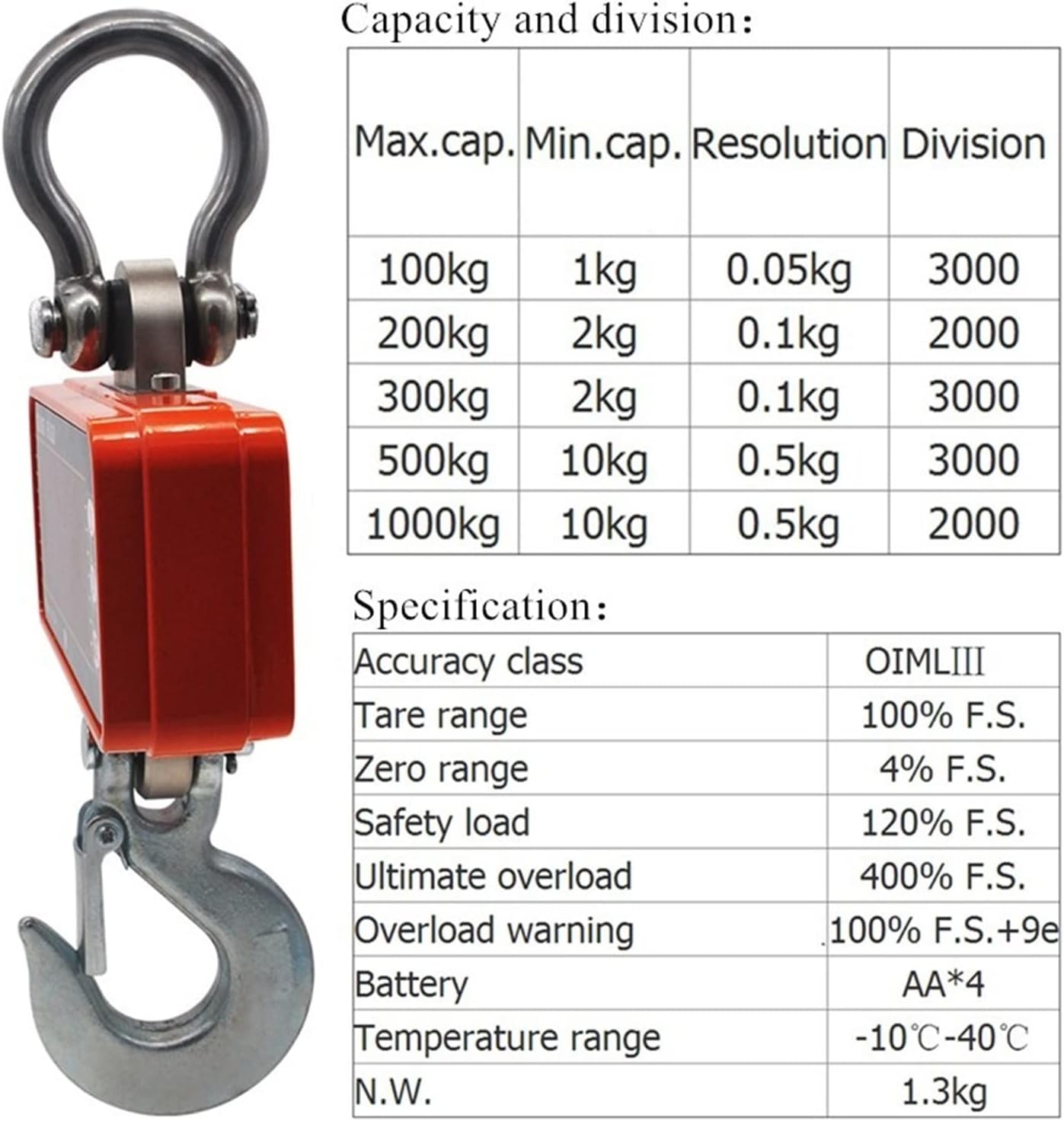
Figure 4: Detailed specifications and capacity/division table for the VGVGV Digital Crane Scale OCS-S1.
| General Specifications | |
|---|---|
| Accuracy Class | OIML III |
| Tare Range | 100% F.S. (Full Scale) |
| Auto Zero Range | ±20% F.S. |
| Zero Range | 4% F.S. |
| Stable Time | 10 seconds |
| Safe Overload | 120% F.S. |
| Overload Alarm | 100% F.S. + 9e |
| Ultimate Load | 400% F.S. |
| Temperature Range | -10°C to 40°C (14°F to 104°F) |
| Battery | 4 x AA 1.5V batteries (not included) |
| Net Weight | Approximately 1.3 kg (2.87 lbs) |
Capacity and Division
| Max. Capacity | Min. Capacity | Resolution | Division |
|---|---|---|---|
| 100kg | 1kg | 0.05kg | 3000 |
| 200kg | 2kg | 2kg | 2000 |
| 300kg | 2kg | 0.1kg | 3000 |
| 500kg | 10kg | 0.5kg | 3000 |
| 1000kg | 10kg | 0.5kg | 2000 |
Note: The specific capacity of your scale is 1000KG / 2000LBS as indicated on the product packaging and display.
Typical Applications
The VGVGV Digital Crane Scale OCS-S1 is suitable for a wide range of heavy-duty weighing tasks:
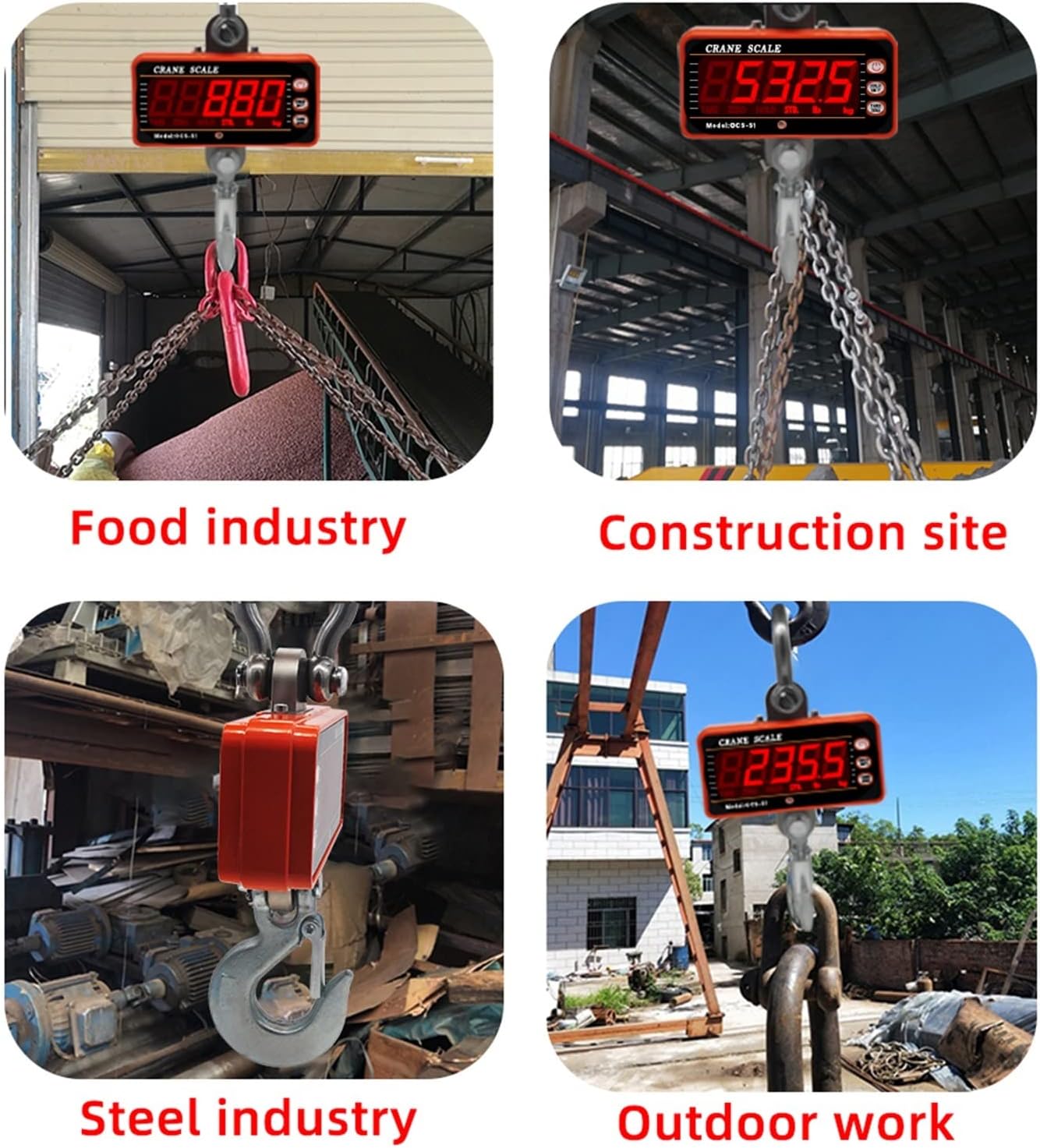
Figure 5: Examples of the VGVGV Digital Crane Scale OCS-S1 in use, including food industry, construction sites, steel industry, and outdoor work environments.
- Industrial Use: Ideal for factories, warehouses, and manufacturing plants for weighing raw materials, finished goods, and components.
- Construction Sites: For measuring building materials, equipment, and waste.
- Agriculture & Livestock: Suitable for weighing feed, produce, and large animals on farms.
- Metallurgy: Used in metal processing and handling for weighing ingots, scrap, and other heavy metal items.
- Outdoor Work: Designed to withstand various outdoor conditions for versatile use.
Warranty and Support
VGVGV products are manufactured to high-quality standards. This product comes with a standard manufacturer's warranty against defects in materials and workmanship. Please refer to your purchase documentation for specific warranty terms and duration.
For technical support, warranty claims, or service inquiries, please contact your retailer or the VGVGV customer service department. Keep your purchase receipt and product model number (OCS-S1) handy when contacting support.
Customer Service Contact:
- Email: [Insert Customer Service Email Here]
- Phone: [Insert Customer Service Phone Number Here]
- Website: [Insert Manufacturer Website Here]