
YITAHOME MAYIHiy9DR
YITAHOME L Shaped Computer Desk User Manual
Model: MAYIHiy9DR
1. Introduction
Thank you for choosing the YITAHOME L Shaped Computer Desk. This manual provides detailed instructions for assembly, operation, maintenance, and troubleshooting to ensure you get the most out of your new desk. Please read this manual thoroughly before beginning assembly or use.
2. Safety Information
- Keep all small parts and packaging materials away from children and pets to prevent choking hazards.
- Ensure all connections are secure before use.
- Do not overload the desk or shelves beyond their stated weight capacity.
- Use on a flat, stable surface to prevent tipping.
- For electrical components (power outlets, LED lights), ensure proper grounding and avoid contact with water. Unplug when not in use or during cleaning.
- Assembly should be performed by at least two adults.
3. Package Contents
Please verify that all components listed below are present before beginning assembly. If any parts are missing or damaged, please contact YITAHOME customer support.
- 1 x L Shaped Desk Frame and Panels
- 1 x Packet of Fittings (screws, bolts, nuts, etc.)
- 1 x Instructions Manual (this document)
- Fabric Drawers (quantity as per model)
- Power Outlet Unit with USB Ports
- LED Light Strip
4. Product Overview and Features
The YITAHOME L Shaped Computer Desk is designed for optimal workspace organization and comfort, featuring a rustic grey finish and robust metal frame. It includes integrated storage and modern conveniences.
Overall view of the YITAHOME L Shaped Computer Desk, showcasing its L-shape design, integrated storage, and monitor stand.
Key Features:
- L-Shaped Design: Maximizes corner space, providing ample room for multiple monitors, laptops, and office essentials.
- Integrated Power Outlets & USB Ports: Conveniently charge devices directly from your desk. Includes 4 AC outlets and 2 USB ports.
- LED Lights: Enhance your workspace ambiance with customizable lighting.
- Monitor Stand/Bookshelf: Elevates monitors to an ergonomic height and provides additional storage for books or decor.
- Fabric Drawers: Six spacious fabric drawers offer versatile storage for files, stationery, and personal items. Includes a file drawer with hanging rails.
- Printer Stand: Dedicated space for a printer or other peripherals.
- Keyboard Tray: Slide-out tray for comfortable keyboard and mouse placement.
- CPU Storage: Open shelf designed to accommodate a computer tower.
- Adjustable Leg Pads: Ensures stability on uneven floors and protects your flooring.
Product Feature Details:

Integrated power strip with 4 AC outlets and 2 USB ports for convenient charging.

Dedicated printer stand for easy access and organization.

Open CPU storage compartment for ventilation and easy access.

Spacious fabric drawers, including one with file hanging rails for organized document storage.
Product Video Overview:
This video provides a visual overview of the YITAHOME L Shaped Desk with Fabric Drawers, highlighting its various features and design elements.
5. Setup and Assembly
Before you begin, ensure you have enough space and all parts are accounted for. It is recommended to assemble the desk with at least two people.
Tools Required (Not Included):
- Phillips Head Screwdriver
- Hammer (optional, for dowels)
Assembly Steps:
- Unpack and Identify Parts: Carefully unpack all components and lay them out on a clean, soft surface (e.g., a blanket or carpet) to prevent scratches. Refer to the parts list in your included "Packet of Fittings" to identify each piece.
- Assemble the Main Desk Frame: Follow the diagrams provided in the separate assembly instruction sheet to connect the metal frame components using the designated screws and bolts. Do not fully tighten screws until all parts are aligned.
- Attach Desk Panels: Secure the main desk panels to the assembled frame. Ensure proper alignment before tightening all screws.
- Install Monitor Stand and Shelves: Attach the monitor stand and any fixed shelves according to the instructions.
- Assemble and Insert Drawers: Construct the fabric drawers. Insert the metal hanging rails into the designated file drawer. Slide all drawers into their respective compartments.
- Install Keyboard Tray: Attach the sliding rails to the keyboard tray and then secure it under the main desk surface.
- Integrate Power Outlet Unit: Carefully place the power outlet unit into its designated cutout on the desk surface. Ensure the power cord is routed safely.
- Apply LED Light Strip: Adhere the LED light strip to the underside of the monitor stand or as indicated in the assembly guide. Connect it to the power source.
- Adjust Leg Pads: Once the desk is fully assembled and in its desired location, adjust the leg pads at the bottom of the desk legs to ensure stability and levelness.
- Final Check: Double-check all connections and ensure all screws are tightened.
6. Operating Instructions
Using the Power Outlets and USB Ports:
- Plug the desk's main power cord into a grounded wall outlet.
- Insert your electronic devices' power plugs into the AC outlets.
- Connect USB charging cables to the USB ports to charge compatible devices.
- Caution: Do not exceed the maximum power rating of the integrated power strip. Refer to the specifications section for details.
Controlling the LED Lights:
The LED lights can be controlled via a remote or a mobile application, depending on the specific model variant. Refer to the separate LED light instruction sheet for detailed pairing and operation instructions, including color changes, brightness adjustments, and mode selections (e.g., music sync, timing function).
Using the Fabric Drawers:
- The fabric drawers are designed for lightweight storage. Avoid placing excessively heavy items in them.
- The bottom drawer is equipped with rails for hanging file folders (letter or legal size, depending on model).
- To remove a drawer, simply pull it out completely. To reinsert, align it with the guides and push gently.
7. Maintenance
- Cleaning: Wipe surfaces with a soft, damp cloth. Avoid harsh chemicals or abrasive cleaners, which can damage the finish. For fabric drawers, spot clean with a mild detergent and allow to air dry.
- Tightening: Periodically check and tighten all screws and bolts to ensure the desk remains stable.
- Protection: Use coasters for drinks and placemats for hot items to protect the desk surface.
- Electrical Components: Keep the power outlets and LED lights dry. Do not attempt to repair electrical components yourself; contact a qualified technician if issues arise.
8. Troubleshooting
| Problem | Possible Cause | Solution |
|---|---|---|
| Desk is wobbly/unstable. | Screws are loose; uneven floor. | Tighten all assembly screws. Adjust the leveling feet at the bottom of the desk legs. |
| Power outlets/USB ports not working. | Desk power cord not plugged in; tripped circuit breaker; faulty unit. | Ensure the desk's power cord is securely plugged into a working wall outlet. Check your home's circuit breaker. If issues persist, contact customer support. |
| LED lights not turning on. | Power connection loose; remote battery dead; faulty strip. | Check the power connection to the LED strip. Replace remote battery if applicable. Refer to the LED light manual for specific troubleshooting. |
| Drawers are difficult to open/close. | Overloaded; misaligned; debris in rails. | Reduce weight in drawers. Ensure drawers are inserted correctly and not misaligned. Check for any obstructions in the drawer compartments. |
9. Specifications
| Attribute | Detail |
|---|---|
| Brand | YITAHOME |
| Model Number | MAYIHiy9DR |
| Model Name | L Shaped Computer Desk with Fabric Drawers |
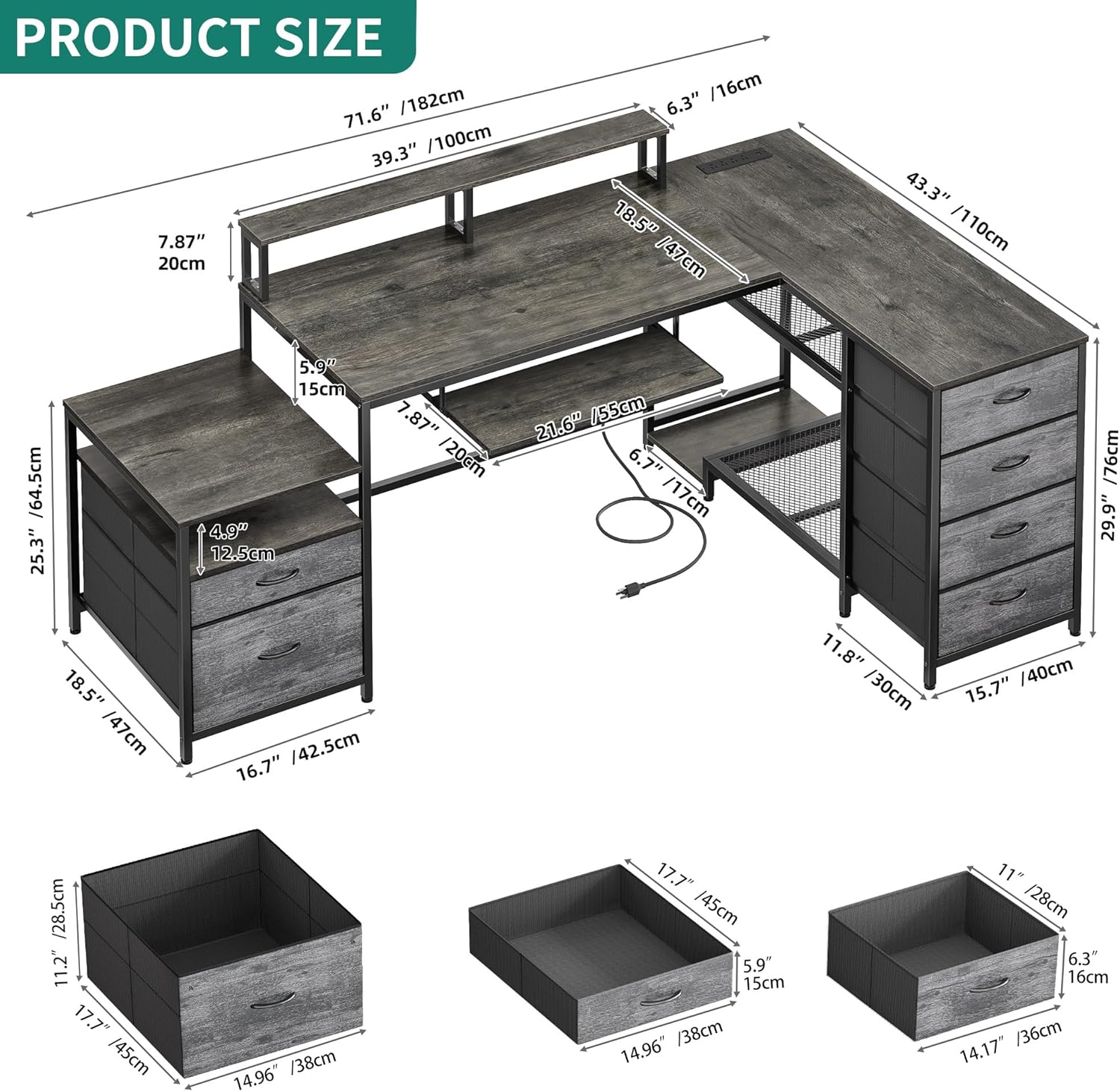
| Product Dimensions (Overall) | 43.3"D x 71.6"W x 37.8"H (110cm D x 182cm W x 96cm H) |
| Item Weight | 69.9 Pounds (approx. 31.7 kg) |
| Color | Grey |
| Style | Country Rustic |
| Base Material | Metal |
| Top Material Type | Engineered Wood |
| Finish Type | Laminated |
| Number of Drawers | 6 (Fabric) |
| Number of Shelves | 2 (plus monitor stand) |
| Power Outlet Unit | 4 AC Outlets (120V/12A), 2 USB Ports (5V/2A) |
| Power Cord Length | 6.56 Feet |
| Assembly Required | Yes |

Detailed product dimensions, including measurements for the desk and individual drawers.
10. Warranty and Support
YITAHOME products come with a limited warranty. For specific warranty details, claims, or technical support, please refer to the warranty card included with your purchase or visit the official YITAHOME website. You can also contact customer service via the contact information provided on the product packaging or the retailer's website.
Customer Support: For assistance with assembly, missing parts, or any other inquiries, please reach out to YITAHOME customer support. Have your model number (MAYIHiy9DR) and purchase date ready for faster service.
Online Resources: For additional tips, FAQs, and product registration, visit the YITAHOME Store on Amazon.
Ask a question about this manual
Ask about setup, troubleshooting, compatibility, parts, safety, or missing instructions. Manuals+ will review the question and use this page’s manual context to help answer it.