
XINFUTE RM-L1592
XINFUTE RM-L1592 Remote Control User Manual
Model: RM-L1592
Introduction
This manual provides comprehensive instructions for the XINFUTE RM-L1592 replacement remote control, designed for Skyworth and Coocaa Android TVs. Please read this manual carefully before using the remote control to ensure proper operation and longevity of the device.
Setup
1. Battery Installation
The RM-L1592 remote control requires two (2) AAA batteries (not included) for operation. Follow these steps to install the batteries:
- Locate the battery compartment cover on the back of the remote control.
- Press down on the tab and slide the cover downwards to open the compartment.
- Insert two new AAA batteries, ensuring the positive (+) and negative (-) terminals match the diagrams inside the compartment.
- Slide the battery compartment cover back into place until it clicks securely.
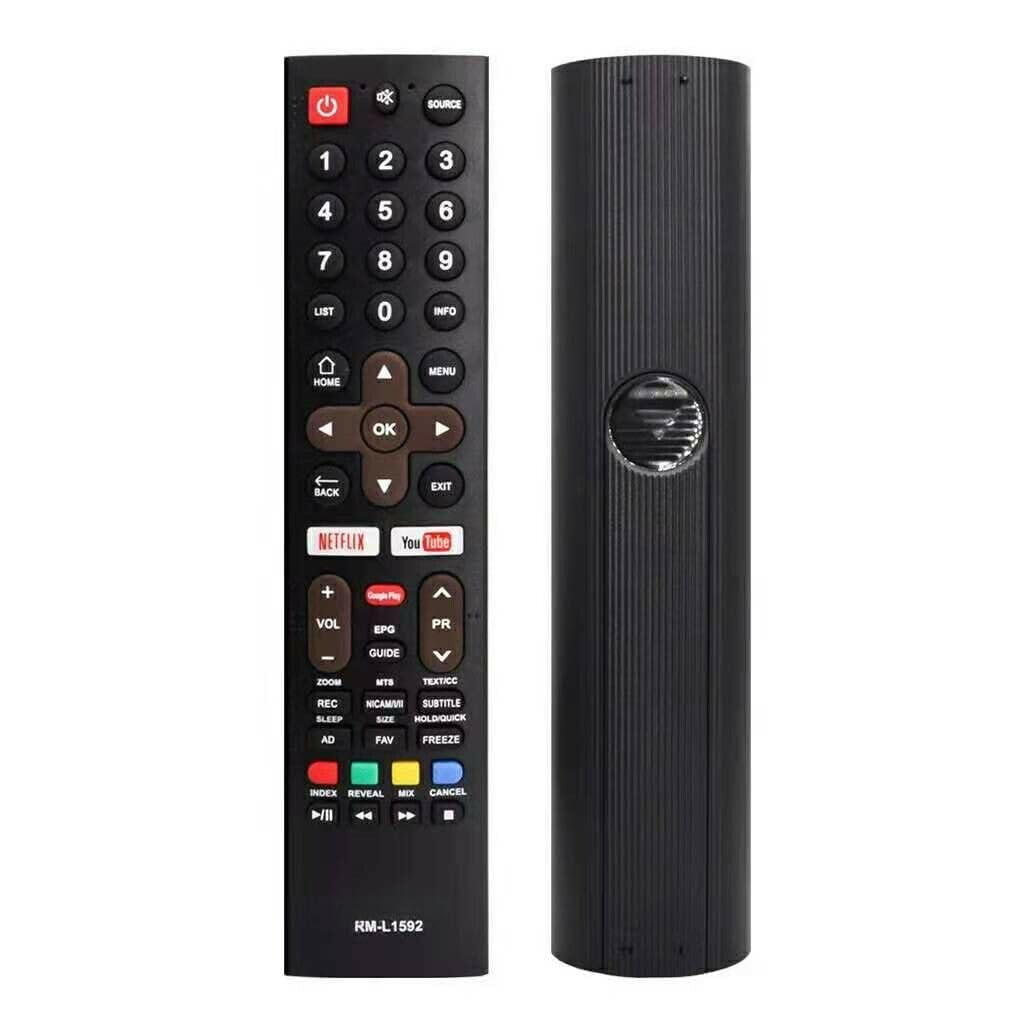
Image: Front view of the XINFUTE RM-L1592 remote control. The battery compartment is located on the back.
2. Initial Use
This remote control is a replacement unit and typically requires no pairing or programming for compatible Skyworth and Coocaa Android TVs. Once batteries are installed, it should function immediately.
Operating Instructions
Familiarize yourself with the buttons and their functions:
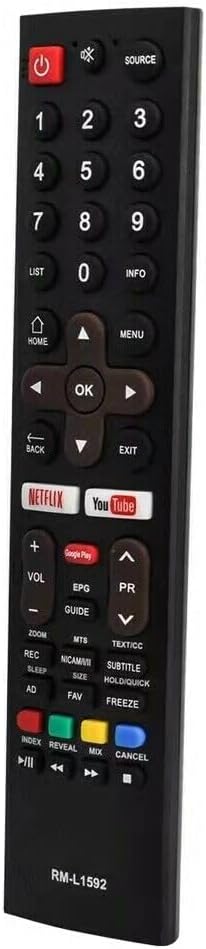
Image: Angled view of the XINFUTE RM-L1592 remote control, highlighting the button layout.
- Power (Red Button): Turns the TV on or off.
- SOURCE: Selects input sources (HDMI, AV, etc.).
- Number Buttons (0-9): Directly input channel numbers.
- LIST / INFO: Accesses channel lists or displays program information.
- HOME: Returns to the TV's main home screen.
- Navigation Pad (Up, Down, Left, Right, OK): Navigates menus and confirms selections.
- MENU: Opens the TV's main menu.
- BACK: Returns to the previous screen or menu.
- EXIT: Exits current menu or application.
- NETFLIX / YouTube / Google Play: Direct access buttons for these streaming services.
- VOL +/-: Adjusts the volume level.
- PR +/- (Program/Channel): Changes TV channels.
- Mute: Mutes or unmutes the TV sound.
- EPG (Electronic Program Guide): Displays the program guide.
- Media Control Buttons (Play/Pause, Stop, Rewind, Fast Forward): Controls media playback.
- Color Buttons (Red, Green, Yellow, Blue): Functionality varies by TV model and application.
Ensure a clear line of sight between the remote control and the TV's infrared receiver for optimal performance. The maximum effective range is approximately 5 meters.
Maintenance
Cleaning
To clean the remote control, gently wipe its surface with a soft, dry cloth. For stubborn dirt, a slightly damp cloth can be used, followed by a dry cloth. Avoid using harsh chemicals, abrasive cleaners, or excessive moisture, as these can damage the remote.
Battery Replacement
Replace batteries when the remote control's response becomes sluggish or stops working. Always replace both AAA batteries at the same time with new ones. Do not mix old and new batteries, or different types of batteries.
Storage
When not in use for extended periods, remove the batteries to prevent leakage, which can damage the remote control. Store the remote in a cool, dry place away from direct sunlight and extreme temperatures.
Troubleshooting
| Problem | Possible Cause | Solution |
|---|---|---|
| Remote control is not working. | Dead or incorrectly inserted batteries. | Replace batteries with new AAA batteries, ensuring correct polarity. |
| Remote control has limited range or intermittent response. | Weak batteries; Obstruction between remote and TV; Remote is too far from TV. | Replace batteries. Remove any objects blocking the signal path. Move closer to the TV (within 5 meters). |
| Specific buttons are not responding. | Button malfunction; TV not compatible with specific function. | Ensure the remote is pointed directly at the TV. Some advanced functions may not be supported by all TV models. If multiple buttons fail, replace batteries. |
Specifications
- Brand: XINFUTE
- Model: RM-L1592
- Compatible Devices: Skyworth Coocaa Android TVs (Television)
- Connectivity Technology: Infrared (IR)
- Maximum Range: 5 Meters
- Battery Type: 2 x AAA Alkaline batteries (not included)
- Material: ABS Material
- Color: As Shown
- Item Weight: 0.08 Kilograms
- Item Dimensions (L x W x H): 6"L x 3"W x 1"H (Approximate)
- UPC: 784853361234
Warranty and Support
Warranty Information
This XINFUTE RM-L1592 remote control comes with a one-year warranty from the date of purchase. This warranty covers manufacturing defects under normal use.
Customer Support
If you encounter any issues or have questions regarding your remote control, please contact the seller within 24 hours of receiving your purchase. For warranty claims or further assistance, refer to your purchase documentation or contact XINFUTE customer service through the retailer where the product was purchased.
Ask a question about this manual
Ask about setup, troubleshooting, compatibility, parts, safety, or missing instructions. Manuals+ will review the question and use this page’s manual context to help answer it.