
AEGTEST AEG-8103-1
User Manual for AEGTEST AEG-8103 Gauss Meter
Model: AEG-8103-1 | Brand: AEGTEST
Introduction
The AEGTEST AEG-8103 Gauss Meter is a high-precision instrument designed for accurate measurement of magnetic field strength and magnetic pole direction. Equipped with a 1% accuracy Hall probe, it offers a measurement range of 0-2500mT, making it suitable for a wide range of applications from laboratory research to industrial quality control. This manual provides comprehensive instructions for the setup, operation, and maintenance of your AEG-8103 Gauss Meter.

Image: The AEG-8103 Gauss Meter, showing the main unit, Hall probe, Type-C charging cable, and the included storage case.
What's in the Box
Upon opening your package, please verify that all the following components are included:
- AEG-8103 Gauss Meter main unit
- Hall sensor probe
- Storage case
- Type-C charging cable
- User manual (this document)

Image: A visual representation of the items included in the AEG-8103 package: the Gauss meter, Hall probe, storage case, Type-C charging cable, and user manual.
Setup
1. Initial Charging
Before first use, fully charge the AEG-8103 Gauss Meter. The device features a built-in 750mAh rechargeable lithium battery, providing up to 16 hours of continuous use on a full charge.
- Connect the provided Type-C charging cable to the charging port on the Gauss Meter.
- Connect the other end of the cable to a standard USB power adapter (not included) or a computer USB port.
- The charging indicator on the device will show the charging status. Once fully charged, the indicator will change or turn off.

Image: The AEG-8103 Gauss Meter being charged via its Type-C port, highlighting its long battery life.
2. Connecting the Hall Probe
The Hall probe is essential for accurate magnetic field measurements.
- Carefully align the connector of the Hall probe with the port on the top of the Gauss Meter.
- Gently push the connector in until it clicks into place, ensuring a secure connection. Do not force the connection.
- To disconnect, pull back on the release ring on the probe connector and gently pull it out.
Operating Instructions
The AEG-8103 Gauss Meter offers various modes and functions for precise magnetic field analysis.
1. Power On/Off
- To power on, press and hold the central power button until the TFT color display illuminates.
- To power off, press and hold the central power button until the display turns off.
2. Basic Measurement (Gs/mT)
The device measures magnetic field strength in Gauss (Gs) or milliTesla (mT).
- Ensure the Hall probe is connected and the device is powered on.
- Position the Hall probe perpendicular to the magnetic field you wish to measure.
- The real-time magnetic field strength will be displayed on the screen.
- Use the menu options to switch between Gs and mT units if necessary.

Image: The AEG-8103 display illustrating real-time magnetic field measurement, magnetic pole detection, and peak value recording capabilities.
3. Magnetic Pole Detection (N/S)
The AEG-8103 can identify the North (N) and South (S) poles of a magnet.
- With the device in measurement mode, bring the Hall probe close to the magnet.
- The display will indicate "N" for North pole or "S" for South pole, along with the field strength.
4. Data Hold and Storage
The device allows you to hold current readings and store data for later review.
- Press the "HOLD" button to freeze the current measurement on the screen. Press again to release.
- The device automatically records maximum values during measurement.
- Access the data storage menu to review up to 50 previously saved readings.

Image: The AEG-8103 display demonstrating its data hold and storage capabilities, showing a list of recorded magnetic field measurements.
5. Alarm Function
Set predefined thresholds for magnetic field strength to trigger audible and visual alarms.
- Navigate to the alarm settings in the menu.
- Set the upper and lower limits for the magnetic field strength.
- When the measurement exceeds these thresholds, the device will activate audible and visual alerts. The alarm threshold is adjustable.

Image: The AEG-8103 Gauss Meter on its stand, showing an active alarm on the screen, indicating sound, light, and screen display alerts for exceeding set thresholds.
6. Dual Modes for Industrial Efficiency
The AEG-8103 offers two specialized modes for industrial applications:
a. QC Test Mode
This mode quickly checks if the magnetic field strength meets set standards, ideal for quality control and material screening.
- Enter QC Test Mode from the main menu.
- Set the desired magnetic field limits (e.g., pass/fail criteria).
- The device will indicate whether the measured field falls within the acceptable range.
b. Counting and Speed Measurement Mode
Detects magnetic field changes to allow dynamic counting and speed measurement, useful for motor testing and equipment maintenance.
- Select Counting and Speed Measurement Mode.
- Position the probe near a rotating magnetic component.
- The device will display counts, rotation rate (RPM), and can calculate speed (MPH/KPH) if wheel circumference is entered.

Image: The AEG-8103 display showcasing its QC inspection function with pass/fail counts and the counting/speed measurement mode with RPM and speed readings.
7. Calibration
The AEG-8103 supports both manual and automatic zero calibration to ensure accuracy.
- Automatic Zero Calibration: The device performs an automatic zero calibration upon startup or when entering certain measurement modes.
- Manual Zero Calibration: To perform a manual zero calibration, ensure the probe is in an area free of magnetic fields. Press and hold the "ZERO" button until the display reads approximately 0.00. Slight fluctuations around zero are normal.
Maintenance
1. Cleaning
- Wipe the device and probe with a soft, dry cloth.
- Do not use abrasive cleaners, solvents, or corrosive chemicals.
- Avoid getting moisture into the device's ports or openings.
2. Storage
- When not in use, store the AEG-8103 Gauss Meter and its accessories in the provided storage case to protect them from dust, impacts, and extreme temperatures.
- Store in a cool, dry place away from direct sunlight and strong magnetic fields.
3. Battery Care
- To prolong battery life, avoid fully discharging the battery frequently.
- If storing for an extended period, charge the battery to approximately 50% every few months.
Troubleshooting
| Problem | Possible Cause | Solution |
|---|---|---|
| Device does not power on. | Low battery or no charge. | Connect the device to the Type-C charging cable and charge fully. |
| Inaccurate readings. | Probe not perpendicular to magnetic field; need for calibration; external interference. | Ensure probe is correctly oriented. Perform zero calibration. Move away from other strong magnetic sources. |
| Probe not detected. | Probe not securely connected. | Ensure the Hall probe is firmly connected to the main unit until it clicks. |
| Alarm constantly active. | Alarm thresholds set too low or high for the current environment. | Adjust the alarm thresholds in the settings menu to appropriate levels for your measurement range. |
Specifications
- Model Number: AEG-8103-1
- Measurement Range: 0-2500mT (0-25000Gs)
- Accuracy: ±1% (Lab-Grade Precision)
- Measurement Units: Gauss (Gs), milliTesla (mT)
- Display: TFT Color Display
- Battery: 750mAh Rechargeable Lithium Ion (included)
- Battery Life: Up to 16 hours continuous use
- Charging Port: Type-C
- Data Storage: Up to 50 readings
- Dimensions: 2.48 x 1.06 x 5.51 inches (6.3 x 2.7 x 14 cm)
- Item Weight: 0.35 ounces (0.01 Kilograms)
- Country of Origin: China
- Manufacturer: AEGTEST

Image: A graphic illustrating the ±1% accuracy of the Hall sensor and the 0-25000 Gs measurement range, emphasizing its suitability for laboratories and metrology.
Warranty and Support
The AEG-8103 Gauss Meter is factory-calibrated and has passed calibration tests by internationally recognized institutions, complying with industry standards.
- For warranty information, please refer to the warranty card included with your product or contact AEGTEST customer support.
- For technical support, troubleshooting assistance, or any inquiries regarding your device, please visit the official AEGTEST website or contact their customer service department.
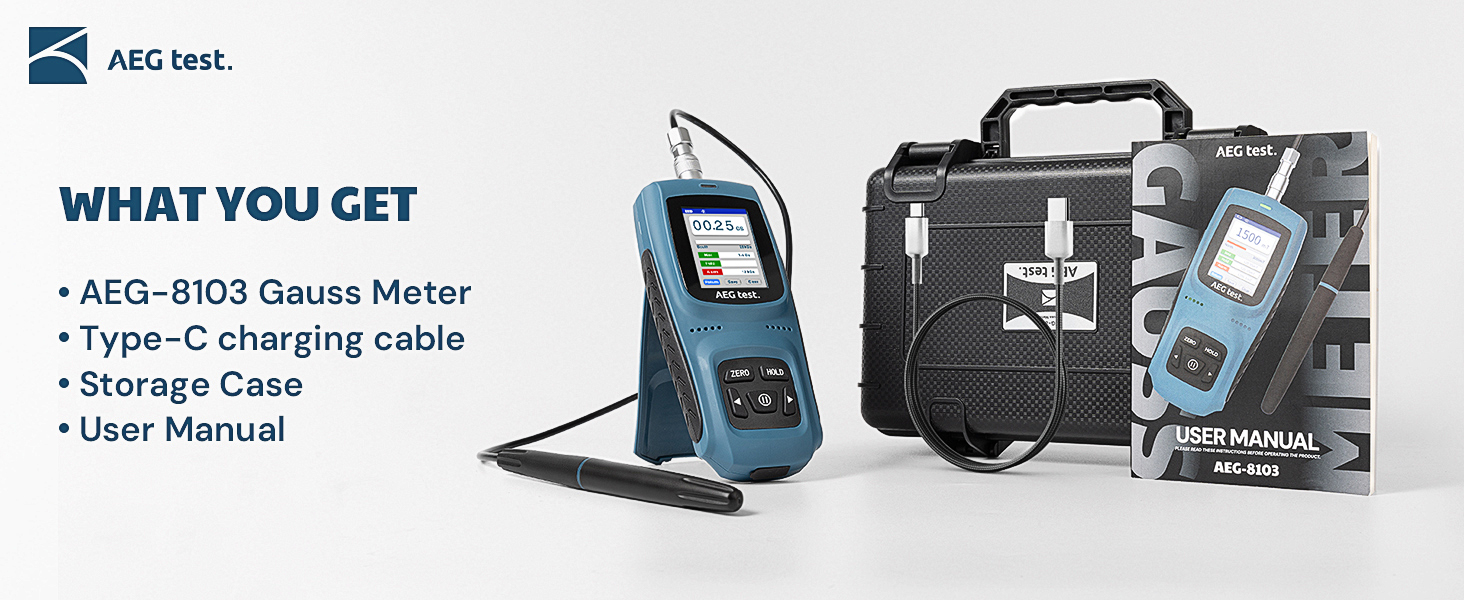
Image: The ILAC-MRA logo, signifying that the product is certified and calibrated, compliant with international standards, and factory-calibrated for precision and reliability.
Ask a question about this manual
Ask about setup, troubleshooting, compatibility, parts, safety, or missing instructions. Manuals+ will review the question and use this page’s manual context to help answer it.